
ANJIELO SMART 94201-94402
ANJIELO SMART Wired Video Intercom System User Manual
مدل: 94201-94402
مقدمه
This manual provides detailed instructions for the installation, operation, and maintenance of your ANJIELO SMART Wired Video Intercom System. Please read this manual thoroughly before installation and use to ensure proper functionality and safety. This system is designed for home and villa applications, offering hands-free communication, a waterproof outdoor doorbell, and one-key unlock features.
ویژگی های کلیدی عبارتند از:
- 4-wire cable system supporting one door camera and one indoor monitor.
- Two unlock buttons on the monitor for separate lock control.
- 16 selectable ringtones with adjustable volume.
- IP65 waterproof and dustproof outdoor camera with infrared night vision.
- راه اندازی و عملیات آسان.
محتویات بسته
بررسی کنید که آیا همه اقلام در بسته موجود است یا خیر:
- 1 x Indoor Monitor
- 1 x Outdoor Doorbell Unit
- پیچ ها و لنگرهای نصب
- Connection Cables (4-wire)
- راهنمای کاربر (این سند)

Image: The ANJIELO SMART Wired Video Intercom System, showing both the indoor monitor and the outdoor doorbell unit.
راه اندازی و نصب
1. اقدامات احتیاطی ایمنی
- Ensure power is disconnected before any wiring or installation.
- اگر در مورد هرگونه روش سیمکشی مطمئن نیستید، با یک برقکار واجد شرایط مشورت کنید.
- مانیتور داخلی را در معرض رطوبت یا دمای شدید قرار ندهید.
2. Mounting the Outdoor Doorbell Unit
The outdoor doorbell unit is IP65 waterproof and designed for outdoor use. Choose a mounting location near your entrance, approximately 1.5 meters (5 feet) from the ground, ensuring clear visibility of visitors.
- با استفاده از براکت نصب به عنوان الگو، نقاط حفاری را علامت بزنید.
- سوراخ ها را دریل کنید و در صورت لزوم لنگرهای دیوار را وارد کنید.
- براکت نصب را به دیوار محکم کنید.
- Connect the 4-wire cable to the doorbell unit (refer to wiring diagram).
- Attach the doorbell unit to the mounting bracket.

Image: The outdoor doorbell unit, highlighting its compact design and dimensions (120mm height, 40mm width, 25mm depth).
۴.۳ نصب مانیتور داخلی
Select a convenient indoor location for the monitor, such as a hallway or living room, where it is easily accessible.
- نقاط سوراخکاری برای براکت نصب مانیتور را علامت بزنید.
- سوراخ ها را دریل کنید و لنگرهای دیواری را وارد کنید.
- براکت نصب را به دیوار محکم کنید.
- Connect the 4-wire cable from the doorbell unit to the indoor monitor (refer to wiring diagram).
- Connect the power supply to the indoor monitor.
- Attach the indoor monitor to its mounting bracket.

Image: The indoor monitor unit, displaying its dimensions (170mm height, 120mm width, 20mm depth).
۵. نمودار سیمکشی (کلی)
The system uses a 4-wire connection between the indoor monitor and the outdoor doorbell. For electronic locks, an additional DC 12V power supply is required and connects to either the doorbell or the monitor, depending on the lock type (fail-safe or fail-secure).
توجه: Locks are not included and must be purchased separately. Consult the specific wiring instructions provided with your electronic lock for detailed connection information.
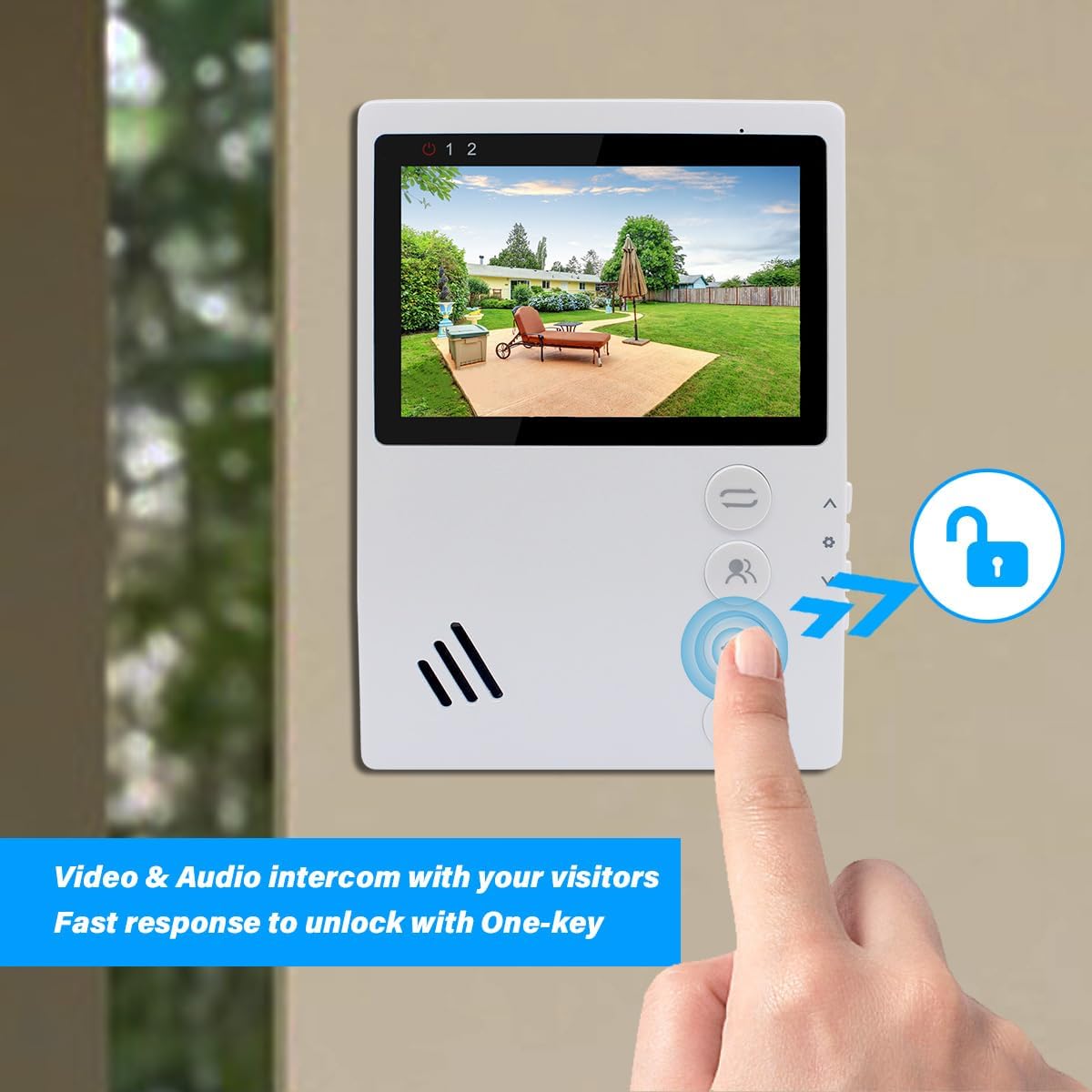
Image: A diagram illustrating the 4-wire connection between the indoor monitor and the outdoor doorbell, and connections for an electronic lock.
عملیات
1. توابع اساسی
- پاسخگویی به تماس: When a visitor presses the doorbell, the indoor monitor will ring and display the visitor's image. Press the "Answer/Hang up" button to initiate two-way audio communication.
- نظارت: Press the "Monitor" button on the indoor unit to view دوربین فضای باز را در هر زمانی تغذیه کنید.
- باز کردن قفل در: During a call or while monitoring, press the "Door Unlock" button to open the connected electronic lock. The monitor has two unlock buttons for controlling two separate locks if configured.
- ارتباط هندزفری: The system supports hands-free two-way audio communication.

Image: The indoor monitor displaying a visitor and an arrow pointing to the "Door Unlock" button, indicating the one-key unlock feature.

Image: A visual representation of two-way audio communication between a visitor at the doorbell and a person inside using the monitor.
2. Monitor Button Functions

Image: The indoor monitor with labels indicating the functions of its main buttons: Transfer, Monitor, Door Unlock, and Answer/Hang up/Return.
- دکمه انتقال: Used for transferring calls (if multiple indoor monitors are installed).
- دکمه مانیتور: Activates the outdoor camera view.
- Door Unlock Button: Activates the electronic lock connected to the system.
- Answer/Hang up/Return Button: Answers incoming calls, ends current calls, or navigates back in menus.
۴. ناوبری منو و تنظیمات

Image: The indoor monitor with labels indicating the functions of its side buttons: Increase/Up, Menu Setting/Confirm, Reduce/Down, and Gate Unlock.
- Increase / Up: در منوها به سمت بالا حرکت میکند یا مقادیر را افزایش میدهد.
- Menu Setting / Confirm: Enters the menu, confirms selections.
- Reduce / Down: در منوها به پایین حرکت میکند یا مقادیر را کاهش میدهد.
- Gate Unlock: An additional unlock button, potentially for a secondary gate or lock.
To adjust settings such as ringtone and volume:
- Press the "Menu Setting / Confirm" button to enter the main menu.
- Use the "Increase / Up" and "Reduce / Down" buttons to navigate through options.
- Select the desired setting (e.g., "Ringtone" or "Volume") and press "Menu Setting / Confirm" to enter.
- Adjust the value using the "Increase / Up" and "Reduce / Down" buttons.
- Press "Menu Setting / Confirm" to save changes and "Answer/Hang up/Return" to exit the menu.
تعمیر و نگهداری
- تمیز کردن: Use a soft, dry cloth to clean the indoor monitor and outdoor doorbell unit. Do not use abrasive cleaners or solvents.
- واحد بیرونی: Periodically check the outdoor unit for any obstructions to the camera lens or microphone/speaker. Ensure the weatherproof cover is securely in place.
- سیم کشی: Regularly inspect all wiring connections for any signs of wear or damage. Ensure connections remain secure.
- به روز رسانی نرم افزار: سازنده را بررسی کنید webبرای هرگونه بهروزرسانی میانافزار موجود برای بهبود عملکرد یا ویژگیهای جدید، به سایت مراجعه کنید.
عیب یابی
| مشکل | علت احتمالی | راه حل |
|---|---|---|
| تصویر روی مانیتور داخلی وجود ندارد. |
|
|
| در حین ارتباط داخلی صدا وجود ندارد. |
|
|
| Door lock not activating. |
|
|
| زنگ در که به صدا در نمیآید. |
|
|
مشخصات
| ویژگی | جزئیات |
|---|---|
| شماره مدل | 94201-94402 |
| فناوری اتصال | Wired (4-wire system) |
| استفاده در فضای باز/داخلی | Indoor monitor, Outdoor doorbell |
| منبع تغذیه | Corded Electric (Indoor monitor powers outdoor unit) |
| Outdoor Doorbell Waterproof Rating | IP65 |
| Outdoor Doorbell Resolution | 1000TVL |
| زاویه لنز دوربین | 90 درجه |
| دید در شب | دید در شب مادون قرمز |
| دمای عملیات | -30 درجه سانتی گراد تا +60 درجه سانتی گراد (-22 درجه فارنهایت تا +140 درجه فارنهایت) |
| ویژگی خاص | 2-Way Audio, One-Key Unlock |
| اجزای شامل | 1X Indoor Monitor, 1X Outdoor Doorbell |
| ابعاد محصول (مانیتور داخلی) | 170 میلی متر (H) x 120 میلی متر (W) x 20 میلی متر (D) |
| Product Dimensions (Outdoor Doorbell) | 120 میلی متر (H) x 40 میلی متر (W) x 25 میلی متر (D) |
| واتtage | 10 وات |
اطلاعات پشتیبانی و تماس
For technical assistance, troubleshooting beyond this manual, or warranty inquiries, please contact ANJIELO SMART customer support.
- سازنده: ANJIELOSAMRT
- برند: ANJIELO SMART
- پشتیبانی آنلاین: بازدید کنید ANJIELO SMART Store on Amazon for product information and potential contact options.
Please have your model number (94201-94402) and purchase details ready when contacting support.
Ask a question about this manual
Ask about setup, troubleshooting, compatibility, parts, safety, or missing instructions. Manuals+ will review the question and use this page’s manual context to help answer it.