
مقدمه
ممنون از خریدتونasing the Kenko Digital Camera KC-ZM08. This compact digital camera is designed for ease of use, allowing you to capture everyday moments with its 5x optical zoom, touch panel operation, and various convenient features. Please read this manual thoroughly before using the camera to ensure proper operation and to maximize your enjoyment of its capabilities. Keep this manual in a safe place for future reference.
محتویات بسته
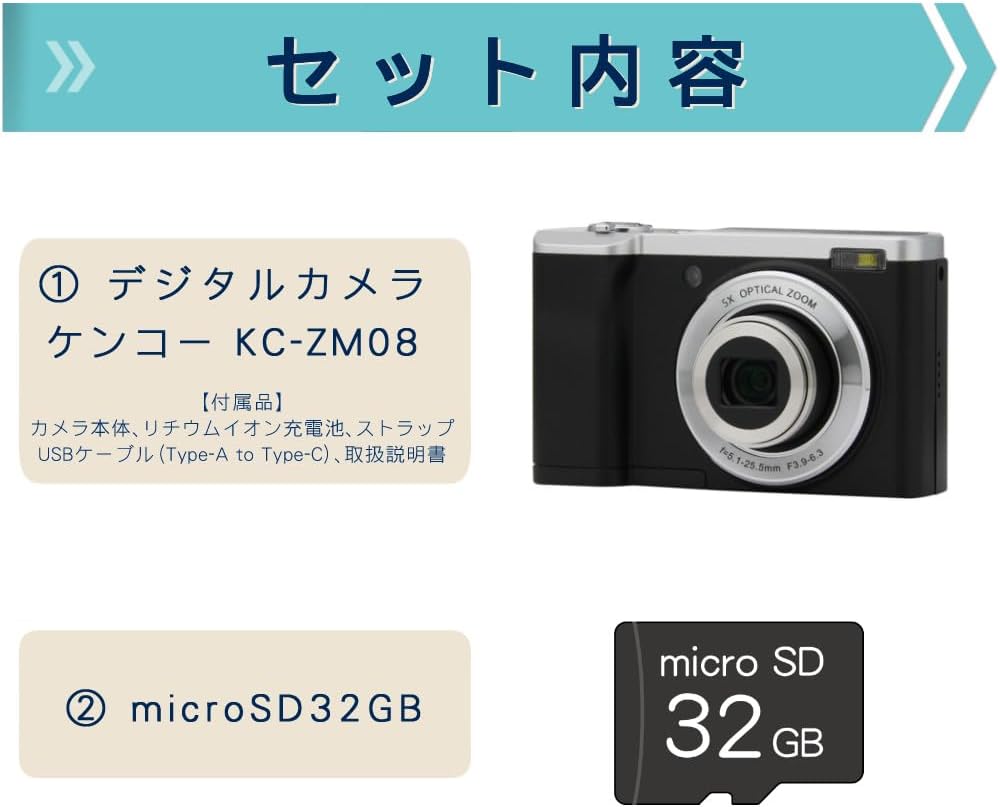
This package includes the Kenko Digital Camera KC-ZM08 and a 32GB microSD card, providing everything you need to start capturing photos and videos.
- Kenko Compact Digital Camera KC-ZM08
- باتری لیتیوم یون قابل شارژ
- بند مچ دست
- کابل USB (از نوع A تا نوع C)
- راهنمای دستورالعمل
- microSD Card (32GB)
ویژگی های کلیدی
زوم اپتیکال 5 برابر

The camera features a 5x optical zoom lens, covering a versatile range from wide-angle 28mm to telephoto 142mm (35mm equivalent). This allows for capturing a wide variety of scenes, from expansive landscapes to distant subjects.
Intuitive Touch Panel Operation

Easily change modes and settings with the responsive touch panel LCD monitor. This intuitive interface simplifies camera operation, making it quick and effortless to adjust your shooting preferences.
Convenient Rear Camera for Selfies

Switch to the rear camera with a single button press for easy selfies. You can capture both photos and videos while viewing yourself on the monitor, ensuring you get the perfect shot.
Shortest Shooting Distance: Approx. 10cm

When shooting at wide-angle, you can get as close as approximately 10cm to your subject, allowing for detailed close-up photography (with the front lens).
Built-in LED Flash and Constant Light

The camera not only has a built-in flash for still images but also features a constant LED light, which is convenient for video recording in low-light conditions.
فیلمبرداری با حرکت آهسته

Easily capture slow-motion videos to add a creative touch to your recordings.
تیراندازی تایم لپس
The camera supports time-lapse shooting, automatically capturing images at set intervals to create dynamic time-lapse videos.
Self-Timer Function
Utilize the self-timer for group photos with friends and family, or for convenient self-portraits.
Webقابلیت دوربین
Connect the camera to your computer via USB to use it as a webدوربین برای تماسهای ویدیویی و پخش زنده.
Digital Image Stabilization (for Video)
Reduce camera shake during video recording with the built-in digital image stabilization feature, ensuring smoother footage.
راهنمای راه اندازی
- شارژ باتری: Insert the rechargeable lithium-ion battery into the camera. Connect the camera to a USB power source using the provided USB Type-A to Type-C cable. The charging indicator will show the charging status. Ensure the battery is fully charged before first use.
- قرار دادن کارت microSD: Open the card slot cover and gently insert the provided 32GB microSD card until it clicks into place. Ensure the card is inserted in the correct orientation.
- بند مچی را وصل کنید: Securely attach the wrist strap to the camera to prevent accidental drops.
- روشن کردن: دکمه پاور را فشار داده و نگه دارید تا دوربین روشن شود.
- تنظیمات اولیه: برای تنظیم تاریخ، زمان و زبان، دستورالعملهای روی صفحه را دنبال کنید.
دستورالعمل های عملیاتی
عکس گرفتن
- حالت عکس را انتخاب کنید: Press the 'MODE' button to select the photo shooting mode.
- شات خود را قاب کنید: Use the LCD screen to compose your image.
- تمرکز: Gently press the shutter button halfway down to focus. The focus frame will turn green when focus is achieved.
- گرفتن: برای گرفتن عکس، دکمه شاتر را تا انتها فشار دهید.
ضبط ویدیوها
- حالت ویدیو را انتخاب کنید: Press the 'MODE' button to select the video recording mode.
- شروع ضبط: Press the shutter button to start recording. A red indicator will appear on the screen.
- توقف ضبط: دوباره دکمه شاتر را فشار دهید تا ضبط متوقف شود.
با استفاده از پنل لمسی
Tap icons on the LCD screen to navigate menus, change settings like image size, ISO, exposure, and picture quality (Super Fine, Fine, Normal). Swipe to browse through captured media in playback mode.
Switching to Rear Camera
Locate the dedicated button for switching between the front and rear cameras. Press this button to activate the rear camera for convenient selfies or vlogging.
حالت پخش
دکمه پخش را فشار دهید تا view your captured photos and videos. Use the navigation buttons or touch screen to scroll through your media.
تعمیر و نگهداری
- تمیز کردن لنز: Use a soft, lint-free cloth specifically designed for camera lenses to gently wipe away dust or smudges. Do not use harsh chemicals.
- پاکسازی بدن: بدنه دوربین را با یک پارچه نرم و خشک پاک کنید. برای آلودگیهای سرسخت، کمیampپارچه را با آب خیس کنید و سپس خشک کنید.
- مراقبت از باتری: وقتی از باتری استفاده نمیکنید، آن را در جای خشک و خنک نگهداری کنید. از تخلیه کامل باتری برای مدت طولانی خودداری کنید.
- ذخیره سازی: When storing the camera for a long time, remove the battery and microSD card. Store the camera in a dry, well-ventilated area away from direct sunlight and extreme temperatures.
عیب یابی
| مشکل | علت / راه حل احتمالی |
|---|---|
| دوربین روشن نمیشود. | ممکن است باتری خالی شده باشد. باتری را به طور کامل شارژ کنید. مطمئن شوید که باتری به درستی وارد شده است. |
| نمیتوان عکس گرفت/فیلم ضبط کرد. | microSD card may be full or not inserted correctly. Check card status or replace. Ensure sufficient battery charge. |
| تصاویر تار هستند. | Ensure the lens is clean. Check focus by pressing the shutter button halfway. Hold the camera steady during shooting. |
| صفحه لمسی پاسخگو نیست. | دوربین را مجدداً راه اندازی کنید. مطمئن شوید که صفحه نمایش تمیز و خشک است. |
مشخصات
| ویژگی | جزئیات |
|---|---|
| نام مدل | KC-ZM08 |
| نام تجاری | کنکو |
| زوم اپتیکال | 5x |
| بزرگنمایی دیجیتال | 2x |
| فناوری حسگر عکس | CMOS |
| وضوح هنوز موثر | 56 مگاپیکسل |
| وضوح تصویربرداری | 1080p |
| حداقل فاصله کانونی | 28 میلی متر |
| حداکثر فاصله کانونی | 142 میلی متر |
| تثبیت تصویر | Digital (for video) |
| سازگار است File فرمت ها | JPEG، MP4 |
| اندازه نمایشگر | 2.8 اینچ |
| نوع فلش | Built-in (Auto, Always On) |
| قابلیت اتصال | USB |
| نوع باتری | لیتیوم یون |
| وزن محصول | 148 grams (excluding accessories, battery) |
| ابعاد | تقریبا 100 × 62 × 32 میلی متر |
گارانتی و پشتیبانی
The Kenko Digital Camera KC-ZM08 comes with a 1-year manufacturer's warranty. For technical support, troubleshooting assistance, or warranty claims, please refer to the contact information provided in the separate warranty card or visit the official Kenko webسایت
لطفا رسید خرید خود را برای گارانتی نگه دارید.
فیلم های محصول
Kenko Digital Camera KC-ZM08 Overview
این ویدیو یک مرور کلی ارائه میدهدview of the Kenko Digital Camera KC-ZM08, highlighting its compact design and ease of use for everyday photography and casual walks.
Digital Camera KC-ZM08 Features
یک نمایش ویدیویی کوتاهasing various features of the KC-ZM08 digital camera.