
مقدمه
The JBL Soundgear Frames are innovative Bluetooth audio glasses designed to provide an immersive audio experience while allowing you to remain aware of your surroundings. Equipped with ultra-slim speakers, an integrated microphone, and touch controls, these frames offer seamless connectivity for music, calls, and video conferences. This manual provides essential information for setting up, operating, and maintaining your Soundgear Frames.
آنچه در جعبه است
Carefully unpack your JBL Soundgear Frames and ensure all items are present:
- JBL Soundgear Frames (Onyx)
- کابل شارژ
- پارچه تمیز کردن
- کیف حمل
توجه: لوازم جانبی اضافی ممکن است جداگانه فروخته شوند.
راه اندازی
1. شارژ کردن دستگاه
Before first use, fully charge your JBL Soundgear Frames. Connect the provided charging cable to the charging port on the frames and to a USB power source. The LED indicator will show charging status.

تصویر: کنار view of the JBL Soundgear Frames, highlighting the charging port and internal electronics within the temple arms.
- زمان شارژ: تقریبا 2 ساعت برای شارژ کامل.
- عمر باتری: Up to 8 hours of audio playback on a full charge.
2. جفت شدن بلوتوث
To connect your Soundgear Frames to a Bluetooth-enabled device:
- Ensure the Soundgear Frames are charged and powered off.
- Press and hold the power button (usually located on one of the temple arms) until the LED indicator flashes blue, indicating pairing mode.
- در دستگاه خود (گوشی هوشمند، تبلت، کامپیوتر)، به تنظیمات بلوتوث بروید و بلوتوث را فعال کنید.
- Select "JBL Soundgear Frames" from the list of available devices.
- پس از اتصال، نشانگر LED به رنگ آبی ثابت در می آید.
The frames support Bluetooth 5.2 for stable and efficient wireless connectivity.
دستورالعمل های عملیاتی
روشن/خاموش برق
- روشن کردن: دکمه پاور را به مدت ۳ ثانیه فشار داده و نگه دارید. چراغ LED روشن خواهد شد.
- خاموش: دکمه پاور را به مدت ۳ ثانیه فشار داده و نگه دارید. چراغ LED خاموش میشود.
پخش موسیقی
Use the touch controls located on the temple arms to manage your audio:
- پخش/مکث: Single tap on either temple arm.
- آهنگ بعدی: Double tap on the right temple arm.
- آهنگ قبلی: Double tap on the left temple arm.
- افزایش صدا: Swipe forward on the right temple arm.
- کاهش حجم: Swipe backward on the right temple arm.
مدیریت تماس
The integrated microphone allows for clear hands-free calls:
- پاسخ/پایان تماس: Single tap on either temple arm.
- رد تماس: Press and hold either temple arm for 2 seconds.
دستیار صوتی
Activate your device's voice assistant (e.g., Siri, Google Assistant) by triple-tapping on either temple arm.

Image: A person wearing the JBL Soundgear Frames outdoors, demonstrating their use in a real-world setting.
تعمیر و نگهداری
تمیز کردن
To maintain the clarity of your lenses and the integrity of the frames:
- از پارچه تمیز کننده ارائه شده برای پاک کردن آرام لنزها و قاب استفاده کنید.
- برای لکههای سرسخت، از اسپری تمیزکننده لنز که مخصوص عینک طراحی شده است استفاده کنید.
- Avoid using abrasive materials or harsh chemicals, as these can damage the lenses and frame finish.
ذخیره سازی
When not in use, store your Soundgear Frames in the provided carrying case to protect them from scratches and impacts.
مراقبت از باتری
To prolong battery life, avoid exposing the frames to extreme temperatures. If storing for an extended period, charge the battery to approximately 50% before storage.
عیب یابی
| مشکل | راه حل |
|---|---|
| Frames do not power on. | مطمئن شوید که باتری شارژ شده است. آن را به منبع تغذیه وصل کنید و دوباره امتحان کنید. |
| اتصال از طریق بلوتوث امکانپذیر نیست. | Make sure the frames are in pairing mode (flashing blue LED). Check your device's Bluetooth settings and forget previous connections if necessary. Restart both devices. |
| صدا نداره یا صداش کمه. | Check the volume level on both the frames and your connected device. Ensure the frames are properly paired. |
| کنترلهای لمسی پاسخگو نیستند. | Ensure the touch surface is clean and dry. Restart the frames. |
مشخصات
| ویژگی | جزئیات |
|---|---|
| شماره مدل | JBLSNDGEARFMSRONX |
| UPC | 050036399845 |
| رنگ | اونیکس |
| شکل مورد | گرد |
| رنگ لنز | مشکی |
| نوع لنز | غیر قطبی |
| مواد قاب | ترموپلاستیک |
| پوشش قاب | فول فریم |
| قابلیت اتصال | بلوتوث 5.2 |
| بلندگوها | Ultra-slim 25mm x 9mm |
| میکروفون | یکپارچه شده است |
| کنترل ها | لمس کنید |
| عمر باتری | تا 8 ساعت |
| زمان شارژ | تقریبا 2 ساعت |
| مقاومت در برابر آب | IP54 (Splash and dust resistant) |
| استفاده توصیه شده | گوش دادن به موسیقی |
| محدوده سنی | بالغ |
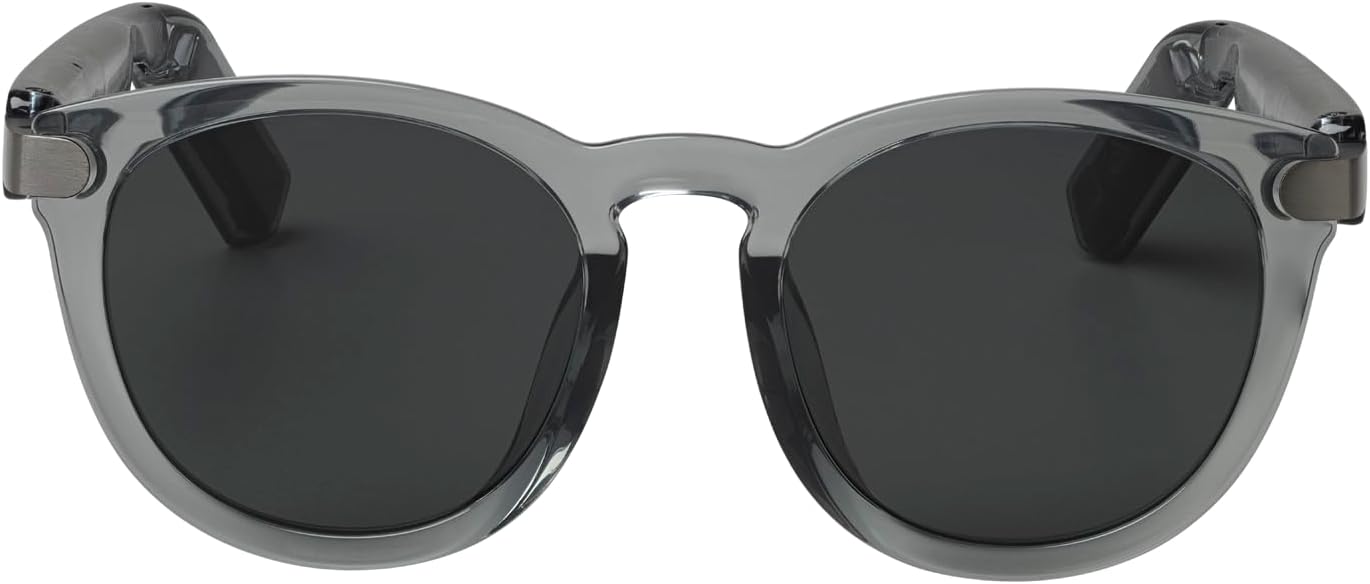
تصویر: جلو view of the JBL Soundgear Frames, showcasing the round, full-frame design and black non-polarized lenses.

تصویر: برگشت view of the JBL Soundgear Frames, showing the overall structure from the rear.
گارانتی و پشتیبانی
JBL products are designed for reliability and performance. For warranty information and customer support, please refer to the warranty card included with your product or visit the official JBL website. You can also find FAQs and additional support resources online.
پشتیبانی آنلاین: www.jbl.com/support