
1. مقدمه
This manual provides detailed instructions for the installation, setup, and operation of your Roinvou Android Radio Upgrade for Jeep Compass 2017-2020. This unit features a 10.1-inch HD touchscreen, Wireless CarPlay, Android Auto, GPS Navigation, WiFi, Bluetooth, FM/RDS radio, and supports a backup camera.
لطفاً قبل از نصب و استفاده، این دفترچه راهنما را به طور کامل مطالعه کنید تا از عملکرد صحیح آن اطمینان حاصل کرده و تجربه رانندگی خود را به حداکثر برسانید.
2. سازگاری
This Roinvou Android Radio Upgrade is specifically designed for Jeep Compass models manufactured between 2017 and 2020.
مهم: قبل از خریدasing and installing, verify that the power cable port on the detail page matches your vehicle's original car wiring. The stereo supports most stock features, including the backup camera and steering wheel controls.

Image: Comparison of the dashboard before and after installation of the Roinvou Android Radio in a Jeep Compass (2017-2020 model). The image highlights key features like Apple CarPlay, Android Auto, Mirror Link, Android 13 OS, 8 Cores, 6GB RAM + 128GB ROM, 1280x720 resolution, and 32-band EQ.
3. محتویات بسته
بسته شامل اجزای زیر است:
- Jeep Compass Car Stereo (Head Unit)
- کابل برق
- جعبه Canbus
- آنتن رادیو
- کابل USB اصلی
- مهار RCA
- آنتن جی پی اس
- دوربین پشتیبان AHD
- میکروفون خارجی
- کابل ورودی دوربین عقب
- کابل USB دوگانه
- ابزار نصب

Image: Visual representation of the complete package contents, including the head unit, various cables, antennas, CANBUS box, backup camera, external microphone, and installation tools.
4. نصب و راه اندازی
نصب توسط متخصص توصیه میشود. قبل از شروع نصب، مطمئن شوید که برق خودرو قطع شده است.
4.1. اتصالات سیم کشی
Refer to the port details and wiring diagrams for correct connections. Ensure all cables are securely connected to their respective ports on the head unit and the vehicle's wiring harness.

Image: Detailed diagram illustrating the various input/output ports on the rear of the head unit and their corresponding cable connections, including Power Cable, RCA Input/Output, USB Cable, 8pin CANBUS Serial Port (Optional), Reversing Camera Input, GPS Antenna, Radio Antenna, MIC, CVBS IN 1, VIDEO OUT, SUB WOOFER, VIDEO IN, AUX R IN, AUX L IN, AUDIO OUT R, AUDIO OUT L, and AMP ادامه مطلب
۳.۲ سیمکشی دوربین دنده عقب
Connect the AHD backup camera as shown in the diagram. The camera supports both CVBS and AHD formats, which can be configured in the factory settings under camera type settings.

Image: Wiring diagram for the included AHD backup camera, showing connections for video output, power (red wire to reversing lamp, black to GND), and the camera power cable.
5. Initial Setup and Customization
5.1. Display and Themes
The unit features a 1280 x 720 HD capacitive touchscreen. You can customize the interface:
- پس زمینه ها: Touch the color circle in the lower left corner of the screen to switch between 19 available backgrounds.
- تمهای دسکتاپ: Long press the main interface to switch between 59 desktop themes.

Image: Illustration of the 1280 x 720 resolution display and various touch gestures supported by the screen.

تصویر: مثالamples of the 19 wallpaper options and 59 desktop themes available for customization on the head unit.
6. دستورالعمل های عملیاتی
۲. کارپلی بیسیم و اندروید اتو
The unit supports both wireless and wired CarPlay and Android Auto. Connect your smartphone via WiFi hotspot or the phone's original USB cable for seamless integration. This allows access to navigation, calls, messages, and music directly from the head unit.
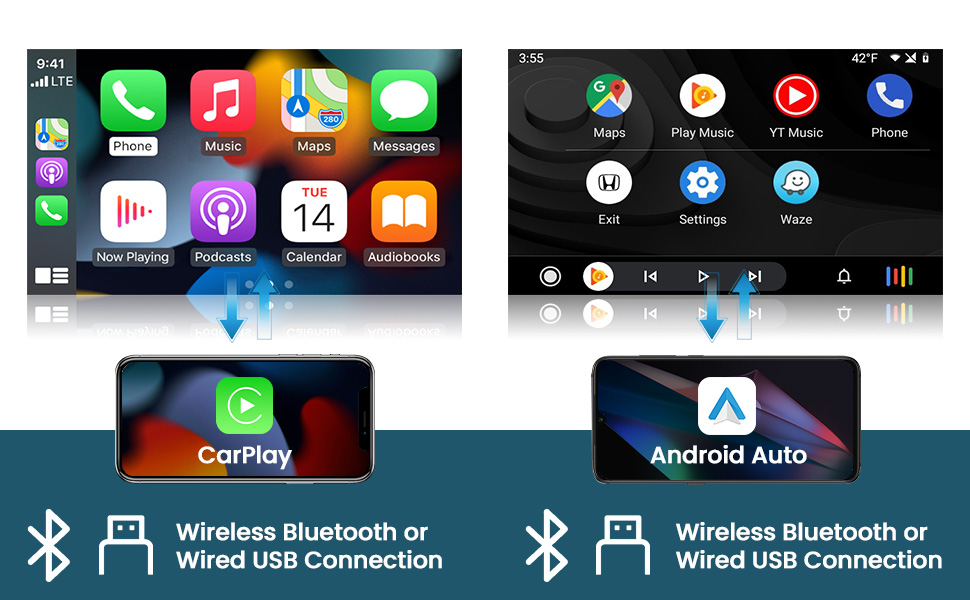
تصویر: ویژوال سابقamples of the Wireless CarPlay and Android Auto interfaces, showing music playback, navigation, and phone call functions.
۶.۶. لینک آینهای
Mirror Link functionality allows you to display your phone's screen directly onto the head unit. This can be achieved via WiFi hotspot or USB connection.

Image: A visual representation of the Mirror Link feature, showing a smartphone screen being mirrored onto the larger head unit display.
۵.۵. ناوبری GPS و وایفای
The unit includes a built-in GPS module. Navigation software like Waze and free offline maps can be used. Connect to WiFi or a mobile hotspot to use online maps and download additional applications from the Play Store, such as YouTube or TikTok.
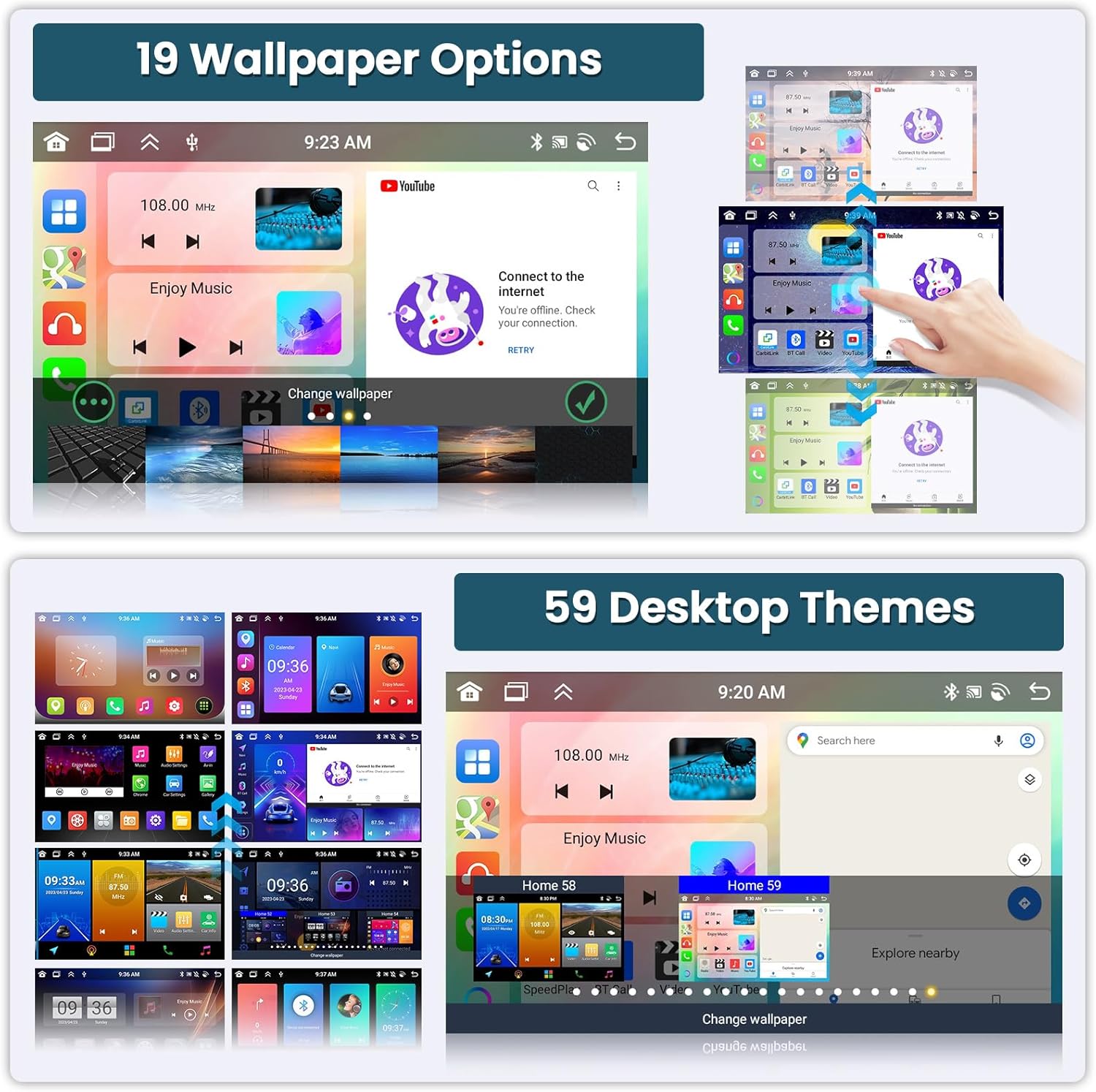
Image: Displays of the GPS navigation interface showing a map with route information, and a screen demonstrating WiFi connectivity for accessing online apps like YouTube, Facebook, and TikTok.
6.4. Bluetooth & FM/RDS Radio
Utilize the built-in and external microphone for hands-free calling, music playback, and voice functions. Sync contacts for easy access. The stable FM radio offers 18 preset stations and supports manual, semi-automatic, and fully automatic channel search. High-quality FM/RDS radio provides channel broadcasting, weather forecasts, and real-time road conditions.

Image: Displays the Bluetooth dialer interface for hands-free calls and the FM/RDS radio interface showing station tuning and presets.
6.5. کنترل صدا
The system supports voice control for various functions, enhancing convenience and safety while driving. Use voice commands to open applications, make calls, or control media playback.
۴.۸. قابلیت تقسیم صفحه نمایش
The split-screen feature allows two applications to run simultaneously on the display, such as navigation and music playback.

Image: A screenshot showing the head unit display split into two sections, with a radio interface on one side and a music player on the other.
۵.۸ دوربین پشتیبان AHD
When the vehicle is shifted into reverse gear, the head unit will automatically display the reversing image from the connected AHD backup camera, aiding in safer parking maneuvers. The camera offers night vision, is waterproof, and provides a wide-angle view.
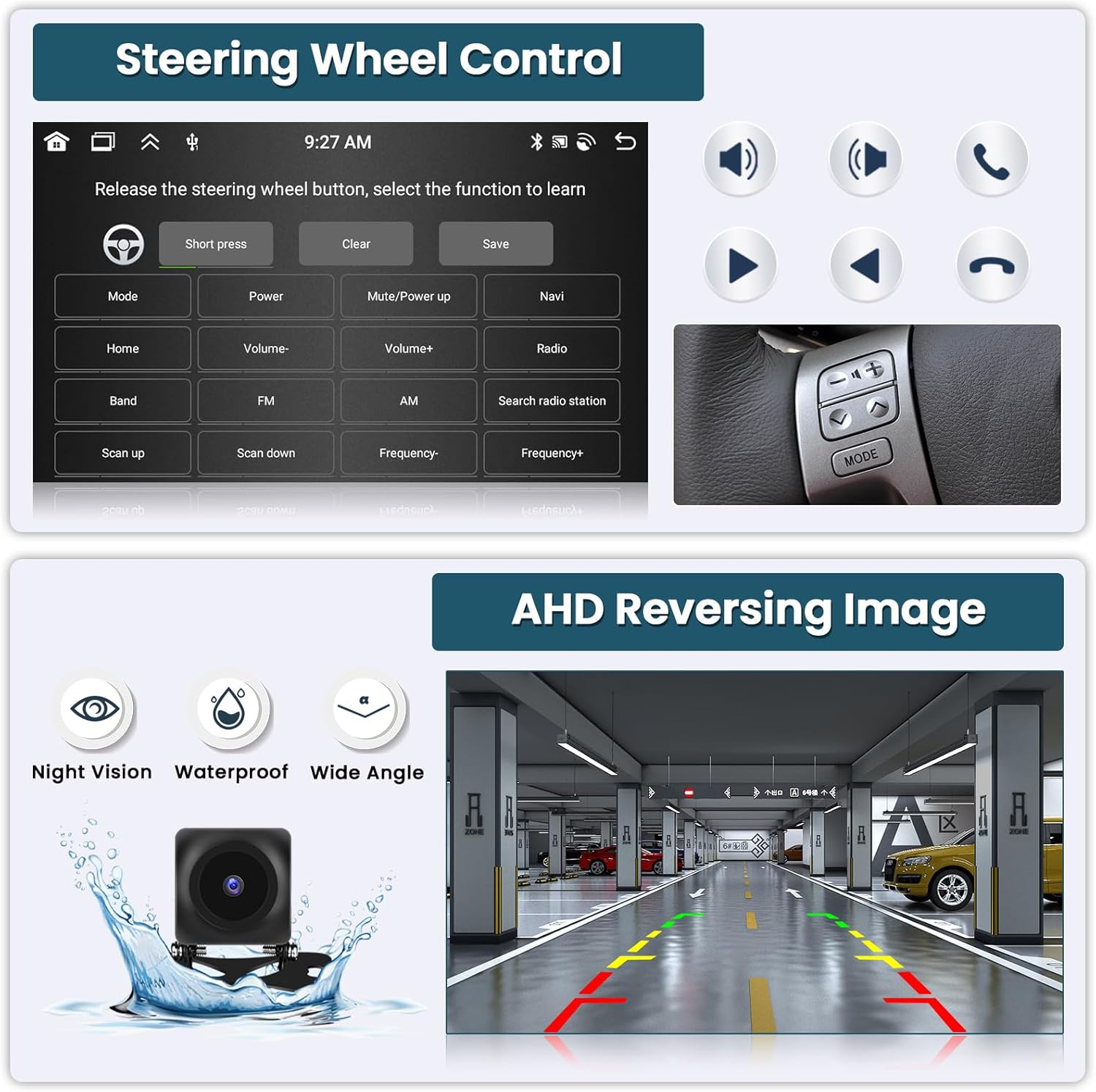
Image: A display of the AHD reversing image on the head unit, showing parking guidelines and highlighting the camera's night vision, waterproof, and wide-angle capabilities.
۴.۷ کنترل فرمان (SWC)
The unit supports existing steering wheel controls, allowing you to manage radio channels, volume, and songs directly from your steering wheel for a safer driving experience.

Image: The interface for programming steering wheel controls, showing options to assign functions like volume, mode, power, and navigation to physical buttons.
6.9. Audio Equalizer (32-band EQ)
The integrated 32-band EQ allows for precise audio tuning, enabling you to customize the sound output to your preference for a superior music listening experience.
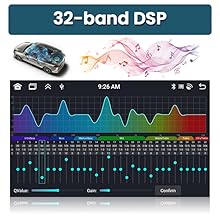
Image: The 32-band Digital Sound Processor (DSP) interface, allowing users to adjust frequency bands for customized audio output.
7. Media Demonstration
Video: This video demonstrates various UI functions, CarPlay, Android Auto, and GPS navigation features of the Roinvou Android Radio. It shows the user interface, music playback, map navigation, and hands-free calling.
8. مشخصات
| ویژگی | جزئیات |
|---|---|
| نام تجاری | روینو |
| شماره مدل | Roinvou-A7208A3572H1MI2US31-C251 |
| سیستم عامل | اندروید 13 |
| پردازنده | 8 هسته |
| حافظه (RAM) | 6 گیگابایت |
| فضای ذخیره سازی (ROM) | 128 گیگابایت |
| اندازه صفحه نمایش | 10.1 اینچ |
| قطعنامه | 1280×720 |
| نوع صفحه نمایش لمسی | خازنی |
| قابلیت اتصال | بلوتوث، یو اس بی، وای فای |
| ویژگی های خاص | Wireless/Wired CarPlay, Wireless/Wired Android Auto, Mirror Link, Voice Control, GPS Navigation, FM/RDS Radio, SWC, 32-band EQ, Split Screen, AHD Backup Camera Support |
| نوع نقشه | North America (offline maps available) |
| حالت خروجی صدا | استریو |
| ورودی رابط انسانی | میکروفون، صفحه لمسی |
9 عیب یابی
اگر با مشکلی مواجه شدید، لطفاً به راهحلهای رایج زیر مراجعه کنید:
- بدون برق: Check all power connections and ensure the vehicle's ignition is on. Verify the power cable port matches your original car's wiring.
- بدون صدا: Check speaker connections, volume levels, and equalizer settings. Ensure the correct audio output source is selected.
- افت سیگنال GPS: مطمئن شوید که آنتن GPS به درستی نصب شده و وضوح کافی دارد. view از آسمان
- مشکلات اتصال CarPlay/Android Auto: Verify your phone's USB cable is original and undamaged. Ensure WiFi hotspot is active for wireless connections. Restart both the head unit and your phone.
- دوربین دنده عقب نمایش داده نمیشود: Check the camera's power and video input connections. Ensure the camera type setting (CVBS/AHD) is correctly configured in the factory settings.
- هنگ کردن/عدم پاسخگویی سیستم: با فشار دادن دکمه تنظیم مجدد (در صورت وجود) یا با خاموش کردن احتراق و راه اندازی مجدد خودرو، یک تنظیم مجدد نرم انجام دهید.
برای راهنمایی بیشتر، لطفا با پشتیبانی مشتریان Roinvou تماس بگیرید.
10. گارانتی و پشتیبانی
This Roinvou Android Radio Upgrade comes with a گارانتی 1 ساله.
For technical support, warranty claims, or any questions regarding your product, please contact Roinvou customer service. You can often find contact information on the manufacturer's webسایت یا از طریق پلتفرم خرید شما.
تماس: roinvouservices@l63.com