
Topyond Topyondmk5ab4yn86
Topyond SW900 Ebike LCD Display User Manual
Universal Ebike LCD Display Control Panel for Electric Bikes and Scooters
1. مقدمه
This user manual provides detailed instructions for the installation, operation, and maintenance of your Topyond SW900 LCD Display. Designed for universal compatibility with 24V, 36V, 48V, and 60V electric bikes and scooters, this display enhances your riding experience by providing essential information and control functions.
2. محصول تمام شدview
The Topyond SW900 LCD Display is a versatile and user-friendly control panel for electric bicycles and scooters. It offers a comprehensive interface to monitor your bike's performance and manage various functions. Crafted from high-quality ABS material, it is designed for durability and reliability in outdoor conditions.
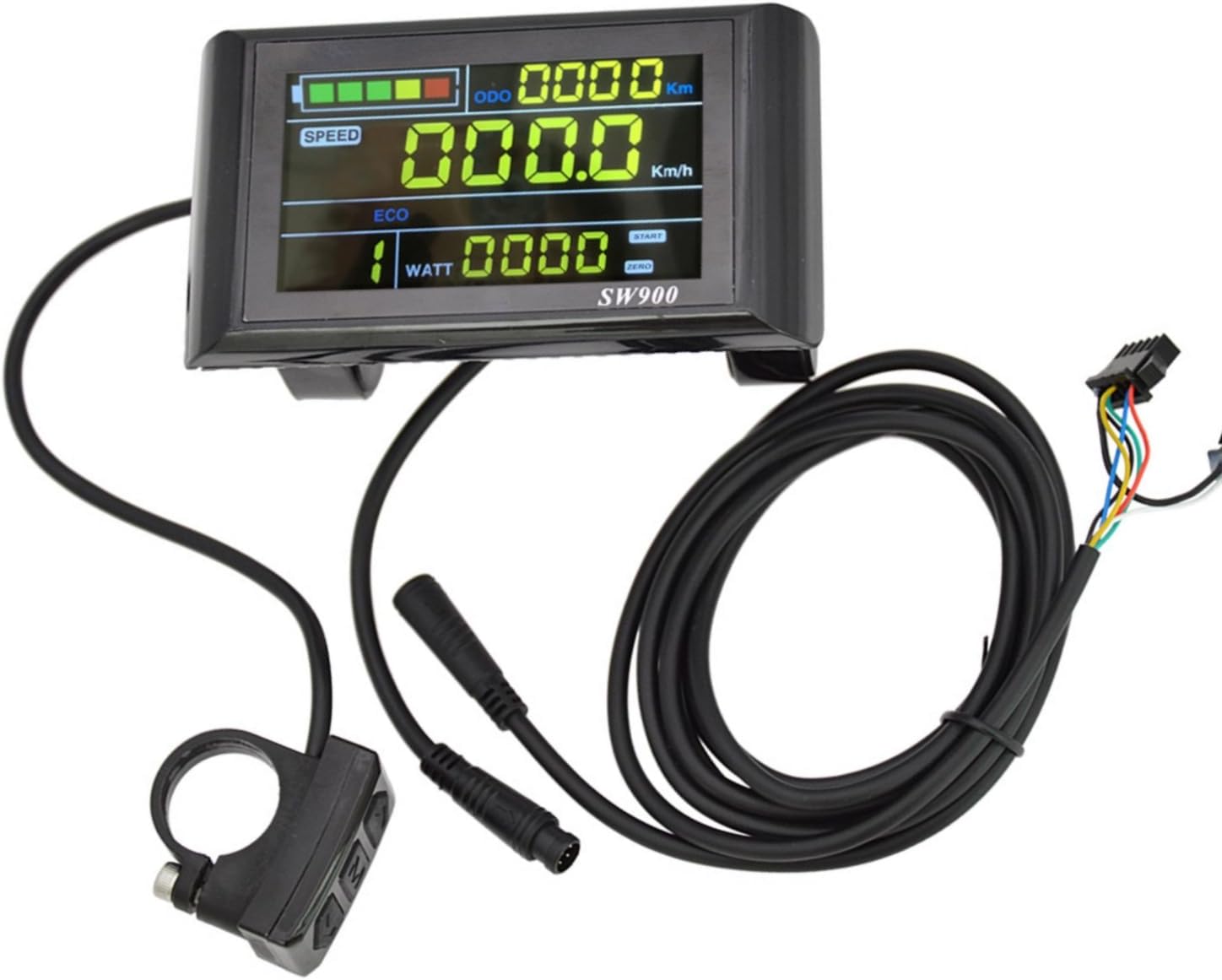
Figure 2.1: Topyond SW900 LCD Display and Control Panel components.
Key features include switch buttons, light controls, battery power display, speed tracking, assist gear adjustment, power indication, and fault prompts. Its compact design ensures minimal space consumption, making it an ideal accessory for various electric vehicles.
3. ویژگی ها
- Versatile and User-friendly: Provides switch buttons, light controls, battery power display, and other essential information for convenient riding.
- بادوام و قابل اعتماد: Constructed from high-quality ABS material for toughness and protection of internal circuits, ensuring long-lasting performance.
- Enhanced Display Functions: Features speed display, assist gear display, power indicator, fault prompt, total mileage, and single mileage.
- جمع و جور و قابل حمل: Sleek design minimizes space, making it easy to carry and store for electric bikes, scooters, and similar vehicles.
- کاربرد گسترده: Standardized 22.2mm installation diameter ensures seamless integration with a broad range of electric bikes and scooters. Compatible with 24V, 36V, 48V, and 60V systems.

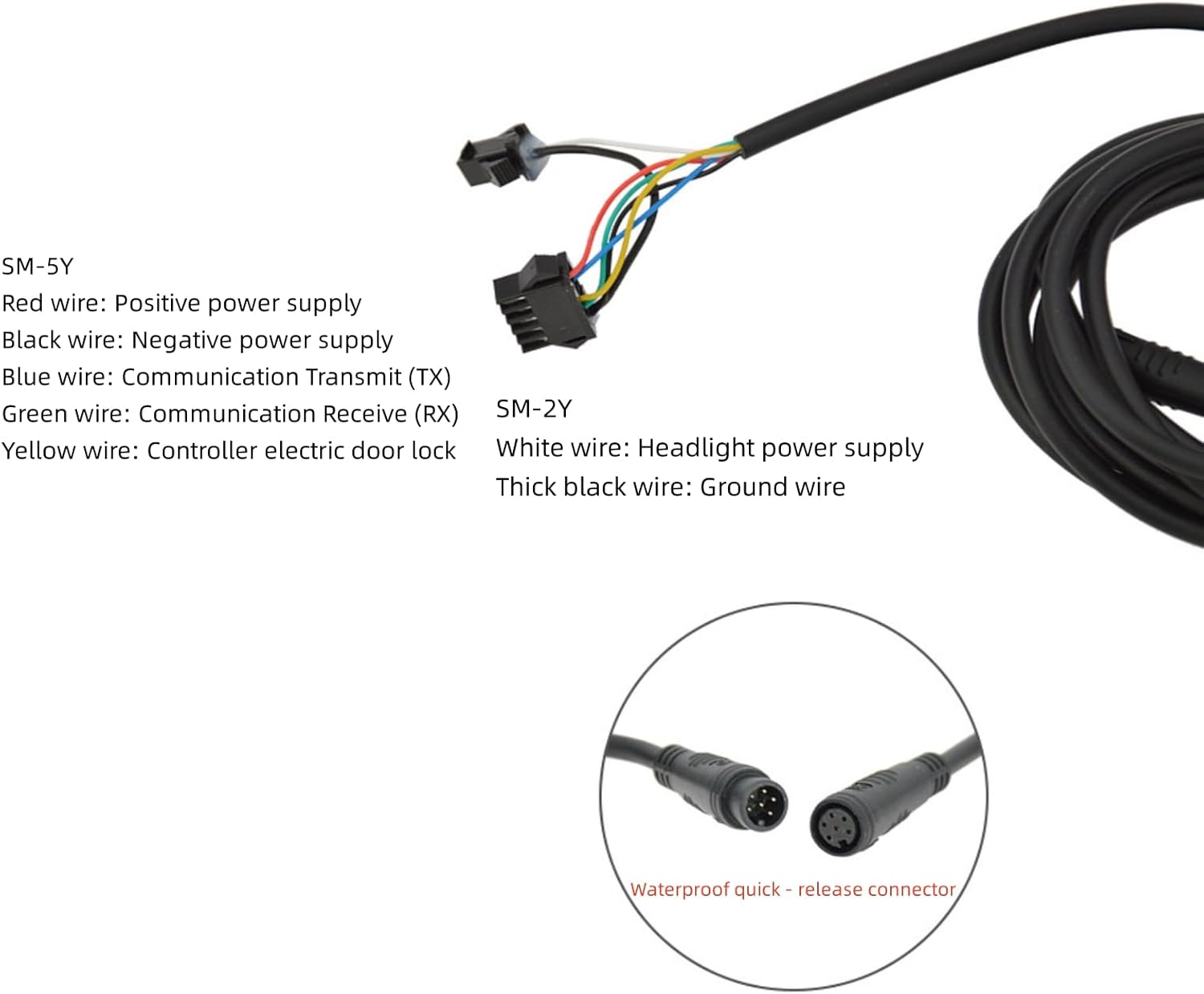
Figure 3.1: The SW900 LCD Display integrated with an electric scooter and an electric bicycle, demonstrating its compact size and wide application.
4. مشخصات
| صفت | ارزش |
|---|---|
| نام تجاری | Topyond |
| شماره مدل | Topyondmk5ab4yn86 (SW900) |
| ابعاد بسته اقلام L x W x H | 5.2 x 3.46 x 3.31 اینچ |
| وزن مورد | 0.26 کیلوگرم |
| وزن بسته بندی | 0.27 کیلوگرم |
| اجزای شامل | Sensor, Mounting Base |
| قطر نصب | 22.2mm (Standard) |
| جلدtage سازگاری | 24V, 36V, 48V, 60V Universal |
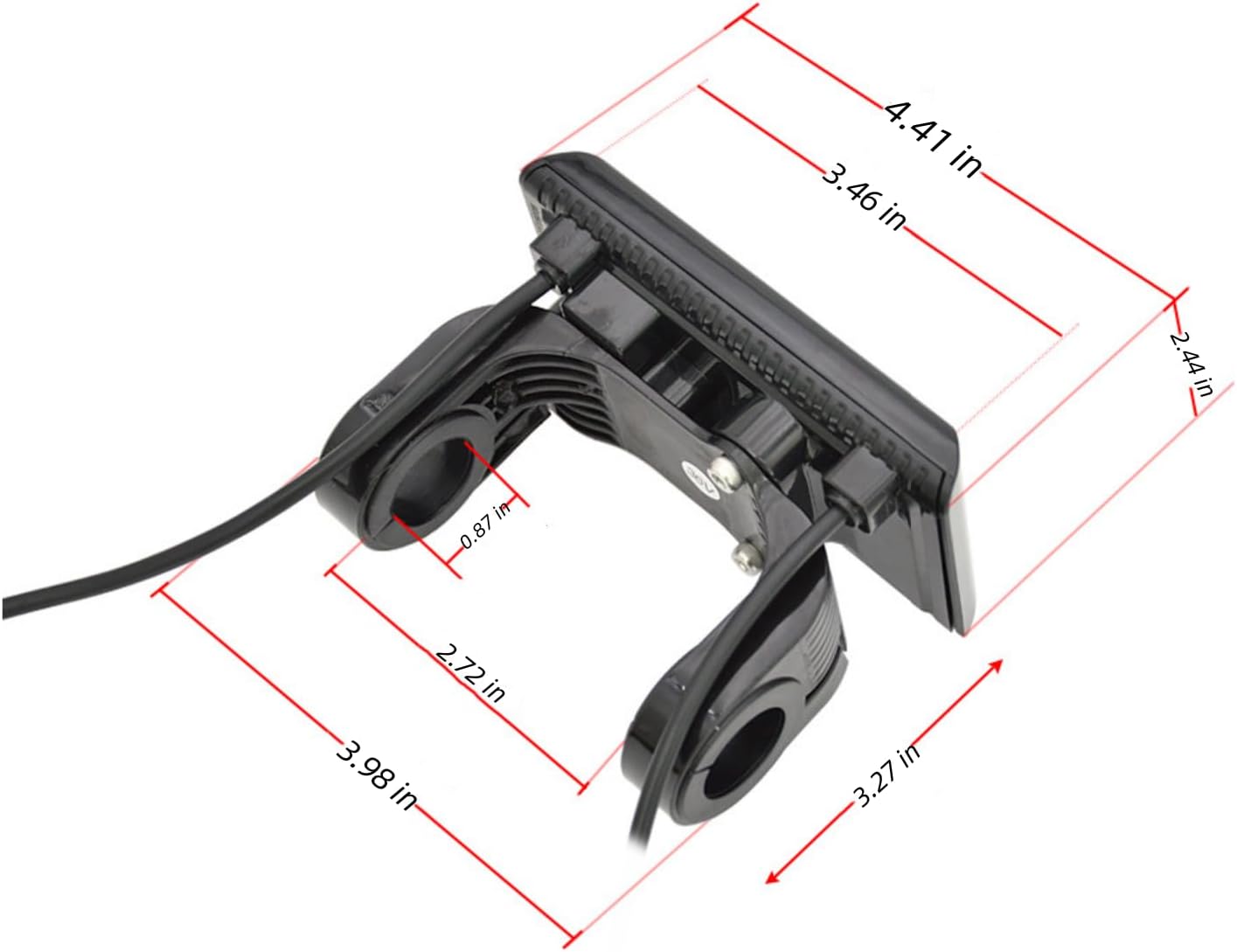
Figure 4.1: Detailed dimensions of the SW900 LCD Display for installation planning.
5. راه اندازی و نصب
The SW900 LCD Display is designed for straightforward installation with a standard 22.2mm handlebar diameter. Follow these steps for proper setup:
- نصب: Securely attach the display and control panel to your electric bike or scooter's handlebar using the provided mounting base. Ensure it is positioned for easy viewing and access to buttons.
- اتصال سیم کشی: Connect the display's wiring harness to your e-bike's controller. Refer to the wiring diagram below for correct pin assignments. Ensure all connections are secure and waterproof.
- روشن کردن: Once connected, turn on your e-bike's power. The display should illuminate and show initial readings.
نمودار سیم کشی
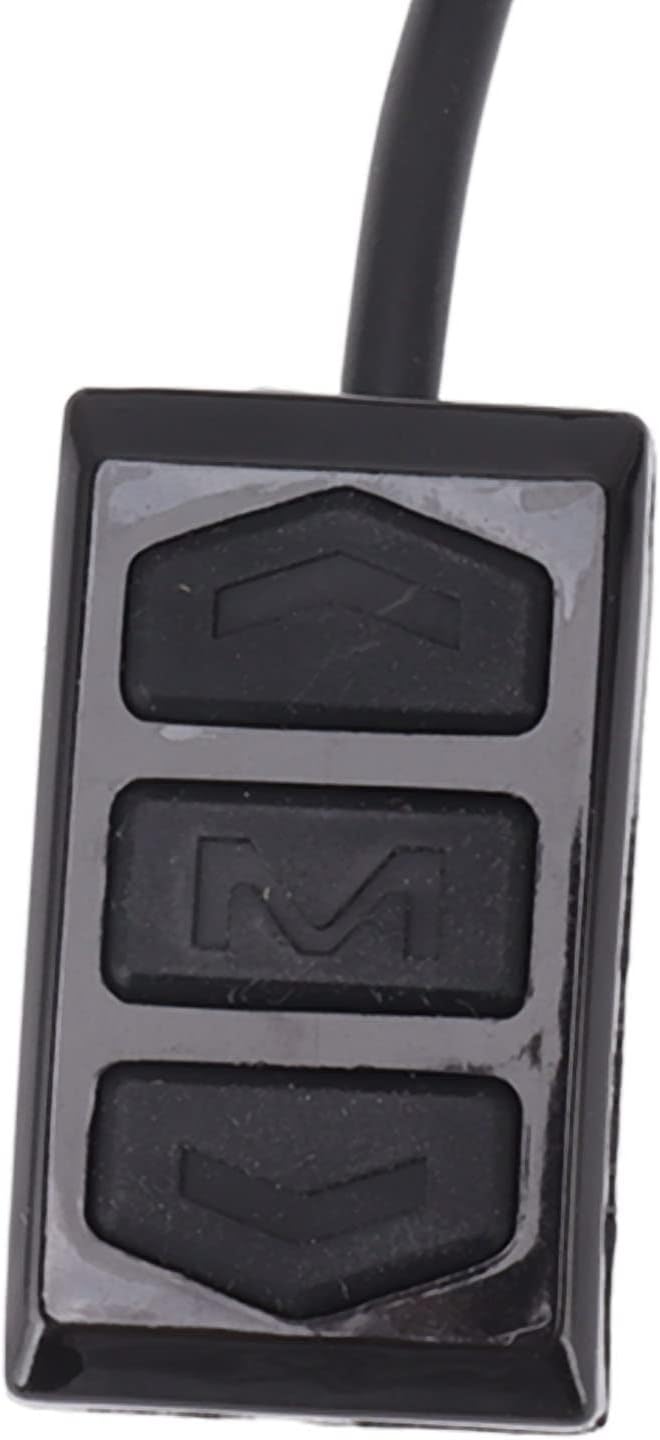
Figure 5.1: Wiring connections for the SW900 LCD Display. Ensure correct polarity and pin matching.
- SM-5Y Connector:
- سیم قرمز: منبع تغذیه مثبت
- سیم سیاه: منبع تغذیه منفی
- سیم آبی: Communication Transmit (TX)
- سیم سبز: Communication Receive (RX)
- سیم زرد: Controller electric door lock
- SM-2Y Connector:
- سیم سفید: Headlight power supply
- Thick black wire: سیم زمینی
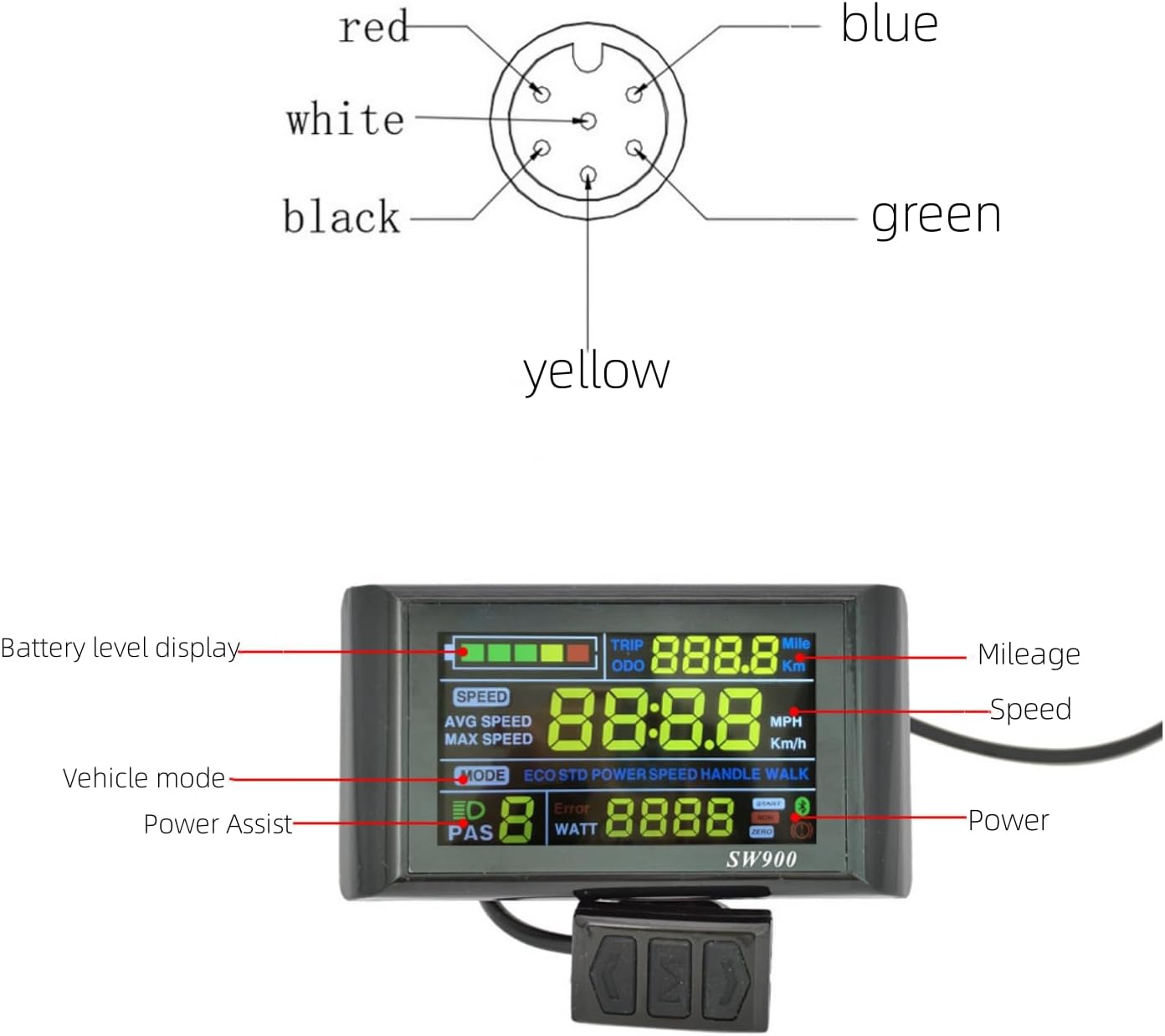
Figure 5.2: Visual representation of the 5-pin connector pinout.
6. دستورالعمل های عملیاتی
The SW900 LCD Display provides intuitive control over your e-bike's functions. Familiarize yourself with the display layout and button operations.

Figure 6.1: SW900 LCD Display with key functions labeled: Battery level, Speed, Mileage (TRIP/ODO), Vehicle mode, Power Assist (PAS), and Power (WATT).
توابع دکمه
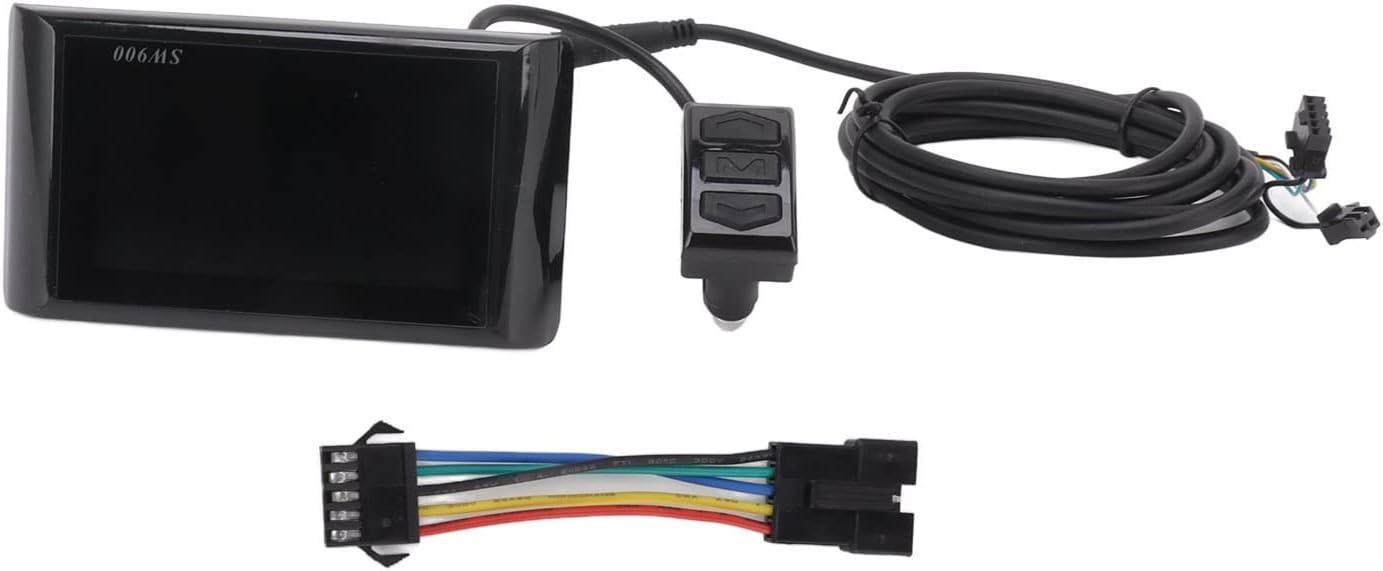
Figure 6.2: The control buttons: Up, Mode (M), and Down.
- روشن/خاموش برق: را فشار داده و نگه دارید حالت (M) button to turn the display on or off.
- Change Display Mode: را به طور خلاصه فشار دهید حالت (M) button to cycle through different display modes (e.g., ODO, TRIP).
- تنظیم سطح کمک: استفاده کنید Up و پایین buttons to increase or decrease the pedal assist level (PAS).
- تنظیمات دسترسی: To enter the parameter settings menu, press and hold the Up و پایین دکمه ها به طور همزمان
Parameter Settings (P-Codes)
Within the settings menu, you can adjust various parameters. Use the Up و پایین buttons to change values and the حالت (M) button to confirm and move to the next parameter.
| کد پارامتر | توضیحات | Typical Range/Notes |
|---|---|---|
| P01 | روشنایی نور پس زمینه | 1 (dimmest) to 3 (brightest) |
| P02 | واحد مسافت پیموده شده | 0: Kilometers (Km), 1: Miles (MPH) |
| P03 | جلدtagسطح | 24V, 36V, 48V, 60V (Set to match your battery) |
| P04 | زمان خواب | 0: No sleep, 1-60: Minutes until auto-off |
| P05 | تنظیم سطح PAS | 0: 3 levels, 1: 5 levels, 2: 9 levels |
| P06 | قطر چرخ | Set in inches (e.g., 26.0, 29.0) |
| P07 | شماره آهنربای سرعت | Number of magnets in motor (e.g., 46) |
| P08 | محدودیت سرعت | Set maximum speed (e.g., 25 km/h or 15.5 mph) |
| P09 | Zero/Non-Zero Start | 0: Zero start, 1: Non-zero start |
| P10 | تنظیم حالت رانندگی | 0: Pedal Assist only, 1: Throttle only, 2: Both |
| P11 | حساسیت PAS | 1-24 (Higher value = more sensitive) |
| P12 | قدرت شروع PAS | 0-5 (Higher value = stronger initial assist) |
| P13 | PAS Magnet Number | 5, 8, 12 (Number of magnets in PAS sensor) |
| P14 | حد فعلی | Set controller current limit (e.g., 12A) |
| P15 | زیر جلدtage ارزش حفاظتی | Set battery low voltage قطع |
| P16 | بازنشانی ODO | Press and hold Up button for 5 seconds to reset ODO |
| P17 | کروز کنترل | 0: خاموش، 1: روشن |
| P18 | Speed Ratio Display | Adjust speed display accuracy |
| P19 | 0-Start Mode | 0: No, 1: Yes (for specific controllers) |
| P20 | پروتکل ارتباطی | 0: Protocol 1, 1: Protocol 2, 2: Protocol 3 (Default: 2) |
مهم: Incorrect parameter settings can affect performance or cause errors. If unsure, consult a professional or refer to your e-bike's controller manual.
Demonstration Video: Display Operation and Settings
Video 6.1: A demonstration of how to power on the SW900 LCD Display, navigate through its various display modes, and access and adjust the parameter settings (P-codes) using the control buttons. This video also shows how to remove the protective film from the screen.
7. تعمیر و نگهداری
Proper maintenance ensures the longevity and optimal performance of your SW900 LCD Display.
- تمیز کردن: Regularly wipe the display screen with a soft, damp پارچه. از استفاده از پاککنندههای ساینده یا حلالهایی که میتوانند به صفحه نمایش یا ... آسیب برسانند، خودداری کنید.asing.
- حفاظت: While the display is durable, avoid direct impacts or excessive force. Ensure the protective film (if present) is removed carefully after installation for clear visibility.
- اتصالات: به طور دورهای تمام اتصالات سیمکشی را بررسی کنید تا مطمئن شوید که محکم و عاری از خوردگی یا آسیب هستند.
- ذخیره سازی: If storing your e-bike for an extended period, ensure the display is clean and stored in a dry environment.
8 عیب یابی
If you encounter issues with your SW900 LCD Display, refer to the common problems and solutions below. The display's fault prompt feature can also indicate specific errors.
| مشکل | علت احتمالی | راه حل |
|---|---|---|
| نمایشگر روشن نمیشود. | No power from battery, loose connection, faulty wiring. | Check battery charge. Verify all wiring connections are secure and correct according to the diagram. Ensure the e-bike's main power is on. |
| Speed reading is incorrect or zero. | Incorrect wheel diameter (P06) or speed magnet number (P07) setting. Faulty speed sensor. | Verify P06 and P07 settings match your e-bike's specifications. Check the speed sensor and its connection for damage or misalignment. |
| Assist levels not working or stuck. | Incorrect PAS level setting (P05). PAS sensor issue. | Check P05 setting. Inspect the PAS sensor for damage or proper installation. |
| Display shows "ER" (Error Code). | Indicates a system error. Specific error codes (e.g., ER01, ER02) correspond to different issues. | Consult your e-bike controller's manual for specific error code meanings. Common errors relate to motor, controller, or battery communication. Check all connections. |
| دکمه ها پاسخگو نیستند | Loose connection to control panel, internal fault. | Check the connection of the control panel to the display. If the issue persists, contact support. |
If troubleshooting steps do not resolve the issue, it is recommended to contact Topyond customer support or a qualified e-bike technician.
9. گارانتی و پشتیبانی
For warranty information, product support, or technical assistance, please refer to the documentation provided with your purchase or contact Topyond customer service directly. Keep your purchase receipt as proof of purchase for any warranty claims.
While this product may be offered with optional protection plans, specific warranty terms and conditions are provided by the manufacturer at the time of purchase.
Ask a question about this manual
Ask about setup, troubleshooting, compatibility, parts, safety, or missing instructions. Manuals+ will review the question and use this page’s manual context to help answer it.