
GL.iNet GL-MT6000, GL-AXT1800
GL.iNet Router User Manual
Models: GL-AXT1800 (Slate AX) & GL-MT6000 (Flint 2)
1. مقدمه
This manual provides comprehensive instructions for the GL.iNet GL-AXT1800 (Slate AX) and GL-MT6000 (Flint 2) Wi-Fi 6 routers. These devices are designed to provide high-speed, secure, and reliable network connectivity for various applications, from travel to home gaming.
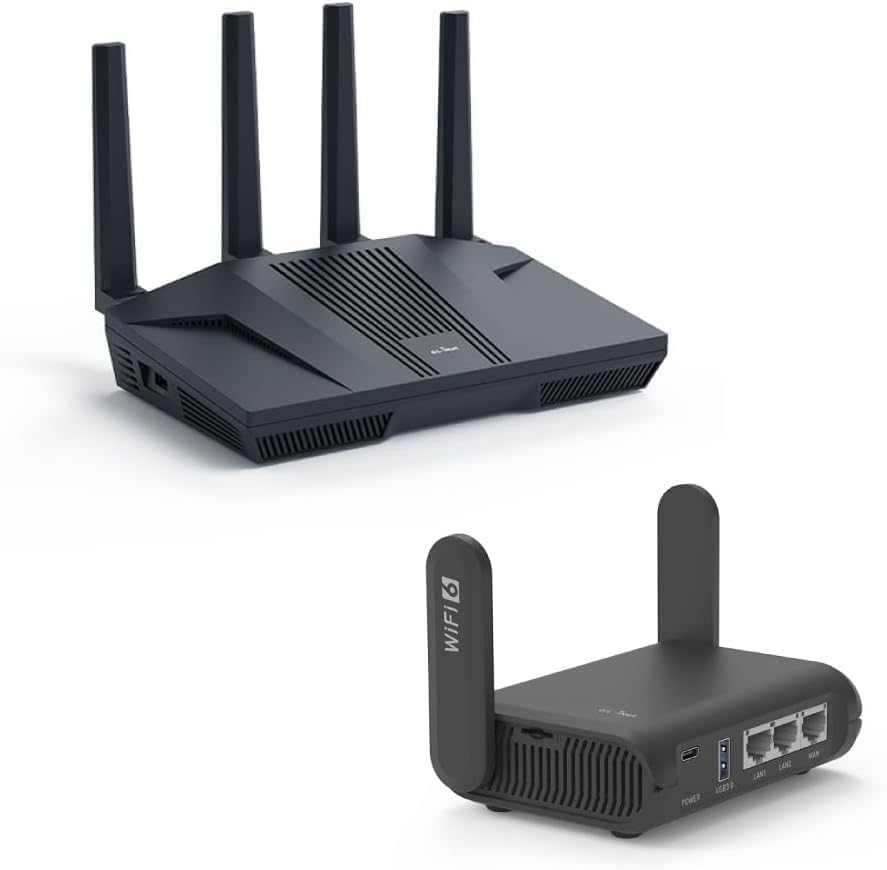
شکل 1.1: The GL.iNet GL-MT6000 (Flint 2) router (top) and GL-AXT1800 (Slate AX) travel router (bottom). The Flint 2 is a larger, more powerful home router, while the Slate AX is compact and designed for portability.
۳. راهاندازی و پیکربندی اولیه
This section guides you through the initial setup process for both GL.iNet routers.
2.1 GL-AXT1800 (Slate AX) Setup

شکل 2.1: عقب view of the GL-AXT1800 (Slate AX) router, highlighting its power input, USB 3.0 port, two LAN ports, and one WAN port.

شکل 2.2: The compact GL-AXT1800 (Slate AX) router, ideal for travel and on-the-go connectivity, shown alongside typical travel items.
- اتصال برق: Connect the provided power adapter to the router's power input and plug it into an electrical outlet.
- اتصال به اینترنت:
- For wired internet, connect an Ethernet cable from your modem or existing router's LAN port to the WAN port on the Slate AX.
- For wireless internet (repeater mode), you will configure this later via the web رابط کاربری
- اتصال دستگاه:
- سیمی: Connect your computer or device to one of the LAN ports using an Ethernet cable.
- بی سیم: جستجو برای the router's default Wi-Fi SSID (printed on the router's label) and connect to it. The default password is also on the label.
- دسترسی داشته باشید Web رابط کاربری: a را باز کنید web مرورگر و حرکت به http://192.168.8.1. Follow the on-screen instructions to set up your administrative password and configure your internet connection.
2.2 GL-MT6000 (Flint 2) Setup

شکل 2.3: عقب view of the GL-MT6000 (Flint 2) router, illustrating its DC 12V power input, 2.5G WAN port, 2.5G WAN/LAN port, three 1G LAN ports, and reset button.
- اتصال برق: Connect the provided power adapter to the router's DC 12V input and plug it into an electrical outlet.
- اتصال به اینترنت: Connect an Ethernet cable from your modem or existing router's LAN port to the 2.5G WAN port on the Flint 2.
- اتصال دستگاه:
- سیمی: Connect your computer or device to any of the LAN ports (2.5G WAN/LAN, LAN1, LAN2, LAN3) using an Ethernet cable.
- بی سیم: جستجو برای the router's default Wi-Fi SSID (printed on the router's label) and connect to it. The default password is also on the label.
- دسترسی داشته باشید Web رابط کاربری: a را باز کنید web مرورگر و حرکت به http://192.168.8.1. Follow the on-screen instructions to set up your administrative password and configure your internet connection.
3. Operating Your Routers
Both GL.iNet routers offer advanced features for enhanced network performance and security.
اتصال وایفای ۶ ۵.۳
Both the Slate AX and Flint 2 support Wi-Fi 6 (802.11ax) standard, providing faster speeds, lower latency, and increased capacity for multiple devices.

شکل 3.1: The Slate AX router efficiently managing connections for multiple devices, including gaming consoles and smartphones, leveraging Wi-Fi 6 technology for optimal performance.

شکل 3.2: The Flint 2 router delivering lightning-fast Wi-Fi 6 speeds, with specific bandwidths for 2.4GHz and 5GHz bands highlighted.
- عملکرد دو باند: Both routers operate on 2.4GHz and 5GHz bands. The Slate AX offers combined speeds of 1800 Mbps (600 Mbps for 2.4GHz, 1200 Mbps for 5GHz). The Flint 2 provides up to 6 Gbps (1148 Mbps for 2.4GHz, 4804 Mbps for 5GHz).
- MU-MIMO و OFDMA: These technologies improve efficiency by allowing the router to communicate with multiple devices simultaneously, reducing congestion and improving overall network performance.
3.2 VPN and Security Features
GL.iNet routers are known for their robust security features, including pre-installed VPN clients.

شکل 3.3: The Slate AX router's security capabilities, featuring support for OpenVPN (up to 120 Mbps) and WireGuard (up to 550 Mbps), along with Cloudflare and IPv6 compatibility.

شکل 3.4: The Flint 2 router's advanced security features, including OpenVPN (up to 190 Mbps) and WireGuard (up to 900 Mbps) support, alongside Cloudflare and IPv6.
- OpenVPN & WireGuard: Both routers come with OpenVPN and WireGuard clients pre-installed, allowing you to connect to over 30 VPN service providers.
- Slate AX: OpenVPN up to 120 Mbps, WireGuard up to 550 Mbps.
- Flint 2: OpenVPN up to 190 Mbps, WireGuard up to 900 Mbps.
- Cloudflare Encryption: Supported for enhanced privacy and security.
- پشتیبانی IPv6: Ensures compatibility with the latest internet protocols.
3.3 Advanced Features (Flint 2)
The GL-MT6000 (Flint 2) offers additional features for high-demand users.
- 2.5G Ethernet Ports: Equipped with 2.5G WAN and 2.5G WAN/LAN ports, providing ultra-fast wired connections for gaming and high-bandwidth applications.
- High-Speed Gaming: Designed for uninterrupted performance with 8-stream Wi-Fi 6 technology, ensuring stable and high-speed connections for online gaming.
4. تعمیر و نگهداری
Regular maintenance ensures optimal performance and longevity of your GL.iNet routers.
- به روز رسانی سیستم عامل: Periodically check for and install firmware updates via the router's web رابط کاربری. بهروزرسانیها اغلب شامل بهبود عملکرد، وصلههای امنیتی و ویژگیهای جدید میشوند.
- تمیز کردن فیزیکی: Keep the routers free from dust. Use a soft, dry cloth to wipe the exterior. Ensure ventilation holes are not obstructed.
- راه اندازی مجدد: If you experience network issues, a simple restart of the router (unplugging power for 10 seconds and plugging back in) can often resolve minor glitches.
- پیکربندی پشتیبان گیری: Regularly back up your router's configuration settings through the web interface. This allows for quick restoration in case of a factory reset or other issues.
5 عیب یابی
این بخش به مشکلات رایجی که ممکن است با آنها مواجه شوید میپردازد و راهحلهایی ارائه میدهد.
| مشکل | علت احتمالی | راه حل |
|---|---|---|
| Cannot access the router's web interface (192.168.8.1) | Incorrect IP address, device not connected to router, IP conflict. |
|
| بدون اتصال به اینترنت | WAN cable disconnected, modem issue, incorrect internet settings. |
|
| Slow Wi-Fi speeds or frequent disconnections | تداخل، تعداد زیاد دستگاهها، سیستم عامل قدیمی، محل قرارگیری روتر. |
|
| VPN connection issues | Incorrect VPN settings, VPN server issues, firewall blocking. |
|
6. مشخصات
Key technical specifications for the GL.iNet GL-AXT1800 (Slate AX) and GL-MT6000 (Flint 2) routers.
| ویژگی | GL-AXT1800 (Slate AX) | GL-MT6000 (Flint 2) |
|---|---|---|
| استاندارد Wi-Fi | Wi-Fi 6 (802.11ax) | Wi-Fi 6 (802.11ax) |
| Wi-Fi Speed (Combined) | 1800 مگابیت در ثانیه (2.4 گیگاهرتز: 600 مگابیت در ثانیه، 5 گیگاهرتز: 1200 مگابیت در ثانیه) | Up to 6 Gbps (2.4GHz: 1148 Mbps, 5GHz: 4804 Mbps) |
| پورت های اترنت | ۱x WAN، ۴x LAN (گیگابیت) | 1x 2.5G WAN, 1x 2.5G WAN/LAN, 3x 1G LAN |
| VPN Speeds (WireGuard) | تا 550 مگابیت بر ثانیه | تا 900 مگابیت بر ثانیه |
| VPN Speeds (OpenVPN) | تا 120 مگابیت بر ثانیه | تا 190 مگابیت بر ثانیه |
| نوع آنتن | External (Foldable) | External (Fixed) |
| ویژگی های خاص | Pocket-sized, Travel Router, USB 3.0 Port | High-speed gaming, DDR4 1GB / eMMC 8GB |
7. اطلاعات گارانتی
GL.iNet products typically come with a limited manufacturer's warranty. For specific warranty terms and conditions, including duration and coverage, please refer to the warranty card included with your product or visit the official GL.iNet webسایت
لطفاً مدرک خرید خود را برای ادعاهای گارانتی نگه دارید.
8. پشتیبانی مشتری
For technical assistance, troubleshooting, or further inquiries regarding your GL.iNet GL-AXT1800 (Slate AX) or GL-MT6000 (Flint 2) routers, please utilize the following resources:
- Official GL.iNet Webسایت: بازدید کنید www.gl-inet.com برای مستندات محصول، سوالات متداول، دانلود میانافزار و انجمنهای گفتگو.
- پورتال پشتیبانی آنلاین: Access the support portal on the GL.iNet website for submitting support tickets or finding detailed guides.
- انجمن انجمن: Engage with other GL.iNet users and experts on the official forum for peer-to-peer support and discussions.
When contacting support, please have your product model number (GL-AXT1800 or GL-MT6000) and serial number ready.
Ask a question about this manual
Ask about setup, troubleshooting, compatibility, parts, safety, or missing instructions. Manuals+ will review the question and use this page’s manual context to help answer it.