
1. مقدمه
اکتبرtagon SF8008 UHD 4K Supreme Combo receiver is a versatile multimedia device designed for high-definition television reception and advanced media functionalities. This receiver supports DVB-S2X, DVB-C, and DVB-T2 standards, offering a wide range of tuning options. It features a powerful processor, dual operating systems (E2 Linux and Define OS), and an integrated M.2 interface for internal storage, including a pre-installed 2TB HDD in this specific model. This manual provides essential information for setting up, operating, and maintaining your receiver.
2. اطلاعات ایمنی
- Ensure the receiver is placed on a stable, flat surface with adequate ventilation.
- دستگاه را در معرض رطوبت، باران یا دمای بسیار بالا قرار ندهید.
- Use only the provided power adapter. Disconnect power during thunderstorms or when unused for extended periods.
- گیرنده را باز نکنید جasinز. تمام مراحل سرویس را به پرسنل واجد شرایط ارجاع دهید.
- باتریهای کنترل از راه دور را دور از دسترس کودکان نگه دارید.
3. محتویات بسته
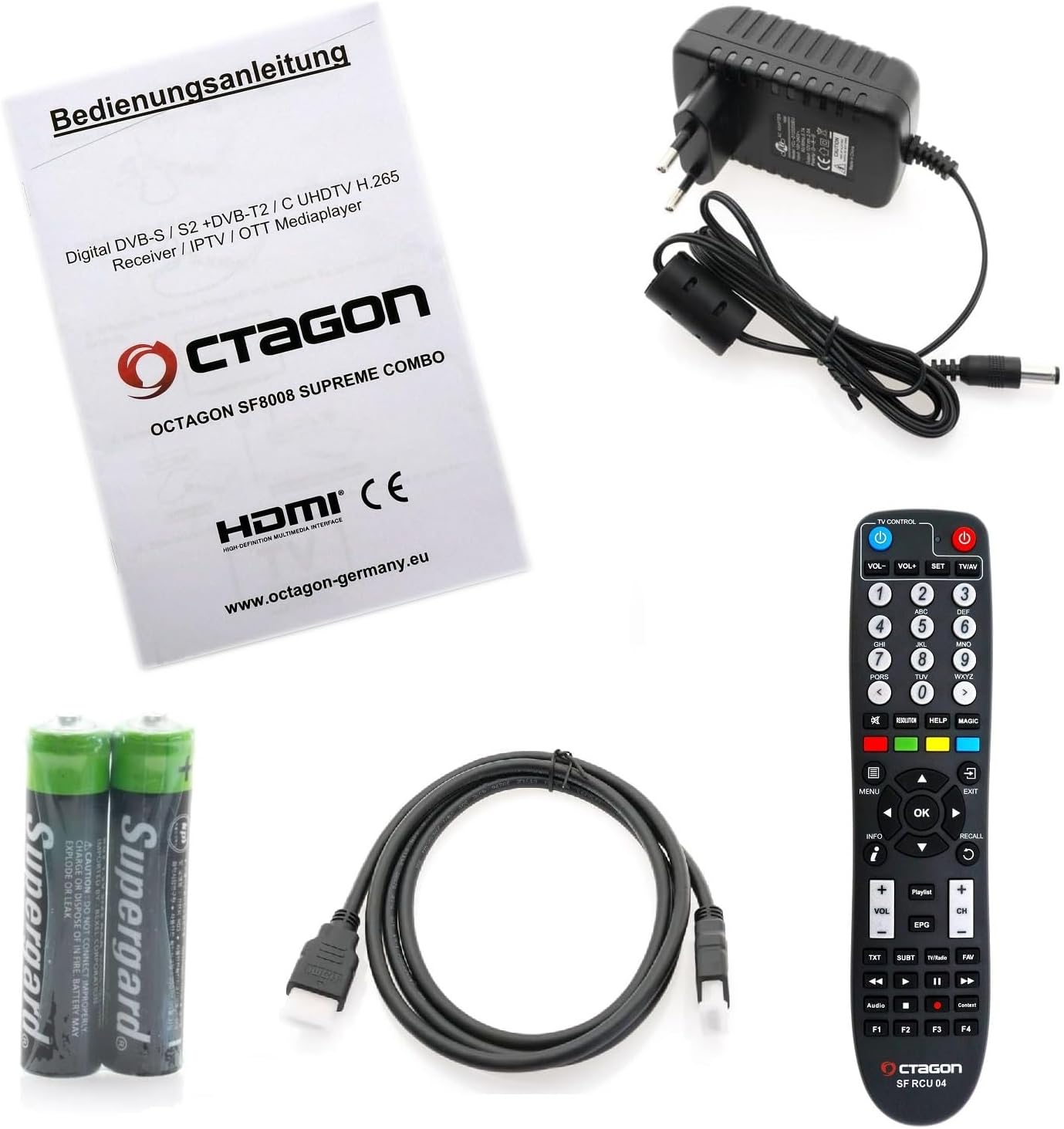
بررسی کنید که آیا همه اقلام در بسته موجود است یا خیر:
- Octagon SF8008 UHD 4K Supreme Combo Receiver with 2TB Internal HDD
- Remote Control (SF RCU 04)
- آداپتور برق
- کابل HDMI
- ۲ عدد باتری قلمی (برای ریموت کنترل)
- راهنمای کاربر (این سند)
4. محصول تمام شدview
4.1 صفحه جلو
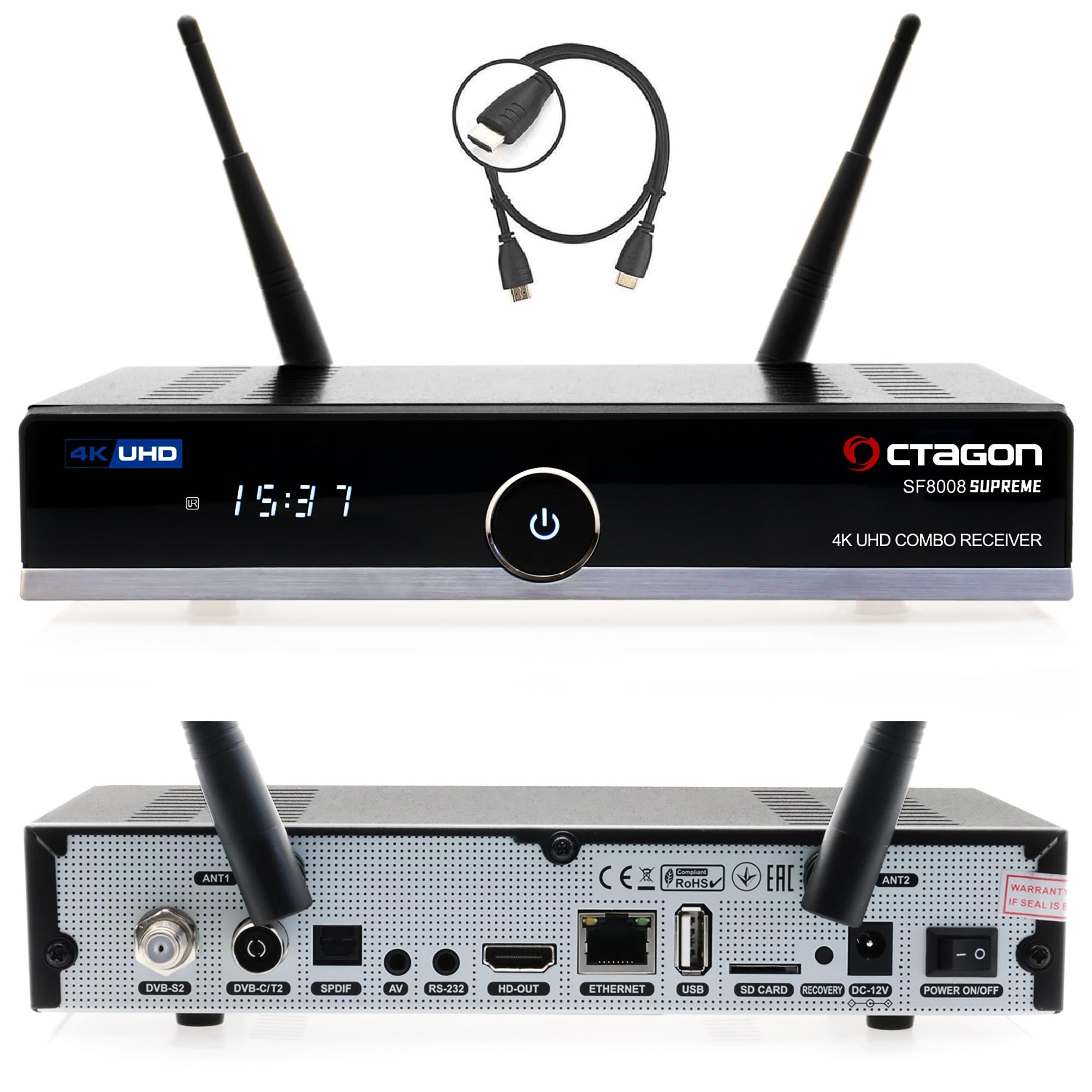
- دکمه پاور: دستگاه را روشن/خاموش می کند.
- 7-Segment Display: Shows time or channel information.
- نشانگر LED: Indicates operational status (red for standby, blue for active).
- سنسور IR: سیگنال هایی را از کنترل از راه دور دریافت می کند.
- پورت USB 3.0: برای اتصال دستگاههای ذخیرهسازی خارجی.
- اسلات کارت CA: For inserting conditional access cards.
4.2 پنل عقب

- ورودی LNB: For satellite antenna connection (DVB-S2X).
- DVB-C/T2 Input: For cable or terrestrial antenna connection.
- Dolby S-PDIF: خروجی صدای دیجیتال
- جک AV: Audio/Video output (jack to RCA cable required).
- پورت RS-232: For maintenance and service.
- Wi-Fi Antennas (2x): برای اتصال به شبکه بیسیم.
- HDMI 2.0a Output: Connects to your TV or display.
- پورت USB 2.0: For additional external devices.
- Gigabit LAN (1000 Mbps): اتصال شبکه سیمی.
- اسلات MicroSD: برای کارتهای حافظه خارجی.
- دکمه تنظیم مجدد: برای ریست سیستم.
- ورودی برق 12 ولت DC: به آداپتور برق وصل می شود.
- سوئیچ قدرت: برق اصلی روشن/خاموش
4.3 Internal Components (M.2 SSD Slot)
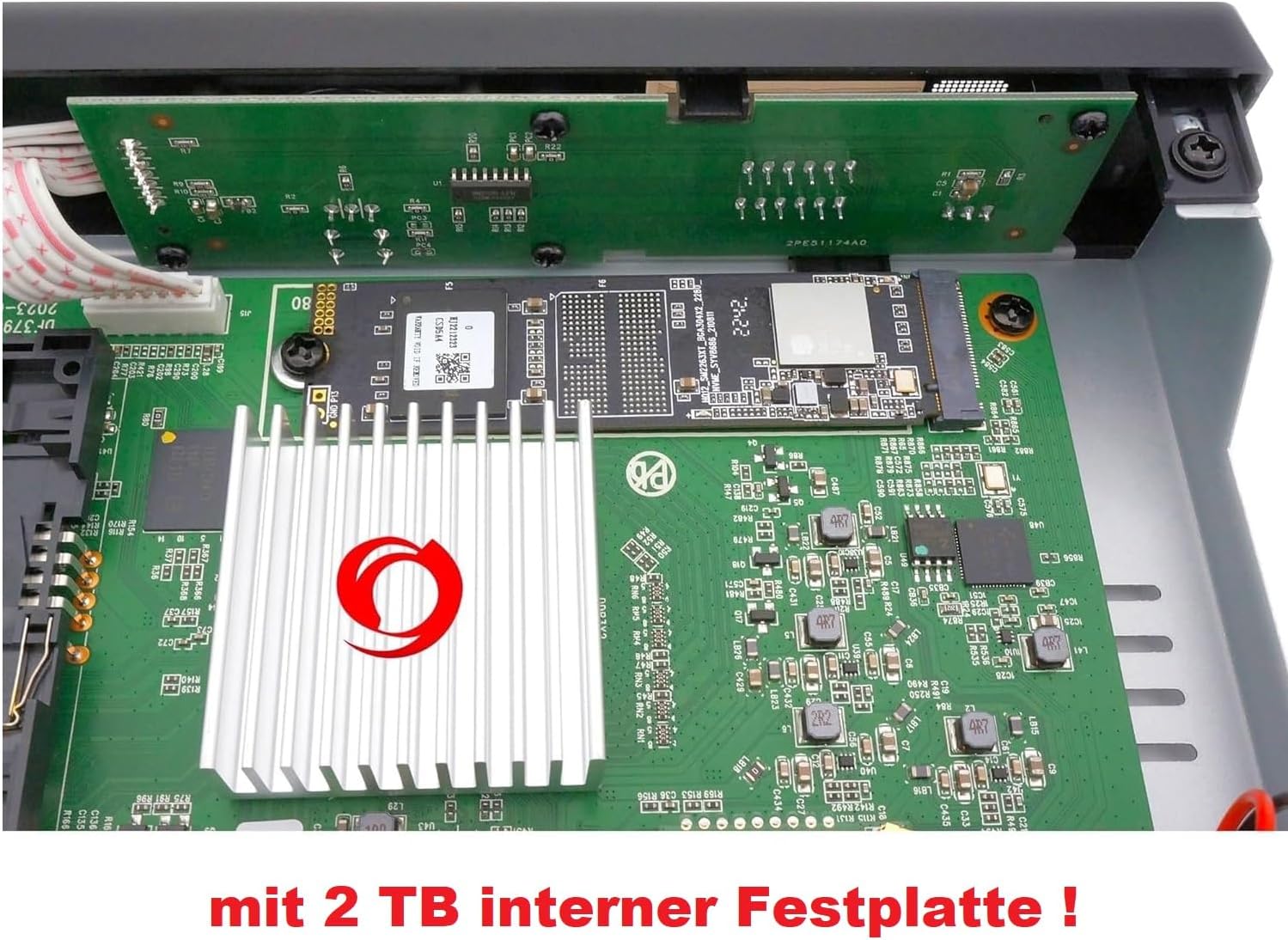
اکتبرtagon SF8008 Supreme Combo features an internal M.2 slot (M Key - PCIe NVMe) for SSD installation, providing fast and silent storage for recordings and media. This model comes with a 2TB internal HDD pre-installed.
5. راه اندازی
۳.۱ اتصال گیرنده
- کابلهای آنتن را وصل کنید: Connect your satellite dish cable to the DVB-S2X LNB input and your terrestrial/cable antenna to the DVB-C/T2 input on the rear panel.
- اتصال به تلویزیون: Use the provided HDMI cable to connect the receiver's HDMI 2.0a output to an HDMI input on your television.
- اتصال شبکه: For internet access, connect an Ethernet cable to the Gigabit LAN port or ensure the Wi-Fi antennas are attached for wireless connection.
- اتصال برق: Connect the power adapter to the DC 12V input on the receiver, then plug the adapter into a power outlet.
- قرار دادن باتری ها: Open the battery compartment of the remote control and insert the two AAA batteries, observing polarity.
5.2 پیکربندی اولیه
Upon first power-on, the receiver will guide you through an initial setup wizard. This typically includes:
- انتخاب زبان: Choose your preferred language for the user interface.
- Video Output Settings: Configure resolution and display settings to match your TV.
- Tuner Configuration: Set up your DVB-S2X, DVB-C, and DVB-T2 tuners according to your signal source. This may involve selecting satellite, transponder, or scanning for channels.
- راه اندازی شبکه: Configure your wired or wireless network connection.
- زمان و تاریخ: Set the correct time zone and synchronize the clock.
6. دستورالعمل های عملیاتی
6.1 Basic Operation with Remote Control
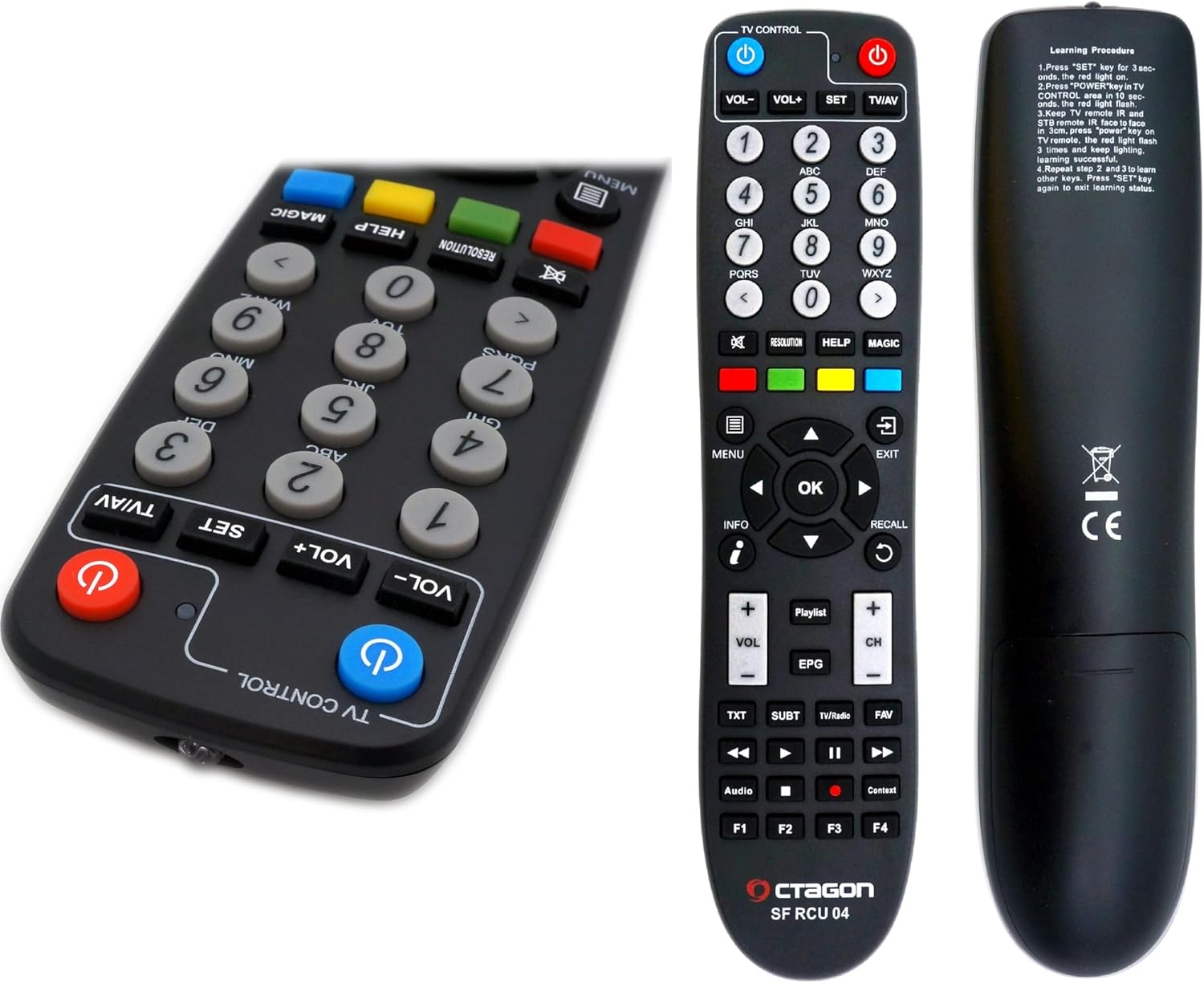
- دکمه پاور: گیرنده را روشن/خاموش یا در حالت آماده به کار قرار میدهد.
- کلیدهای عددی (0-9): برای انتخاب مستقیم کانال.
- افزایش/کاهش صدا: میزان صدا را تنظیم میکند.
- کانال بالا/پایین: کانال ها را تغییر می دهد.
- دکمه OK: Confirms selections or displays channel list.
- کلیدهای پیکان: Navigate through menus and lists.
- دکمه MENU: به منوی اصلی دسترسی پیدا می کند.
- دکمه EXIT: از منو یا صفحه فعلی خارج میشود.
- دکمه EPG: راهنمای برنامه الکترونیکی را نمایش می دهد.
- دکمه اطلاعات: Shows program information.
- دکمه های رنگی (قرمز، سبز، زرد، آبی): Perform context-sensitive functions as indicated on-screen.
6.2 Dual OS Functionality (E2 Linux & Define OS)
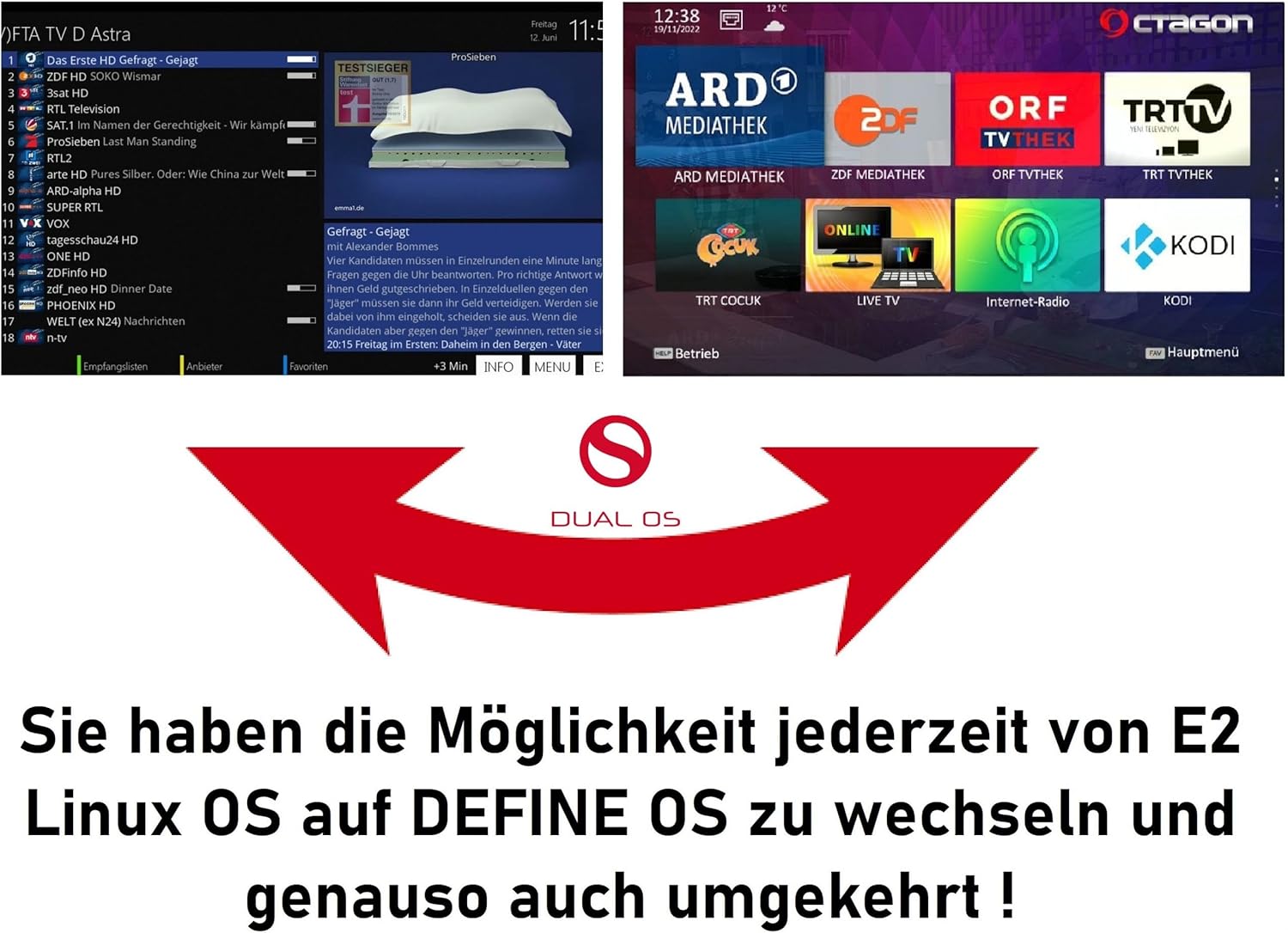
The SF8008 Supreme Combo supports a dual operating system environment, allowing you to switch between E2 Linux OS and Octagon Define Linux OS. This feature, known as Multiboot, provides flexibility and access to different user interfaces and plugin ecosystems.
- To switch between operating systems, access the Multiboot menu, typically available during startup or via a specific menu option within the current OS.
- E2 Linux OS offers extensive customization, a wide range of plugins, and a community-driven development.
- Define OS provides a streamlined user experience with essential features.
6.3 Recording and Timeshift (PVR)
With the integrated 2TB M.2 HDD, the receiver supports PVR (Personal Video Recorder) functions, including recording and Timeshift.
- ضبط: You can record live TV programs directly to the internal 2TB HDD. Recordings can be scheduled via the EPG or initiated manually.
- تغییر زمان: Pause live television and resume playback later. This feature temporarily stores the live broadcast on the internal HDD, allowing you to fast-forward or rewind within the buffered content.
- Access recorded content through the media player or a dedicated PVR menu.
6.4 ویژگی شبکه
The receiver offers robust network connectivity and features:
- Gigabit LAN: Provides high-speed wired network connection (up to 1000 Mbps) for streaming and data transfer.
- Dual-Band Wi-Fi (2.4/5 GHz): Integrated Wi-Fi module with two antennas supports speeds up to 1200 Mbps for wireless connectivity.
- بلوتوث 5.1: For connecting compatible Bluetooth devices, such as headphones or speakers.
- Sat>IP Client: Allows the receiver to receive satellite signals over your home network, even without a direct satellite tuner connection.
- DLNA Function: Enables streaming of media content (music, photos, videos) from compatible devices on your network (e.g., PC, NAS).
۵.۳ پخش رسانه
The SF8008 supports playback of various media formats from internal storage (2TB HDD), external USB drives, or MicroSD cards.
- فرمت های پشتیبانی شده: Includes 2160P media playback for H.264 and H.265 (HEVC) video, MP3 audio, and various image formats.
- Access the media player through the main menu to browse and play your content.
7. تعمیر و نگهداری
7.1 تمیز کردن
- Before cleaning, disconnect the receiver from the power outlet.
- برای پاک کردن سطوح خارجی از یک پارچه نرم و خشک استفاده کنید.
- از پاککنندههای مایع، اسپریها یا مواد ساینده استفاده نکنید، زیرا ممکن است به روکش یا اجزای داخلی آسیب برسانند.
- مطمئن شوید که شیارهای تهویه عاری از گرد و غبار و موانع باشند.
7.2 به روز رسانی نرم افزار
Regular software updates are released to improve performance, add features, and fix bugs.
- The receiver supports OTA (Over-The-Air) updates. Check the system settings menu for available updates.
- در طول فرآیند بهروزرسانی، دستورالعملهای روی صفحه را با دقت دنبال کنید. در طول بهروزرسانی، دستگاه را خاموش نکنید.
8 عیب یابی
این بخش به مشکلات رایجی که ممکن است با آنها مواجه شوید میپردازد.
| مشکل | علت احتمالی | راه حل |
|---|---|---|
| بدون عکس و صدا | Loose HDMI cable, incorrect input on TV, receiver not powered on. | Check HDMI connections, select correct TV input, ensure receiver is powered on. |
| بدون سیگنال | Antenna not connected, incorrect tuner settings, bad weather. | Check antenna connections, verify tuner configuration in settings, wait for weather to clear. |
| کنترل از راه دور کار نمی کند | باتریها تمام شدهاند، حسگر مادون قرمز مسدود شده، ریموت خارج از محدوده است. | Replace batteries, ensure clear line of sight to receiver, operate within range. |
| مشکلات اتصال شبکه | Incorrect Wi-Fi password, router issues, loose Ethernet cable. | Verify network settings, restart router, check Ethernet cable connection. |
| سیستم هنگ میکند یا از کار میافتد | Software issue, overheating. | Perform a soft reboot (power cycle), check for software updates, ensure adequate ventilation. If persistent, consider a factory reset (data loss may occur). |
9. مشخصات
| ویژگی | جزئیات |
|---|---|
| پردازنده | Hisilicon Hi3798MV200 Huawei, Quad-Core 64-bit (4 x 1.6 GHz), 15000 DMIPS |
| فلش مموری | 8 گیگابایت eMMC |
| RAM | 1 گیگابایت DDR4 |
| پیکربندی تنظیم کننده | DVB-S2X & DVB-C/T2 Combo (2 tuners) + Multistream support |
| رمزگشایی ویدیو | H.265 HEVC UHD (3840 x 2160), HDR10, HLG |
| سیستم عامل | Dual OS (E2 Linux & Define OS Linux) |
| ذخیره سازی داخلی | M.2 Slot (M Key - PCIe NVMe) with 2TB HDD pre-installed |
| شبکه | Gigabit LAN (1000 Mbps), Integrated Dual-Band Wi-Fi (2.4/5 GHz) up to 1200 Mbps, Bluetooth 5.1 |
| پورت های USB | 1x USB 3.0، 1x USB 2.0 |
| سایر بنادر | HDMI 2.0a, S/PDIF, AV (Jack to RCA), RS-232, MicroSD Slot, CA Card Reader |
| مصرف برق | کمتر از 0.5 وات در حالت آماده به کار |
| ابعاد (W x D x H) | 22 × 12.5 × 4 سانتی متر |
| وزن | 950 گرم |
10. گارانتی و پشتیبانی
For warranty information and technical support, please refer to the documentation provided with your purchase or visit the official Octagon webسایت. فاکتور خرید خود را برای موارد گارانتی نگه دارید.