
وی تک ES2050
دفترچه راهنمای تلفن بیسیم VTech ES2050 DECT
مدل: ES2050
1. محصول تمام شدview
The VTech ES2050 is a DECT cordless phone designed for home and office use, featuring an integrated digital answering machine, call blocking capabilities, and enhanced audio functions. This manual provides detailed instructions for setting up, operating, and maintaining your phone.

The VTech ES2050 DECT Cordless Phone with its base unit, showcasing the handset's backlit display and keypad, and the base unit's answering machine controls.

The VTech ES2050 DECT Cordless Phone positioned in a contemporary living space, highlighting its sleek design and integration into a home environment.

Illustration of the VTech ES2050's Nuisance Call Blocker feature, showing how it helps prevent unwanted calls from ringing through. Up to 100 numbers can be blacklisted.

The VTech ES2050's Digital Answering System, capable of recording up to 30 minutes of messages, with a digital message counter on the base unit.

Depiction of the VTech ES2050's easy one-touch features, including Mute/Alarm, adjustable ring volume and melodies, and a high-quality handsfree speakerphone.

Visual representation of the VTech ES2050's Volume Booster function, which amplifies incoming sounds for enhanced clarity and loudness, beneficial for hearing-impaired users.

The VTech ES2050 handset with its backlit display and keypad illuminated, demonstrating improved visibility in low-light conditions.

A composite image illustrating key features: 100 name and number phonebook, calling numbers displayed with 20 call list records, 10 last number redial, and up to 18 hours talk time / 250 hours standby time.
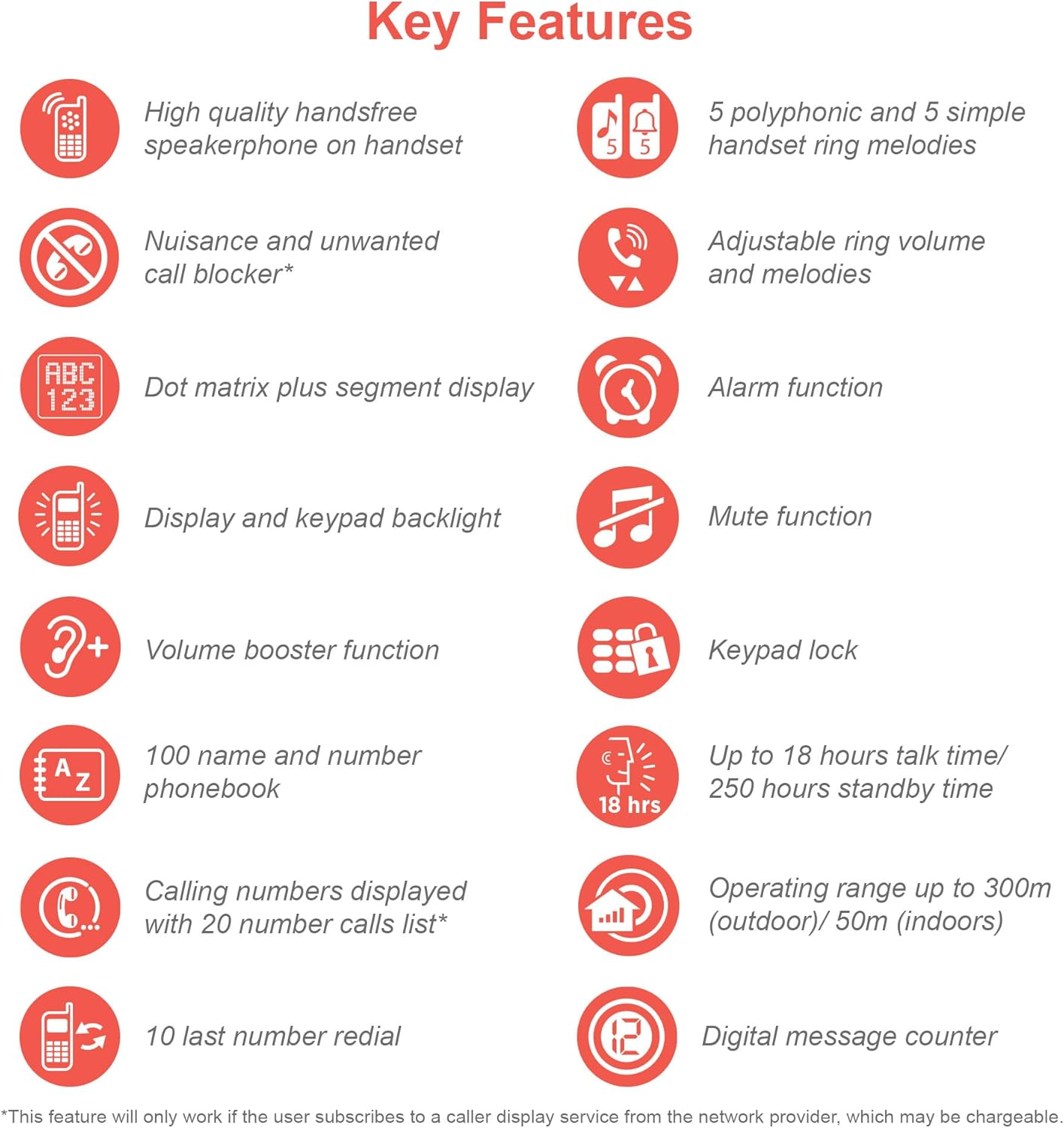
An infographic summarizing the VTech ES2050's key features, including speakerphone, call blocker, polyphonic ringtones, alarm, mute, keypad lock, volume booster, phonebook, call list, redial, talk time, operating range, and digital message counter.
ویژگی های کلیدی:
- منشی دیجیتال: 30 minutes recording time.
- Nuisance Call Blocker: Block up to 100 blacklisted numbers.
- Volume Booster: Amplifies incoming sounds for enhanced clarity.
- عمر طولانی باتری: Up to 18 hours talk time / 250 hours standby time.
- صفحه نمایش و صفحه کلید با نور پس زمینه: آسان viewدر نور کم
- Handsfree Speakerphone: High-quality speakerphone on handset.
- دفترچه تلفن: 100 name and number capacity.
- شماره گیری سریع: 3 speed dial numbers.
- حالت ECO: For reduced power consumption.
- شناسه تماس گیرنده / انتظار مکالمه: Stores 20 records.
- شماره گیری مجدد: 10 last number redial.
- عملکرد زنگ هشدار: Integrated alarm.
- عملکرد بی صدا: For privacy during calls.
- قفل صفحه کلید: Prevents accidental dialing.
۲. چه چیزهایی در جعبه است؟
قبل از شروع، مطمئن شوید که همه اجزا موجود هستند:
- 1 واحد پایه
- 1 گوشی بی سیم
- 1 Charger (for handset)
- 1 Battery Pack (2 AAA batteries included)
- سیم خط تلفن
- راهنمای شروع سریع (برای جزئیات کامل به این دفترچه راهنما مراجعه کنید)
3. راهنمای راه اندازی
3.1. نصب و شارژ باتری
- Locate the battery compartment cover on the back of the handset. Slide it open.
- دوشاخه باتری را محکم به جک داخل محفظه وصل کنید.
- Place the 2 AAA batteries (included) into the compartment, ensuring correct polarity (+ and -).
- درپوش محفظه باتری را تعویض کنید.
- Place the handset on the base unit or charger. The charging indicator light on the handset should illuminate.
- قبل از اولین استفاده، اجازه دهید گوشی حداقل ۱۶ ساعت شارژ شود تا از ظرفیت کامل باتری اطمینان حاصل شود.
۱. اتصال واحد پایه
- یک سر سیم خط تلفن را به جک TEL LINE در پشت دستگاه پایه وصل کنید.
- سر دیگر سیم خط تلفن را به پریز دیواری تلفن خود وصل کنید.
- سر کوچک آداپتور برق را به جک POWER در پشت واحد پایه وصل کنید.
- سر بزرگ آداپتور برق را به یک پریز برق استاندارد وصل کنید.
- Ensure all cables are securely connected and routed to prevent tripping hazards.
۵. تنظیمات اولیه (تاریخ و زمان)
After the handset is charged, you will need to set the date and time. Follow the on-screen prompts on the handset display. If prompted multiple times, ensure each step is confirmed before proceeding.
- را فشار دهید MENU/OK دکمه
- حرکت به تاریخ و زمان با استفاده از کلیدهای جهت دار
- را فشار دهید MENU/OK را انتخاب کنید.
- تاریخ و زمان فعلی را با استفاده از صفحه کلید وارد کنید.
- را فشار دهید MENU/OK ذخیره کردن
4. دستورالعمل های عملیاتی
4.1. برقراری و دریافت تماس
- برای برقراری تماس: گوشی را بردارید یا فشار دهید صحبت کنید button. Dial the number.
- برای دریافت تماس: وقتی تلفن زنگ میخورد، گوشی را بردارید یا دکمه صحبت کنید دکمه
- برای پایان دادن به تماس: Place the handset back on the base unit/charger or press the پایان دکمه
۵.۲. استفاده از بلندگو
در طول تماس ، دکمه را فشار دهید SPEAKER button to activate the handsfree speakerphone. Press it again to switch back to the handset earpiece.
4.3. Digital Answering Machine
- پخش پیامها: روی واحد پایه، فشار دهید PLAY/STOP.
- حذف پیام ها: در حین پخش پیام، را فشار دهید حذف کنید روی واحد پایه
- ضبط پیام خروجی (OGM): Refer to the handset menu for OGM recording options.
4.4. Nuisance Call Blocker
This feature allows you to block unwanted calls. You can add numbers to a blacklist.
- To Block a Number from Call History: Access the Call History, select the number, and choose the "Block" option.
- To Manually Add a Number to Blacklist: Navigate to the Call Blocker menu in the handset settings and add the number.
- The phone can store up to 100 blacklisted numbers.
4.5. Volume Booster
به amplify the incoming sound during a call, press the تقویت button (often marked with a speaker icon or "+") on the handset. Press it again to deactivate.
۴.۷ دفترچه تلفن و شماره گیری سریع
- افزودن مخاطبین: Access the Phonebook menu, select "Add New Entry", and enter the name and number.
- شماره گیری از دفترچه تلفن: را فشار دهید دفترچه تلفن button, scroll to the desired contact, and press صحبت کنید.
- شماره گیری سریع: Assign frequently called numbers to speed dial keys (e.g., 1, 2, 3). Refer to the handset menu for speed dial setup.
4.7. حالت ECO
The phone automatically enters ECO mode when the handset is close to the base unit, reducing power consumption and transmission power. This mode is indicated by an ECO icon on the display.
5. تعمیر و نگهداری
- تمیز کردن: تلفن و پایه را با یک پارچه نرم و لطیف پاک کنید.amp پارچه از پاک کننده ها یا حلال های ساینده استفاده نکنید.
- مراقبت از باتری: For optimal battery life, avoid overcharging by leaving the handset off the charger for extended periods once fully charged. If the phone will not be used for a long time, remove the batteries.
- مکان: واحد پایه را در یک مکان مرکزی و دور از سایر دستگاههای الکترونیکی که ممکن است باعث تداخل شوند، قرار دهید.
6 عیب یابی
If you experience issues with your VTech ES2050 phone, try the following solutions:
| مشکل | راه حل ممکن |
|---|---|
| بوق شماره گیری وجود ندارد / امکان برقراری یا دریافت تماس وجود ندارد. |
|
| کیفیت صدای پایین / استاتیک. |
|
| دستگاه پیامگیر پیامها را ضبط نمیکند. |
|
| Handset display is blank or unresponsive. |
|
| Difficulty with menu navigation or settings. |
|
7. مشخصات
| ویژگی | جزئیات |
|---|---|
| شماره مدل | ES2050 |
| نوع تلفن | بیسیم DECT |
| نوع سیستم پاسخگویی | دیجیتال |
| ظرفیت ضبط | دقیقه 30 |
| زمان مکالمه تلفنی | تا 18 ساعت |
| زمان آماده به کار تلفن | تا 250 ساعت |
| باتری ها | 2 عدد باتری قلمی (شامل) |
| منبع تغذیه | شارژ باتری |
| Dialler Type | صفحه کلید تکی |
| دستگاه های سازگار | Standard Landline Telephone Networks |
| رنگ | مشکی |
| سازنده | VTech |
| کشور مبدا | چین |
8. گارانتی و پشتیبانی
برای اطلاعات گارانتی و پشتیبانی فنی، لطفاً به وبسایت رسمی VTech مراجعه کنید. webبه سایت مراجعه کنید یا با خدمات مشتریان VTech تماس بگیرید. رسید خرید خود را به عنوان مدرک خرید نگه دارید.
سازنده: VTech
For the most up-to-date support resources, visit the VTech support page or refer to the contact information provided with your product packaging.