
1. مقدمه
The VersaCheck X1 Silver 2024 software is designed for personal check creation, enabling users to print bank-compliant checks. This software helps manage accounts, track transactions, and create checks with advanced security features. It offers a cost-effective solution compared to purchasing pre-printed checks.
Video 1: VersaCheck 2024 Overview. This video provides a general introduction to the VersaCheck 2024 software, highlighting its key features and benefits for personal check creation and financial management.
2. سیستم مورد نیاز
To ensure optimal performance, your system should meet the following requirements:
- سیستم عامل: Windows 11, Windows 10, Windows 8.1, Windows 8, Windows 7.
- چاپگر: Laser or inkjet printer supported by Windows.
- اتصال به اینترنت: Required for software download and activation.
3. نصب و راه اندازی
Follow these steps to download and install your VersaCheck X1 Silver 2024 software:
- دانلود کنید: After purchase, locate the download link provided. Download the software installer to your computer.
- اجرای نصبکننده: روی نصب کننده دانلود شده دوبار کلیک کنید file برای شروع فرآیند نصب
- دستورات را دنبال کنید: Follow the on-screen instructions to complete the installation. This typically involves accepting the license agreement and choosing an installation directory.
- فعال سازی: Upon first launch, you may be prompted to activate the software using your license key.
- Print Credits: The software includes 165 print validation codes. Additional print codes are available free inside VersaCheck Check Refills (not ValueChex), which can be purchased online.
4. دستورالعمل های عملیاتی
4.1 Creating and Printing Personal Checks
VersaCheck X1 Silver allows you to create and print personalized checks.
- Check Design: Utilize a variety of templates to design your personal checks.
- ورود داده ها: Input payee information, amounts, dates, and memos.
- چاپ: Print checks using your compatible laser or inkjet printer.
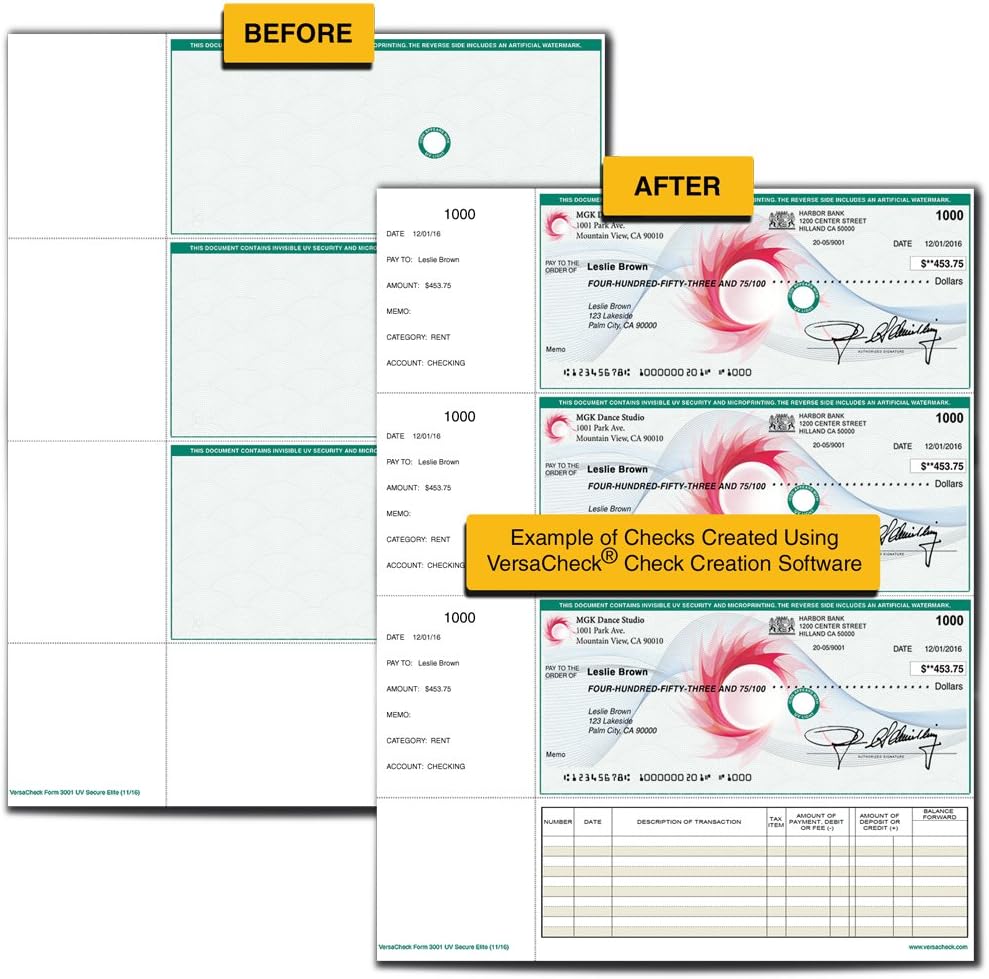
Image 1: Check Creation Exampله This image illustrates the transformation from a blank check paper to a fully printed personal check using VersaCheck software, highlighting the customization and security elements.

Image 2: Create & Print Custom Checks. This image details the process of creating and printing custom checks, emphasizing features like custom DNA tags, managing multiple accounts, and enhanced security.
4.2 Financial Management
The software includes tools to help you manage your finances effectively.
- مدیریت حساب کاربری: Set up and manage unlimited accounts.
- Transaction Tracking: Track accounts and transactions.
- Activity Alerts: Receive alerts for account activity.
- Finance & Contact Manager: Organize financial data and contacts.

Image 3: Home Finance Management. This image displays the main screen for financial management within VersaCheck, illustrating features such as check writing, auto-scheduling, and an overview of accounts and transactions.
4.3 Auto-Pay-Scheduler
Schedule reminders and automatic payments to streamline your financial tasks.
4.4 Integrated Email Check Printing
Instantly receive and print checks sent to you via email.
4.5 Compatibility with Other Software
VersaCheck X1 Silver can be used as a standalone application or integrated with other financial software such as QuickBooks and Quicken.
5. ویژگی های امنیتی
The software incorporates advanced security measures to protect your checks from counterfeiting and fraud.
- INKcrypt Counterfeit-Proof Safeguards: Utilizes unique DNA security patterns and icons.
- Personalized DNA Security: Each check you print can have a unique DNA security pattern.
- UV Fluorescent Ink: Invisible UV fluorescent ink can be used for additional security, visible only under UV light.
- Micro Print Border: A fine line of text that appears as a solid line to the naked eye, but reveals micro-printed words when magnified.
- Erasure Protection: Designed to show signs of alteration if attempts are made to erase information.

Image 4: VersaCheck Silver Security. This image highlights the security features of VersaCheck Silver, including compliance with banking standards and the use of DNA security patterns to prevent fraud.
6. تعمیر و نگهداری
To ensure the longevity and optimal performance of your VersaCheck software, consider the following maintenance tips:
- به روز رسانی نرم افزار: Regularly check for and install software updates to benefit from new features, security enhancements, and bug fixes.
- پشتیبان گیری از داده ها: Periodically back up your financial data and check templates to prevent data loss.
- اسکن سیستم: Ensure your computer's antivirus and anti-malware software is up-to-date and performs regular scans.
7 عیب یابی
If you encounter issues with your VersaCheck X1 Silver software, try the following steps:
- مشکلات نصب: If the software fails to install, ensure your system meets the minimum requirements and temporarily disable any antivirus software that might interfere with the installation process. Re-enable antivirus after installation.
- مشکلات چاپ: Verify your printer is correctly connected, has sufficient ink/toner, and the correct paper type is loaded. Check printer settings within the VersaCheck software.
- نرمافزار پاسخگو نیست: Close and restart the application. If the issue persists, restart your computer.
- پیام های خطا: Note down any error messages displayed and refer to the online support resources or contact customer support for specific guidance.
- Print Credits: If you are unable to print due to insufficient print credits, ensure you have purchased VersaCheck Check Refills (not ValueChex) which include additional print codes.
8. مشخصات
| نام محصول | VersaCheck X1 Silver 2024 - 1 User Personal Check Creation Software [PC Download] |
| مدل | X1 Silver 2024 |
| نام تجاری | VersaCheck |
| پلت فرم | دانلود کامپیوتر |
| سیستم عامل های پشتیبانی شده | ویندوز 11، 10، 8.1، 8، 7 |
| مجوز کاربر | 1 کاربر |
| Included Print Credits | 165 (additional credits with VersaCheck Check Refills) |
| ویژگی های کلیدی | Personal check creation, financial management, INKcrypt security, Auto-Pay-Scheduler, email check printing, compatibility with QuickBooks/Quicken. |
9. پشتیبانی و گارانتی
For technical assistance, product inquiries, or warranty information, please refer to the official VersaCheck webسایت یا با پشتیبانی مشتری آنها تماس بگیرید.
- منابع آنلاین: Visit the VersaCheck support portal for FAQs, knowledge base articles, and user forums.
- خدمات مشتری: Contact VersaCheck customer service for direct assistance with software issues or questions.