
YAMAHA FGDP-50
دفترچه راهنمای پد درام انگشتی یاماها FGDP-50
Model: FGDP-50 | Brand: YAMAHA
مقدمه
The Yamaha FGDP-50 is a portable finger drum pad designed for beat-making, composition, and performance. It features highly responsive pads with velocity sensitivity and aftertouch, allowing for expressive drumming. This manual provides essential information for setting up, operating, and maintaining your FGDP-50.

Figure 1: Yamaha FGDP-50 Finger Drum Pad.
ویژگی های کلیدی
- 18 Performance Pads: Designed for intuitive finger drumming.
- 8 RGB-backlit Assignable Pads: Customize with various sounds and visual feedback.
- Velocity Sensitivity & Aftertouch: Captures the nuances of your performance.
- 48 Preset Drum Kits: A wide variety of sounds to get started.
- USB Connectivity: For connecting to computers (PC/Mac) and USB storage devices.
- Built-in Speaker & Rechargeable Battery: Enables portable use without external equipment.
- Aux In: Allows playing along with external audio sources.
- Rec'n'Share Feature: Easily record and share performances.
راه اندازی
1. جعبه گشایی و بازرسی اولیه
Carefully remove the FGDP-50 from its packaging. Inspect the device for any signs of damage. Ensure all included accessories are present.
Video 1: Official Yamaha Finger Drum Pads Overview. This video demonstrates the features and capabilities of the Yamaha FGDP-50 and FGDP-30 models, including pad responsiveness, sound variety, and connectivity options.
2. روشن و شارژ
The FGDP-50 has a built-in rechargeable battery. For first use, it is recommended to fully charge the device. Connect the provided USB cable to the "TO HOST" micro-USB port on the rear of the unit and the other end to a USB power adapter (not included) or a computer's USB port.
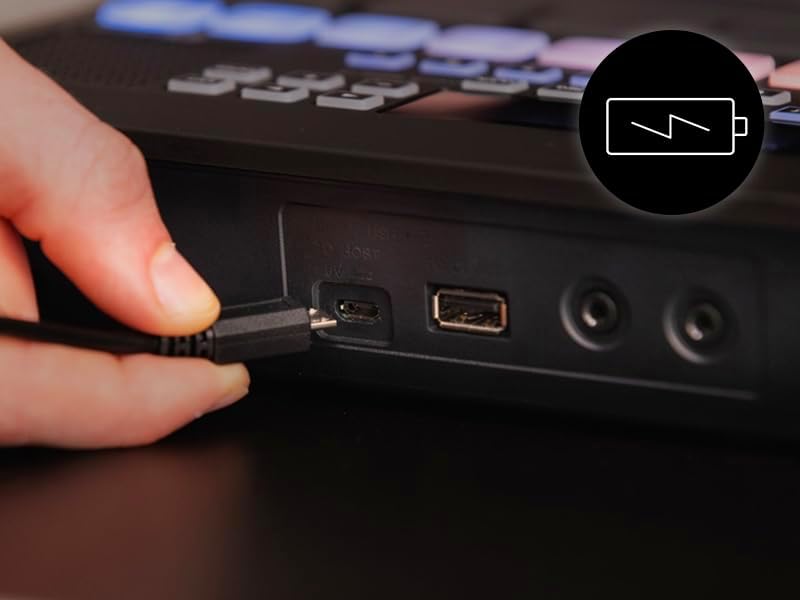
Figure 2: Connecting the USB cable for charging or power.
Press and hold the power button on the side of the unit to turn it on. The display will illuminate, and the pads will light up. If the battery is low, a "Low Battery" message will appear on the display.

Figure 3: Top panel layout of the FGDP-50.
3. اتصالات
The FGDP-50 offers various connection options:
- USB TO HOST (Micro-USB): Connects to a computer for MIDI/Audio data transfer and power.
- USB TO DEVICE (USB-A): For connecting a USB flash drive to load samples or save performances.
- AUX IN (3.5mm stereo mini jack): Connect an external audio player (e.g., smartphone) to play along with backing tracks.
- PHONES/OUTPUT (3.5mm stereo mini jack): هدفون را برای تمرین خصوصی یا یک هدفون خارجی وصل کنید ampسیستم لافایر/بلندگو

شکل ۵.۱: اتصالات پنل پشتی.

Figure 5: Connecting an external audio device via AUX IN.
دستورالعمل های عملیاتی
1. Basic Finger Drumming
The FGDP-50's pads are ergonomically arranged for comfortable and effective finger drumming. Experiment with different finger positions and pressure to explore the velocity sensitivity of the pads.

Figure 6: Ergonomic pad layout for finger drumming.
2. Using Preset Drum Kits
The FGDP-50 comes with 48 high-quality preset drum kits. Use the [KIT] button and navigation controls to browse and select different kits. Each kit offers a unique set of drum sounds and percussion elements.
3. RGB Pads
The 8 assignable RGB-backlit pads can be customized to trigger various voices and provide visual feedback. Refer to the detailed manual for instructions on assigning voices to these pads.

Figure 7: RGB pads in action, providing visual cues.
4. Built-in Metronome (Click)
To help with timing and rhythm, the FGDP-50 includes a built-in metronome. Press the [CLICK] button to activate or deactivate the metronome. You can adjust the tempo using the dedicated tempo controls.
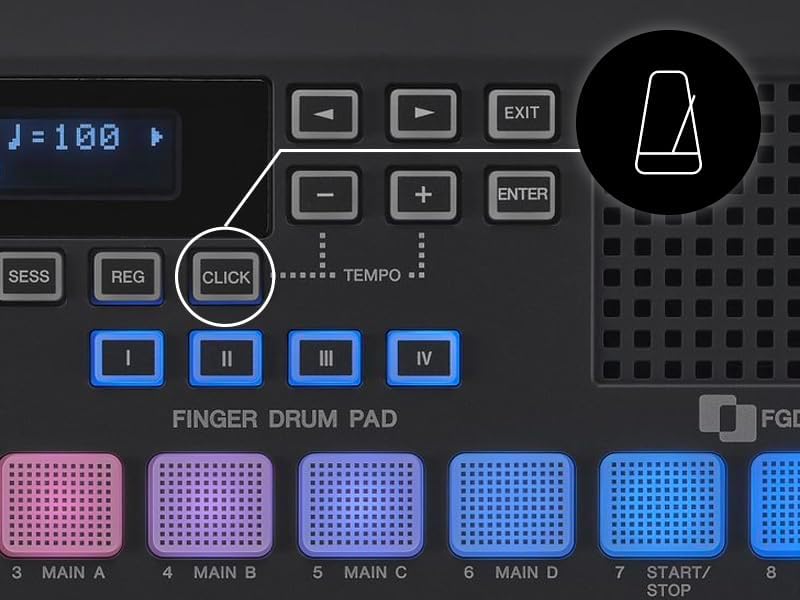
Figure 8: Metronome (CLICK) button and tempo adjustment.
5. Playback Sampler (FGDP-50 only)
The FGDP-50 allows you to load one-shot samples or loops from a USB flash drive. Insert your USB drive into the "TO DEVICE" USB-A port. Use the [AUDIO] button and display menu to navigate and select your desired samples for playback.
6. Rec'n'Share App Integration
Enhance your recording and sharing experience by connecting your FGDP-50 to the Yamaha Rec'n'Share app on your smartphone. This app allows you to easily record high-quality audio and video of your performances for social media or personal archives.

Figure 9: Using the Rec'n'Share app with FGDP-50.
تعمیر و نگهداری
To ensure the longevity and optimal performance of your Yamaha FGDP-50, follow these maintenance guidelines:
- تمیز کردن: Use a soft, dry cloth to wipe down the surface of the unit. For stubborn dirt, slightly dampen the cloth with water and a mild detergent, then wipe dry immediately. Avoid abrasive cleaners or solvents.
- ذخیره سازی: دستگاه را در جای خشک و خنک و دور از نور مستقیم خورشید، دمای بسیار بالا و رطوبت بالا نگهداری کنید.
- رسیدگی: Avoid dropping the unit or subjecting it to strong impacts. Do not place heavy objects on top of it.
- مراقبت از باتری: For optimal battery life, avoid fully discharging the battery frequently. If storing for an extended period, charge the battery to about 50% every few months.
عیب یابی
If you encounter issues with your FGDP-50, refer to the following common problems and solutions:
| مشکل | علت احتمالی | راه حل |
|---|---|---|
| دستگاه روشن نمی شود. | باتری کم یا خالی. | Connect the unit to a USB power source and allow it to charge. Ensure the power button is pressed firmly. |
| صدایی از بلندگو/هدفون شنیده نمیشود. | Volume too low; incorrect output connection; internal speaker muted. | Increase the volume. Ensure headphones are fully plugged into the PHONES/OUTPUT jack. Check if the internal speaker is muted in settings. |
| Pads are unresponsive or inconsistent. | Pad sensitivity settings; dirty pads. | Adjust pad sensitivity settings via the menu. Clean the pad surfaces with a soft, dry cloth. |
| Cannot load samples from USB. | نادرست است file format; USB drive not formatted correctly; drive not fully inserted. | اطمینان از samples are in a compatible format (e.g., WAV). Format the USB drive to FAT32. Re-insert the USB drive firmly into the "TO DEVICE" port. |
For further assistance, please contact Yamaha customer support or visit the official Yamaha webسایت
مشخصات
| ویژگی | جزئیات |
|---|---|
| شماره مدل | FGDP-50 |
| وزن مورد | 2.43 پوند |
| ابعاد محصول | 8.8 x 8.8 x 2 اینچ |
| پدها | 18 Performance Pads, 8 RGB-backlit Assignable Pads |
| فناوری اتصال | USB |
| دستگاه های سازگار | کامپیوتر، لپ تاپ |
| منبع تغذیه | USB powered, built-in rechargeable battery |
| ویژگی های خاص | Backlit, Velocity Sensitive Keys, Portable, Beat Maker |
گارانتی و پشتیبانی
Your Yamaha FGDP-50 is covered by a manufacturer's warranty. Please refer to the warranty card included in your product packaging for specific terms and conditions. For technical support, product registration, or service inquiries, visit the official Yamaha Musical Instruments webسایت یا با بخش خدمات مشتریان آنها تماس بگیرید.
پشتیبانی آنلاین: Yamaha FGDP-50 Product Page
Ask a question about this manual
Ask about setup, troubleshooting, compatibility, parts, safety, or missing instructions. Manuals+ will review the question and use this page’s manual context to help answer it.