
1. مقدمه
The TAXNELE TVPS1-63P is a versatile 3-in-1 Din Rail Voltage Protector designed to safeguard electrical equipment from damage caused by overvoltage, undervoltage, and overcurrent conditions. This device automatically cuts off the power supply when abnormal conditions are detected and restores it once the line voltage returns to normal operating parameters. It also functions as a voltmeter, ammeter, and energy meter, providing real-time monitoring of your electrical system.
ویژگی های کلیدی:
- حفاظت خودکار: Instantaneous power cut-off during overvoltage, undervoltage, or overcurrent events.
- اتصال مجدد خودکار: Power supply automatically restores when conditions normalize.
- پارامترهای قابل تنظیم: Overvoltage, undervoltage, overcurrent protection values, and reconnection delay time are fully adjustable.
- نظارت در زمان واقعی: Integrated voltmeter, ammeter, and energy meter (kWh) for comprehensive electrical monitoring.
- عملکرد حافظه: Retains kWh, overvoltage, undervoltage, and overcurrent values even after power loss.
- Overcurrent Lock: If overcurrent events exceed a set number of times (1-20 adjustable), the protector locks, requiring manual reset to prevent frequent cycling and potential equipment damage.
2. اطلاعات ایمنی
لطفاً قبل از نصب یا استفاده از این دستگاه، تمام دستورالعملهای ایمنی را مطالعه و درک کنید. عدم رعایت این دستورالعملها ممکن است منجر به برقگرفتگی، آتشسوزی یا آسیب جدی شود.
- نصب و نگهداری فقط باید توسط برقکارهای واجد شرایط انجام شود.
- Ensure the main power supply is disconnected before any installation or wiring work.
- Verify that the device's rated voltage and current match your electrical system's requirements.
- اگر دستگاه آسیب دیده یا دچار نقص فنی به نظر میرسد، از آن استفاده نکنید.
- دستگاه را از آب و رطوبت بیش از حد دور نگه دارید.
3. محصول تمام شدview
The TAXNELE TVPS1-63P features a clear digital display and intuitive controls for easy operation and monitoring.

Figure 3.1: Product Information Display. This image shows the front panel of the TAXNELE TVPS1-63P. Key indicators and controls are labeled: 'N input' and 'L input' at the top, 'N output' and 'L output' at the bottom. The digital display shows 'V' for voltage, 'A' for current, and 'Kwh' for energy consumption. Indicators for 'Over Under Voltage', 'Over Current', and 'Power On' are visible. Control buttons include 'POWER' (On/Off), 'SET' (for entering settings mode), and 'UP' and 'DOWN' arrows for adjusting values.

شکل 3.2: جلو View of the TAXNELE TVPS1-63P. این تصویر به وضوح نشان میدهد view of the device's front panel, highlighting the digital display showing voltage (230V), current (63.0A), and energy (99.99 kWh). The 'TAXNELE MULTI-FUNCTION PROTECTOR' branding is visible, along with the model number 'TVPS1-63P IN:63A' and control buttons for Power, Set, Up, and Down.
4. مشخصات
Detailed technical specifications for the TAXNELE TVPS1-63P.
| مشخصات | ارزش |
|---|---|
| نام تجاری | تاکسنل |
| شماره مدل | TVPS1-63P |
| رتبه جلدtage | ۲۲۰-۲۴۰ ولت (۵۰ هرتز/۶۰ هرتز) |
| رتبه بندی فعلی | 63 Amps |
| زیر جلدtagمحدوده حفاظت الکترونیکی | 140 ولت-210 ولت (قابل تنظیم، پیشفرض: 170 ولت) |
| بیش از جلدtagمحدوده حفاظت الکترونیکی | 230 ولت-300 ولت (قابل تنظیم، پیشفرض: 270 ولت) |
| محدوده حفاظت اضافه جریان | ۱A-۶۳A (قابل تنظیم، پیشفرض: ۶۳A) |
| Reconnect Time (Delay On Time) | 1-500s (Adjustable, Default: 30s) |
| نوع مدار شکن | استاندارد |
| نوع نصب | پایه ریل DIN |
| ابعاد محصول | ۱۰.۸ اینچ عمق × ۱۶.۳ اینچ عرض × ۱۴.۶ اینچ ارتفاع (۲۷۵ میلیمتر عمق × ۴۱۵ میلیمتر عرض × ۳۷۰ میلیمتر ارتفاع) |
| وزن مورد | 6.4 اونس (181.44 گرم) |
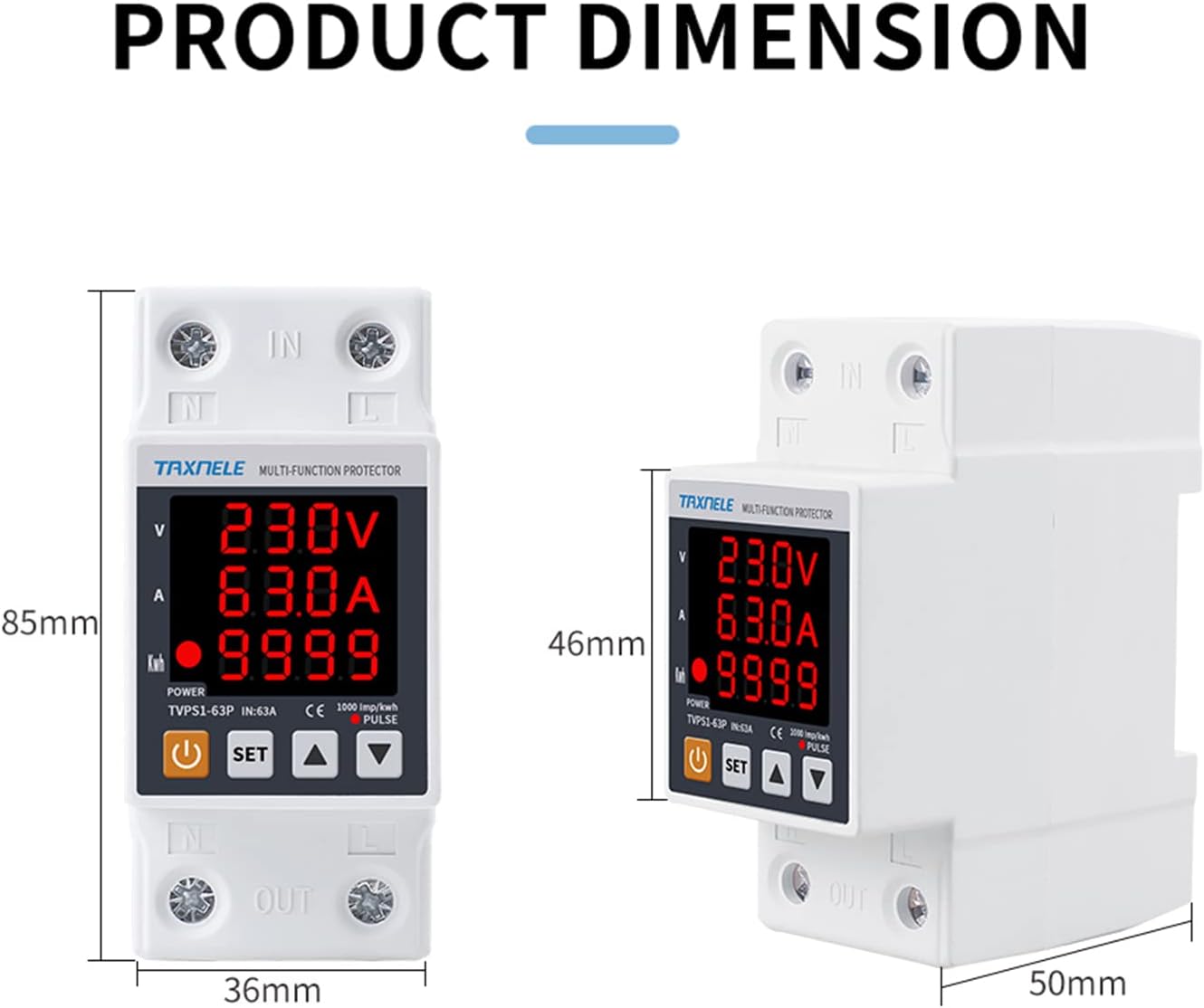
شکل ۴.۳: ابعاد محصول. This image illustrates the physical dimensions of the TAXNELE TVPS1-63P, showing a height of 85mm, a width of 36mm, and a depth of 50mm. These measurements are crucial for proper installation planning.
5. نصب و راه اندازی
Proper installation is crucial for the safe and effective operation of the voltage محافظ
5.1 نصب ریل DIN
The TVPS1-63P is designed for standard 35mm DIN rail installation.
- Ensure the DIN rail is securely mounted within your electrical panel.
- Align the protector with the DIN rail and press firmly until it clicks into place.
- Verify that the device is stable and does not wobble.
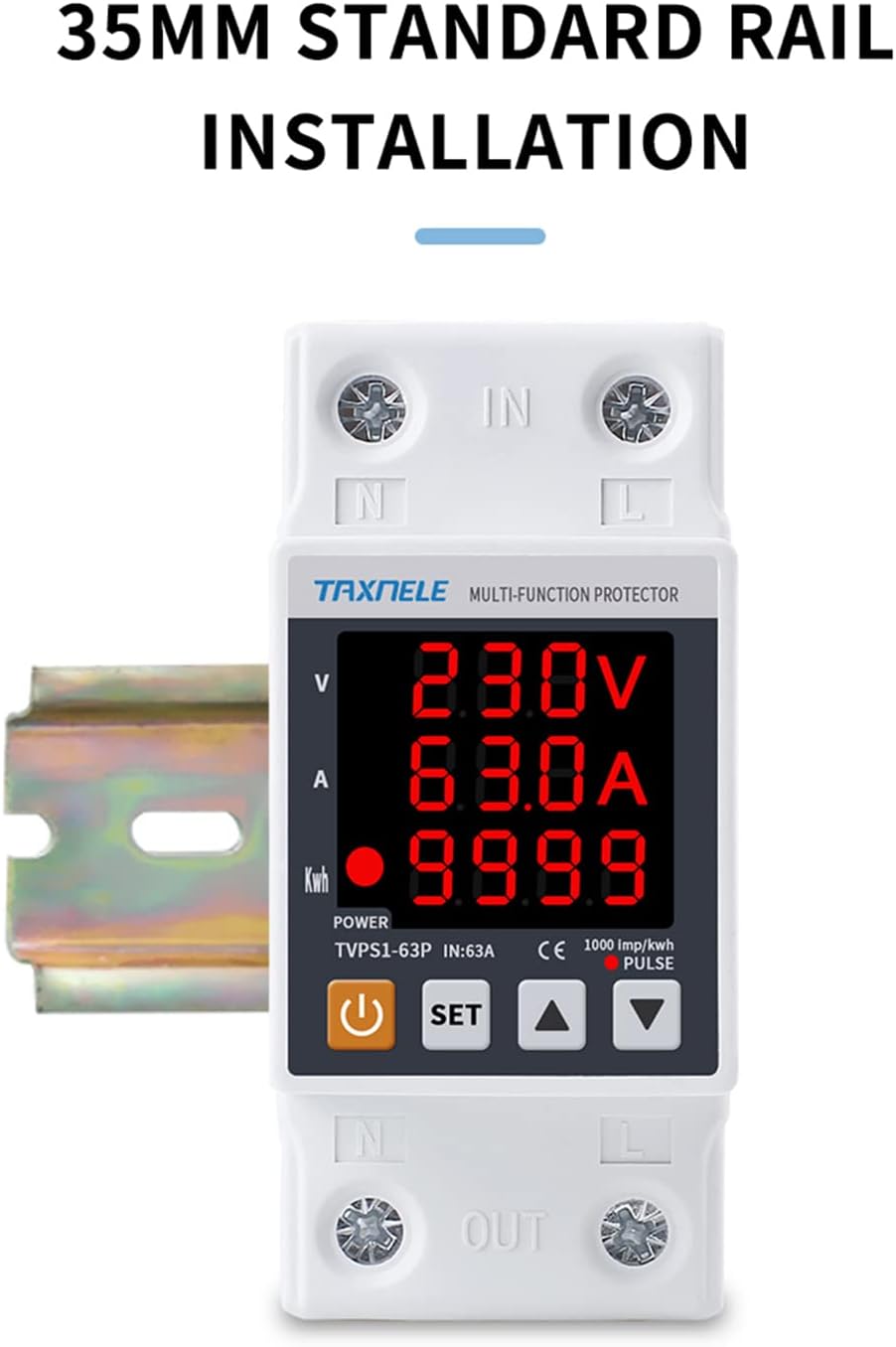
Figure 5.1: 35mm Standard Rail Installation. This image demonstrates the TAXNELE TVPS1-63P being installed onto a standard 35mm DIN rail, indicating its compatibility with common electrical panel setups.
5.2 دستورالعمل سیم کشی
Connect the device according to the wiring diagram provided. Always ensure power is OFF before wiring.
- Connect the incoming neutral (N) and live (L) wires to the 'IN' terminals at the top of the protector.
- Connect the outgoing neutral (N) and live (L) wires to the 'OUT' terminals at the bottom of the protector, leading to your protected load.
- مطمئن شوید که تمام اتصالات محکم و ایمن هستند تا از تماسهای شل و گرمای بیش از حد جلوگیری شود.
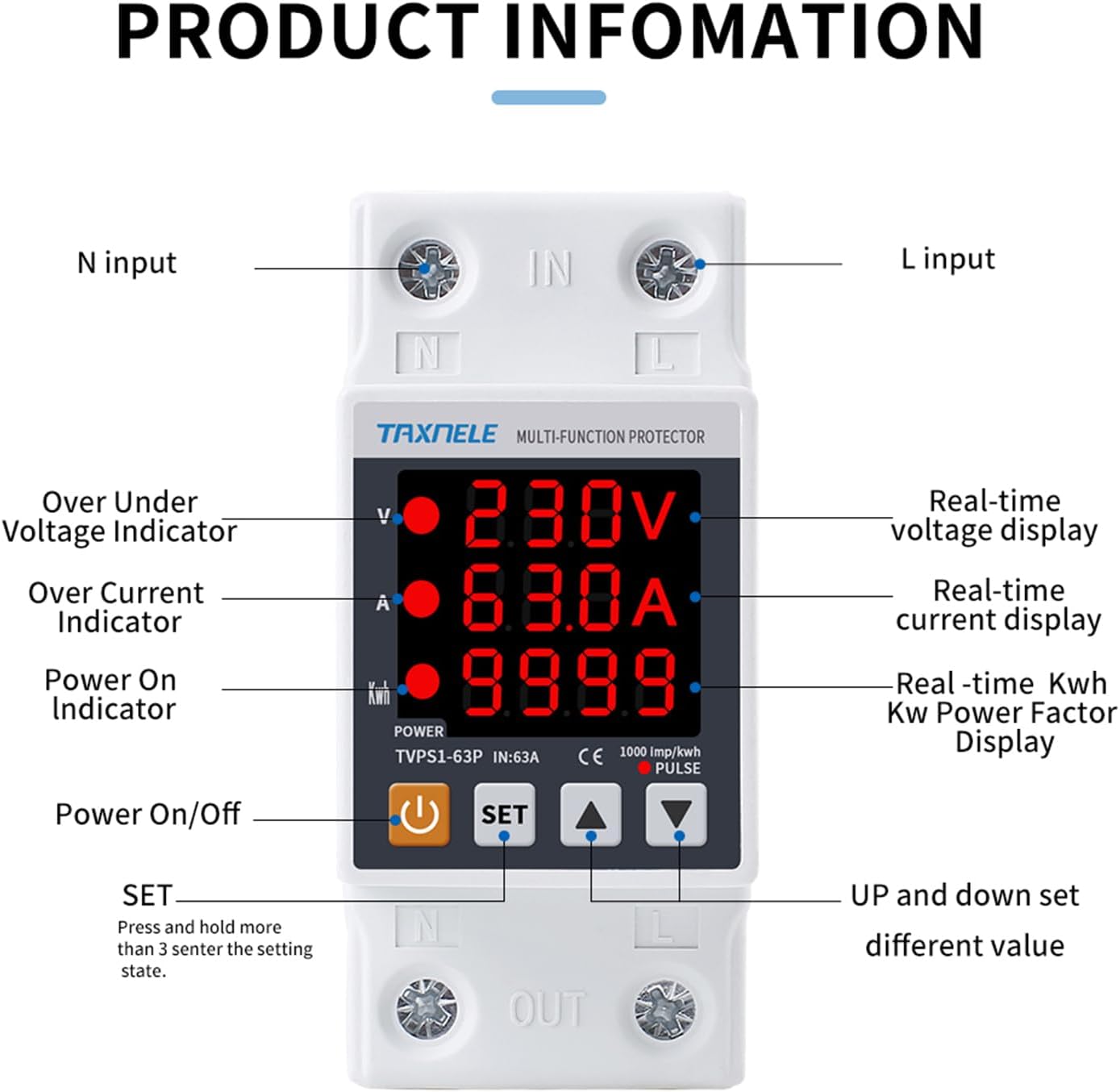
Figure 5.2: Product Wiring Diagram. This diagram illustrates the correct wiring connections for the TAXNELE TVPS1-63P. It shows the protector connected in series between an incoming power source (left circuit breaker) and an outgoing load (right circuit breaker), with clear red and blue lines indicating live and neutral connections respectively.
6. راه اندازی و پیکربندی
The protector allows for adjustment of various parameters to suit your specific needs.
6.1 Entering Settings Mode
- را فشار داده و نگه دارید تنظیم کنید button for more than 3 seconds to enter the setting state.
- The display will show the first adjustable parameter.
6.2 تنظیم پارامترها
- استفاده کنید UP و پایین arrow buttons to change the value of the currently displayed parameter.
- را فشار دهید تنظیم کنید button briefly to cycle through the different adjustable parameters:
- زیر جلدtage Protection (140V-210V, Default: 170V)
- بیش از جلدtage Protection (230V-300V, Default: 270V)
- Over Current Protection (1A-63A, Default: 40A)
- Reconnect Time (Delay On Time) (1-500s, Default: 30s)
- Overcurrent Lock Times (1-20, Default: 1)
- After adjusting all desired parameters, wait for a few seconds without pressing any buttons. The device will automatically save the settings and exit the setting mode.
6.3 Resetting kWh
- To reset the accumulated kWh value to zero, press the UP و پایین arrow buttons simultaneously for more than 3 seconds.
7. دستورالعمل های عملیاتی
Once installed and configured, the TAXNELE TVPS1-63P operates automatically to protect your electrical system.
7.1 Automatic Protection and Reconnection
- هنگامی که خط جلدtage or current exceeds the set protection limits (overvoltage, undervoltage, or overcurrent), the protector will instantaneously cut off the power supply to prevent damage to connected equipment.
- Once the abnormal condition clears and the line voltage returns to normal, the protector will automatically restore the power supply after the set reconnection delay time has elapsed.
۶.۱ نمایش مقادیر خوانده شده
صفحه نمایش دیجیتال اطلاعات را در زمان واقعی ارائه میدهد:
- جلدtage (V): حجم خط فعلی را نمایش میدهدtage.
- جریان (A): Displays the current load.
- انرژی (کیلووات ساعت): Displays the accumulated energy consumption. Press the قدرت button briefly to cycle through kWh, kW, and Power Factor display.

شکل ۳.۱: حجم بلادرنگtage, Current, kWh/KW/Power Factor Display. This image highlights the real-time display capabilities of the protector, showing Voltage, Current, and kWh/KW/Power Factor. It also notes that the voltage can be corrected if the value is incorrect and instructs to press the power key to display kWh, KW, and Power Factor.
8. تعمیر و نگهداری
The TAXNELE TVPS1-63P is designed for minimal maintenance. However, regular checks can ensure its longevity and reliable operation.
- تمیز کردن: Periodically wipe the device with a dry, soft cloth to remove dust. Do not use abrasive cleaners or solvents.
- بازرسی: Annually inspect wiring connections for tightness and signs of wear or damage. Ensure the device is securely mounted on the DIN rail.
- شرایط محیطی: Ensure the operating environment is within the specified temperature and humidity ranges to prevent malfunction.
9 عیب یابی
Refer to the following common issues and solutions before contacting support.
| مشکل | علت احتمالی | راه حل |
|---|---|---|
| صفحه نمایش وجود ندارد/دستگاه روشن نمیشود | No input power; faulty wiring; device malfunction. | Check main power supply. Verify wiring connections. If power is present and wiring is correct, the device may be faulty. |
| Power cut-off, but conditions appear normal | Protection parameters set too sensitively; temporary voltage/current fluctuation. | Review and adjust overvoltage, undervoltage, or overcurrent settings. Increase reconnection delay time if frequent nuisance trips occur. |
| Device locks and does not restore power automatically | Overcurrent lock feature activated (exceeded set number of overcurrent events). | Manually press the تنظیم کنید button to unlock and restore power. Investigate the cause of frequent overcurrents in your system. |
| جلد نادرستtagقرائتهای الکترونیکی/فعلی | Calibration issue; external interference. | While the device has a correction feature, if persistent inaccuracies occur, consult a qualified electrician or contact support. |
10. گارانتی و پشتیبانی
TAXNELE products are manufactured to high-quality standards. For warranty information, please refer to the terms and conditions provided at the point of purchase or contact the manufacturer directly. In case of technical issues or support inquiries, please use the contact information below.
اطلاعات سازنده:
- برند: تاکسنل
- سازنده: YUEQING TAIXIN ELECTRIC CO., LIMITED
- آدرس: No. 57 Suiv Road, Liushi Town, Wenzhou City, Zhejiang Province 325604 CN
- نماینده اتحادیه اروپا: eVatmaster Consulting GmbH
- آدرس نماینده EC: Bettinastr. 30، 60325 فرانکفورت آم ماین، آلمان
- EC Representative Email: contact@evatmaster.com

Figure 10.1: Product Packaging with Manufacturer Details. This image displays the product packaging, which includes essential manufacturer information such as the brand, model, manufacturer name, address, and contact details for the EC Representative. This information is vital for warranty claims and customer support.