
1. مقدمه
Thank you for choosing the Pinell Supersound 001. This compact and versatile radio offers a superior audio experience with its integrated equalizer, allowing you to customize the sound to your preference. The Supersound 001 supports DAB+ and FM radio reception, as well as audio streaming via Bluetooth 5.0 from your mobile devices. Designed for flexibility, it can be powered by either an AC adapter or batteries, making it suitable for both home and portable use.
2. اطلاعات ایمنی
- منبع تغذیه: فقط از آداپتور برق مشخص شده استفاده کنید. از میزان ولتاژ مطمئن شویدtage با الزامات منطقه شما مطابقت دارد.
- استفاده از باتری: If using batteries, ensure they are inserted with correct polarity. Do not mix old and new batteries, or different types of batteries. Remove batteries if the unit will not be used for an extended period.
- آب و رطوبت: Do not expose the unit to rain, moisture, or dripping/splashing liquids. Keep away from objects filled with liquids, such as vases.
- گرما: دستگاه را نزدیک منابع گرما مانند رادیاتور، شوفاژ، اجاق گاز یا سایر دستگاهها (از جمله ...) قرار ندهید. ampزنده کننده ها) که گرما تولید می کنند.
- تهویه: از تهویه کافی اطمینان حاصل کنید. هیچ یک از منافذ تهویه را مسدود نکنید.
- تمیز کردن: قبل از تمیز کردن، دستگاه را از برق بکشید. از یک پارچه نرم و خشک استفاده کنید. از پاک کننده های مایع یا اسپری استفاده نکنید.
- سرویس دهی: سعی نکنید خودتان این محصول را سرویس دهید. کلیه خدمات را به پرسنل خدمات واجد شرایط ارجاع دهید.
3. محتویات بسته
لطفاً بررسی کنید که همه موارد موجود باشند:
- Pinell Supersound 001 Radio
- آداپتور برق
- راهنمای کاربر
4. محصول تمام شدview
Familiarize yourself with the controls and display of your Pinell Supersound 001 radio.
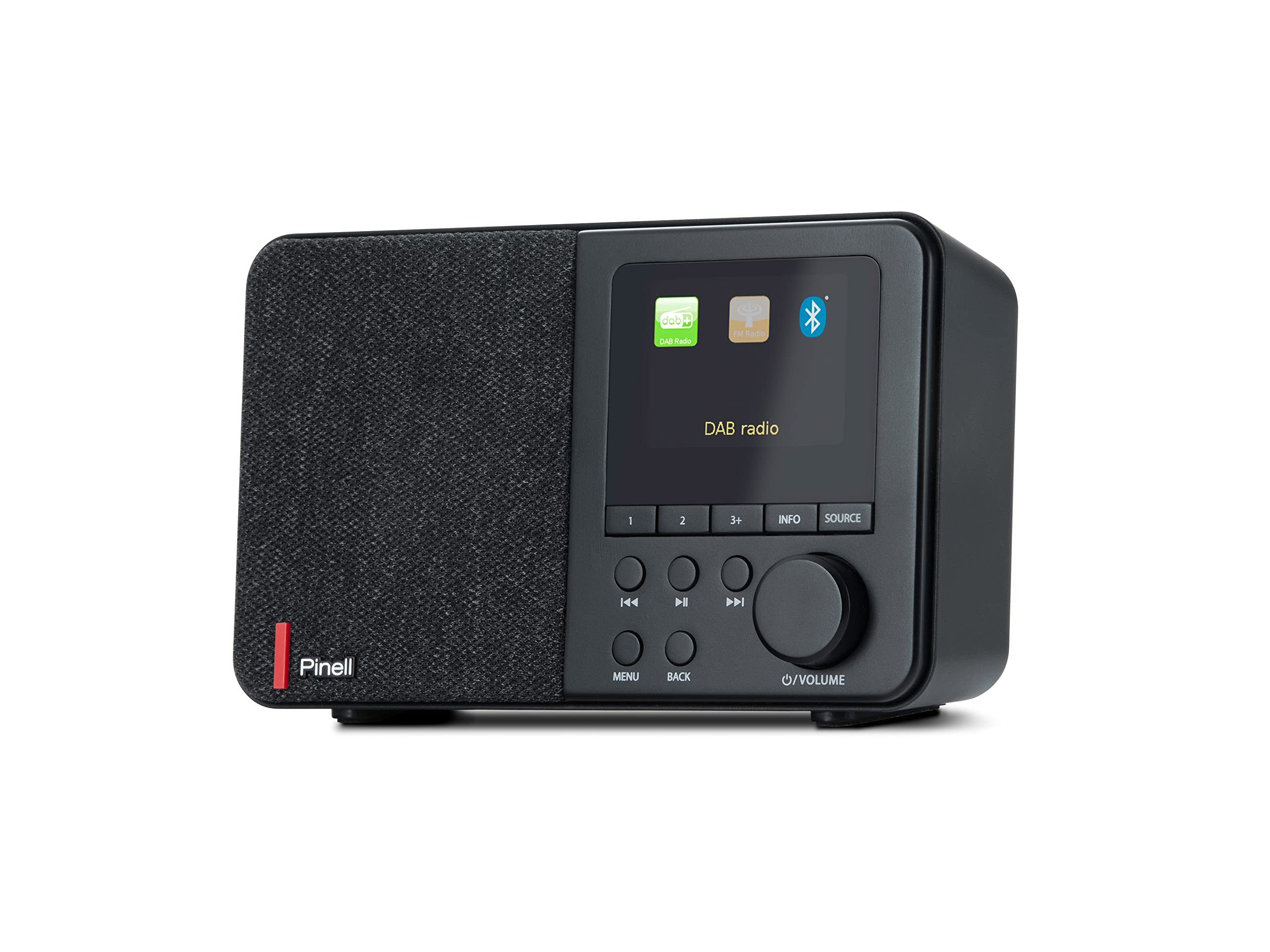
The image displays the front panel of the Pinell Supersound 001 radio. On the left is the speaker grille. The right side features a monochrome display showing 'DAB', 'NRK P1+', '11:03', and 'Distriktsnyheter', indicating DAB+ mode with station information. Below the display are several buttons: '1', '2', '3+', 'INFO', 'SOURCE', 'MENU', 'BACK', and navigation/playback controls (left, play/pause, right). A large rotary knob for volume and power is located on the bottom right.
کنترل ها و عملکردها:
- نمایش: Shows station information, time, menu options, and settings.
- سخنران: Integrated 3W RMS speaker for audio output.
- 1, 2, 3+ Buttons: For quick access to stored radio station presets.
- دکمه اطلاعات: اطلاعات اضافی در مورد ایستگاه یا مسیر فعلی را نمایش میدهد.
- دکمه منبع: Switches between DAB+, FM, and Bluetooth input modes.
- Navigation Buttons (◀◀, ►►): Navigate through menus, stations, or tracks.
- Play/Pause Button (►█): Play or pause audio in Bluetooth mode.
- دکمه MENU: به منوی اصلی برای تنظیمات و گزینهها دسترسی پیدا میکند.
- دکمه بازگشت: به منو یا صفحه قبلی برمی گردد.
- دکمه ولوم/پاور: Rotate to adjust volume. Press to power on/off the unit.
- جک هدفون: Located on the back or side for private listening.
5. راه اندازی
5.1 اتصال برق
The Supersound 001 can be powered by the included AC adapter or by batteries (not included).
- برق متناوب: Connect the power adapter to the DC IN socket on the back of the radio, then plug the adapter into a wall outlet.
- قدرت باتری: Open the battery compartment (usually on the bottom or back). Insert the required number of batteries (e.g., AA or C, refer to the compartment label) ensuring correct polarity. Close the compartment securely.
5.2 آنتن
For optimal radio reception, ensure the telescopic antenna is fully extended and positioned vertically. Adjust its direction for the best signal quality.
6. دستورالعمل های عملیاتی
6.1 روشن/خاموش
را فشار دهید Volume/Power knob برای روشن یا خاموش کردن رادیو
6.2 انتخاب منبع
را فشار دهید دکمه SOURCE repeatedly to cycle through available modes: DAB+, FM, and Bluetooth.
۵.۲ حالت رادیو DAB+
- اولین استفاده: When you first switch to DAB+ mode, the radio will automatically perform a full scan for available stations. This may take a few minutes.
- انتخاب ایستگاه: استفاده کنید ◀◀ و ►► buttons to browse through the list of available DAB+ stations. Press the Volume/Power knob برای انتخاب یک ایستگاه.
- نمایش اطلاعات: را فشار دهید دکمه INFO to cycle through different information displays, such as program type, signal strength, bit rate, and time/date.
6.4 حالت رادیو FM
- اسکن اتوماتیک: در حالت FM، را فشار داده و نگه دارید ►► دکمه را فشار دهید تا به طور خودکار ایستگاه بعدی موجود را اسکن کنید.
- تنظیم دستی: را به طور خلاصه فشار دهید ◀◀ or ►► buttons to fine-tune the frequency step-by-step.
- نمایش اطلاعات: را فشار دهید دکمه INFO به view RDS (Radio Data System) information if available.
۳.۲.۲ حالت بلوتوث ۵.۰
- جفت شدن: با استفاده از دکمه، رادیو را به حالت بلوتوث تغییر دهید. دکمه SOURCE. The display will show 'Pairing' or 'Waiting for connection'. On your mobile device, enable Bluetooth and search for 'Pinell Supersound 001'. Select it to pair.
- پخش: Once paired, you can play audio from your device. Use the دکمه پخش/مکث on the radio or your device to control playback. The ◀◀ و ►► buttons can be used to skip tracks.
۵.۳ ذخیره و فراخوانی پیشتنظیمها
- فروشگاه: Tune to your desired station (DAB+ or FM). Press and hold one of the 1, 2, or 3+ buttons تا زمانی که صفحه نمایش ذخیره شدن ایستگاه را تأیید کند.
- به یاد بیاورید: دکمه مربوطه را به طور خلاصه فشار دهید 1, 2, or 3+ button برای تنظیم فوری روی ایستگاه ذخیره شده.
6.7 Alarm Clock, Sleep Timer, and Snooze
Access these functions via the دکمه MENU.
- زنگ هشدار: Navigate to 'Alarm' in the menu. Set the alarm time, source (DAB+, FM, or buzzer), and volume.
- تایمر خواب: Navigate to 'Sleep' in the menu. Set a duration (e.g., 15, 30, 60 minutes) after which the radio will automatically turn off.
- تعویق: هنگامی که زنگ هشدار به صدا در می آید ، را فشار دهید Volume/Power knob (or a designated snooze button if available) to temporarily silence it for a short period.
۵.۵ تنظیمات اکولایزر
The integrated equalizer allows you to adjust the audio output. Navigate to 'Equalizer' or 'Sound Settings' in the MENU. You can choose from preset equalizer modes or customize bass and treble levels to suit your listening preference.
۵.۵ استفاده از هدفون
Connect standard 3.5mm headphones to the headphone jack for private listening. The main speaker will be muted automatically.
7. تعمیر و نگهداری
- تمیز کردن: برای تمیز کردن سطح رادیو از یک پارچه نرم، خشک و بدون پرز استفاده کنید. از پاک کنندههای ساینده، واکس یا حلالها استفاده نکنید.
- ذخیره سازی: اگر رادیو را برای مدت طولانی نگهداری میکنید، باتریها را برای جلوگیری از نشت خارج کنید. در جای خشک و خنک نگهداری شود.
- مراقبت از آنتن: آنتن تلسکوپی را به آرامی حمل کنید تا از خم شدن یا شکستن آن جلوگیری شود.
8 عیب یابی
اگر با مشکلی مواجه شدید، لطفاً به مشکلات و راهحلهای رایج زیر مراجعه کنید:
- بدون برق:
- Check if the AC adapter is securely connected to both the radio and the power outlet.
- اگر از باتری استفاده میکنید، مطمئن شوید که به درستی در دستگاه قرار گرفته و خالی نشدهاند. در صورت لزوم باتری را تعویض کنید.
- دریافت ضعیف رادیو (DAB+/FM):
- آنتن تلسکوپی را کاملاً بیرون بکشید و تنظیم کنید.
- Try moving the radio to a different location, away from potential interference sources (e.g., other electronic devices, thick walls).
- Perform a full scan for DAB+ stations in the menu.
- مشکلات جفت شدن بلوتوث:
- مطمئن شوید که رادیو در حالت جفتسازی بلوتوث قرار دارد.
- Make sure Bluetooth is enabled on your mobile device and it is within range (typically 10 meters).
- سعی کنید دستگاه را از حالت جفت خارج کرده و دوباره جفت کنید.
- Ensure no other Bluetooth devices are actively connected to the radio.
- بدون صدا:
- Check the volume level on both the radio and your connected Bluetooth device.
- اگر انتظار دارید صدا از بلندگو پخش شود، مطمئن شوید که هدفون به آن وصل نیست.
- Verify the correct source (DAB+, FM, Bluetooth) is selected.
9. مشخصات
| نام تجاری | پینل |
| نام مدل | سوپرصدا 001 |
| شماره مدل | BP001 |
| رنگ | مشکی |
| فناوری اتصال | Bluetooth 5.0, Headphone Jack |
| ویژگی های خاص | Integrated Clock, Portable, Equalizer |
| دستگاه های سازگار | Headphones, Bluetooth-enabled devices |
| منبع تغذیه | AC Adapter, Batteries (not included) |
| باندهای رادیویی پشتیبانی می شوند | FM، DAB+ |
| خروجی برق RMS | 3 وات |
| ابعاد محصول (L x W x H) | 7.1 × 17.5 × 10.6 سانتی متر |
10. گارانتی و پشتیبانی
Pinell products are designed for reliability and performance. For specific warranty details, please refer to the warranty card included with your purchase or visit the official Pinell website. If you require technical support or have questions not covered in this manual, please contact Pinell customer service through their official channels.