
محصول تمام شده استview
The EPOS Adapt 361 is an over-ear Bluetooth headset designed for professional use. It features Active Noise Cancellation (ANC) to reduce background noise, optimizing focus in busy environments. The headset is optimized for Unified Communications (UC) and allows seamless switching between multiple devices. Its ergonomic design and comfortable ear pads provide noise dampening and comfort for extended wear. The headset is crafted from high-quality materials with a matt black finish.
Please note: During a brand transition period, products may feature either EPOS | SENNHEISER or EPOS branding.
آنچه در جعبه است
- هدست EPOS Adapt 361
- دانگل USB-C مدل BTD 800
- USB-C Cable with USB-C Connector
- Audio Cable (2.5 mm Twist Lock and 3.5 mm Jack Plugs)
- کیسه ذخیره سازی
- برگه انطباق
- راهنمای ایمنی
راهنمای راه اندازی
1. شارژ هدست
Before first use, fully charge the headset using the provided USB-C cable. Connect the USB-C end to the headset and the other end to a compatible USB power source. The LED indicator on the headset will show charging status.
2. Connecting via Bluetooth (Wireless)
- روشن کردن هدست.
- Activate Bluetooth pairing mode on the headset (refer to the headset controls for specific button presses, usually a long press on the power button or a dedicated Bluetooth button).
- On your device (PC, smartphone), enable Bluetooth and search for available devices.
- Select "EPOS Adapt 361" from the list to pair.
3. Connecting via USB-C Dongle (BTD 800)
For optimal performance with PC and Microsoft Teams, use the BTD 800 USB-C dongle.
- Plug the BTD 800 USB-C dongle into an available USB-C port on your computer.
- The dongle will automatically pair with your headset. The LED on the dongle will indicate connection status.
- Ensure the headset is selected as the audio input/output device in your computer's sound settings and communication applications (e.g., Microsoft Teams).
4. Connecting via Audio Cable (Wired)
For wired connection, use the provided audio cable.
- Connect the 2.5 mm twist-lock end of the audio cable to the headset.
- Connect the 3.5 mm jack end to the audio output of your device.
دستورالعمل های عملیاتی
کنترل های هدست
The EPOS Adapt 361 features intuitive controls for managing calls, media, and headset functions. These are typically touch-sensitive or button-based on the earcups.
- روشن/خاموش برق: دکمه پاور را فشار داده و نگه دارید.
- کنترل صدا: Use the dedicated volume buttons or touch controls.
- حذف فعال نویز (ANC): Toggle ANC on/off to manage ambient noise.
- دکمه مایکروسافت تیمز: A dedicated button on the BTD 800 USB-C dongle allows for quick access to Microsoft Teams functions.
- مدیریت تماس: Answer/end calls, mute microphone using designated buttons.
- کنترل رسانه: پخش/مکث، رد کردن آهنگها.
- درخواست صوتی: The headset provides voice prompts for status updates.
استفاده از میکروفون
The headset features two advanced microphones optimized for voice pickup, ensuring clear communication during calls.
قابلیت اتصال چند نقطه ای
The headset supports multipoint connectivity, allowing it to be connected to two Bluetooth devices simultaneously, enabling seamless switching between them.
طراحی تاشو
The robust, foldable design allows for easy storage and portability in the included storage pouch.
تعمیر و نگهداری
تمیز کردن
Wipe the headset with a soft, dry cloth. Avoid using harsh chemicals or abrasive materials. Do not immerse the headset in water.
ذخیره سازی
When not in use, store the headset in the provided storage pouch to protect it from dust and damage. The foldable design facilitates compact storage.
عیب یابی
- صدا ندارد/کیفیت صدای ضعیف:
- مطمئن شوید که هدست شارژ و روشن است.
- Verify Bluetooth connection or dongle connection.
- Check device's audio output settings.
- Ensure the audio cable is securely connected if using wired mode.
- میکروفون کار نمی کند:
- بررسی کنید که آیا میکروفون بی صدا است.
- Verify headset is selected as the input device in your application settings.
- مشکلات اتصال:
- هدست و دستگاه متصل را مجدداً راه اندازی کنید.
- Re-pair the Bluetooth connection or re-insert the USB-C dongle.
- مطمئن شوید که هیچ دستگاه دیگری با سیگنال بلوتوث تداخل ندارد.
- Active Noise Cancellation (ANC) Performance:
- مطمئن شوید که ANC فعال شده است.
- Check that the earcups are properly seated over your ears for optimal seal.
For advanced troubleshooting and firmware updates, utilize the EPOS Manager and EPOS Connect software.
مشخصات
| نام مدل | ADAPT 300 Series (Model 361) |
| فناوری اتصال | سیمی، بیسیم (بلوتوث ۵.۴) |
| فناوری ارتباطات بی سیم | بلوتوث |
| پاسخ فرکانس | 22000 هرتز |
| جک هدفون | جک 2.5 میلی متری |
| قرار دادن گوش | بالای گوش |
| کنترل نویز | حذف نویز فعال |
| دستگاه های سازگار | PC |
| نوع کنترل | کنترل رسانه، لمسی |
| ویژگی های خاص | ActiveGard, Comfortable, Detachable Cable, Ergonomic Design, Foldable, Hands-free, Microphone Included, Microsoft Teams Button, Multipoint, Noise Cancellation, Rechargeable Battery, Sub Band Coding (SBC), Unified Communication, Voice Prompt, apt-X Technology |
| وزن مورد | 8.5 اونس (241 گرم) |
| ابعاد محصول | 7.8 x 5.4 x 4.2 اینچ |
| باتری ها | 1 باتری لیتیوم یونی (شامل) |
تصاویر محصول
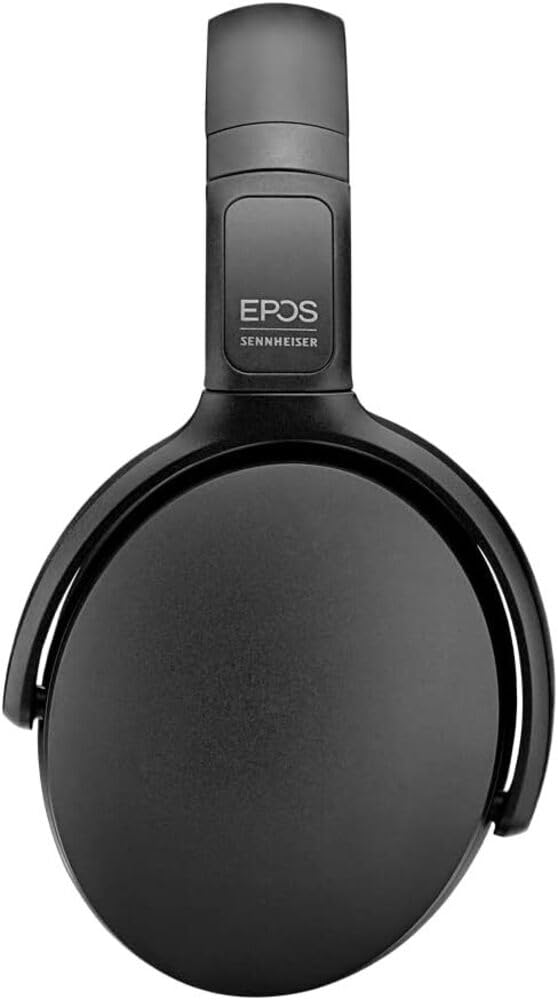
Image 1: The EPOS Adapt 361 Headset, showcasing its sleek black design and comfortable over-ear earcups. The adjustable headband is visible, designed for a secure and personalized fit.
گارانتی و پشتیبانی
برای اطلاعات گارانتی و پشتیبانی فنی، لطفاً به EPOS رسمی مراجعه کنید. website or contact EPOS customer service. Details regarding specific warranty periods and service procedures can be found in the documentation included with your product or on the manufacturer's support pages.
The included Compliance Sheet and Safety Guide provide additional important information.