
مقدمه
Thank you for choosing the LORERAN BT-24 Wireless Keyboard and Mouse Combo. This manual provides essential instructions for setting up, operating, maintaining, and troubleshooting your new device. Please read this manual thoroughly before use to ensure optimal performance and longevity of your product.
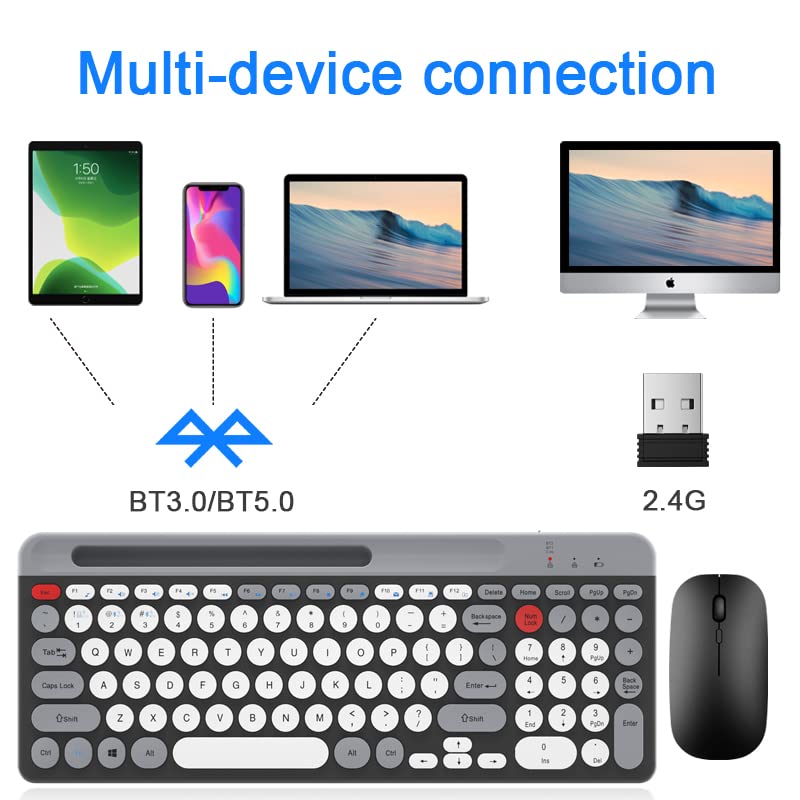
Image: LORERAN BT-24 Wireless Keyboard and Mouse Combo, showcasinجی، کیبورد تمامسایز و ماوس ارگونومیک.
محتویات بسته
- 1 x LORERAN Wireless Keyboard
- 1 x LORERAN Wireless Mouse
- 1 x 2.4G USB Receiver (often stored in the mouse or keyboard battery compartment)
- 1 عدد کابل شارژ Type-C
- ۱ عدد دفترچه راهنمای کاربر (این سند)
دستورالعمل های راه اندازی
۲. شارژ کردن دستگاهها
The keyboard and mouse are equipped with built-in rechargeable batteries. Before first use, it is recommended to fully charge both devices.
- Connect the provided Type-C charging cable to the charging port on the keyboard and mouse.
- سر دیگر کابل را به یک منبع تغذیه USB (مثلاً پورت USB کامپیوتر، آداپتور دیواری USB) وصل کنید.
- A full charge typically takes approximately 3 hours. The keyboard can operate continuously for up to 300 hours on a full charge.

Image: Illustration of the keyboard and mouse being charged via Type-C cables.
2. Connecting to Devices (Dual Mode: 2.4G Wireless & Bluetooth)
The combo supports connection via a 2.4G USB receiver or Bluetooth (BT1 and BT2 channels), allowing connection to up to three devices simultaneously.
2.1. اتصال بی سیم 2.4G
- Locate the 2.4G USB receiver. It is often stored in a compartment on the mouse or keyboard.
- Plug the 2.4G USB receiver into an available USB port on your computer or laptop.
- صفحه کلید و ماوس را روشن کنید.
- در صفحه کلید، را فشار دهید fn+1 keys to select the 2.4G mode.
- صفحه کلید و ماوس باید به طور خودکار به دستگاه شما متصل شوند.

Image: The LORERAN keyboard and mouse shown alongside the 2.4G USB receiver.
۲.۲ اتصال بلوتوث (BT1 / BT2)
The combo supports Bluetooth 5.0 + 3.0 technology.
- صفحه کلید و ماوس را روشن کنید.
- در صفحه کلید، فشار دهید fn+2 برای کانال بلوتوث ۱، یا fn+3 for Bluetooth Channel 2. The indicator light will flash, indicating pairing mode.
- On your device (Mac, PC, Laptop, Tablet, Phone), enable Bluetooth and search for new devices.
- Select "LORERAN Keyboard" and "LORERAN Mouse" from the list of available devices to pair.
- پس از جفت شدن، چراغ نشانگر روی صفحه کلید دیگر چشمک نخواهد زد.

Image: Diagram illustrating multi-device connectivity options (phone, tablet, laptop, desktop) via Bluetooth (BT3.0/BT5.0) and 2.4G wireless.
دستورالعمل های عملیاتی
۱. جابجایی بین دستگاههای متصل
To switch between your connected devices, simply press the corresponding function key on the keyboard:
- fn+1: Switch to 2.4G Wireless mode.
- fn+2: Switch to Bluetooth Channel 1.
- fn+3: Switch to Bluetooth Channel 2.
۱. ویژگیهای صفحهکلید
- Circular Keys: The keyboard features uniquely designed circular keys for a comfortable typing experience.
- Low-Noise Switches: Keys are designed for quiet operation with satisfactory tactile feedback.
- صفحه کلید عددی: A standard numeric keypad is included for improved workflow.
- کلیدهای میانبر رسانه: Utilize the F1-F12 keys with the Fn key for quick access to media controls and other functions. (Refer to the image below for specific functions).
- کلید تنظیم صدا: A dedicated volume knob allows for convenient adjustment of audio levels by rotating it.

Image: Close-up of the LORERAN keyboard showing the layout of function keys (F1-F12) and their associated media controls.
۲. ویژگیهای ماوس
- تنظیم DPI: An exclusive button on the mouse allows you to adjust the DPI (Dots Per Inch) sensitivity. Cycle through 800, 1200, and 1600 DPI settings for precise cursor control.
- کلیکهای بیصدا: The mouse buttons are designed for quiet operation, minimizing noise during use.

Image: The LORERAN mouse highlighting its whisper-quiet click and adjustable DPI settings (800, 1200, 1600).
۴.۳ حالت خواب خودکار
To conserve battery life, both the keyboard and mouse will automatically enter sleep mode if not used for over 30 minutes. To wake them up, simply press any key on the keyboard or click any button on the mouse.
تعمیر و نگهداری
- تمیز کردن: Use a soft, dry cloth to gently wipe the surfaces of the keyboard and mouse. For dust accumulation between keys, a can of compressed air can be used. Avoid using harsh chemicals or abrasive materials.
- شارژ کردن: Recharge the devices when the battery indicator light shows low power or when performance degrades. Regular charging helps maintain battery health.
- ذخیره سازی: When not in use for extended periods, store the keyboard and mouse in a cool, dry place.
عیب یابی
- دستگاه وصل نمیشود:
- Ensure both keyboard and mouse are powered on.
- سطح باتری را بررسی کنید و در صورت لزوم شارژ کنید.
- For 2.4G connection, ensure the USB receiver is securely plugged into a working USB port and fn+1 انتخاب شده است.
- For Bluetooth connection, ensure Bluetooth is enabled on your device and you have selected fn+2 or fn+3 on the keyboard. Try re-pairing the devices.
- Try connecting to a different USB port or a different device to rule out port or device specific issues.
- تأخیر یا اتصال متناوب:
- Ensure there are no strong interference sources nearby (e.g., other wireless devices, large metal objects).
- Move the keyboard and mouse closer to the receiver or Bluetooth-enabled device.
- دستگاهها را دوباره شارژ کنید.
- Mouse cursor not moving or erratic:
- Check the mouse battery level.
- مطمئن شوید که حسگر نوری در پایین ماوس تمیز و بدون مانع است.
- سعی کنید از ماوس روی سطح دیگری استفاده کنید.
- با استفاده از دکمه DPI روی ماوس، DPI را تنظیم کنید.
- Keyboard keys not responding:
- سطح باتری کیبورد را بررسی کنید.
- مطمئن شوید که حالت اتصال صحیح (2.4G، BT1، BT2) انتخاب شده است.
- رایانه یا دستگاه خود را مجدداً راه اندازی کنید.
مشخصات
| نام تجاری | LORERAN |
| مدل | BT-24 |
| فناوری اتصال | Bluetooth (5.0 + 3.0), 2.4G Wireless |
| دستگاه های سازگار | Mac OS/iOS 10.12+, Windows 8/10+, Android 4.3+ (Laptop, PC, Tablet, Phone) |
| ویژگی های خاص | Ergonomic, Rechargeable, Multi-device support, Quiet operation |
| ظرفیت باتری کیبورد | 500mAh (approximate, based on 300 hours usage) |
| تنظیمات DPI ماوس | 800-1200-1600 DPI |
| تشخیص حرکت | نوری |
| وزن مورد | 739 گرم |
| رنگ | White (as per product listing, though images show black/grey) |
توجه: مشخصات ممکن است بدون اطلاع قبلی تغییر کند.
گارانتی و پشتیبانی
For warranty information or technical support, please refer to the documentation included with your purchase or contact LORERAN customer service through the retailer where the product was purchased. Please retain your proof of purchase for warranty claims.
For further assistance, you may visit the LORERAN brand page on Amazon: LORERAN Brand Store