
مقدمه
The Autel PowerScan PS100 is a versatile diagnostic tool designed for testing electrical systems in 6 to 30 volt vehicles. It provides a comprehensive solution for various electrical tests, including voltage and polarity testing, continuity testing, signal circuit testing, component activation, and short circuit location. This manual provides instructions for the proper use and maintenance of your PowerScan PS100.
محتویات بسته
Verify that all items are present in your PowerScan PS100 kit:
- Autel PowerScan PS100 Unit
- کابل پسوند 20 فوتی
- Battery Clip Set
- آداپتور برق خودرو
- راهنمای کاربر
- کیس محافظ

Image: Contents of the Autel PowerScan PS100 kit.
محصول تمام شده استview (اجزای تشکیل دهنده)
Familiarize yourself with the main components of the PowerScan PS100:
- نکته کاوشگر: Used for making contact with circuits.
- Head Lights: محل کار را روشن میکند.
- Red/Green Polarity Indicator: LEDs indicating positive (red) or negative (green) circuits.
- نمایشگر LCD: نشان می دهد جلدtage, resistance, and other test results.
- تنظیم مجدد مدار شکن: Resets the internal circuit breaker after an overload.
- سوئیچ قدرت: Controls power to the probe tip for component activation.
- دکمه حالت: Cycles through different testing modes.
- سخنران: Provides audible tones for certain test results.
- آداپتور: Connects the main unit to the power source.
- Auxiliary Ground Lead: Provides an additional ground connection for testing.

Image: Labeled components of the PowerScan PS100.
اطلاعات ایمنی
Always observe the following safety precautions when using the PowerScan PS100:
- از محافظ چشم مناسب استفاده کنید.
- Do not use the tool if the cable or unit is damaged.
- Ensure proper ventilation when working on vehicles.
- از تماس با قطعات متحرک موتور خودداری کنید.
- Do not connect the tool to voltages exceeding 30 volts.
- The tool is equipped with a circuit breaker for overload protection. If the circuit breaker trips, reset it before continuing.
راه اندازی و اتصال
To begin using the PowerScan PS100:
- Connect the red battery clip to the positive (+) terminal of the vehicle's battery.
- Connect the black battery clip to the negative (-) terminal of the vehicle's battery or a good chassis ground.
- The tool will power on automatically once connected.
- Before testing any circuit or component, perform a quick self-check by flipping the power switch forward and backward. The LED lights and tone should respond, indicating proper operation.

Image: Performing a quick self-test on the PowerScan PS100.
حالت های عملیاتی
The PowerScan PS100 features four primary operating modes, accessible by pressing the دکمه حالت:
- DC جلدtage: ولتاژ DC را نمایش میدهدtage with a resolution of 0.1 volts.
- AC جلدtage: حداکثر حجم را نشان میدهدtage، حداقل جلدtage, and duty cycle of an AC signal.
- مقاومت: Measures the resistance between the probe tip and the auxiliary ground lead.
- Tone On/Off: Activates or deactivates an audible tone for test results. This is useful in dark environments.

Image: Display modes for DC Voltage ، AC جلدtage, Resistance, and Tone On/Off.
Video: An introduction to the functions of the Autel PowerScan PS100 Circuit Tester, demonstrating various operating modes.
فعال سازی کامپوننت
The PowerScan PS100 can activate components by supplying positive or negative voltage directly to them. This allows for testing components like lights, motors, wipers, radiator fans, and relays both on and off the vehicle.
- To activate a component, connect the probe tip to the component's terminal.
- را فشار دهید کلید برق forward for positive voltage or backward for negative voltage.
- Observe the component's operation to determine its condition.
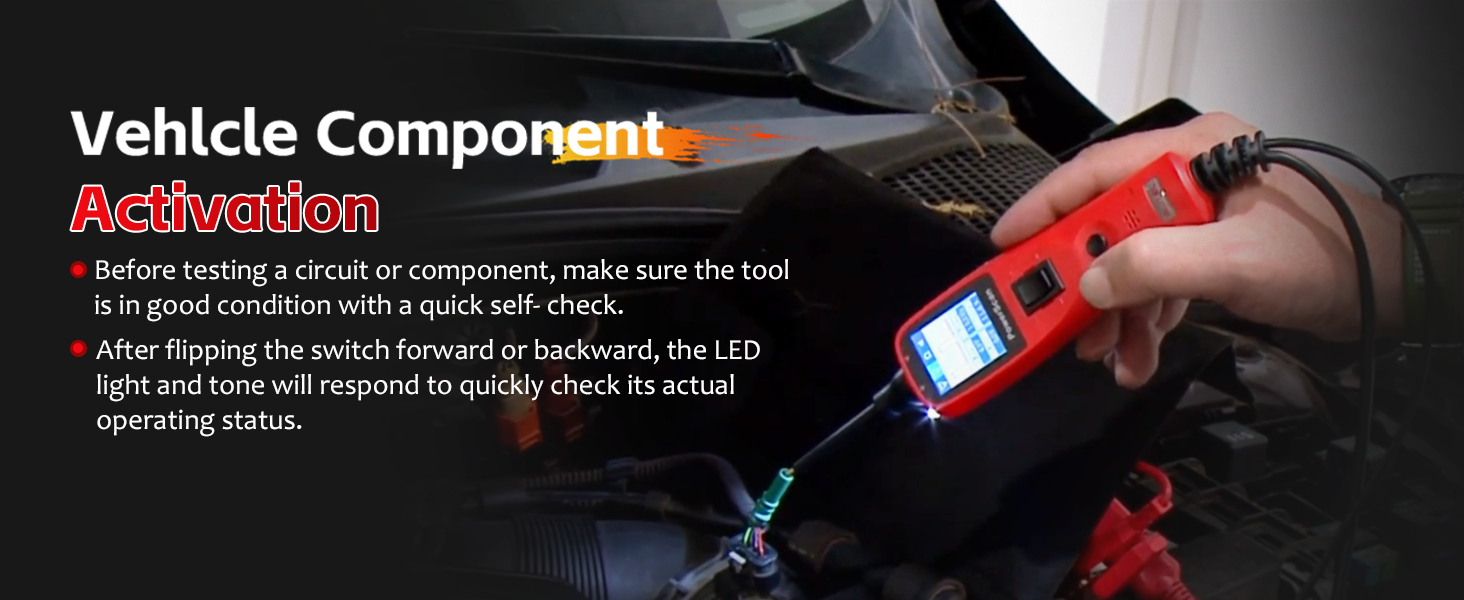
Image: Activating a vehicle component using the PowerScan PS100.
Polarity and Circuit Indication
The tool provides visual and audible indications for circuit polarity:
- When the probe tip contacts a positive circuit، LED قرمز illuminates, and a high-pitched tone sounds.
- When the probe tip contacts a negative circuit (ground), the LED سبز illuminates, and a low-pitched tone sounds.
- If the circuit is باز کردن, neither LED will light.

Image: Red and Green Polarity LEDs indicating circuit status.
Short Circuit Detection and Protection
The PowerScan PS100 is designed to help locate short circuits and includes built-in protection:
- When a short circuit is detected, the tool's internal circuit breaker will trip to protect the device and the vehicle's electrical system.
- To reset the circuit breaker, press the تنظیم مجدد مدار شکن دکمه
- Use the tool to trace the short circuit by following the change in voltage readings or LED indications.
Video: Demonstrating the circuit breaker reset function on the Autel PowerScan PS100.
کابل فرمت
The included 20-foot (6-meter) extension cable provides extended reach, allowing you to test circuits across various parts of the vehicle without needing to reposition the power source connection.

Image: The 20-foot extension cable for enhanced accessibility.
برنامه های کاربردی
The Autel PowerScan PS100 is compatible with 6 to 30 volt electrical systems, making it suitable for a wide range of vehicles and applications, including:
- ماشین ها
- SUV ها
- موتور سیکلت
- کامیون ها
- اتوبوس ها
- Steamships (with compatible voltagسیستم های الکترونیکی)

Image: Wide application range of the PowerScan PS100.
تعمیر و نگهداری
To ensure the longevity and proper functioning of your PowerScan PS100:
- دستگاه را با نرم افزار تمیز کنیدamp پارچه از پاک کننده ها یا حلال های ساینده استفاده نکنید.
- Store the tool in its protective case when not in use to prevent damage.
- Keep the probe tip clean and free from debris.
- از قرار دادن ابزار در معرض دما یا رطوبت شدید خودداری کنید.
عیب یابی
If you encounter issues with your PowerScan PS100, consider the following:
- بدون برق: Ensure the battery clips are securely connected to the vehicle's battery terminals and that the battery has sufficient charge (6-30V).
- No Reading: Check that the probe tip is making good contact with the circuit. Verify the tool is in the correct operating mode.
- قطع مکرر مدارشکن: This indicates a short circuit or an overload. Identify and resolve the underlying electrical issue before continuing to test. Reset the circuit breaker after each trip.
- قرائت های نادرست: Ensure all connections are clean and secure. The vehicle's battery voltage should be stable.
مشخصات
| ویژگی | مشخصات |
|---|---|
| نام تجاری | Autel |
| مدل | Autel PowerScan PS100 |
| منبع تغذیه | Battery Powered (from vehicle) |
| جلد عملیاتیtage | 6 به 30 ولت DC |
| نوع اندازه گیری | ولت متر |
| وزن مورد | 1 پوند |
| حداقل حجم عملیاتیtage | 6 ولت |
| درجه حرارت بالا | 60 درجه سانتیگراد |
| دستگاه های سازگار | Vehicles with 6 to 30 volt electrical systems |
| ابعاد مورد | 14 x 8 x 10 اینچ |
پشتیبانی و گارانتی
For technical assistance, product inquiries, or warranty information, please refer to the official Autel website or contact Autel customer support directly. Details can typically be found on the product packaging or within the included documentation.