
1. مقدمه
The GT Media V8 Finder 2 is a professional DVB-S/S2/S2X digital satellite signal finder designed for quick and accurate satellite dish alignment. Featuring a 3.5-inch high-definition LCD, H.264 hardware decoding, and a range of advanced functions, this device simplifies the process of finding and optimizing satellite signals for both professional installers and DIY enthusiasts.
This manual provides detailed instructions on how to set up, operate, and maintain your V8 Finder 2, ensuring optimal performance and longevity of the device.

شکل 1.1: جلو view of the GT Media V8 Finder 2, displaying its user interface.
2. محتویات بسته
لطفاً بستهبندی را با دقت بررسی کنید تا مطمئن شوید همه اقلام موجود و در شرایط خوبی هستند. در صورت مفقود شدن یا آسیب دیدن هر یک از اقلام، لطفاً با فروشنده خود تماس بگیرید.
- GT Media V8 Finder 2 Unit
- جعبه هدیه
- آداپتور برق
- Protective Bag with Strap
- راهنمای کاربر
- F-type to IEC Adapter (for certain interfaces)

Figure 2.1: All items included in the GT Media V8 Finder 2 package.
3. ویژگی های محصول
The V8 Finder 2 is equipped with a comprehensive set of features to facilitate efficient satellite signal acquisition and analysis:
- DVB-S/S2/S2X Compatibility: Supports all major satellite standards, including FTA (Free-To-Air) detection.
- H.264 Decoding: Features 8-bit hardware decoding for clear signal display.
- 3.5-inch HD LCD: High-resolution screen for convenient viewing of satellite lists, signal parameters, and channel previews.
- Advanced Signal Analysis: Includes Loop Search and Spectrum Analyzer functions for detailed signal evaluation.
- Automatic AZ/EL Calculation: Calculates azimuth and elevation angles automatically for precise dish positioning.
- Blind Scan & Preset Satellites: Supports quick blind scanning and comes with an integrated list of European satellites for easy selection.
- مدیریت قدرت: Equipped with a 7.4V 4000mAh large capacity battery, Type-C charging, LNB short circuit protection, real-time battery display, and low battery reminder.
- قابلیت اتصال: Features HDMI and AV output for connecting to external displays, USB 2.0 for upgrades, and supports DISSEQC 1.0/1.1/1.2, Unicable, and 0/22kHz tone.
- قابلیت حمل: Compact design with a waterproof casing and protective bag for outdoor use.
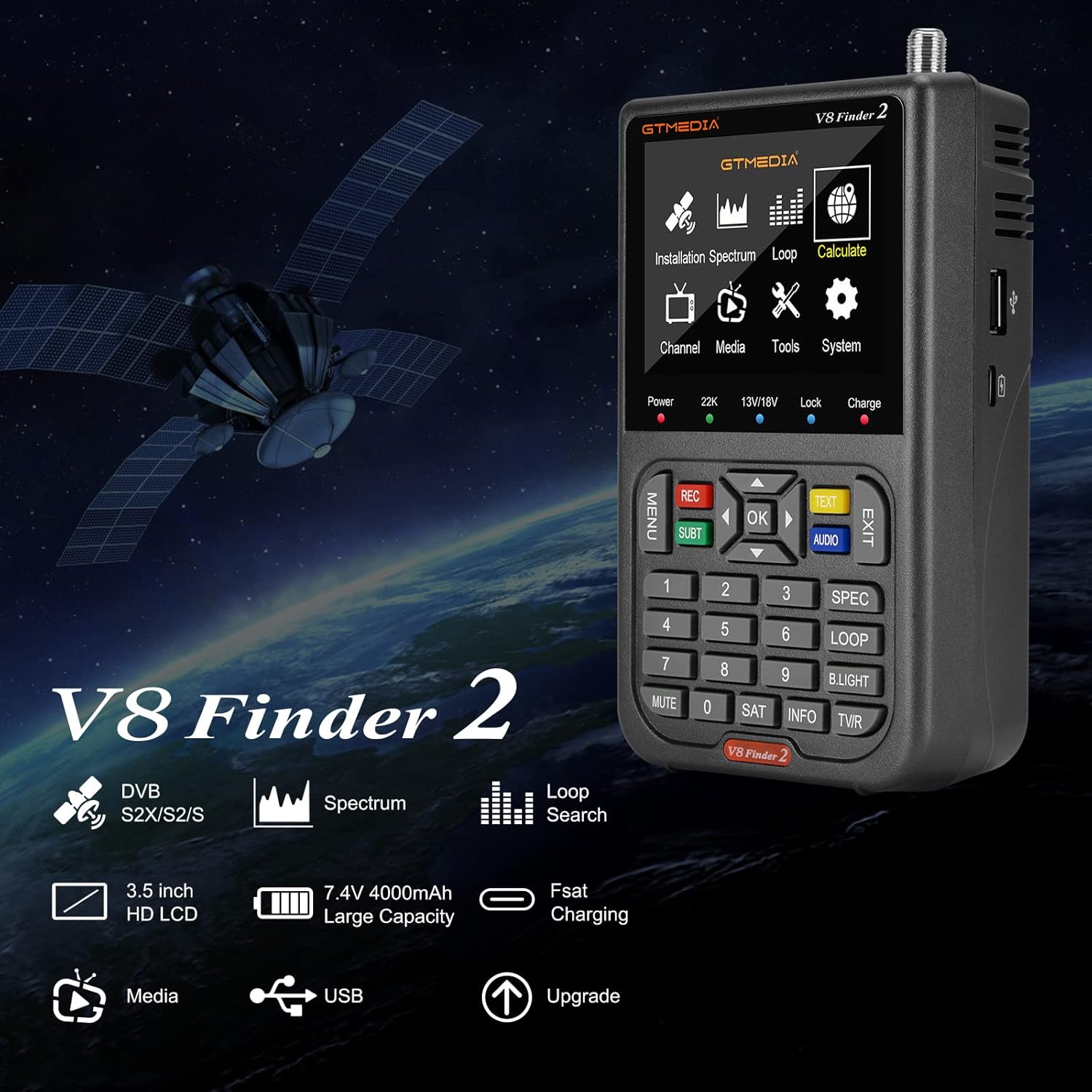
Figure 3.1: Key features of the V8 Finder 2.
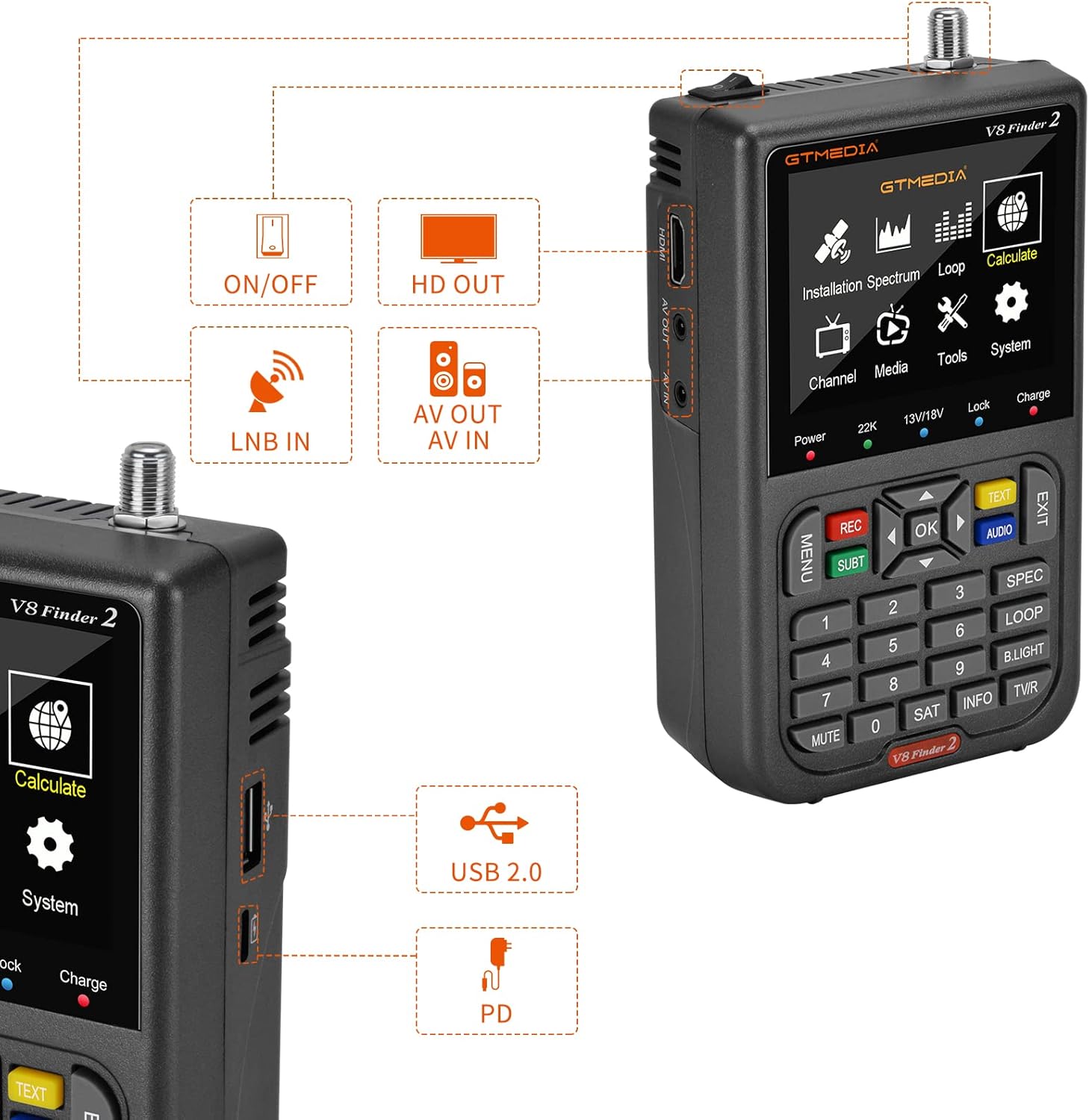
شکل 3.2: تمام شده استview of the device's input and output ports.
4. راه اندازی
Follow these steps to set up your GT Media V8 Finder 2 for satellite dish alignment:
- دستگاه را شارژ کنید: Before first use, fully charge the V8 Finder 2 using the provided power adapter and Type-C port. The battery indicator on the screen will show charging status.
- Connect to LNB: Connect the LNB (Low Noise Block) cable from your satellite dish to the 'LNB IN' port on the V8 Finder 2.
- روشن کردن: Press the 'ON/OFF' button to power on the device.
- تنظیمات اولیه: Navigate to the 'System' menu to set your preferred language, local time, and other display settings.
- Select Satellite: From the main menu, select 'Installation'. Choose the desired satellite from the pre-loaded list. If your satellite is not listed, you may need to add it manually or perform a blind scan later.
- Transponder Settings: Select a transponder for the chosen satellite. Ensure the frequency, symbol rate, and polarization (H/V) are correct.
- Calculate AZ/EL: Use the 'Calculate' function to determine the optimal azimuth and elevation angles for your location and selected satellite. This will provide guidance for initial dish positioning.
- Connect to TV (Optional): For a larger view, connect the V8 Finder 2 to a TV or monitor using an HDMI or AV cable.

Figure 4.1: Connection diagram for the V8 Finder 2.

Figure 4.2: The 'Calculate' interface for satellite alignment.
5. دستورالعمل های عملیاتی
The V8 Finder 2 features an intuitive menu system. Use the directional buttons (Up, Down, Left, Right) and the 'OK' button to navigate and confirm selections. The 'MENU' button returns to the previous screen, and 'EXIT' returns to the main menu or exits a function.
۷.۱ عملکردهای منوی اصلی
- نصب و راه اندازی: For setting up satellites, transponders, and performing scans.
- طیف: Displays the signal spectrum for visual analysis of signal quality and interference.
- حلقه: Allows for continuous monitoring of multiple transponders or satellites.
- محاسبه کنید: Assists in calculating dish alignment angles based on location.
- کانال: Manages TV and radio channels.
- رسانه: Accesses multimedia files (music, pictures, movies) and recording functions.
- ابزار: Provides utilities like information display, factory reset, USB upgrade, and backup.
- سیستم: Configures device settings such as language, AV settings, time, and OSD settings.
5.2 Satellite Alignment
Once connected and a satellite/transponder is selected:
- Adjust your satellite dish slowly, first for elevation, then for azimuth, while observing the signal strength and quality bars on the V8 Finder 2's screen.
- Aim for the highest possible signal strength (S) and quality (Q) percentages. The device will emit an audible tone, which increases in pitch as the signal improves.
- Once optimal signal is achieved, carefully tighten all dish mounting bolts to secure the position.

Figure 5.1: Transponder list and signal indicators in the 'Installation' menu.
5.3 توابع پیشرفته
- بررسی نقطه کور: In the 'Installation' menu, select 'Scan Mode' and choose 'Blind Scan' to search for all available channels on a selected satellite without prior transponder information.
- آنالایزر طیف: Access this function from the main menu to visualize the frequency spectrum, helping to identify potential interference or weak signal areas.
- جستجوی حلقهای: Monitor signal quality for multiple transponders simultaneously, useful for multi-LNB setups or verifying signal stability across a range of frequencies.

Figure 5.2: Satellite Search options, including Blind Scan.

Figure 5.3: Spectrum Analyzer interface.

Figure 5.4: Loop Search display for multi-transponder monitoring.
6. تعمیر و نگهداری
Proper maintenance ensures the longevity and reliable performance of your V8 Finder 2.
- تمیز کردن: Use a soft, dry cloth to clean the device. Do not use liquid cleaners or aerosols, as they may damage the screen or internal components.
- مراقبت از باتری: To prolong battery life, avoid fully discharging the device frequently. Recharge the battery when the low battery reminder appears. If storing for extended periods, charge the battery to about 50% every few months.
- به روز رسانی نرم افزار: مرتباً GTMEDIA رسمی را بررسی کنید website for firmware updates. Updates can be installed via the 'USB Upgrade' option in the 'Tools' menu.
- ذخیره سازی: Store the device in a cool, dry place, away from direct sunlight and extreme temperatures. Use the protective bag to prevent scratches and minor impacts.

Figure 6.1: The 3.5-inch screen displaying battery status.
7 عیب یابی
If you encounter issues with your V8 Finder 2, refer to the following common problems and solutions:
- دستگاه روشن نمیشود:
- مطمئن شوید که باتری شارژ دارد. آداپتور برق را وصل کنید و دوباره امتحان کنید.
- دکمه پاور را برای عملکرد مناسب بررسی کنید.
- No signal or weak signal:
- مطمئن شوید که کابل LNB به طور محکم به پورت 'LNB IN' متصل شده است.
- Check the LNB itself for damage or proper function.
- Ensure the correct satellite and transponder are selected in the 'Installation' menu.
- Adjust the satellite dish alignment (azimuth and elevation) slowly and precisely.
- Check for any obstructions between the dish and the satellite.
- صفحه خالی یا هنگ کرده است:
- با نگه داشتن دکمه پاور، سعی کنید دستگاه را مجدداً راه اندازی کنید.
- If the issue persists, perform a 'Factory Setting' reset from the 'Tools' menu. Note that this will erase all custom settings.
- Incorrect channel display or no channels found:
- Ensure the signal quality is sufficient.
- Perform a 'Blind Scan' to re-scan for all available channels.
- Verify that the correct satellite and transponder parameters are entered.
For issues not covered here, please refer to the 'Information' section in the 'Tools' menu for device details or contact GTMEDIA customer support.

Figure 7.1: The 'Tools' menu, including 'Factory Setting' for troubleshooting.
8. مشخصات
| ویژگی | مشخصات |
|---|---|
| شماره مدل | V8 Finder 2 |
| ابعاد (L x W x H) | 15.5 × 9.5 × 4.5 سانتی متر |
| وزن | 400 گرم |
| نمایش | 3.5-inch High Definition LCD |
| Satellite Standards | DVB-S/S2/S2X |
| رمزگشایی ویدیو | H.264 (8-bit) |
| باتری | 7.4 ولت 4000 میلی آمپر ساعت لیتیوم یون |
| پورت شارژ | Type-C (PD supported) |
| پورت های ورودی/خروجی | LNB IN, HDMI OUT, AV OUT/IN, USB 2.0 |
| پشتیبانی از DiSEqC | 1.0/1.1/1.2, USALS, Unicable |
| Tone Support | 0/22 کیلوهرتز |
9. گارانتی و پشتیبانی
For warranty information, technical support, and service inquiries, please refer to the official GTMEDIA website or contact their authorized customer service channels. Keep your purchase receipt as proof of purchase for warranty claims.