
1. راه اندازی
۱.۱ جعبهگشایی و محتویات بسته
با دقت تمام اقلام را از بستهبندی خارج کنید. مطمئن شوید که اجزای زیر وجود دارند:
- Pinell Supersound 301 Internet Radio
- آداپتور برق
- کنترل از راه دور با باتری
- راهنمای کاربر

شکل 1.1: The Pinell Supersound 301 product packaging, showing the radio and its branding.
1.2 اتصال برق
Connect the supplied power adapter to the DC IN port on the rear of the radio. Plug the other end of the adapter into a suitable wall outlet. The radio will enter standby mode or power on automatically.
1.3 اتصال آنتن
For optimal DAB+ and FM radio reception, extend the telescopic antenna located on the rear of the unit. Adjust its position for the best signal quality.

شکل 1.2: The Pinell Supersound 301 with its telescopic antenna fully extended for improved radio reception.
۴.۵ راهاندازی اولیه و اتصال Wi-Fi
Upon first power-on, the radio will guide you through an initial setup wizard. This typically includes:
- انتخاب زبان: Use the 'scroll' knob to select your preferred language and press to confirm.
- تنظیم زمان / تاریخ: Set the current time and date. This can often be synchronized automatically via the internet.
- راه اندازی شبکه Wi-Fi: The radio will scan for available Wi-Fi networks. Select your network from the list, then use the 'scroll' knob to enter the password. Press to confirm. A successful connection is required for Internet Radio and Spotify Connect functionalities.

شکل 1.3: The Wi-Fi logo, indicating wireless network connectivity for the radio.
2. دستورالعمل های عملیاتی
2.1 کنترل های اساسی
The Pinell Supersound 301 features intuitive controls on its front panel and a remote control for convenient operation.
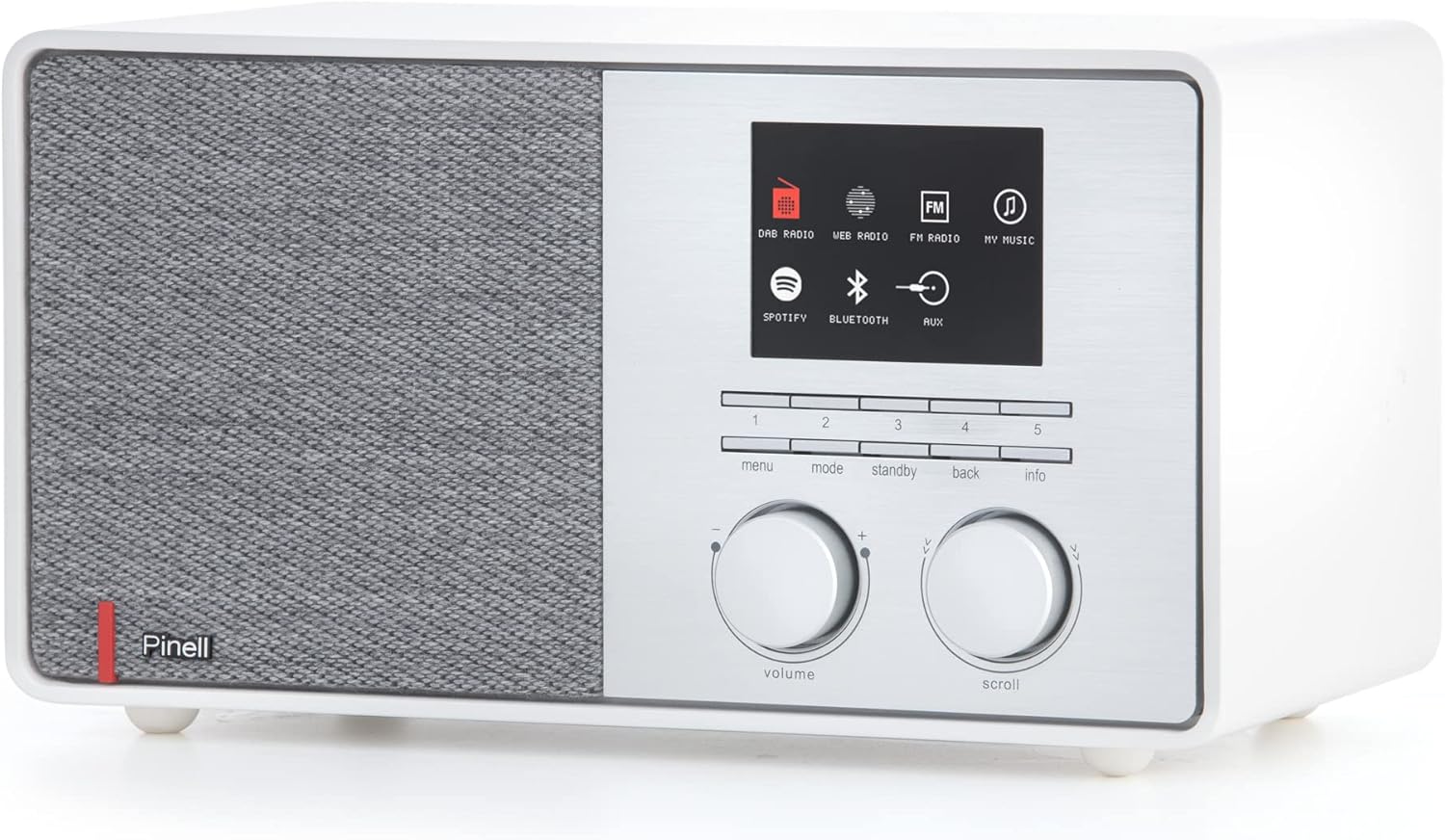
شکل 2.1: Front panel of the Pinell Supersound 301, showing the display, control knobs, and buttons.
- کلید تنظیم صدا: Rotate to adjust the audio output level. Press to mute/unmute.
- Scroll Knob: Rotate to navigate through menus and lists. Press to select an option or confirm an entry.
- دکمه منو: برای تنظیمات و گزینه ها به منوی اصلی دسترسی پیدا کنید.
- دکمه حالت: Switch between different audio sources (Internet Radio, DAB+, FM, Bluetooth, AUX, Spotify Connect).
- دکمه آماده به کار: Power the unit on or off (to standby mode).
- دکمه برگشت: به منو یا صفحه قبلی برگردید.
- دکمه اطلاعات: Display additional information about the current track or station.
- دکمههای از پیش تعیینشده (۱-۶): Quickly access your saved favorite stations.
2.2 با استفاده از کنترل از راه دور
The included remote control provides full functionality from a distance.
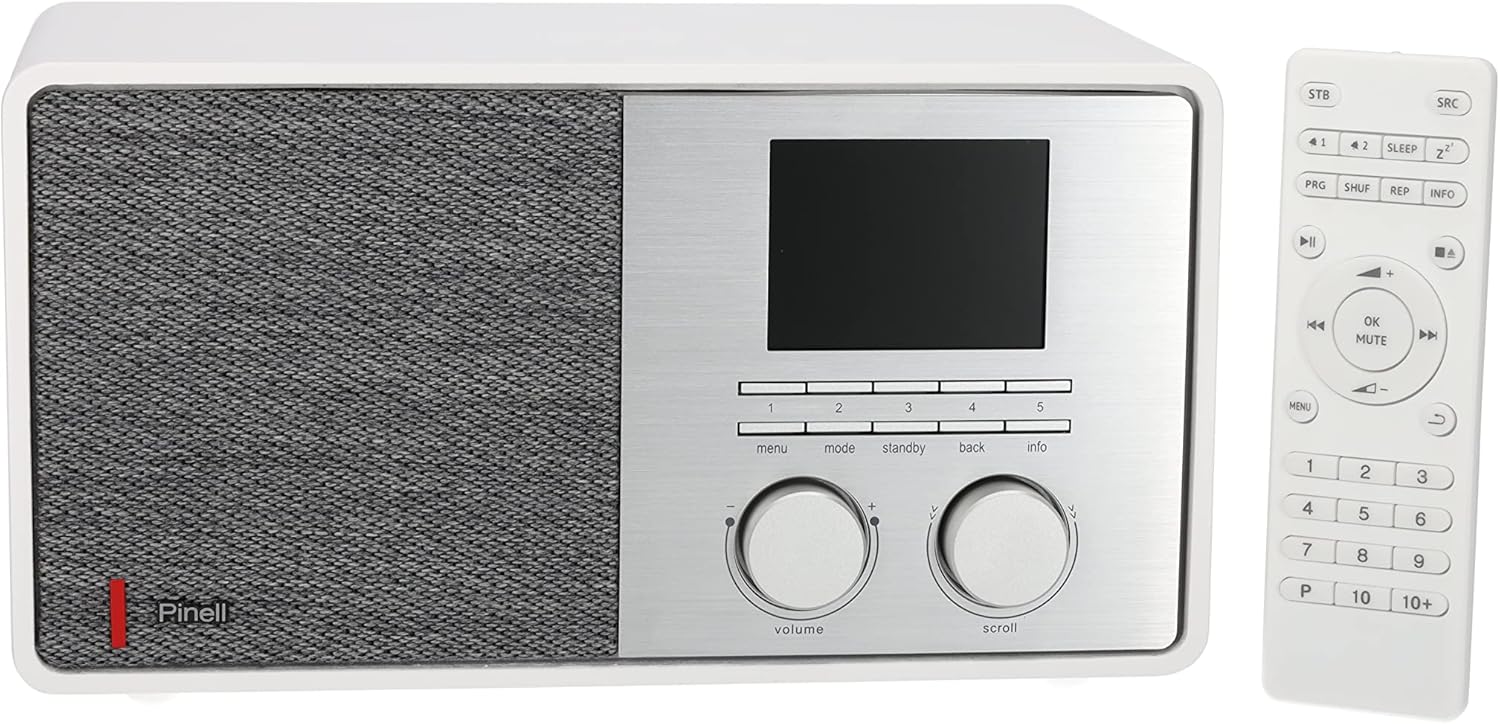
شکل 2.2: The Pinell Supersound 301 radio shown alongside its dedicated remote control.
Refer to the remote control layout for specific button functions, which mirror most of the front panel controls and add numerical input for presets and direct access.
2.3 رادیو اینترنتی
Access thousands of internet radio stations from around the world.
- را فشار دهید حالت button until "Internet Radio" is selected.
- استفاده کنید اسکرول کنید knob to browse stations by location, genre, or search.
- را فشار دهید اسکرول کنید knob to select a station and begin playback.
- برای ذخیره یک ایستگاه به عنوان ایستگاه از پیش تنظیم شده، یکی از دکمهها را فشار داده و نگه دارید. دکمه های از پیش تعیین شده (1-5) until the display confirms it's saved.
2.4 DAB+ and FM Radio
Enjoy digital and analog terrestrial radio broadcasts.

شکل 2.3: The DAB+ logo, representing Digital Audio Broadcasting Plus technology.
- را فشار دهید حالت button to select "DAB+" or "FM".
- For DAB+, the radio will automatically scan for available stations upon first use. For FM, use the اسکرول کنید knob to tune manually or press and hold to auto-scan.
- استفاده کنید اسکرول کنید knob to navigate through the list of available stations.
- برای ذخیره یک ایستگاه به عنوان ایستگاه از پیش تنظیم شده، یکی از دکمهها را فشار داده و نگه دارید. دکمه های از پیش تعیین شده (1-5).
2.5 اتصال بلوتوث
صدا را به صورت بیسیم از دستگاههای دارای بلوتوث خود پخش کنید.
- را فشار دهید حالت button to select "Bluetooth". The radio will enter pairing mode, indicated on the display.
- On your external device (e.g., smartphone), enable Bluetooth and search for available devices.
- Select "Pinell Supersound 301" from the list to pair. Once connected, you can play audio from your device through the radio.
2.6 Spotify Connect
Control your Spotify music directly from the Spotify app on your smartphone or tablet.

شکل 2.4: The Spotify Connect logo, indicating compatibility with Spotify's streaming service.
- Ensure your radio is connected to the same Wi-Fi network as your device running the Spotify app.
- Open the Spotify app on your device and play a song.
- Tap the "Devices Available" icon (usually a speaker or computer icon) at the bottom of the screen.
- Select "Pinell Supersound 301" from the list of available devices. Your music will now play through the radio, controlled by the Spotify app.
2.7 ورودی AUX
دستگاههای صوتی خارجی را با استفاده از کابل صوتی 3.5 میلیمتری متصل کنید.
- Connect one end of a 3.5mm audio cable to the AUX IN port on the rear of the radio.
- سر دیگر را به جک هدفون یا خروجی صدای دستگاه خارجی خود وصل کنید.
- را فشار دهید حالت button to select "AUX". Audio from your external device will now play through the radio.
2.8 خروجی هدفون
For private listening, connect headphones to the headphone jack on the rear of the unit. This will mute the main speaker output.
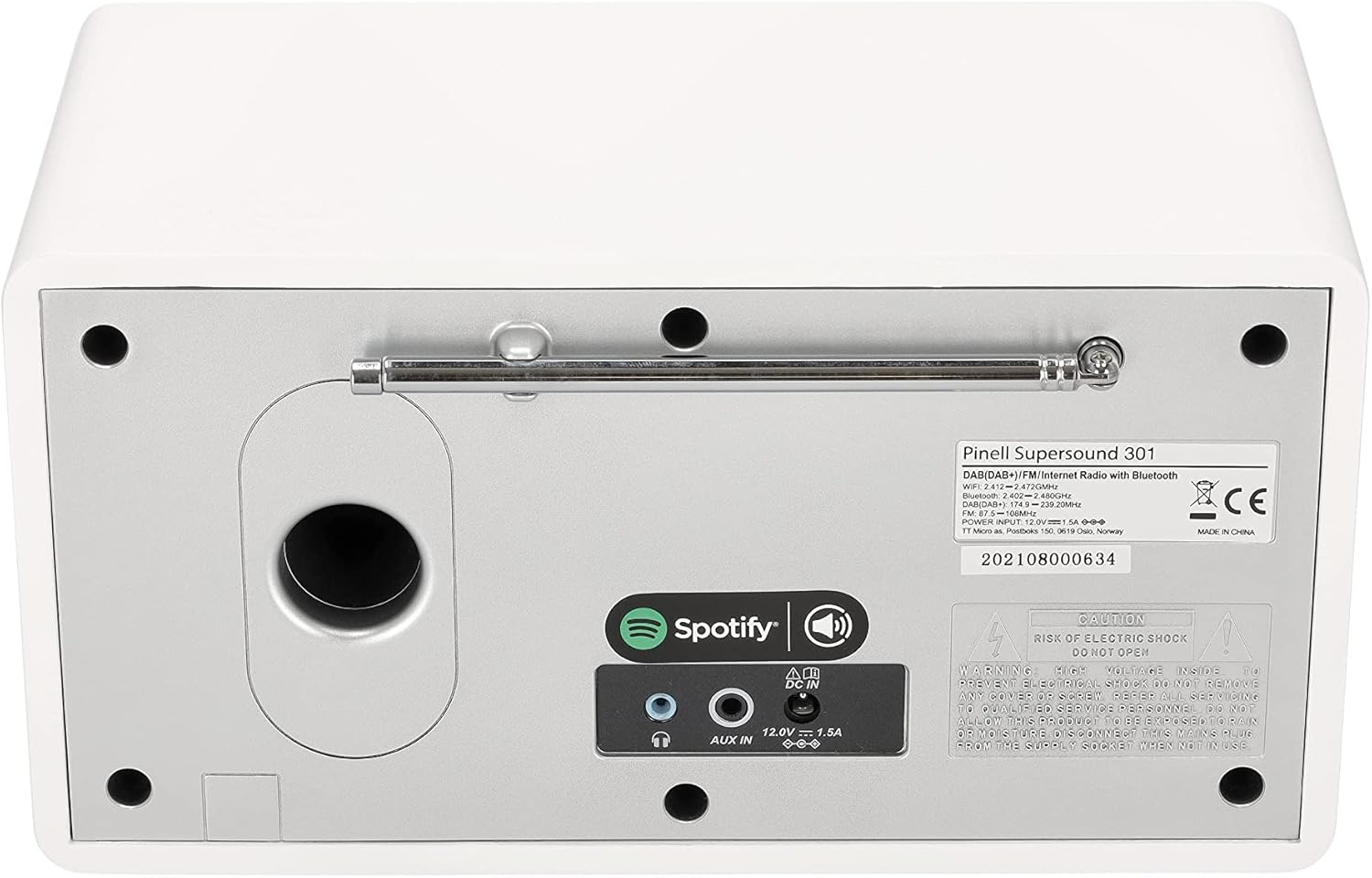
شکل 2.5: The rear panel of the Pinell Supersound 301, highlighting the AUX IN and headphone output ports.
3. تعمیر و نگهداری
3.1 دستورالعمل تمیز کردن
برای حفظ ظاهر و عملکرد رادیوی خود:
- همیشه قبل از تمیز کردن آداپتور برق را جدا کنید.
- برای پاک کردن سطوح خارجی از یک پارچه نرم و خشک استفاده کنید.
- برای لکههای سرسخت، به آرامی dampپارچه را با آب بشویید. از استفاده از پاککنندههای ساینده، حلالها یا اسپریهای شیمیایی خودداری کنید، زیرا این مواد میتوانند به روکش آسیب برسانند.
- اجازه ندهید مایعات وارد دستگاه شوند.
3.2 مراقبت عمومی
- Avoid placing the radio in direct sunlight, near heat sources, or in areas with high humidity.
- از تهویه مناسب در اطراف دستگاه اطمینان حاصل کنید.
- Protect the unit from strong impacts or vibrations.
4 عیب یابی
If you encounter issues with your Pinell Supersound 301, refer to the following common problems and solutions:
| مشکل | علت احتمالی | راه حل |
|---|---|---|
| بدون قدرت | آداپتور برق وصل نیست یا پریز برق ایراد دارد. | Ensure the power adapter is securely connected to the radio and a working power outlet. Try a different outlet. |
| صدا نداره | Volume too low, muted, or incorrect source selected. | Increase the volume. Check if the radio is muted. Ensure the correct audio source (Internet Radio, DAB+, FM, Bluetooth, AUX) is selected. If headphones are connected, disconnect them. |
| مشکلات اتصال وای فای | رمز عبور نادرست، سیگنال ضعیف یا مشکل روتر. | Re-enter the Wi-Fi password carefully. Move the radio closer to the Wi-Fi router. Restart your router. |
| دریافت ضعیف رادیو (DAB+/FM) | آنتن گسترش نیافته یا ناحیه سیگنال ضعیف است. | Fully extend and adjust the telescopic antenna. Try repositioning the radio. Perform a new station scan. |
| جفت شدن بلوتوث شکست خورد | Device not in pairing mode, or too far away. | Ensure the radio is in Bluetooth pairing mode. Make sure your external device's Bluetooth is enabled and it's searching. Keep devices within close range. |
| اتصال اسپاتیفای کار نمیکند | Radio and device on different networks, or Spotify app issue. | Verify both the radio and your control device are connected to the same Wi-Fi network. Restart the Spotify app. |
4.1 تنظیم مجدد کارخانه
If problems persist, a factory reset may resolve them. This will erase all saved settings and presets.
- به قسمت اصلی بروید منو.
- انتخاب کنید تنظیمات سیستم (یا مشابه).
- انتخاب کنید تنظیم مجدد کارخانه و انتخاب خود را تایید کنید.
- The radio will restart, and you will need to go through the initial setup process again.
5. مشخصات
| ویژگی | جزئیات |
|---|---|
| نام تجاری | پینل |
| نام مدل | سوپرصدا 301 |
| شماره مدل | BP004 |
| رنگ | سفید |
| فناوری اتصال | Wi-Fi, Bluetooth 4.0, AUX |
| ویژگی های خاص | Internet Radio, Spotify Connect, DAB+, FM Tuner |
| قدرت خروجی صدا | 7 W (1-inch tweeter) |
| باندهای رادیویی پشتیبانی شده | DAB+، FM |
| منبع تغذیه | Corded Electric (Power Adapter) |
| دستگاه های سازگار | هدفون |
| ابعاد محصول | 25L x 14.5W x 13.8H سانتی متر |
| اجزای شامل | Internet Radio, Power Adapter, Remote Control with Batteries, User Manual |
| بهروزرسانیهای نرمافزار تضمین شده تا | اطلاعات در دسترس نیست |
| در دسترس بودن قطعات یدکی | اطلاعات در دسترس نیست |
6. اطلاعات گارانتی
The Pinell Supersound 301 comes with a standard manufacturer's warranty. Please refer to the warranty card included in your product packaging or your purchase documentation for specific terms, conditions, and duration of the warranty.
مدرک خرید (رسید یا فاکتور) خود را نگه دارید زیرا برای هرگونه ادعای گارانتی لازم خواهد بود.
7. پشتیبانی مشتری
For further assistance, technical support, or service inquiries regarding your Pinell Supersound 301, please contact:
- Pinell Official Webسایت: Visit the official Pinell webسایتی برای سوالات متداول، منابع پشتیبانی و اطلاعات تماس.
- پشتیبانی خرده فروشان: Contact the retailer from whom you purchased the product for local support and service options.