
1. مقدمه
The LILLIPUT AVMATRIX SD2080 is a versatile 2x8 SDI/HDMI Splitter and Converter designed for professional video applications. It automatically detects input signals, supporting both HDMI and 3G-SDI, and provides simultaneous distribution and conversion to four 3G-SDI and four HDMI outputs. This device is ideal for scenarios requiring signal splitting, format conversion, and extended cable runs with SDI equalization and re-clocking capabilities.
This manual provides essential information for the proper installation, operation, and maintenance of your SD2080 unit. Please read it thoroughly before use.
2. اطلاعات ایمنی
- از حجم منبع تغذیه اطمینان حاصل کنیدtage با الزامات دستگاه مطابقت دارد.
- دستگاه را در معرض باران، رطوبت یا دمای بسیار بالا قرار ندهید.
- از قرار دادن دستگاه در نزدیکی منابع گرما یا در معرض نور مستقیم خورشید خودداری کنید.
- سی را باز نکنیدasinز؛ تمام خدمات را به پرسنل واجد شرایط ارجاع دهید.
- قبل از تمیز کردن یا جابجایی دستگاه، برق را قطع کنید.
- فقط از آداپتور برق ارائه شده استفاده کنید.
3. محتویات بسته
بررسی کنید که آیا همه اقلام در بسته موجود است یا خیر:
- AVMATRIX SD2080 Main Unit
- Power Adapter (USB and threaded locking DC)
- Detachable Mounting Brackets (2x)
- راهنمای کاربر (این سند)
4. ویژگی های محصول

توضیحات تصویر: This image displays a diagram highlighting the key features of the AVMATRIX SD2080. It shows icons and text indicating 2x8 distribution, HDMI/SDI conversion, support for up to 1080p60, SDI equalization, and clock recovery.
- Auto-detected input: 1×HDMI / 1×3G-SDI
- Pass-through output: 4×3G-SDI, 4×HDMI
- Distributes and converts between SDI & HDMI signals.
- SDI with equalization and re-clocking for reliable signal transmission over long distances.
- Input and output support up to 1080p60 resolution.
- Easy input signal switching via DIP switches.
- USB and threaded locking DC power supply for secure connection.
- Detachable bracket design for flexible wall mounting options.
5. محصول تمام شدview
5.1 صفحه جلو

توضیحات تصویر: This image shows the front panel of the AVMATRIX SD2080. From left to right, it features an HDMI input port, an SDI input port, and four SDI output ports (SDI OUT 1-4). Small indicator lights are visible next to the input ports.
- ورودی HDMI: پورت ورودی HDMI
- SDI IN: 3G-SDI input port.
- SDI OUT 1-4: Four 3G-SDI output ports.
- چراغ های نشانگر: Signal status indicators for inputs.
5.2 پنل عقب
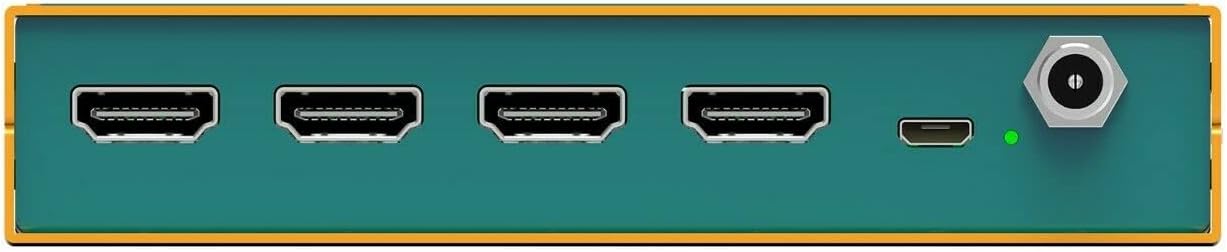
توضیحات تصویر: This image displays the rear panel of the AVMATRIX SD2080. It features four HDMI output ports (HDMI OUT 1-4), a USB port, and a threaded locking DC power input port. A power indicator light is also visible.
- HDMI OUT 1-4: Four HDMI output ports.
- USB: USB port for potential firmware updates or control.
- قدرت: Threaded locking DC power input.
- نشانگر قدرت: وضعیت قدرت را نشان می دهد.
5.3 Top Panel and DIP Switches

توضیحات تصویر: این تصویر نمای نزدیکی را ارائه میدهد view of the DIP switches located on the side of the AVMATRIX SD2080 unit. There are four individual switches labeled 1, 2, 3, and 4, with an "ON" position indicated in red. These switches are used for input selection.
- DIP Switches (1-4): Used to select the active input source (HDMI or SDI). Refer to the "Operating Instructions" section for detailed configuration.
6. راه اندازی و نصب
6.1 نصب فیزیکی
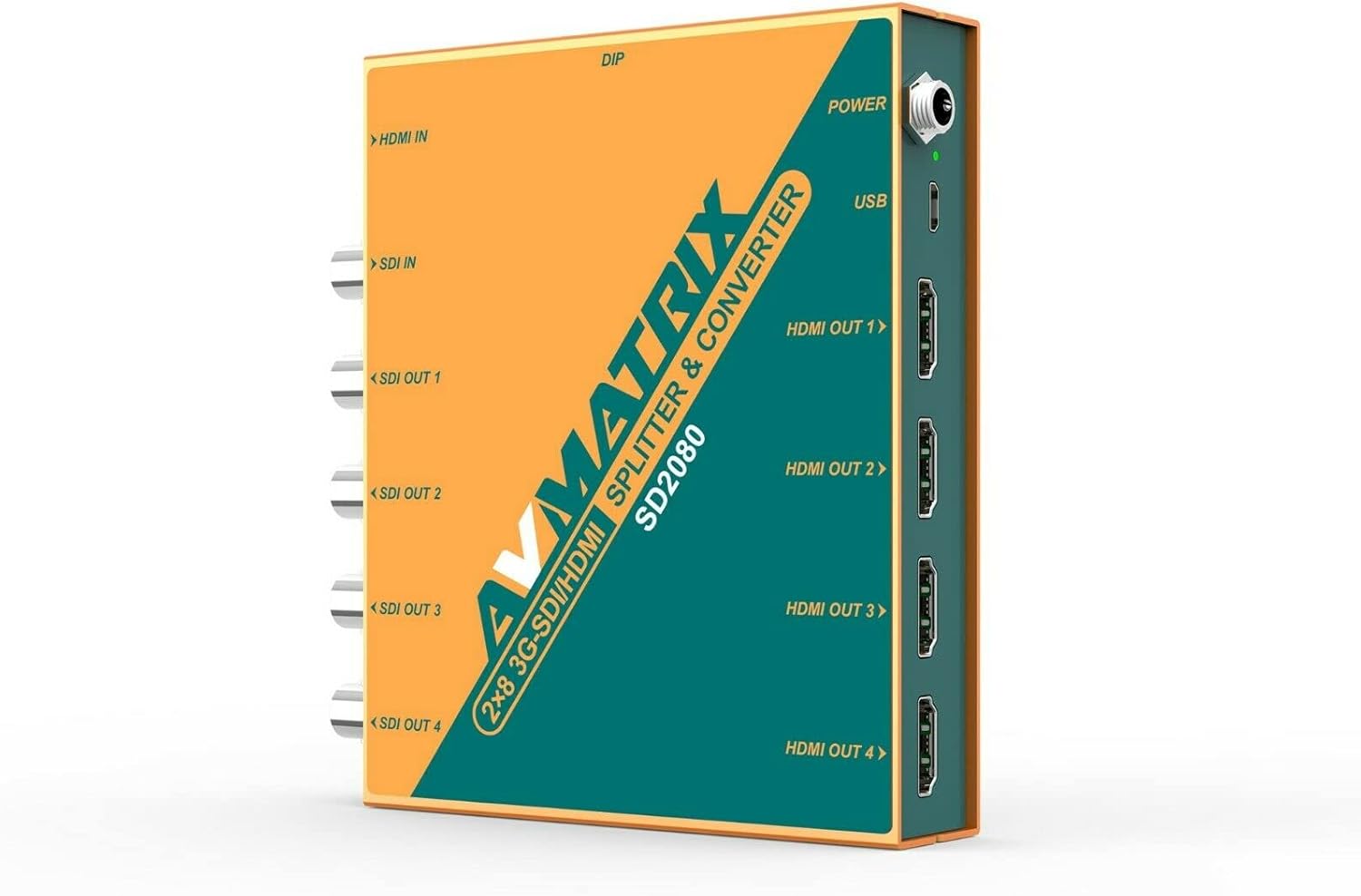
توضیحات تصویر: This image shows the AVMATRIX SD2080 unit with its detachable mounting brackets attached. The brackets are designed for wall mounting, providing flexible installation options.
The SD2080 comes with detachable mounting brackets for flexible installation. Attach the brackets to the sides of the unit using the provided screws. Once attached, the unit can be securely mounted to a wall or other flat surface.
6.2 اتصال دستگاه ها

توضیحات تصویر: This diagram illustrates typical connection scenarios for the AVMATRIX SD2080. It shows various input sources like a Video Switcher (HDMI In) and PTZ Camera (SDI In) connecting to the SD2080. The outputs are then shown connecting to devices such as a TV, LED Wall, Recorder, and Projector via HDMI Out and SDI Out ports.
- اتصال ورودی: Connect your HDMI source (e.g., video switcher, computer) to the ورودی HDMI port. Connect your 3G-SDI source (e.g., PTZ camera, SDI encoder) to the SDI IN port. The unit will auto-detect the active input.
- اتصال خروجی: Connect your display devices (e.g., monitors, TVs, projectors) to the HDMI OUT 1-4 ports. Connect your SDI receiving devices (e.g., recorders, SDI monitors) to the SDI OUT 1-4 پورت ها
- اتصال برق: آداپتور برق ارائه شده را به قدرت input on the rear panel. Ensure the threaded locking connector is securely fastened.
7. دستورالعمل های عملیاتی
7.1 روشن/خاموش
Once all connections are made, connect the power adapter to an electrical outlet. The power indicator light on the rear panel will illuminate, indicating the unit is powered on. There is no separate power button; the unit powers on automatically when connected to power.
7.2 Input Selection using DIP Switches
The AVMATRIX SD2080 features DIP switches on its side panel to select the active input source. The unit supports auto-detection, but manual selection can be enforced if needed.
توضیحات تصویر: This image shows the four DIP switches (1-4) on the side of the AVMATRIX SD2080. The switches are currently set to an "ON" position for switches 1, 2, 3, and 4. This configuration determines the input source selection.
Refer to the following table for DIP switch configurations:
| تنظیم سوئیچ DIP | منبع ورودی | توضیحات |
|---|---|---|
| همه خاموش | ردیابی خودکار | The unit automatically detects and uses the first active input (HDMI or SDI). |
| 1 را روشن و بقیه را خاموش کنید | ورودی HDMI | Forces the unit to use the HDMI input. |
| 2 را روشن و بقیه را خاموش کنید | SDI IN | Forces the unit to use the SDI input. |
| ترکیبات دیگر | Reserved / Auto-detect | For optimal performance, use only the specified settings for forced input. |
توجه: Always power off the unit before changing DIP switch settings to ensure proper application of the new configuration.
7.3 Signal Distribution and Conversion
Once an input signal is detected and selected, the SD2080 will simultaneously distribute the signal to all four SDI outputs and convert/distribute it to all four HDMI outputs. The SDI outputs feature equalization and re-clocking to maintain signal integrity over longer cable runs.
8. تعمیر و نگهداری
- تمیز کردن: برای تمیز کردن دستگاه از یک پارچه نرم و خشک استفاده کنید. از پاک کننده های مایع یا آئروسل استفاده نکنید.
- ذخیره سازی: Store the unit in a cool, dry place away from direct sunlight and extreme temperatures when not in use for extended periods.
- تهویه: برای جلوگیری از گرمای بیش از حد، از تهویه مناسب در اطراف دستگاه اطمینان حاصل کنید. هیچ یک از منافذ تهویه را مسدود نکنید.
9 عیب یابی
| مشکل | علت احتمالی | راه حل |
|---|---|---|
| بدون خروجی ویدیو |
|
|
| سیگنال متناوب |
|
|
| DIP switch changes not taking effect | Unit not power cycled after changing DIP switches. | Disconnect and reconnect power after making DIP switch changes. |
10. مشخصات
توضیحات تصویر: This image includes a detailed technical specification table for the AVMATRIX SD2080, covering inputs, outputs, SDI video rate, compliance, color space, format support for SDI and HDMI, dimensions, weight, power, and environmental conditions. It also shows a diagram of the unit's dimensions and port layout.
| دسته بندی | مشخصات |
|---|---|
| ورودی ها | 1×HDMI (Type A), 1×3G-SDI |
| خروجی ها | 4×HDMI, 4×3G-SDI |
| نرخ ویدئو SDI | SD/HD/3G-SDI |
| انطباق با SDI | SMPTE 259M، SMPTE 292M، SMPTE 424M |
| فضای رنگی SDI | یووی 4:2:2 |
| Input/Output Support | تا 1080p60 |
| کانکتور برق | DC 12V (USB and threaded locking) |
| فعلی | 600 میلی آمپر |
| جلدtagمحدوده | 6-28 ولت |
| مصرف برق | 6.5 وات |
| دمای عملیاتی | -20 درجه سانتی گراد ~ 60 درجه سانتی گراد |
| دمای ذخیره سازی | -30 درجه سانتی گراد ~ 70 درجه سانتی گراد |
| رطوبت نسبی | 0% تا 90% غیر متراکم |
| ابعاد (LWD) | ۲۲ میلیمتر × ۲۲ میلیمتر × ۱۴ میلیمتر (تقریباً ۰.۸۶۶ × ۰.۸۶۶ × ۰.۵۵۱ اینچ) |
| وزن | ۱۲۰ گرم (تقریباً ۰.۲۶ پوند) |
۱۰. پشتیبانی و تماس
For technical support, warranty inquiries, or further assistance, please contact LILLIPUT customer service. Refer to the official LILLIPUT webسایتی برای بهروزترین اطلاعات تماس.
Webسایت: www.avmatrixusa.com
ایمیل: Sales@avmatrixusa.com
تلفن: 1-888-608-3088