
جدیدتر ۴۰
Neewer 47.2in/120cm Quick-Setup Deep Parabolic Softbox
مدل: 10100339
مقدمه
This manual provides comprehensive instructions for the assembly, operation, and maintenance of your Neewer 47.2in/120cm Quick-Setup Deep Parabolic Softbox. Designed for professional and amateur photographers, this softbox features a Bowens mount for broad compatibility and a deep parabolic shape for focused, soft light. Please read this manual thoroughly before use to ensure optimal performance and product longevity.

This image displays the assembled Neewer 47.2in/120cm Deep Parabolic Softbox, mounted on a light stand, alongside its compact carrying bag. It provides an overview of the product and its portability.
راه اندازی
Follow these steps to correctly set up your deep parabolic softbox:
- Unpack the Softbox: Remove the softbox and its components from the carrying bag.
- Expand the Softbox: With the Bowens mount facing you, grasp two opposing rods. Pull them outwards and upwards simultaneously until they click and lock into place. Repeat this process for all 16 rods. Ensure all rods are fully extended and locked to form the parabolic shape.

This image illustrates the "Easy Pull-up Design" feature, showing a hand pulling one of the softbox rods upwards until it locks into place, simplifying the assembly process.
- Attach Diffusers (Optional):
- پخش کننده داخلی: Secure the inner baffle to the internal loops of the softbox using the attached elastic bands or clips. This helps to eliminate hot spots.
- پخش کننده بیرونی: Attach the larger outer diffusion panel to the front edge of the softbox using the hook-and-loop fasteners. This provides the primary softening of the light.
- Mount to Light: Align the Bowens mount of the softbox with the Bowens mount on your compatible studio light (e.g., Neewer CB60, CB100, CB150, S101, 300W/400W Vision4, Godox 300D II, 120D II, 200D, 200X, SL-60W, AD400PRO, VL300). Insert the softbox mount and rotate it clockwise until it locks securely into place.

مفصل view of the standard Bowens mount, highlighting its compatibility with various studio lights. This mount ensures secure attachment and quick interchangeability.
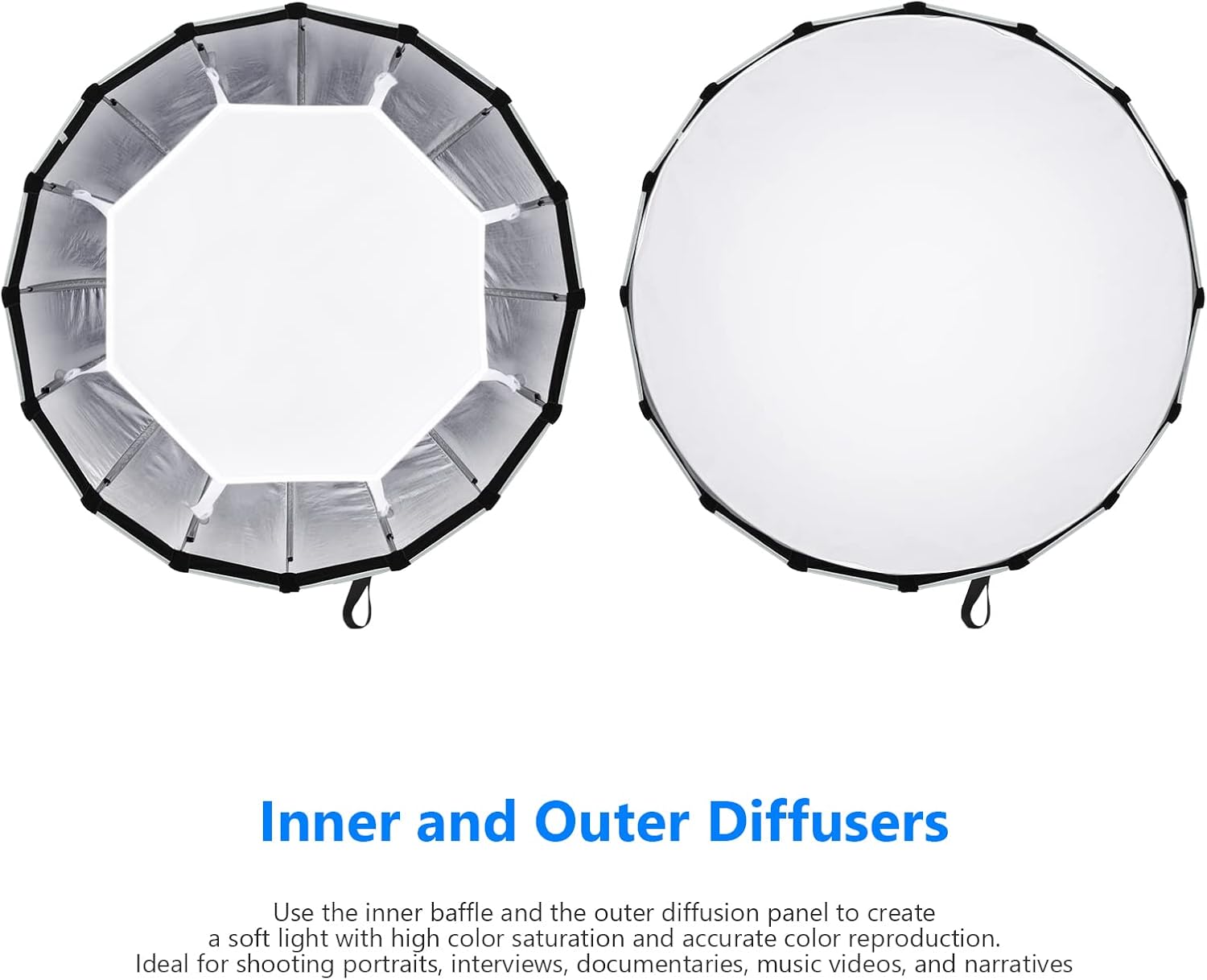
This image shows the two diffusion panels included with the softbox: an inner baffle and an outer diffusion panel. These are used to soften and spread the light output.
عملیاتی
The Neewer Deep Parabolic Softbox is designed to shape and soften light for various photographic and videographic applications.
- شکلدهی نور: The deep parabolic design, combined with the highly reflective interior, concentrates light into a focused beam, providing excellent control over light spill.
- انتشار: Use the inner and outer diffusers to achieve a softer, more even light quality. The inner baffle helps to eliminate hot spots, while the outer diffuser spreads the light for a broad, flattering illumination. Experiment with using only the outer diffuser or both for different levels of softness.

A close-up of the softbox's interior, revealing the highly reflective silver lining designed to maximize light output and ensure even distribution.

This comparative image demonstrates the effect of the inner and outer diffusers. It shows a model lit without a softbox, then with the softbox, then with the inner diffuser, and finally with both inner and outer diffusers, illustrating the progressive softening of light.

This image depicts the Neewer parabolic softbox actively in use during a photography session, showcasing its large size and how it provides broad, soft illumination for subjects.
تعمیر و نگهداری
Proper care and maintenance will extend the life of your softbox.
- تمیز کردن: Use a soft, dry cloth to wipe down the exterior and interior reflective surfaces. For stubborn marks, a slightly damp cloth with mild soap can be used, followed by a dry wipe. Ensure the softbox is completely dry before storage.
- تاشو و ذخیره سازی: To fold the softbox, press the release button on the Bowens mount for each rod and gently push the rod inwards until it collapses. Once all rods are released, fold the softbox compactly and place it in its dedicated carrying bag.

This image demonstrates the "Folding Steps," showing a hand pressing a release button on the softbox mount to disengage a rod, allowing the softbox to be collapsed for storage or transport.
- رسیدگی: Avoid applying excessive force to the rods or mount during setup and takedown. When using outdoors, secure the softbox with sandbags or weights to prevent it from being affected by wind.
عیب یابی
- Difficulty Assembling/Disassembling: Ensure you are pulling/pushing the rods firmly until they click into place or pressing the release button correctly. If a rod feels stuck, gently wiggle it while applying pressure.
- Uneven Light Output: Check that both the inner and outer diffusers are properly installed and stretched taut. Ensure the light source is centered within the softbox.
- Softbox Not Secure on Light: Verify that the Bowens mount is fully inserted and rotated clockwise until it locks. Check for any obstructions in the mount.
- Softbox Wobbles on Stand: Ensure your light stand is sturdy and properly weighted, especially for a softbox of this size. Always use sandbags for stability.
مشخصات
| نام تجاری | بیشتر از این |
| شماره مدل | 10100339 |
| قطر | 47.2 اینچ / 120 سانتی متر |
| عمق | Approximately 28.7 inches / 73 cm |
| نوع کوه | کوه بوونز |
| Number of Rods | 16 |
| مواد | فلز، نایلون |
| وزن مورد | 5.28 پوند (2.4 کیلوگرم) |
| ابعاد بسته بندی | 37.8 x 9.84 x 8.07 اینچ |
گارانتی و پشتیبانی
Neewer products typically come with a limited warranty. Please refer to the warranty card included with your purchase or visit the official Neewer webسایت برای اطلاعات دقیق و شرایط گارانتی.
For technical support, troubleshooting assistance, or inquiries regarding parts and service, please contact Neewer customer support through their official website or the contact information provided with your product packaging. When contacting support, please have your product model number (10100339) and purchase date available.
Ask a question about this manual
Ask about setup, troubleshooting, compatibility, parts, safety, or missing instructions. Manuals+ will review the question and use this page’s manual context to help answer it.