
EKSA EM100
دفترچه راهنمای ماوس بازی EKSA EM100
مدل: EM100
1. مقدمه
The EKSA EM100 Gaming Mouse is a high-performance wired ergonomic gaming mouse designed for PC gamers. It features 7 programmable buttons, customizable Chroma RGB lighting, and an adjustable optical sensor with up to 8000 DPI. This manual provides detailed instructions for setting up, operating, and maintaining your EM100 Gaming Mouse to ensure optimal performance and longevity.
2. محتویات بسته
لطفا از موجود بودن تمام اقلام در بسته اطمینان حاصل کنید:
- 1 x EKSA EM100 Gaming Mouse
- 1 x دفترچه راهنمای کاربر
- ۱ عدد جعبه کادو (بستهبندی)
- 1 x 1.5m/59in Cable (integrated)

Figure 2.1: Contents of the EKSA EM100 Gaming Mouse package, including the mouse, user manual, and gift box.
3. ویژگی های محصول
- 7 دکمه قابل برنامه ریزی: Customize functions for Left, Right, Scroll, DPI, Forward, Backward, and RGB Light buttons.
- DPI قابل تنظیم: 6-level DPI settings (800/1600/2400/3200/4800/8000) for precise control.
- Chroma RGB Backlighting: 6 backlight modes with 16 million customizable colors, including "Breathing and Streamer" effects.
- طراحی ارگونومیک: Shaped for comfort during extended use, with non-slip sides to reduce hand sweat and improve grip.
- کابل بادوام: 5-inch flexible braided cable designed to minimize drag and interference.
- سازگاری گسترده: Supports Windows 2000/XP/Vista/7/8/10/11 for programmable features and macOS for normal use. Compatible with Laptops, PCs, and MacBooks.

شکل 3.1: تمام شده استview of key features including 7 functional buttons, RGB lighting, ergonomic design, 8000 DPI, and parachute cord.
4. راه اندازی
- ماوس را از بستهبندی خارج کنید: Carefully remove the EKSA EM100 Gaming Mouse and its accessories from the packaging.
- اتصال به کامپیوتر: Insert the USB plug of the mouse cable into an available USB port on your computer (PC, Laptop, or MacBook).

Figure 4.1: The USB plug and braided cable of the EKSA EM100 Gaming Mouse.
- Driver Installation (Windows): For programmable features and advanced customization on Windows operating systems, it is recommended to download and install the official EKSA EM100 driver. Refer to the official EKSA website for the latest driver software. For macOS, the mouse functions normally without additional drivers, but programmable features are not available.

شکل 4.2: مثالample of the programmable software interface for the EKSA EM100 Gaming Mouse.
- قرار دادن: Place the mouse on a flat, clean surface, preferably a mouse pad, for optimal tracking performance.
5. دستورالعمل های عملیاتی
5.1 توابع دکمه
The EKSA EM100 Gaming Mouse features 7 buttons, each with a default function. These can be customized via the driver software on Windows.
- دکمه سمت چپ: تابع کلیک اولیه
- دکمه سمت راست: عملکرد کلیک ثانویه (منوی زمینه).
- Scroll Button (Middle Click): Activates middle click, often used for opening links in new tabs or auto-scrolling.
- دکمه DPI: تنظیمات DPI را تغییر میدهد.
- دکمه جلو: به جلو حرکت میکند web مرورگرها یا file کاشفان
- دکمه عقب: به عقب حرکت میکند web مرورگرها یا file کاشفان
- دکمه چراغ: Cycles through RGB lighting modes or turns lights off.

Figure 5.1: Diagram illustrating the location and default function of each button on the EKSA EM100 Gaming Mouse.
۳.۲ تنظیم تنظیمات DPI
The mouse offers 6 adjustable DPI levels, allowing you to change cursor sensitivity on the fly. Press the دکمه DPI located behind the scroll wheel to cycle through the following settings:
- ۸۰۰ DPI (سبز)
- ۱۶۰۰ DPI (بنفش)
- ۲۴۰۰ نقطه در اینچ (آبی)
- ۳۲۰۰ DPI (قرمز)
- ۴۰۰۰ DPI (فیروزهای)
- ۴۸۰۰ DPI (زرد)
Each DPI level is indicated by a specific color on the mouse's lighting, providing visual feedback for your current setting.
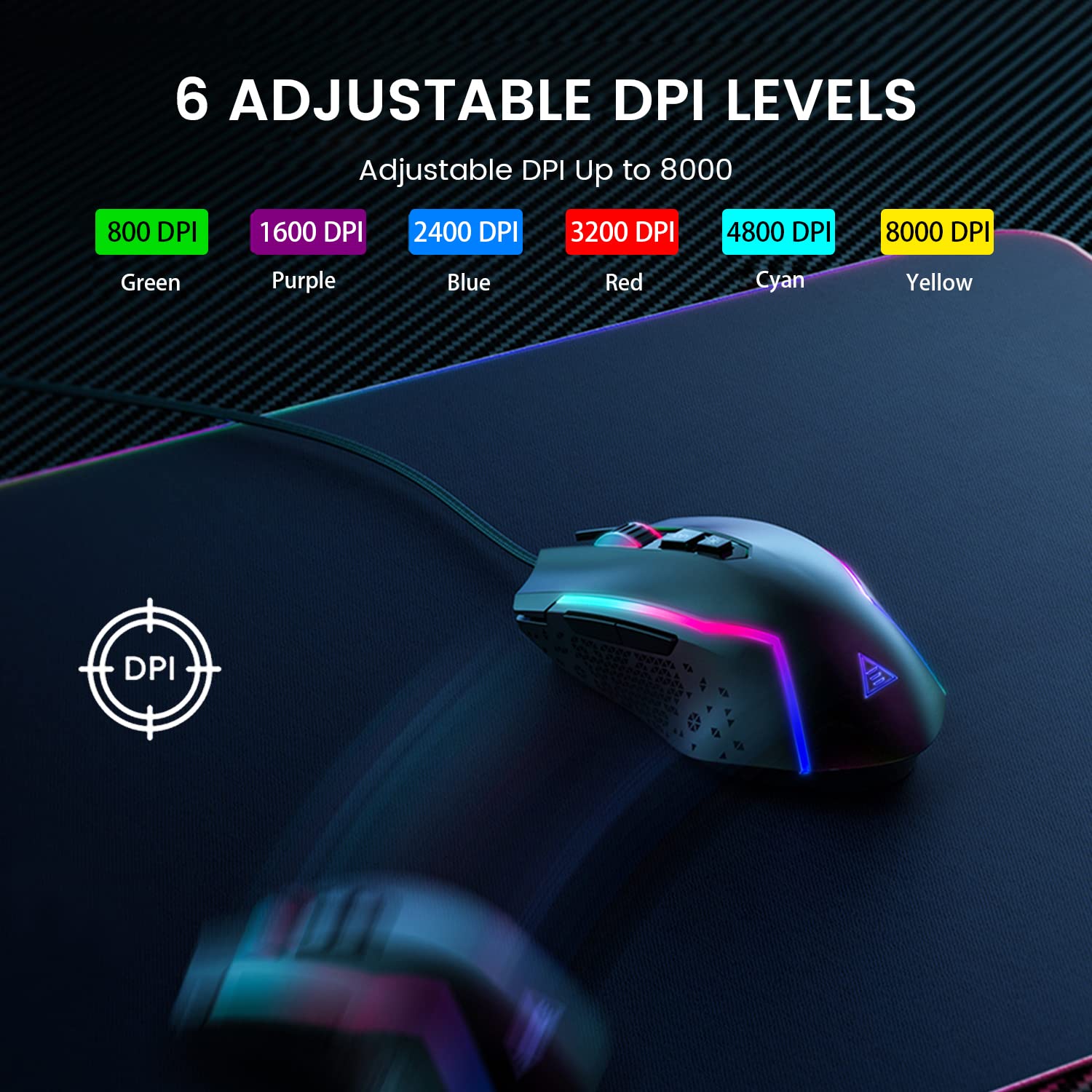
Figure 5.2: Visual representation of the 6 adjustable DPI levels and their corresponding indicator colors.
۵.۲ سفارشیسازی نور پسزمینه RGB
The EKSA EM100 features dynamic Chroma RGB backlighting with 6 distinct modes and 16 million color options. Press the دکمه چراغ ها (located near the DPI button) to cycle through the available lighting effects, including "Breathing" and "Streamer" modes, or to turn the lights off.

Figure 5.3: The EKSA EM100 Gaming Mouse showcasing its vibrant RGB backlight effects.
6. تعمیر و نگهداری
Proper maintenance ensures the longevity and optimal performance of your EKSA EM100 Gaming Mouse.
- تمیز کردن: از یک پارچه نرم و خشک برای پاک کردن سطح ماوس استفاده کنید. برای آلودگیهای سرسخت، کمی ...ampپارچه را با آب یا یک محلول تمیزکننده ملایم بپوشانید. از استفاده از مواد شیمیایی قوی یا مواد ساینده خودداری کنید.
- مراقبت از سنسور: حسگر نوری زیر ماوس را تمیز و عاری از گرد و غبار نگه دارید. در صورت لزوم از یک گوش پاک کن یا هوای فشرده استفاده کنید.
- مدیریت کابل: Avoid sharp bends or excessive pulling on the braided cable to prevent internal damage.
- ذخیره سازی: وقتی برای مدت طولانی از ماوس استفاده نمیکنید، آن را در محیطی تمیز و خشک و دور از نور مستقیم خورشید و دمای شدید نگهداری کنید.
7 عیب یابی
| مشکل | علت احتمالی | راه حل |
|---|---|---|
| ماوس پاسخ نمیدهد. | اتصال USB شل، پورت USB معیوب، مشکل درایور. |
|
| حرکت مکاننما نامنظم یا پرشدار است. | Dirty optical sensor, unsuitable surface, software interference. |
|
| چراغهای RGB کار نمیکنند یا گیر کردهاند. | Software glitch, light mode setting. |
|
| Programmable buttons not working (Windows). | Driver not installed or corrupted, incorrect software settings. |
|
8. مشخصات
| ویژگی | جزئیات |
|---|---|
| نام تجاری | EKSA |
| مدل | EM100 |
| قابلیت اتصال | سیمی (USB) |
| نوع سنسور | نوری |
| سطوح DPI | 800 / 1600 / 2400 / 3200 / 4800 / 8000 |
| دکمه های قابل برنامه ریزی | 7 |
| نور پس زمینه | Chroma RGB (6 modes, 16 million colors) |
| طول کابل | 1.5 متر (59 اینچ) |
| نوع کابل | بافته شده |
| جهت گیری دست | دوسویه |
| ابعاد محصول (L x W x H) | 11.5 × 5.5 × 17.5 سانتی متر |
| وزن مورد | 150 گرم |
| سیستم عامل های سازگار | Windows 2000/XP/Vista/7/8/10/11, macOS (normal use) |
| بستر سخت افزاری | کامپیوتر شخصی/مک/لینوکس/یونیکس |
| کشور مبدا | چین |
9. گارانتی و پشتیبانی
EKSA products are designed for reliability and performance. For warranty information, technical support, or to download the latest drivers and software for your EM100 Gaming Mouse, please visit the official EKSA webسایت:
Please retain your proof of purchase for any warranty claims. For specific regional support or inquiries, refer to the contact information provided on the EKSA webسایت
Ask a question about this manual
Ask about setup, troubleshooting, compatibility, parts, safety, or missing instructions. Manuals+ will review the question and use this page’s manual context to help answer it.