
مقدمه
This manual provides comprehensive instructions for the use and care of your new Remote brand compatible remote control. This remote is specifically designed to function seamlessly with Nordmende ND40S3000J SMART televisions, offering full functionality without the need for complex programming.
لطفاً برای اطمینان از تنظیم و عملکرد صحیح ریموت کنترل خود، این دفترچه راهنما را با دقت مطالعه کنید.
راه اندازی
1. نصب باتری
The remote control requires alkaline batteries (not included). Follow these steps to install them:
- درپوش محفظه باتری را در پشت ریموت کنترل قرار دهید.
- برای باز کردن، درپوش را به سمت پایین بکشید یا ضامن آن را فشار دهید.
- Insert two new alkaline batteries, ensuring the positive (+) and negative (-) terminals match the diagrams inside the compartment.
- پوشش محفظه باتری را دوباره سر جایش قرار دهید و آن را تا زمانی که محکم شود، سر جایش بلغزانید.
مهم: Always use new alkaline batteries for optimal performance. Do not mix old and new batteries, or different types of batteries.
۲. استفاده اولیه (بدون نیاز به برنامهنویسی)
This compatible remote control is pre-programmed for the Nordmende ND40S3000J SMART TV model. No additional programming or setup steps are required. Once batteries are installed, the remote is ready for immediate use with your television.
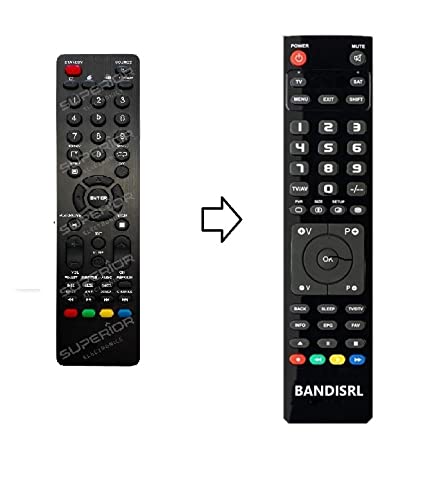
شکل 1: The Remote compatible remote control. This image displays the layout of the buttons and the overall design of the remote, ready for use with your Nordmende TV.
دستورالعمل های عملیاتی
To operate your Nordmende ND40S3000J SMART TV with this remote control, point the remote directly at the television's infrared receiver. Ensure there are no obstructions between the remote and the TV.
- دکمه پاور: را فشار دهید تا تلویزیون روشن یا خاموش شود.
- افزایش/کاهش صدا: میزان صدا را تنظیم می کند.
- کانال بالا/پایین: کانالهای تلویزیون را پشت سر هم عوض میکند.
- دکمه های عددی (0-9): مستقیماً کانالهای تلویزیونی را انتخاب کنید.
- دکمههای ناوبری (کلیدهای جهتنما، تأیید): در میان منوها پیمایش کنید و گزینه ها را انتخاب کنید.
- دکمههای تلویزیون هوشمند: Access specific Smart TV functions or applications (e.g., Home, Apps, Netflix, YouTube, etc., depending on the remote's layout and TV's features).
- دکمه قطع صدا: صدای تلویزیون را قطع میکند.
- منبع/دکمه ورودی: بین منابع ورودی موجود (HDMI، AV و غیره) جابهجا میشود.
Refer to your Nordmende TV's original user manual for specific details on its menu structure and Smart TV functionalities.
تعمیر و نگهداری
تمیز کردن کنترل از راه دور
برای تمیز کردن کنترل از راه دور، از یک پارچه نرم و خشک استفاده کنید. برای آلودگیهای سرسخت، کمی ...ampen the cloth with water. Do not use abrasive cleaners, alcohol, or solvents, as these can damage the remote's surface and internal components.
تعویض باتری
Replace batteries when the remote control's response becomes sluggish or stops working. Always replace both batteries simultaneously with new alkaline batteries. Dispose of used batteries according to local regulations.
ذخیره سازی
کنترل از راه دور را در جای خشک و خنک و دور از نور مستقیم خورشید و دمای بسیار بالا نگهداری کنید. اگر قرار است از کنترل برای مدت طولانی استفاده نشود، توصیه میشود باتریها را برای جلوگیری از نشتی خارج کنید.
عیب یابی
- ریموت کنترل کار نمیکند:
- بررسی کنید که آیا باتریها به درستی و با قطبیت صحیح (+/-) وارد شدهاند یا خیر.
- Replace the batteries with new alkaline batteries.
- مطمئن شوید که هیچ مانعی بین کنترل از راه دور و گیرنده مادون قرمز تلویزیون وجود ندارد.
- مطمئن شوید که کنترل را مستقیماً به سمت تلویزیون گرفتهاید.
- مطمئن شوید که تلویزیون روشن است.
- بعضی از دکمهها جواب نمیدهند:
- This remote is designed for the Nordmende ND40S3000J SMART TV. If you are using it with a different model, some advanced functions may not be compatible.
- Ensure the buttons are clean and free from debris.
- تلویزیون با مکث پاسخ میدهد:
- ممکن است باتریها ضعیف شده باشند؛ آنها را تعویض کنید.
- Ensure a clear line of sight to the TV's infrared sensor.
- Avoid strong light sources (like direct sunlight) that might interfere with the infrared signal.
If troubleshooting steps do not resolve the issue, please refer to the Support section.
مشخصات
| برند: | Remote (Manufacturer: Bandisrl) |
| دستگاه های سازگار: | Nordmende ND40S3000J SMART Television |
| فناوری اتصال: | مادون قرمز (IR) |
| ویژگی خاص: | بدون نیاز به برنامه نویسی |
| نوع باتری: | قلیایی |
| باتری های شامل: | خیر |
| رنگ: | مشکی |
| تعداد دکمه ها: | 25 |
| نوع کنترلر: | کنترل دکمه |
گارانتی و پشتیبانی
اطلاعات گارانتی
Specific warranty details for this compatible remote control are not provided in this manual. Please refer to the purchase documentation or contact the seller/manufacturer (Bandisrl) for information regarding warranty coverage and terms.
پشتیبانی مشتری
For further assistance, technical support, or inquiries regarding compatibility with other TV models, please contact the manufacturer, Bandisrl. Contact information can typically be found on the product packaging or the seller's webسایت
If you own a different TV model than the Nordmende ND40S3000J SMART, it is recommended to contact Bandisrl to confirm compatibility before purchase or use.