
کتر ۲۱۲۹۱۷
Keter Detroit Multipurpose Storage Cabinet User Manual
مدل: ۲۵۹۸۰۶ | برند: کتر
مقدمه
This manual provides essential information for the safe and efficient use of your Keter Detroit Multipurpose Storage Cabinet. Please read these instructions carefully before assembly and operation, and retain them for future reference.
اطلاعات ایمنی
- Ensure all components are present and undamaged before assembly. Do not attempt to assemble if parts are missing or broken.
- Assemble the cabinet on a flat, stable surface to prevent tipping.
- Do not overload shelves. Adhere to the specified weight capacities: 10 kg (22 lbs) for adjustable shelves and 15 kg (33 lbs) for the fixed shelf.
- هنگام مونتاژ قطعات کوچک را از کودکان دور نگه دارید.
- For stability, it is recommended to secure the cabinet to a wall, especially if placed in areas with high traffic or uneven surfaces. Mounting hardware is not typically included and may need to be purchased separately based on wall type.
محتویات بسته
بررسی کنید که آیا تمام اجزای زیر در بسته شما موجود است:
- Cabinet panels (sides, top, bottom, back)
- قفسههای قابل تنظیم (۳ عدد)
- Fixed shelf (1 unit)
- Door panels (2 units)
- Handles and associated hardware
- Assembly fasteners and connectors
- راهنمای دستورالعمل

Figure 1: Keter Detroit Multipurpose Storage Cabinet. This image shows the fully assembled cabinet with its doors open, revealing the internal shelving configuration, including three adjustable shelves and one fixed shelf, along with a tall storage section.
راه اندازی و مونتاژ
Assembly is required for this product. Follow the steps below carefully. It is recommended to have two people for assembly.
- منطقه را آماده کنید: Clear a spacious, flat, and clean area for assembly.
- شناسایی مولفه ها: Lay out all parts and identify them using the provided parts list in the separate assembly diagram (if applicable).
- پانل های جانبی را جمع آوری کنید: Attach the base and top panels to the side panels using the provided fasteners. Ensure they are securely locked into place.
- پنل پشتی را وارد کنید: Slide the back panel into the grooves of the side panels. Ensure it is fully seated.
- نصب قفسه ثابت: Secure the fixed shelf into its designated position. This shelf provides structural integrity.
- قفسههای قابل تنظیم نصب کنید: Place the adjustable shelves at your desired height. The cabinet features multiple slots for flexible shelf placement. Each adjustable shelf can hold up to 10 kg.
- درها را وصل کنید: Mount the door panels to the cabinet frame using the hinge mechanisms. Ensure the doors swing freely and close properly.
- نصب دستگیرهها: Attach the handles to the door panels using the provided screws.
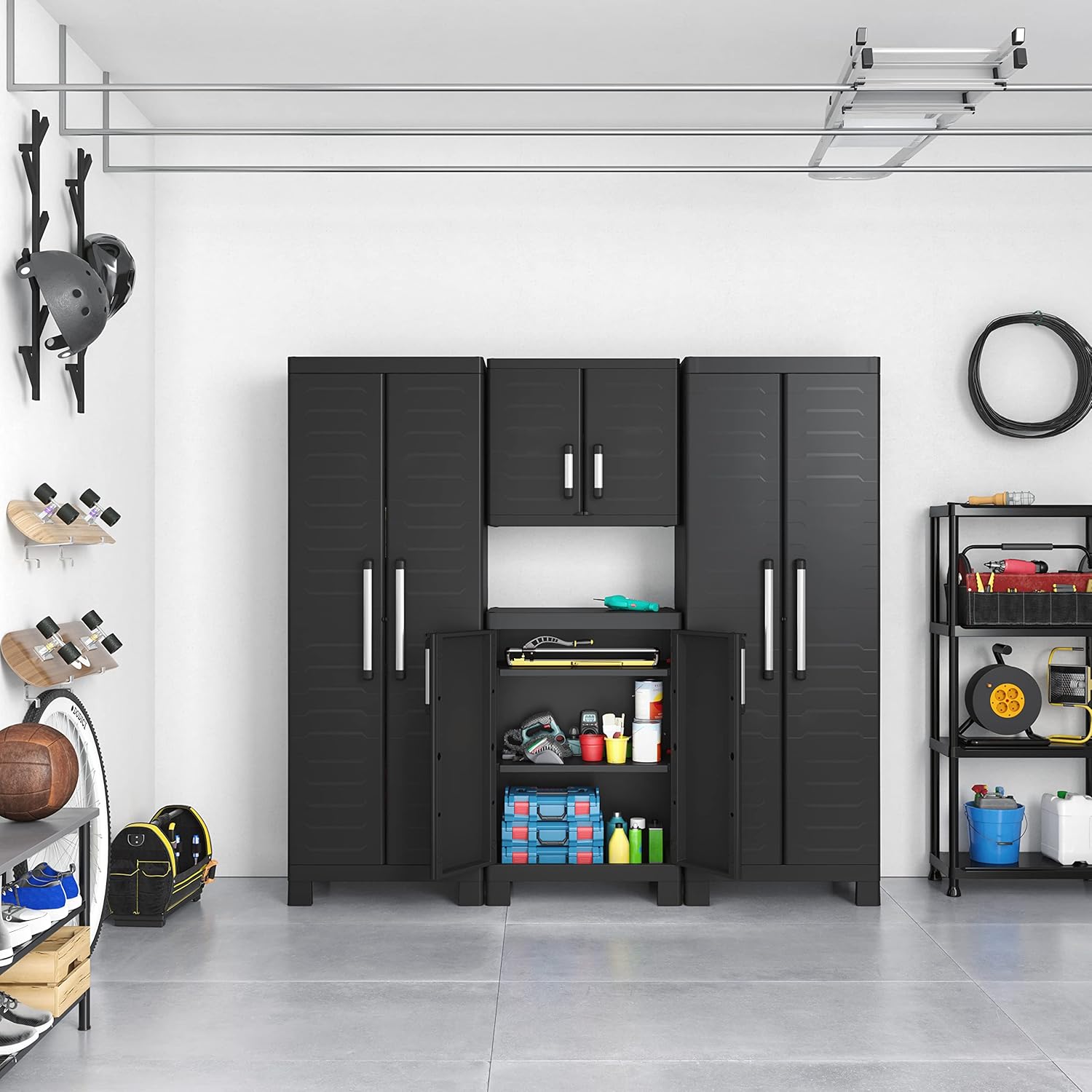
Figure 2: Keter Detroit Multipurpose Storage Cabinet integrated into a garage storage system. This image demonstrates how multiple Keter Detroit cabinets can be arranged together to form a comprehensive storage solution in a garage or workshop environment.

شکل 3: نمای نزدیک view of the Keter Detroit Multipurpose Storage Cabinet handles. The image highlights the design and material of the cabinet's handles, which are typically made of durable plastic with a metallic finish for ergonomic grip and aesthetic appeal.
دستورالعمل های عملیاتی
The Keter Detroit Multipurpose Storage Cabinet is designed for versatile storage.
- تنظیم قفسه ها: To adjust the height of the three adjustable shelves, simply lift the shelf, remove the support pegs from their current slots, reposition them to the desired height, and then reinsert the shelf. Ensure all four support pegs are securely in place before loading the shelf.
- Tall Item Storage: Utilize the dedicated empty section for storing taller items such as brooms, mops, or long tools.
- عملیات درب: Open and close the cabinet doors by gently pulling or pushing the handles. Ensure doors are fully closed to protect contents from dust and moisture.

Figure 4: Close-up of a shelf within the Keter Detroit Multipurpose Storage Cabinet, indicating a 15 kg weight capacity. This image specifically shows the fixed shelf, highlighting its robust design and the maximum weight it can safely support.
تعمیر و نگهداری
- تمیز کردن: سطوح کابینت را با تبلیغ پاک کنیدamp cloth and mild soap. Avoid abrasive cleaners or solvents that could damage the plastic.
- بازرسی: به صورت دورهای تمام بستها و اتصالات را بررسی کنید تا از محکم بودن آنها اطمینان حاصل شود. در صورت لزوم، دوباره آنها را محکم کنید.
- محیط ذخیره سازی: While durable, prolonged exposure to extreme temperatures or direct sunlight may affect the plastic over time. Store in a sheltered area if possible.
عیب یابی
| مشکل | علت احتمالی | راه حل |
|---|---|---|
| کابینت لق یا ناپایدار است. | Uneven assembly surface; loose fasteners; overloaded shelves. | Ensure assembly on a flat surface. Check and tighten all fasteners. Redistribute weight evenly on shelves and do not exceed capacity. Consider securing to a wall. |
| درها به درستی بسته نمیشوند. | Misaligned hinges; obstruction; cabinet not level. | Check hinge alignment and adjust if necessary. Remove any obstructions. Ensure the cabinet is on a level surface. |
| قفسهها خمیده یا قوسدار شدهاند. | قفسه بیش از حد بارگذاری شده. | Reduce the weight on the shelf. Ensure weight is distributed evenly. Adhere to the maximum weight capacities. |
مشخصات
| نام تجاری | کتر |
| شماره مدل | 9636100 |
| رنگ | مشکی |
| مواد | پلاستیک |
| ابعاد محصول (D x W x H) | ۱۹ اینچ عمق × ۲۵.۷ اینچ عرض × ۴۲.۵ اینچ ارتفاع (۴۸.۳ سانتیمتر عمق × ۶۵.۳ سانتیمتر عرض × ۱۰۸ سانتیمتر ارتفاع) |
| وزن مورد | 33 پوند (15 کیلوگرم) |
| تعداد قفسه ها | ۲ عدد (۱ عدد قابل تنظیم، ۱ عدد ثابت) |
| ظرفیت قفسه قابل تنظیم | 10 کیلوگرم (22 پوند) در هر قفسه |
| ظرفیت قفسه ثابت | 15 کیلوگرم (33 پوند) |
| مونتاژ مورد نیاز است | بله |

Figure 5: Keter Detroit Multipurpose Storage Cabinet with key dimensions. This diagram illustrates the height (H182cm), depth (D45cm), and width (W65cm) of the cabinet, providing a clear visual reference for its size.
اطلاعات گارانتی
Keter products are manufactured to the highest quality standards. For specific warranty terms and conditions, please refer to the warranty card included with your product or visit the official Keter webلطفاً رسید خرید خود را برای هرگونه ادعای گارانتی نگه دارید.
پشتیبانی مشتری
If you have any questions, require assistance with assembly, or need to report missing/damaged parts, please contact Keter customer support:
- Webسایت: www.keter.com (اطلاعات تماس محلی را بررسی کنید)
- پشتیبانی آنلاین: Refer to the "Contact Us" section on the Keter website for FAQs and support forms.
اسناد مرتبط - 9636100
 |
دستورالعمل مونتاژ کابینت چند منظوره Keter Detroit دستورالعملهای دقیق مونتاژ کابینت چندمنظوره Keter Detroit، شامل فهرست قطعات، راهنمای گام به گام و هشدارهای ایمنی. به چندین زبان موجود است. |
 |
Detroit XL Multipurpose Storage Cabinet Assembly Instructions Step-by-step guide for assembling the Detroit XL Multipurpose storage cabinet. Includes parts list, assembly steps, and important usage information. |
 |
دستورالعمل مونتاژ کابینت چند منظوره Keter Excellence XL با آویز پارچه دستورالعملهای جامع مونتاژ کابینت چندمنظوره Keter Excellence XL، مجهز به آویز پارچهای. این راهنما دستورالعملهای گام به گام برای راهاندازی آسان و ایمن راهکار ذخیرهسازی Keter شما، شامل لیست قطعات دقیق و هشدارهای ایمنی را ارائه میدهد. |
 |
دفترچه راهنمای مونتاژ انبار باغ Keter Darwin 6x4W - دستورالعملها و راهنما دفترچه راهنمای جامع مونتاژ برای آلونک باغی Keter Darwin 6x4W. شامل آمادهسازی محل، لیست قطعات، دستورالعملهای مونتاژ گام به گام و دستورالعملهای مراقبت. به چندین زبان موجود است. |
 |
کابینت و ایستگاه آمادهسازی فضای باز Keter Unity XL - دفترچه راهنمای مونتاژ دستورالعملهای مونتاژ گام به گام، لیست قطعات، دستورالعملهای ایمنی و اطلاعات گارانتی برای کابینت ذخیرهسازی فضای باز و ایستگاه آمادهسازی Keter Unity XL. ویژگیهای آن شامل ساخت بادوام، ampفضای ذخیرهسازی، و یک سطح آمادهسازی. |
 |
دستورالعملها و راهنمای مونتاژ کابینت ابزار Keter Space Winner دستورالعملهای دقیق مونتاژ کابینت ابزار Keter Space Winner، شامل لیست قطعات، راهنمای گام به گام و اطلاعات ایمنی مهم. یاد بگیرید که چگونه راهحل ذخیرهسازی بادوام خود را بسازید. |
Ask a question about this manual
Ask about setup, troubleshooting, compatibility, parts, safety, or missing instructions. Manuals+ will review the question and use this page’s manual context to help answer it.