
1. مقدمه
This manual provides essential information for the safe and effective use of your Canon PowerShot G1 X Mark III Digital Camera. Please read this manual thoroughly before using the camera and retain it for future reference.

شکل 1.1: جلو view of the Canon PowerShot G1 X Mark III Digital Camera with the lens extended. This image displays the camera's compact body, the integrated zoom lens, and the Canon branding.
The PowerShot G1 X Mark III is an advanced compact camera featuring a 24.2MP APS-C CMOS sensor and a DIGIC 7 image processor. It is designed for high-quality still photography and Full HD video recording, offering a versatile 3x optical zoom lens and Dual Pixel CMOS AF for precise focusing.
۲. چه چیزهایی در جعبه است؟
مطمئن شوید که تمام موارد زیر در بسته شما موجود است:
- Canon PowerShot G1 X Mark III Digital Camera
- Canon NB-13L Lithium-Ion Battery Pack (3.6V, 1250mAh)
- Canon CB-2LH Battery Charger for NB-13L Li-Ion Batteries
- درپوش لنز
- رشته کلاهک لنز
- NS-DC12 Neck Strap
- Strap Adapter for NS-DC12
- کابل Micro HDMI
3. راه اندازی
۱. شارژ و نصب باتری
- Insert the NB-13L battery into the CB-2LH charger.
- شارژر را به پریز برق وصل کنید. نشانگر شارژ روشن خواهد شد.
- پس از اتمام شارژ، نشانگر تغییر میکند یا خاموش میشود. باتری را خارج کنید.
- پوشش محفظه باتری روی دوربین را باز کنید.
- Insert the charged battery into the camera, ensuring correct orientation. Close the cover securely.
3.2. قرار دادن کارت حافظه
The camera supports SD, SDHC, and SDXC memory cards. For optimal performance, especially with video recording and continuous shooting, use a UHS Speed Class 3 (U3) card.
- درپوش اسلات کارت حافظه را باز کنید.
- کارت حافظه را طوری قرار دهید که برچسب آن رو به جلوی دوربین باشد تا در جای خود محکم شود.
- درپوش شیار کارت حافظه را محکم ببندید.
۱. اتصال بند گردنی
Thread the NS-DC12 neck strap through the strap adapters and then through the camera's strap mounts. Ensure both ends are securely fastened to prevent accidental drops.
۲.۴. روشن کردن اولیه و تنظیمات اولیه
را فشار دهید روشن/خاموش button to power on the camera. Follow the on-screen prompts to set the date, time, and language. These settings are crucial for proper image file مدیریت
4. کار با دوربین
۱. کنترلهای دوربینview

شکل 4.1: بالا view of the camera, illustrating the mode dial, hot shoe, and various control dials for quick adjustments.

شکل 4.2: عقب view of the camera, highlighting the LCD screen, electronic viewfinder, and the arrangement of control buttons for menu navigation and settings.
Familiarize yourself with the camera's buttons and dials. The mode dial on the top allows selection of various shooting modes, including Program AE, Shutter-priority AE, Aperture-priority AE, Manual, and Automatic modes. Dedicated dials provide direct adjustment of exposure compensation and other settings.
۲. عکاسی مقدماتی
عکس گرفتن:
- Turn the mode dial to your desired shooting mode (e.g., AUTO for automatic settings).
- Frame your subject using the electronic viewیاب یا صفحه LCD
- Press the shutter button halfway down to focus. The camera uses Dual Pixel CMOS AF for fast and accurate phase-detection autofocus.
- برای ثبت تصویر، دکمه شاتر را تا انتها فشار دهید.
4.3. ضبط ویدئو
The camera supports Full HD 1080p video recording at up to 60 frames per second in MP4 format.
- Set the camera to video recording mode (if applicable, or press the dedicated video record button).
- برای شروع ضبط، دکمه ضبط ویدیو را فشار دهید.
- دوباره دکمه را فشار دهید تا ضبط متوقف شود.
4.4. Using the LCD Monitor and Electronic Viewیاب

شکل 4.3: سمت view of the camera with the vari-angle touchscreen LCD extended, demonstrating its flexibility for various shooting angles.
The camera features a 3.0-inch vari-angle touchscreen LCD, allowing for flexible shooting angles and intuitive control. You can also use the built-in 2.36m-dot OLED electronic viewfinder for a clear view، به خصوص در شرایط پرنور.
۳. فلاش داخلی
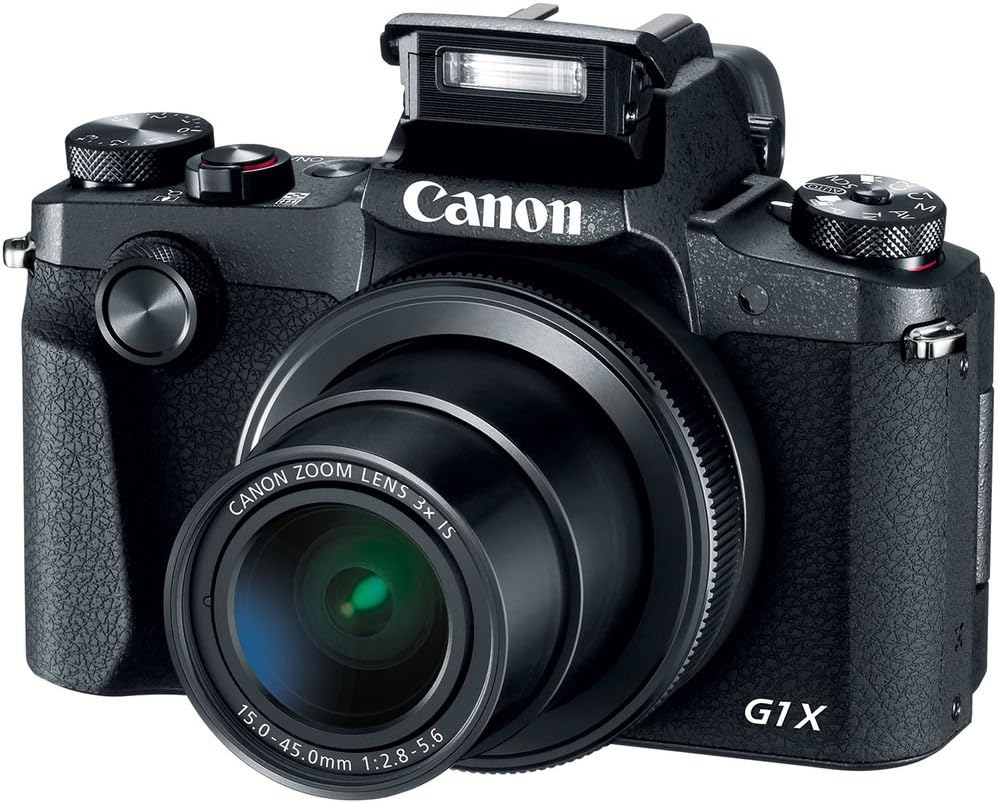
شکل 4.4: جلو view of the camera with the pop-up flash in the raised position, ready for use in low-light conditions.
The camera includes a built-in pop-up flash. To activate it, press the flash release button. Flash modes include Auto, On, Slow Synch, and Off. The hot shoe allows for external flash units.
4.6. قابلیت اتصال
The PowerShot G1 X Mark III offers Wi-Fi, NFC, and Bluetooth connectivity for transferring images to smart devices and remote control. Refer to the camera's menu for pairing instructions.
5. تعمیر و نگهداری
۶.۳ تمیز کردن دوربین
- برای تمیز کردن بدنه دوربین از یک پارچه نرم و بدون پرز استفاده کنید.
- برای لنز و صفحه نمایش LCD، از پارچه و محلول مخصوص تمیز کردن لنز استفاده کنید. از مواد شیمیایی قوی خودداری کنید.
- Use a blower brush to remove dust from the lens and sensor area (when exposed).
5.2. مراقبت از باتری
- قبل از هر بار استفاده باتری را به طور کامل شارژ کنید.
- باتری ها را در زمانی که استفاده نمی کنید در جای خشک و خنک نگهداری کنید.
- از قرار دادن باتریها در معرض دمای شدید خودداری کنید.
5.3. ذخیره سازی
When storing the camera for extended periods, remove the battery and memory card. Store the camera in a dry, dust-free environment, preferably in a camera bag.
6 عیب یابی
| مشکل | علت / راه حل احتمالی |
|---|---|
| دوربین روشن نمیشود. | Battery may be depleted or incorrectly inserted. Ensure battery is charged and properly seated. |
| نمیشه عکس گرفت. | Memory card may be full, locked, or not inserted. Check card status and free space. |
| تصاویر تار هستند. | Check focus settings. Ensure sufficient light. Use image stabilization or a tripod if necessary. |
| فلاش روشن نمیشود. | Flash may be set to 'Off' or in a mode where it does not fire automatically. Check flash settings. |
7. مشخصات
- سنسور: 24.2 MP APS-C CMOS Sensor
- پردازشگر تصویر: DIGIC 7
- لنز: 24-72mm (35mm Equivalent) 3x Optical Zoom, f/2.8-5.6
- تثبیت تصویر: نوری
- فوکوس خودکار: Dual Pixel CMOS AF (Phase Detection)
- محدوده ISO: ۱۰۰-۲۰۰۰۰۰ (گسترشیافته)
- تیراندازی مداوم: حداکثر 9 فریم در ثانیه
- ضبط ویدئو: Full HD 1080p at 60 fps (MP4)
- Viewیابنده: 2.36m-dot OLED Electronic Viewیاب
- LCD: 3.0" Vari-Angle Touchscreen LCD (1280 x 720 resolution)
- قابلیت اتصال: Built-In Wi-Fi, NFC, Bluetooth, Micro HDMI
- رسانه ذخیره سازی: SD, SDHC, SDXC (UHS-I compatible)
- باتری: NB-13L Lithium-Ion
- ابعاد (تقریباً): 4.53 x 3.00 x 2.36 اینچ (115 x 76 x 60 میلیمتر)
- وزن (تقریباً): 14.0 oz (399 g) with battery and memory card
- ساخت و ساز: Dust- and Water-Resistant
8. گارانتی و پشتیبانی
This product is covered by a 90-day limited warranty. For warranty claims or technical support, please refer to the official Canon support channels or contact your retailer.