
1. مقدمه
This manual provides detailed instructions for the setup, operation, maintenance, and troubleshooting of your uRage Exodus 700 Semi-Mechanical Gaming Keyboard. Please read this manual thoroughly before using the product to ensure optimal performance and longevity.
2. محتویات بسته
بررسی کنید که آیا همه اقلام در بسته موجود است یا خیر:
- uRage Exodus 700 Semi-Mechanical Gaming Keyboard
- User's Guide (this document)
- کارت گارانتی
3. راه اندازی
۳.۱ اتصال صفحه کلید
The uRage Exodus 700 keyboard connects via a wired USB-A connection. Follow these steps to connect your keyboard:
- یک پورت USB-A موجود در رایانه خود را پیدا کنید.
- رابط USB-A کابل کیبورد را به پورت USB-A کامپیوتر خود وصل کنید.
- The operating system (Windows 11/10/8/7) will automatically detect and install the necessary drivers.
۲.۲ نصب نرمافزار (اختیاری)
For advanced customization, including macro programming and lighting effects, dedicated gaming software is available. Refer to the official uRage website for the latest software download and installation instructions.

Image 1: uRage Exodus 700 Semi-Mechanical Gaming Keyboard connected and ready for use.
۴. کار با صفحه کلید
4.1 ویژگی های کلیدی
- کلیدهای نیمه مکانیکی: Provides a tactile typing experience with fast response times (1 ms) and a key travel of 2.5 mm.
- ضد شبح: Ensures that multiple key presses are registered simultaneously, crucial for gaming. Up to 24 keys can be registered at once.
- نورپردازی RGB: Customizable backlighting with various effects and colors.
- WIN Lock-Function: Disables the Windows key to prevent accidental interruptions during gameplay.
- تکیهگاه مچ دست یکپارچه: Designed for enhanced comfort during extended use.
۵.۱ کنترل روشنایی RGB
The keyboard features integrated RGB lighting. Specific key combinations (often involving the 'Fn' key) or the dedicated gaming software can be used to:
- Turn the lighting on or off.
- Cycle through different lighting modes and effects.
- سطوح روشنایی را تنظیم کنید.
Refer to the keyboard's function key legends for specific lighting control shortcuts.

Image 2: Keyboard in use, demonstrating RGB lighting.
4.3 Macro and Multimedia Functions
The keyboard includes 4 dedicated macro buttons (G1-G4) and additional multimedia functions. These can be programmed and controlled:
- برنامه نویسی ماکرو: Use the dedicated gaming software to record and assign complex key sequences to the macro buttons.
- کنترل های چند رسانه ای: Access functions like volume control, play/pause, and track skipping via function key combinations.
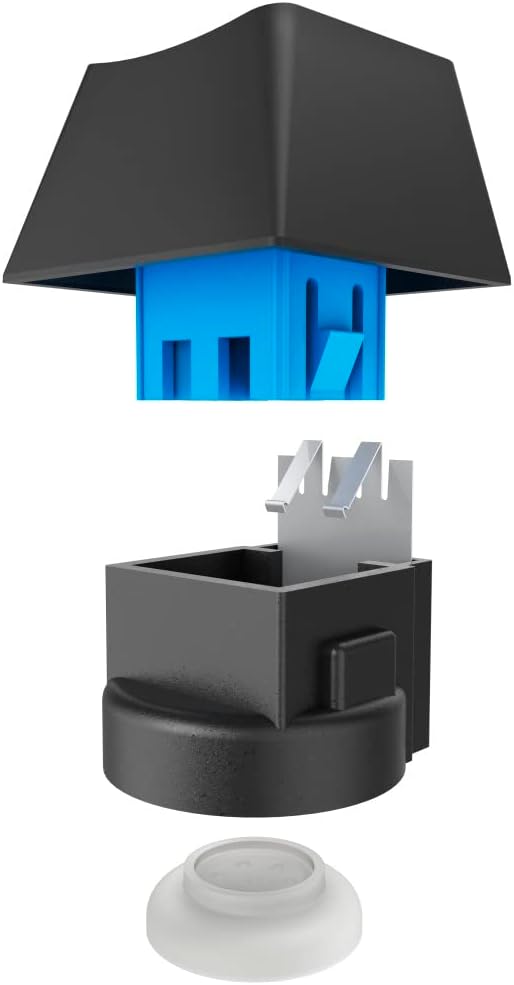
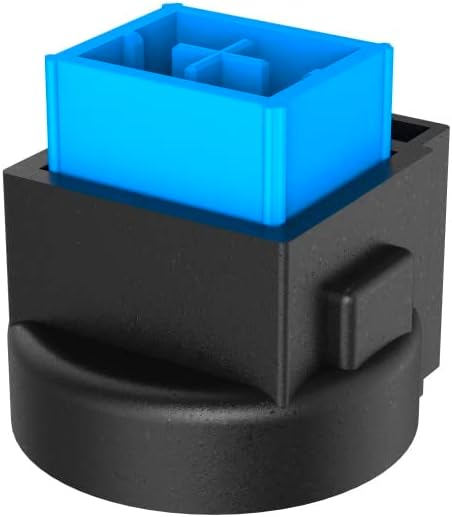
Image 3: Exploded and assembled views of the semi-mechanical key structure.
5. تعمیر و نگهداری
نگهداری مناسب، طول عمر و عملکرد کیبورد شما را تضمین میکند.
5.1 تمیز کردن
- قبل از تمیز کردن، کیبورد را از کامپیوتر جدا کنید.
- برای پاک کردن سطح کیبورد از یک پارچه نرم و خشک استفاده کنید.
- برای گرد و غبار و خرده ریزهای بین کلیدها، از هوای فشرده استفاده کنید.
- از استفاده از مواد شیمیایی قوی، پاککنندههای ساینده یا رطوبت بیش از حد خودداری کنید.
5.2 ذخیره سازی
وقتی از کیبورد استفاده نمیکنید، آن را در محیطی تمیز و خشک و دور از نور مستقیم خورشید و دمای شدید نگهداری کنید.
6 عیب یابی
If you encounter issues with your uRage Exodus 700 keyboard, refer to the following common solutions:
- صفحه کلید پاسخ نمیدهد:
- مطمئن شوید که کابل USB به طور ایمن به صفحه کلید و کامپیوتر وصل شده است.
- سعی کنید صفحه کلید را به یک پورت USB دیگر وصل کنید.
- کامپیوتر خود را مجددا راه اندازی کنید.
- کلیدها ثبت نمیشوند:
- هرگونه مانع فیزیکی زیر کلیدها را بررسی کنید.
- Ensure the keyboard drivers are correctly installed (check Device Manager on Windows).
- نورپردازی RGB کار نمیکند:
- Verify that the lighting is not turned off via keyboard shortcuts.
- Check the gaming software settings if installed.
- Macro functions not working:
- Ensure the gaming software is running and macros are correctly configured.
- Update the gaming software to the latest version.
If problems persist, contact uRage customer support for further assistance.
7. مشخصات
| ویژگی | مشخصات |
|---|---|
| نام مدل | خروج 700 |
| شماره مدل | ham_n8_U8186011 |
| چیدمان صفحه کلید | کوئرتی (انگلیسی) |
| فناوری کلیدی | Semi-Mechanical |
| تعداد کلیدها | 114 |
| Rollover Buttons | تا 24 |
| زمان پاسخگویی | 1 میلی ثانیه |
| طول عمر کلید | 10 Million Attacks |
| Work Travel | 2.5 میلی متر |
| قابلیت اتصال | USB-A سیمی |
| نورپردازی | رنگ های RGB |
| سیستم عامل سازگار | ویندوز 11/10/8/7 |
| Number of Macro Buttons | 4 |
| رنگ | مشکی |
| مواد | پلاستیک |
| طول کابل | 180 سانتی متر |
| ابعاد (W x H x D) | 47 × 3.5 × 19 سانتی متر |
| وزن | 885 گرم |
8. ضمانت و پشتیبانی
8.1 گارانتی سازنده
The uRage Exodus 700 Semi-Mechanical Gaming Keyboard comes with a 5 سال گارانتی سازندهلطفاً رسید خرید خود را برای موارد گارانتی نگه دارید. گارانتی شامل نقص در مواد و ساخت در شرایط استفاده عادی میشود.
8.2 پشتیبانی مشتری
For technical support, warranty claims, or further inquiries, please visit the official uRage website or contact their customer service department. Contact information can typically be found on the warranty card included in your package or on the brand's official webسایت