
1. مقدمه
This manual provides essential information for the safe and efficient use of your HP Envy x360 13.3-inch 2-in-1 laptop. Please read this manual thoroughly before operating your device to ensure optimal performance and longevity. This device combines the functionality of a traditional laptop with the versatility of a tablet, featuring a responsive touchscreen and a 360-degree hinge.
2. ویژگی های محصول
- 13.3-inch Full HD IPS Touch-Screen Display: Experience vibrant visuals and intuitive interaction with the responsive touch display.
- 11th Generation Intel Core i5-1135G7 Processor: Delivers efficient performance for multitasking, productivity, and entertainment.
- 8GB DDR4 RAM: Provides substantial memory for smooth operation of multiple applications.
- 256GB PCIe NVMe SSD: Offers fast boot-up times and quick data access with solid-state storage.
- صفحه کلید با نور پس زمینه: Enables comfortable typing in various lighting conditions.
- خواننده اثر انگشت: Enhances security and provides quick, convenient login.
- سیستم عامل ویندوز ۱۰ خانگی: Pre-installed for a familiar and productive user experience.
- 360-degree Hinge: Allows the device to transform between laptop, tent, stand, and tablet modes.
- گرافیک اینتل آیریس Xe: Integrated graphics for clear visuals and light creative tasks.
- Bang & Olufsen Audio with Three Speakers: صدایی غنی و فراگیر ارائه میدهد.
- HP Wide Vision HD Camera with Camera Shutter: For video calls and privacy.
۳. فیزیکی بیش ازview
Familiarize yourself with the various components and ports of your HP Envy x360 laptop.

شکل ۲: زاویهدار view of the HP Envy x360 laptop in traditional laptop mode, displaying the keyboard and screen.
پورت ها و کانکتورها:
- پورتهای USB 3.0 نوع A (x2): برای اتصال دستگاههای خارجی مانند درایوهای USB، ماوس یا صفحهکلید.
- پورت HDMI (1 عدد): برای اتصال به نمایشگرهای خارجی یا پروژکتورها.
- Micro SD Card Reader (x1): For reading and writing data to Micro SD cards.
- جک ترکیبی هدفون/میکروفون (x1): برای اتصال هدفون یا میکروفون خارجی.
- پورت USB-C (1 عدد): For data transfer, charging, and display output (Thunderbolt compatible).
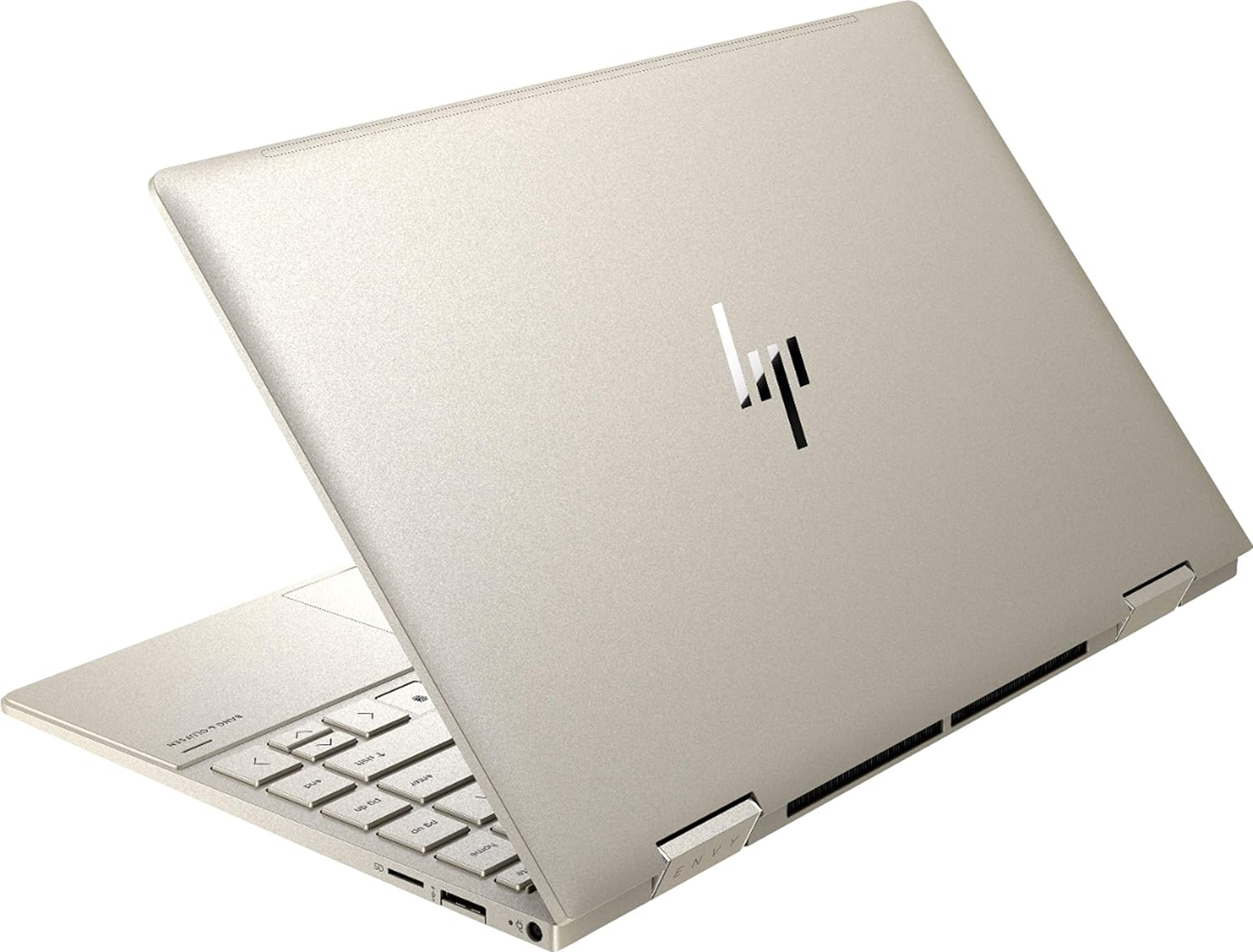
شکل 3.2: عقب view of the HP Envy x360 laptop, highlighting the sleek design and port placement on the sides.
4. راه اندازی
4.1 روشن شدن اولیه
- Unpack your HP Envy x360 laptop and included accessories.
- آداپتور برق را به پورت شارژ لپتاپ و سپس به پریز برق وصل کنید.
- Press the power button, typically located on the side or keyboard deck, to turn on the laptop.
- برای تکمیل تنظیمات ویندوز ۱۱ نسخه خانگی، از جمله انتخاب زبان، اتصال به شبکه و ایجاد حساب کاربری، دستورالعملهای روی صفحه را دنبال کنید.
4.2 اتصال لوازم جانبی
Connect your mouse, external display, or other USB devices to the available ports as described in Section 3. For wireless devices, enable Bluetooth in Windows settings and pair your devices.
5. دستورالعمل های عملیاتی
5.1 Using the 2-in-1 Modes
Your HP Envy x360 features a versatile 360-degree hinge, allowing for multiple usage modes:
- حالت لپتاپ: Traditional laptop orientation for typing and productivity.
- حالت چادر: صفحه نمایش را به عقب تا کنید تا به شکل V معکوس درآید، که برای تماشای ویدیو یا ارائه در فضاهای محدود ایدهآل است.
- حالت ایستاده: Fold the screen back further, resting the keyboard face down, to use the display for media consumption or touch-based applications.
- حالت تبلت: Fold the screen completely back against the base, transforming the device into a tablet for touch interaction.

Figure 5.1: The HP Envy x360 laptop configured in tent mode, suitable for media viewing.

Figure 5.2: The HP Envy x360 laptop fully folded into tablet mode, ready for touch input.
5.2 Touchscreen and Keyboard Usage
- صفحه لمسی: Use gestures similar to a smartphone or tablet for navigation, zooming, and interaction with applications.
- صفحه کلید با نور پس زمینه: Press the function key (Fn) and the appropriate F-key (usually F5 or F4, check keyboard icons) to toggle the keyboard backlight on/off or adjust brightness.
- خواننده اثر انگشت: Enroll your fingerprint through Windows Hello settings for secure and fast login.
6. تعمیر و نگهداری
Regular maintenance helps prolong the life of your laptop.
- تمیز کردن: Use a soft, lint-free cloth to clean the screen and chassis. For stubborn smudges, dampپارچه را با آب یا یک پاککنندهی مناسب برای صفحه نمایش، تمیز کنید. از مواد شیمیایی قوی خودداری کنید.
- به روز رسانی نرم افزار: Regularly update Windows and HP drivers to ensure optimal performance and security.
- مراقبت از باتری: از خالی شدن کامل باتری به طور مکرر خودداری کنید. برای نگهداری طولانی مدت، باتری را تا حدود ۵۰ تا ۷۰ درصد شارژ کنید.
- تهویه: Ensure the laptop's vents are not obstructed to prevent overheating. Use on a hard, flat surface when possible.
7 عیب یابی
این بخش به مشکلات رایجی که ممکن است با آنها مواجه شوید میپردازد.
۷.۱ مشکلات برق
- لپ تاپ روشن نمی شود: Ensure the power adapter is securely connected and the outlet is functional. Try a different outlet or power adapter if available.
- باتری شارژ نمی شود: Verify the power adapter connection. Check for any damage to the cable or port.
7.2 مشکلات نمایش
- صفحه خالی است: برای بررسی اینکه آیا مشکل از نمایشگر لپتاپ است یا خیر، یک مانیتور خارجی وصل کنید. لپتاپ را مجدداً راهاندازی کنید.
- صفحه لمسی پاسخگو نیست: Restart the laptop. Ensure all drivers are up to date via Windows Update or HP Support Assistant.
۶.۲ مشکلات عملکرد
- عملکرد کند: برنامههای غیرضروری را ببندید. Task Manager را برای فرآیندهایی که منابع زیادی مصرف میکنند بررسی کنید. از فضای خالی کافی روی SSD اطمینان حاصل کنید.
- گرمای بیش از حد: Clean vents. Ensure proper airflow. Reduce workload if consistently hot.
8. مشخصات
| ویژگی | جزئیات |
|---|---|
| نام تجاری | HP |
| نام مدل | اچپی انوی ایکس ۳۶۰ |
| اندازه صفحه نمایش | 13.3 اینچ |
| وضوح نمایش | 1920 x 1080 (Full HD) |
| نوع نمایشگر | LED IPS Touch Screen |
| پردازنده | 11th Generation Intel Core i5-1135G7 (2.4 GHz, up to 4.2 GHz with Turbo Boost) |
| حافظه رم | 8 گیگابایت DDR4 |
| ذخیره سازی | 256 گیگابایت SSD |
| سیستم عامل | ویندوز 10 صفحه اصلی |
| گرافیک | گرافیک Intel Iris Xe (یکپارچه) |
| ویژگی های خاص | کیبورد با نور پس زمینه، حسگر اثر انگشت |
| صوتی | Bang & Olufsen Audio with Three speakers |
| قابلیت اتصال | Wireless-AX, Bluetooth, USB, HDMI |
| پورت ها | 2x USB 3.0 Type-A, 1x HDMI, 1x Micro SD Card Reader, 1x Headphone/Microphone Combo, 1x USB-C |
| ابعاد (L x W x H) | ۵.۹ اینچ در ۱۱.۸ اینچ در ۱۴.۶ اینچ |
| وزن | 2.92 پوند |
| رنگ | طلای کم رنگ |
۲. چه چیزهایی در جعبه است؟
The following items are included with your HP Envy x360 laptop:
- HP Envy x360 13.3-inch 2-in-1 Laptop
- آداپتور برق
- ماوس پد

Figure 9.1: The HP Envy x360 laptop shown alongside the included mouse pad.
10. گارانتی و پشتیبانی
Your HP Envy x360 laptop comes with a standard manufacturer's warranty. For detailed warranty information, please refer to the warranty card included in your product packaging or visit the official HP support website. For technical assistance, driver downloads, or service requests, please contact HP Customer Support.
پشتیبانی HP Webسایت: support.hp.com