
مقدمه
This manual provides essential information for setting up, operating, maintaining, and troubleshooting your HP 2021 15.6-inch Full HD Laptop. This device is equipped with an Intel Celeron N4020 Processor, 8GB DDR4 RAM, and a 256GB Solid State Drive, designed for everyday computing tasks.
آنچه در جعبه است
Carefully unpack your new HP laptop and ensure all components are present.
- لپتاپ اچپی ۱۴
- آداپتور برق 45 ولت هوشمند
- Documentation (Setup poster)

Image: Contents of the HP laptop box, showing the laptop, AC adapter, and setup poster.
راه اندازی
۴.۲ روشن کردن و شارژ اولیه
Before first use, connect the AC power adapter to the laptop's power port and then to a wall outlet. Allow the battery to charge sufficiently before disconnecting the power adapter.
2. Windows 10 S Mode Setup
Follow the on-screen prompts to complete the initial Windows 10 S mode setup. This includes selecting your region, keyboard layout, connecting to a Wi-Fi network, and signing in with or creating a Microsoft account.
3. Activating Microsoft Office 365
لپتاپ شما شامل یک سال اشتراک مایکروسافت آفیس ۳۶۵ میشود. برای فعالسازی:
- هر برنامه آفیس (مثلاً ورد، اکسل) را اجرا کنید.
- Start activation by signing in with your Microsoft account. Create one if you do not have one.
- روی «فعال کردن آفیس» کلیک کنید.
- Sign in to your account and follow the prompts.
- Complete steps 1, 2, and 3 as indicated.
- Click "Refresh" once Office is ready.
- Open a document and accept the license agreement.
4. Switching Out of Windows 10 S Mode (Optional)
Windows 10 S mode is designed for security and performance, limiting app installations to the Microsoft Store. If you need to install apps from outside the Microsoft Store, you can switch to regular Windows 10 Home or Pro. This process is irreversible.
- در رایانه شخصی خود که ویندوز 10 را در حالت S اجرا میکند، باز کنید تنظیمات > به روز رسانی و امنیت > فعال سازی.
- در بخش «تغییر به ویندوز ۱۱ نسخه خانگی» یا «تغییر به ویندوز ۱۱ نسخه حرفهای»، گزینه به فروشگاه بروید. (Ensure you do not click a "Go to the Store" link in an "Upgrade your edition of Windows" section if present.)
- در صفحه «خروج از حالت S» (یا صفحه مشابه) که در فروشگاه مایکروسافت ظاهر میشود، گزینه دریافت کنید دکمه
- After you see a confirmation message on the page, you will be able to install apps from outside of the Microsoft Store.
تصویر: کنار view of the HP laptop highlighting the SuperSpeed USB Type-C, SuperSpeed USB Type-A, HDMI 1.4b, RJ-45 Ethernet port, headphone/microphone combo, and media card reader.
دستورالعمل های عملیاتی
صفحه کلید و تاچ پد
The laptop features a full-size keyboard with an integrated numeric keypad for enhanced productivity. The precision touchpad supports multi-touch gestures for intuitive navigation.
اتصال لوازم جانبی
- دستگاه های USB: Connect USB devices such as external drives, mice, or keyboards to the SuperSpeed USB Type-A or Type-C ports.
- نمایشگر خارجی: از پورت HDMI 1.4b برای اتصال مانیتور یا پروژکتور خارجی استفاده کنید.
- شبکه: برای اتصال به شبکه سیمی، یک کابل اترنت را به پورت RJ-45 وصل کنید.
- صوتی: Plug headphones or an external microphone into the headphone/microphone combo jack.
Webدوربین و میکروفون
The integrated HP True Vision 720p HD camera and dual array digital microphones are ready for online meetings and video calls. Ensure appropriate privacy settings are configured in Windows.
کارت خوان رسانه ای
Insert compatible SD media cards into the multi-format SD media card reader to access photos and files.

Image: The HP laptop's display area, highlighting the HP True Vision 720p HD Camera, rich 6.5 mm micro-edge Full HD IPS display, Intel UHD Graphics, and tuned stereo speakers.
تعمیر و نگهداری
مراقبت از باتری
To prolong battery life, avoid fully discharging the battery frequently. For optimal performance, use the provided HP 45W Smart AC power adapter. The laptop supports HP Fast Charge, allowing it to charge up to 50% in approximately 45 minutes when powered off.
تمیز کردن لپتاپ
کمی d از یک پارچه نرم و بدون پرز استفاده کنیدampبرای تمیز کردن صفحه نمایش، آن را با آب یا پاککننده صفحه نمایش آغشته کنید. برای صفحه کلید و شاسی، از یک پارچه نرم و خشک استفاده کنید. از مواد شیمیایی قوی یا مواد ساینده خودداری کنید.
به روز رسانی نرم افزار
Regularly check for and install Windows updates to ensure your system has the latest security patches and performance improvements. You can find these in تنظیمات > به روز رسانی و امنیت > به روز رسانی ویندوز.
عیب یابی
روشن نشدن لپتاپ
- مطمئن شوید که آداپتور برق متناوب (AC) به طور ایمن به لپتاپ و یک پریز برق فعال متصل است.
- با وصل کردن دستگاه دیگری به پریز برق، از سالم بودن آن اطمینان حاصل کنید.
- اگر باتری کاملاً خالی شده باشد، ممکن است چند دقیقه طول بکشد تا لپتاپ روشن شود و شارژ شود.
Battery Not Holding Charge / Only Works When Plugged In
- Check the battery health status in Windows settings.
- Ensure all drivers, especially power management drivers, are up to date.
- If the issue persists, the battery may require service or replacement. Contact HP Support for assistance.
بدون اتصال Wi-Fi
- بررسی کنید که آیا Wi-Fi در تنظیمات ویندوز فعال است یا خیر.
- روتر و مودم خود را مجدداً راه اندازی کنید.
- Ensure Wi-Fi drivers are installed and up to date.
نمایش مسائل
- If the screen is blank, try connecting an external monitor to determine if the issue is with the laptop's display or graphics card.
- روشنایی صفحه نمایش را با استفاده از کلیدهای تابع تنظیم کنید.
برای مشکلات پیچیدهتر، به پشتیبانی HP مراجعه کنید webسایت یا با خدمات مشتریان آنها تماس بگیرید.
مشخصات
Below are the key technical specifications for your HP 2021 15.6" FHD Laptop:
| ویژگی | مشخصات |
|---|---|
| نام تجاری | HP |
| نام مدل | HP 2021 |
| اندازه صفحه نمایش | 15.6 اینچ |
| وضوح نمایش | FHD (1920 x 1080) IPS, Anti-Glare |
| پردازنده | Intel Celeron N4020 (up to 2.8 GHz, 2 Cores, 4MB Cache) |
| حافظه رم | 8 گیگابایت DDR4 SDRAM |
| ذخیره سازی | ۲۵۶ گیگابایت SSD (درایو حالت جامد) |
| گرافیک | گرافیک UHD اینتل |
| سیستم عامل | ویندوز ۱۱ اس |
| پورت ها | 1x SuperSpeed USB Type-C, 2x SuperSpeed USB Type-A, 1x HDMI 1.4b, 1x RJ-45, 1x Headphone/Microphone Combo, 1x AC Smart Pin |
| اتصال بی سیم | 802.11a/b/g/n/ac Wi-Fi, Bluetooth |
| Webبادامک | دوربین HP True Vision 720p HD با میکروفون های دیجیتال آرایه دوگانه یکپارچه |
| باتری | 3-Cell, 41 WHr, Integrated Lithium Ion |
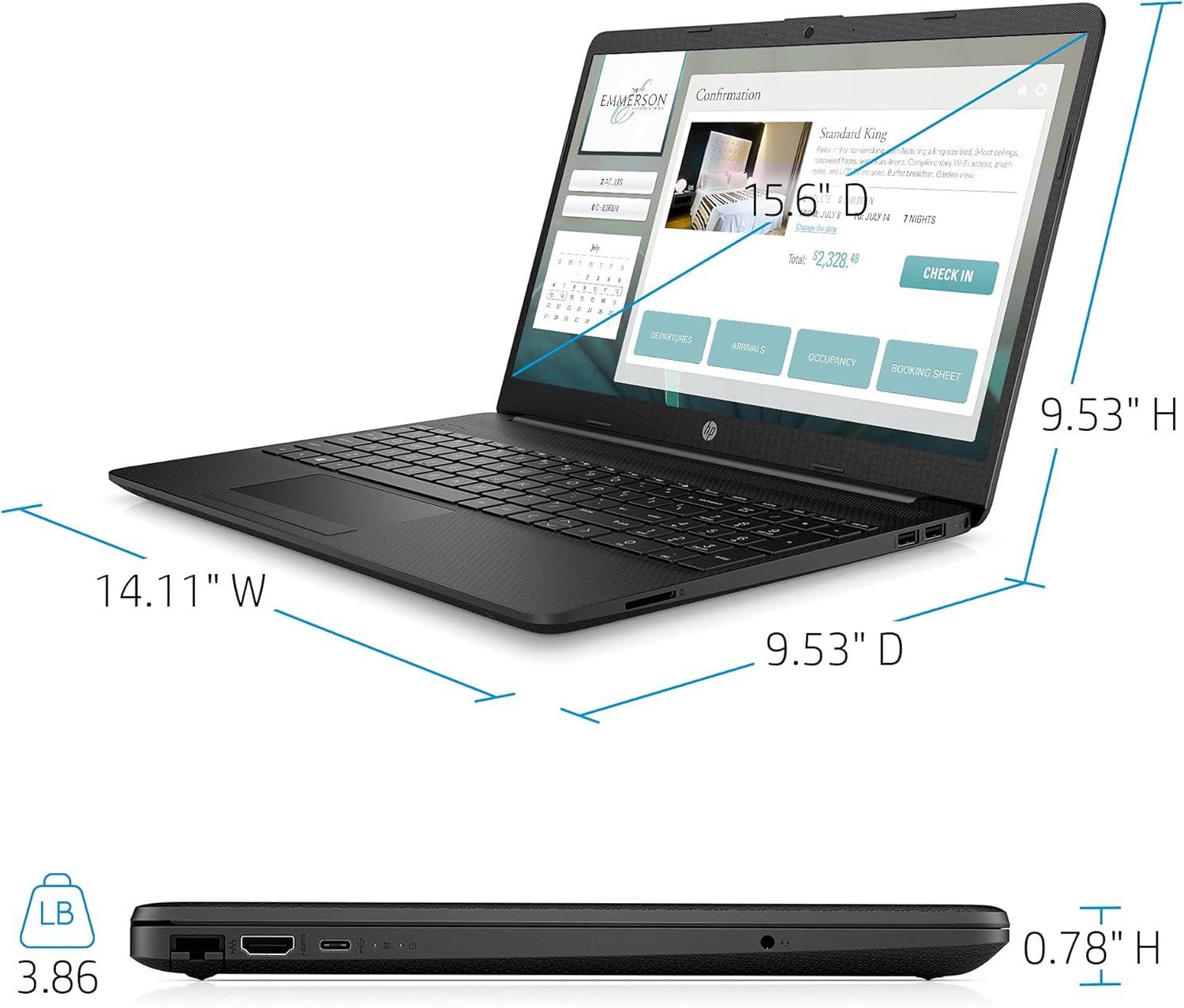
| وزن | 3.86 پوند |
| رنگ | مشکی |

Image: Physical dimensions of the HP laptop (14.11" W x 9.53" D x 0.78" H) and weight (3.86 lbs).
اطلاعات گارانتی
Your HP 2021 15.6" FHD Laptop comes with a limited manufacturer's warranty. Please refer to the documentation included in the box for specific terms, conditions, and duration of your warranty. Keep your proof of purchase for warranty claims.
پشتیبانی کنید
برای کمک بیشتر، پشتیبانی فنی یا سوالات مربوط به خدمات، لطفاً از پشتیبانی رسمی HP دیدن کنید website or contact HP customer service directly. You can find contact information and resources on the HP webسایت: