
مقدمه
This manual provides essential information for the proper use and maintenance of your Blitzwolf BW-AT2C Smartwatch. Please read these instructions carefully before using the device to ensure optimal performance and longevity. This smartwatch features Bluetooth calling, comprehensive health monitoring, various sports modes, and smart notifications.
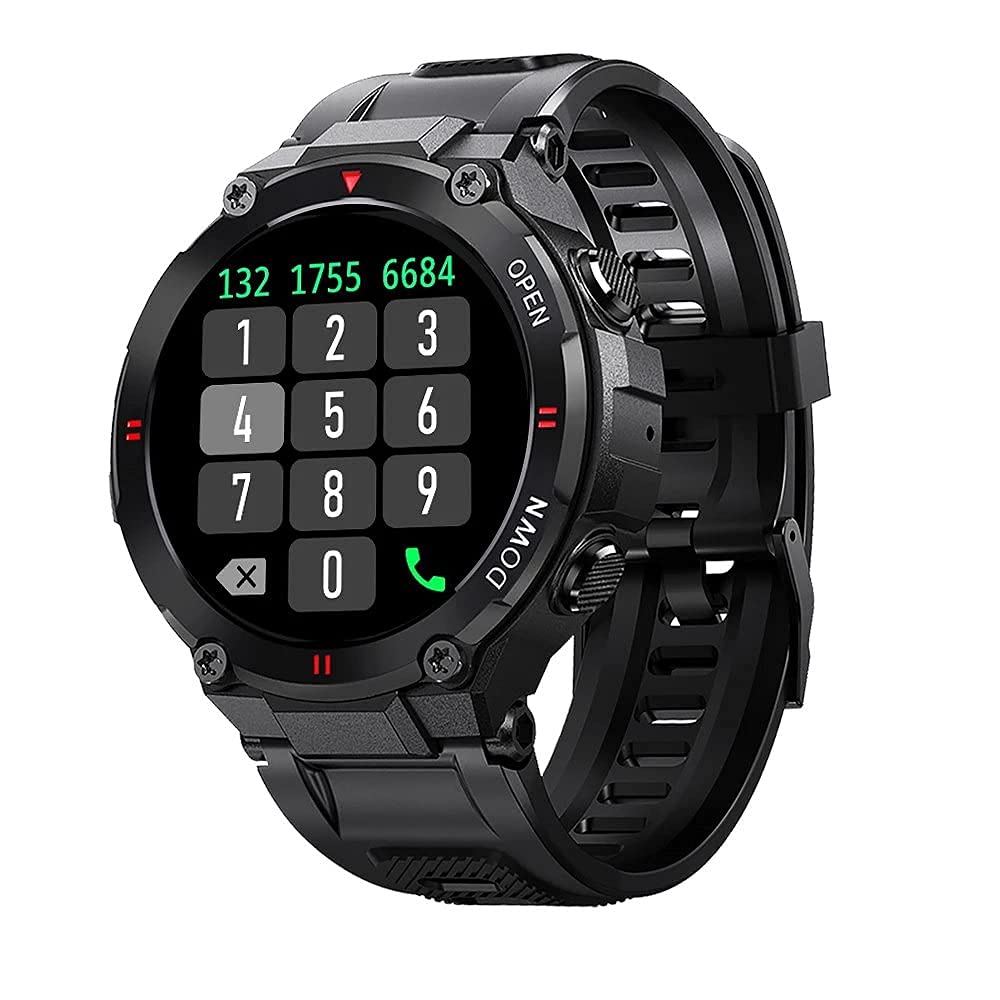
تصویر: جلو view of the Blitzwolf BW-AT2C Smartwatch, displaying a digital watch face with time, date, battery, and step count.
محصول تمام شده استview
The Blitzwolf BW-AT2C Smartwatch is designed for daily use, fitness tracking, and communication. It features a durable build and a clear display.
- نمایش: 1.3-inch IPS full touch screen.
- کنترل: Full touch screen and two side buttons.
- حسگرها: Heart rate, blood pressure, blood oxygen, pedometer, sleep monitor.
- قابلیت اتصال: Bluetooth 5.0 for calls and data synchronization.
- ماندگاری: مقاومت در برابر آب IP54

Image: The smartwatch displaying weather information, highlighting its robust design and metal buttons.

تصویر: عقب view of the smartwatch, showing the optical heart rate sensor and magnetic charging contacts, along with the model number BW-AT2C.
راه اندازی
1. شارژ کردن دستگاه
Before initial use, fully charge your smartwatch. Connect the magnetic charging cable to the charging contacts on the back of the watch and plug the USB end into a power adapter (not included) or a computer's USB port. The watch screen will indicate charging status. A full charge takes approximately 2 hours.
۲. نصب و جفتسازی برنامه
- دانلود اپلیکیشن: جستجو برای "Da Fit" in your smartphone's app store (Google Play Store for Android or Apple App Store for iOS) and install it.
- بلوتوث را فعال کنید: اطمینان حاصل کنید که بلوتوث در گوشی هوشمند شما فعال است.
- برنامه Da Fit را باز کنید: Launch the "Da Fit" application on your smartphone.
- افزودن دستگاه: In the app, navigate to the "Device" section and select "Add Device". The app will search for available devices.
- ساعت خود را انتخاب کنید: Choose "BW-AT2C" from the list of found devices to initiate pairing.
- تایید جفت شدن: برای تأیید جفتسازی، هرگونه پیام روی صفحه را هم در تلفن و هم در ساعت خود دنبال کنید.
- Enable Call Function: For the Bluetooth call feature, you may need to pair the watch a second time through your phone's Bluetooth settings. Look for "BW-AT2C_CALL" or similar in your phone's Bluetooth device list and connect to it.
توجه: For full functionality, ensure the "Da Fit" app has all necessary permissions (e.g., location, notifications, contacts) enabled on your smartphone.
دستورالعمل های عملیاتی
ناوبری اولیه
- صفحه نمایش لمسی: برای پیمایش در منوها و ویژگیها، انگشت خود را به چپ/راست، بالا/پایین بکشید. برای انتخاب، ضربه بزنید.
- دکمه های کناری: The top button typically acts as a power/wake button and a back button. The bottom button may be a shortcut to sports modes or other functions, depending on customization.
- بیدار شدن از خواب: Raise your wrist or press a side button to wake the screen.
- تنظیم روشنایی: Adjust screen brightness through the watch settings or the Da Fit app for better visibility in various lighting conditions.
- چهرههای ساعت سفارشی: Change watch faces directly on the watch or via the Da Fit app. You can also customize watch faces with your own photos.
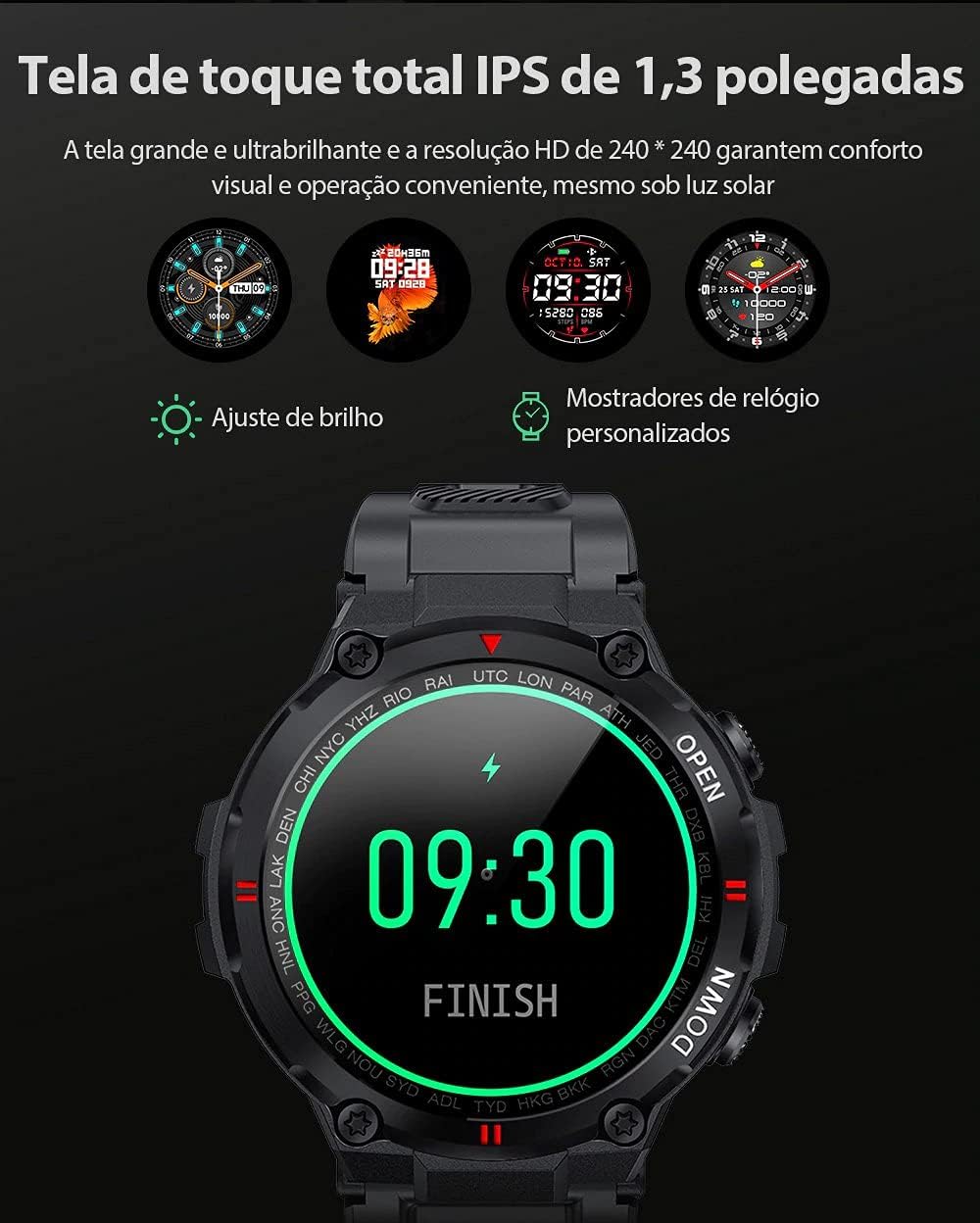
Image: The smartwatch displaying multiple customizable watch faces and options for brightness adjustment.
برقراری و دریافت تماس
The BW-AT2C allows you to make and receive calls directly from your wrist after successful Bluetooth pairing (including the call function pairing).
- دریافت تماس: وقتی تماسی دریافت میشود، ساعت شناسه تماسگیرنده را نمایش میدهد. میتوانید مستقیماً از روی صفحه ساعت به تماس پاسخ دهید یا آن را رد کنید.
- برقراری تماس: برای شروع تماس، به صفحه شماره گیری یا لیست مخاطبین روی ساعت دسترسی پیدا کنید.

Image: A comparison showing the BW-AT2C model with its Bluetooth call function (dial pad visible) next to the BW-AT2 model without this feature.
کنترل موسیقی
Control music playback on your smartphone directly from your watch. Functions include play, pause, skip forward, and skip backward.
پایش سلامت
این ساعت هوشمند به طور مداوم معیارهای مختلف سلامت را رصد میکند.
- ضربان قلب: نظارت بر ضربان قلب در زمان واقعی. View ضربان قلب فعلی و دادههای قبلی شما در برنامه.
- فشار خون: Measure your blood pressure on demand.
- اکسیژن خون (SpO2): سطح اشباع اکسیژن خون خود را کنترل کنید.
- نظارت بر خواب: الگوهای خواب شما، از جمله خواب عمیق، خواب سبک و زمانهای بیداری را پیگیری میکند.
- گام شمار: تعداد قدمهای روزانه، مسافت طی شده و کالری سوزانده شده شما را محاسبه میکند.

Image: The smartwatch screen showing a graph of heart rate data, indicating current BPM and historical trends.
حالت های ورزشی
The watch supports multiple sports modes to track your workouts accurately. Available modes include Walking, Running, Cycling, Skipping Rope, Badminton, Basketball, and Football. Select your desired mode before starting an activity to record relevant data.
اطلاعیه ها
Receive notifications from your smartphone directly on your watch. This includes call reminders, message alerts, and app notifications from platforms like WhatsApp, Instagram, Facebook, and Twitter. Ensure notification permissions are granted in the Da Fit app and your phone's settings.

Image: The smartwatch on a user's wrist, showing an incoming call alert and SMS reminder, indicating its notification capabilities.
سایر ویژگی ها
- ساعت زنگدار: Set up to three alarms via the app.
- کرونومتر: Use the built-in stopwatch for timing activities.
- یادآوری کم تحرک: The watch will alert you if you remain inactive for too long.
- کنترل دوربین از راه دور: از ساعت خود به عنوان شاتر دوربین گوشی خود استفاده کنید.
- Find Watch/Find Phone: Locate your watch or phone using the respective functions in the app or on the watch.
- تقویم: Access calendar information.
تعمیر و نگهداری
- تمیز کردن: ساعت و بند آن را مرتباً با یک پارچه نرم و خشک پاک کنید. برای آلودگیهای سرسخت، از یک پارچه نرم و کمی مرطوب استفاده کنید.amp cloth and dry thoroughly. Avoid harsh chemicals.
- مقاومت در برابر آب (IP54): The BW-AT2C is IP54 water-resistant, meaning it is protected against dust ingress and splashing water from any direction. It is suitable for daily use like hand washing or light rain. Do not submerge the watch in water, wear it while swimming, showering, or in saunas. Prolonged exposure to water or high-pressure water jets may cause damage.
- شارژ کردن مخاطبین: برای اطمینان از شارژ صحیح، اتصالات شارژ مغناطیسی را تمیز و خشک نگه دارید.
- ذخیره سازی: ساعت را در صورت عدم استفاده، در جای خشک و خنک نگهداری کنید.
عیب یابی
| مشکل | راه حل |
|---|---|
| ساعت روشن نمیشود. | مطمئن شوید که ساعت کاملاً شارژ شده است. آن را حداقل به مدت 30 دقیقه به شارژر وصل کنید. |
| نمیتوان با تلفن هوشمند جفتسازی کرد. |
|
| اعلان ها دریافت نمی شود. |
|
| Call function not working. | Ensure you have paired the "BW-AT2C_CALL" device in your phone's Bluetooth settings in addition to the main watch pairing. |
| دادههای نادرست سلامت. | Ensure the watch is worn snugly on your wrist, not too tight or too loose. Keep the sensor clean. Note that this device is not a medical device and data is for reference only. |
مشخصات

Image: Diagram illustrating the dimensions of the Blitzwolf BW-AT2C Smartwatch, including watch face diameter, strap width, and total length.
| ویژگی | جزئیات |
|---|---|
| نام تجاری | بلیتزولف |
| مدل | BW-AT2C |
| رنگ | مشکی |
| نسخه بلوتوث | 5.0 |
| سیستم عامل سازگار | Android 4.4+ / iOS 8.0+ |
| حالت عملیات | Full Touch Screen + 2 Side Buttons |
| برنامه همراه | دا فیت |
| مقاومت در برابر آب | IP54 |
| پایش سلامت | Heart Rate, Blood Pressure, Blood Oxygen, Sleep, Pedometer |
| حالت های ورزشی | Walking, Running, Cycling, Skipping Rope, Badminton, Basketball, Football |
| اندازه صفحه نمایش | 1.3 اینچی IPS |
| قطعنامه | 240 x 240 پیکسل |
| ظرفیت باتری | 400 میلی آمپر ساعت |
| زمان آماده به کار | تقریباً 30 روز |
| زمان استفاده | Approx. 4-7 days (varies by usage) |
| زمان شارژ | تقریبا 2 ساعت |
| نوع شارژ | شارژ مغناطیسی |
| مواد بند | سیلیکون |
| عرض تسمه | 22mm (Removable) |
| ابعاد محصول | 52 x 12 mm (Watch Face) |
| وزن محصول | 55 گرم |
گارانتی و پشتیبانی
For warranty information and technical support, please refer to the documentation provided with your purchase or visit the official Blitzwolf webسایت. فاکتور خرید خود را برای موارد گارانتی نگه دارید.
If you encounter issues not covered in the troubleshooting section, please contact customer support for assistance.