
SAMSUNG AR24TVFCKWKGU
Samsung WindFree™ Wall-mount AC User Manual
Model: AR24TVFCKWK/GU
مقدمه
This user manual provides essential information for the safe and efficient operation, maintenance, and troubleshooting of your Samsung WindFree™ Wall-mount Air Conditioner. Please read this manual thoroughly before using the appliance and keep it for future reference.

تصویر: جلو view of the Samsung WindFree™ Wall-mount AC indoor unit, displaying a temperature of 23°C.
اطلاعات ایمنی
برای جلوگیری از آسیب یا جراحت به دستگاه، همیشه اقدامات احتیاطی ایمنی زیر را رعایت کنید.
- Ensure the air conditioner is installed by a qualified professional.
- انگشتان یا اجسام خارجی را در ورودی یا خروجی هوا وارد نکنید.
- آب را مستقیماً روی دستگاه اسپری نکنید.
- قبل از تمیز کردن یا انجام تعمیر و نگهداری ، دستگاه را از برق جدا کنید.
- کودکان را از دستگاه و کنترل از راه دور دور نگه دارید.
اجزای محصول
Your Samsung WindFree™ AC package includes the following main components:
- واحد داخلی
- واحد فضای باز
- کنترل از راه دور
- راهنمای کاربر (این سند)
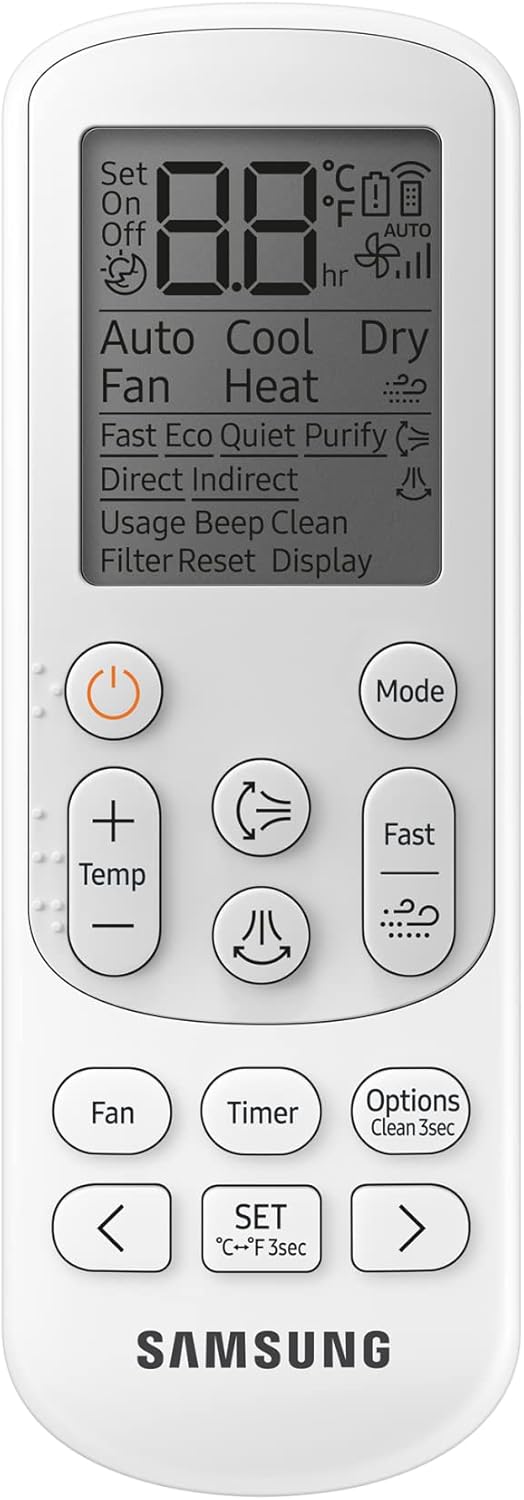
Image: The remote control for the Samsung WindFree™ AC, showing various function buttons.
راه اندازی و نصب
Installation of the Samsung WindFree™ Wall-mount AC should only be performed by certified technicians. This section provides general information regarding the setup.
بررسی های قبل از نصب
- Ensure the installation location is structurally sound to support the unit's weight.
- Verify proper electrical supply (240 Volts AC) is available.
- Confirm adequate space for airflow around both indoor and outdoor units.
نصب یونیت داخلی
The indoor unit is designed for wall-mounting. Ensure it is level and securely fastened to prevent vibration and noise.

Image: The indoor unit with its air outlet flap open, ready for operation.
Connecting Refrigerant Lines and Electrical Wiring
Refrigerant lines and electrical wiring must be connected according to local codes and manufacturer specifications. Improper connections can lead to system malfunction or safety hazards.
قرار دادن واحد در فضای باز
The outdoor unit should be placed on a stable, level surface, away from direct sunlight and obstructions that could impede airflow. Ensure sufficient clearance for maintenance.

Image: The outdoor unit, designed for durability and efficient operation.
دستورالعمل های عملیاتی
Your Samsung WindFree™ AC offers various modes and features for optimal comfort and energy efficiency.
Basic Operation with Remote Control
- روشن/خاموش برق: را فشار دهید قدرت دکمه روشن یا خاموش کردن دستگاه.
- انتخاب حالت: استفاده کنید حالت button to cycle through modes: Cool, Fan, Dry, Auto.
- تنظیم دما: استفاده کنید دما + و دما - دکمه ها را برای تنظیم دمای مورد نظر خود تنظیم کنید.
- سرعت فن: Adjust fan speed using the فن دکمه
ویژگی های کلیدی
- WindFree™ Cooling: This mode disperses air gently through 23,000 micro air holes, eliminating unpleasant drafts. Activate via the remote control.
- خنک کننده سریع: Designed to cool rooms quickly from corner to corner. This mode utilizes a wider inlet, bigger fan, and wider blade for enhanced airflow.

Image: Diagram showing the enhanced airflow design for faster cooling.
- AI Auto Cooling: This intelligent feature optimizes cooling based on user preferences and environmental conditions.
- Good Sleep Mode: Provides an optimal temperature for a comfortable night's sleep, often reducing noise levels.

Image: Good Sleep mode promotes comfortable rest.
- فناوری اینورتر دیجیتال: This technology maintains the desired temperature without frequently turning the compressor on and off, leading to energy savings.

Image: Energy saving graph illustrating the efficiency of Digital Inverter technology.
تعمیر و نگهداری
سرویس و نگهداری منظم، عملکرد بهینه و طول عمر کولر گازی شما را تضمین میکند.
عملکرد تمیز کردن خودکار
When the air conditioner is turned off, the Auto Clean function automatically runs a fan to remove dust and moisture from the heat exchanger, preventing the growth of bacteria and odors.

تصویر: داخلی view of the AC unit, highlighting the heat exchanger cleaned by the Auto Clean function.
Cleaning the Anti-Bacterial Filter
The Easy Filter Plus is located on the top of the indoor unit for easy access. It should be cleaned regularly to maintain air quality and efficiency.
- کولر گازی را خاموش کنید و آن را از برق جدا کنید.
- پانل جلویی واحد داخلی را باز کنید.
- Gently remove the Easy Filter Plus from its slot.
- Clean the filter with a soft brush or vacuum cleaner. For heavy dirt, wash with lukewarm water and a mild detergent.
- قبل از نصب مجدد، اجازه دهید فیلتر در یک منطقه سایهدار کاملاً خشک شود.
- پنل جلویی را ببندید.

Image: Illustration of removing the Easy Filter Plus for cleaning.
نظافت عمومی
- قسمت بیرونی واحدهای داخلی و خارجی را با یک پارچه نرم و لطیف پاک کنید.amp پارچه
- از مواد شیمیایی خشن یا پاک کننده های ساینده استفاده نکنید.
- Ensure the drainage hose is clear of obstructions.
عیب یابی
قبل از تماس با خدمات، لطفاً به مشکلات رایج زیر و راهحلهای آنها مراجعه کنید.
| مشکل | علت احتمالی | راه حل |
|---|---|---|
| واحد روشن نمی شود. | No power supply; remote control batteries dead. | Check power connection and circuit breaker; replace remote control batteries. |
| سرمایش ناکافی | Dirty air filter; blocked outdoor unit; room too large; windows/doors open. | Clean air filter; clear obstructions from outdoor unit; ensure room is sealed; check unit capacity for room size. |
| نشت آب از واحد داخلی | گرفتگی شلنگ تخلیه؛ نصب نادرست. | Check and clear drain hose; contact a qualified technician for inspection. |
| سر و صدای غیر معمول. | قطعات شل؛ اشیاء خارجی؛ عدم تعادل فن. | Turn off unit and inspect for loose parts or obstructions; if noise persists, contact service. |
اگر پس از امتحان کردن این راهحلها مشکل همچنان ادامه داشت، لطفاً با پشتیبانی مشتریان سامسونگ تماس بگیرید.
مشخصات
Detailed technical specifications for the Samsung WindFree™ Wall-mount AC (Model: AR24TVFCKWK/GU).
| صفت | ارزش |
|---|---|
| شماره مدل | AR24TVFCKWK/GU |
| نام تجاری | سامسونگ |
| تایپ کنید | Wall-mount Split System Air Conditioner |
| ظرفیت | ۰.۷ تن (۹۰۰۰ واحد حرارتی بریتانیایی) |
| منبع تغذیه | سیم برقی |
| جلدtage | 240 ولت (AC) |
| واتtage | 1985 وات |
| سطح نویز | 51 دسی بل |
| ابعاد واحد داخلی (طول x عرض x ارتفاع) | ۳۶.۵ در ۱۴.۲ در ۷.۰۱ سانتیمتر (تقریباً ۳۷ در ۱۴.۴ در ۷.۴ سانتیمتر) |
| وزن مورد | 55 کیلوگرم |
| ویژگی های خاص | WindFree™ Cooling, Digital Inverter, AI Auto Cooling, Anti Bacterial Filter, Auto Clean |
| نوع مبرد | R410A (Hydrofluorocarbon) |

Image: Dimensions of the indoor unit.

Image: Internal components of the outdoor unit, contributing to its performance.

Image: Properties of R410A refrigerant used in the system.
گارانتی و پشتیبانی
برای اطلاعات مربوط به گارانتی و پشتیبانی مشتری، لطفاً به کارت گارانتی ارائه شده همراه محصول خود مراجعه کنید یا از وبسایت رسمی سامسونگ دیدن کنید. webسایت برای منطقه شما
خدمات مشتریان سامسونگ: For technical assistance, repairs, or inquiries, please contact Samsung's authorized service centers.
- پشتیبانی آنلاین: www.samsung.com/support/
- Phone Support: Refer to your regional Samsung webسایتی برای شمارههای تماس محلی.
هنگام تماس با پشتیبانی، رسید خرید و شماره سریال محصول خود را در دسترس داشته باشید.
اسناد مرتبط - AR24TVFCKWKGU
 |
Samsung AR70F12D1JWXSP Air Conditioner User Manual Comprehensive user manual for the Samsung AR70F12D1JWXSP air conditioner, covering installation, operation, smart features, maintenance, troubleshooting, and safety information. |
 |
Samsung Air Conditioner User Manual - AR60H**D1*** Comprehensive user manual for the Samsung AR60H**D1*** air conditioner, covering setup, operation, smart features, maintenance, and troubleshooting. Learn how to maximize your unit's performance and efficiency. |
 |
دفترچه راهنمای کولر گازی سامسونگ AR60H**D1*** این دفترچه راهنما دستورالعملهای جامعی را برای کولر گازی سامسونگ AR60H**D1*** ارائه میدهد که شامل راهاندازی، عملکرد، ویژگیهای هوشمند مانند حالتهای WindFree™ و هوش مصنوعی، نگهداری، اقدامات ایمنی و عیبیابی میشود. یاد بگیرید که چگونه با دستگاه جدید سامسونگ خود، راحتی و بهرهوری انرژی را به حداکثر برسانید. |
 |
دفترچه راهنمای کولر گازی سامسونگ AR9500T WindFree | ویژگیهای انرژی وایفای و هوش مصنوعی User manual for the Samsung AR9500T WindFree air conditioner. This guide provides essential information on safety, operation, features like WindFree cooling, Wi-Fi connectivity, AI Energy functions, cleaning, and maintenance. Learn to maximize comfort and efficiency with your Samsung air conditioner. |
 |
Modifica Regolamento Concorso Samsung Clima Cool Awards Aggiornamento delle regole برای il concorso a premi 'Samsung Clima Cool Awards'، che offre premi legati all'acquisto di sistemi di climatizzazione Samsung. Dettagli su periodi di validità, meccaniche di partecipazione, e premi. |
 |
راهنمای نصب پایه دیواری چرخان خودکار سامسونگ راهنمای جامع نصب پایه دیواری چرخان خودکار سامسونگ، شامل لیست قطعات، ابعاد و دستورالعملهای گام به گام برای انواع مختلف دیوار. |
Ask a question about this manual
Ask about setup, troubleshooting, compatibility, parts, safety, or missing instructions. Manuals+ will review the question and use this page’s manual context to help answer it.