
مقدمه
Thank you for choosing the Newskill Manticore Gaming PC Case. This manual provides essential information for the proper installation, operation, and maintenance of your new PC chassis. Please read these instructions carefully before beginning the assembly process to ensure optimal performance and longevity of your components.
محصول تمام شده استview
The Newskill Manticore is an ATX mid-tower gaming PC case designed for high-performance builds. It features a mesh front panel for superior airflow, a tempered glass side panel to showcase your components, and four pre-installed 120mm ARGB fans for effective cooling and customizable aesthetics.
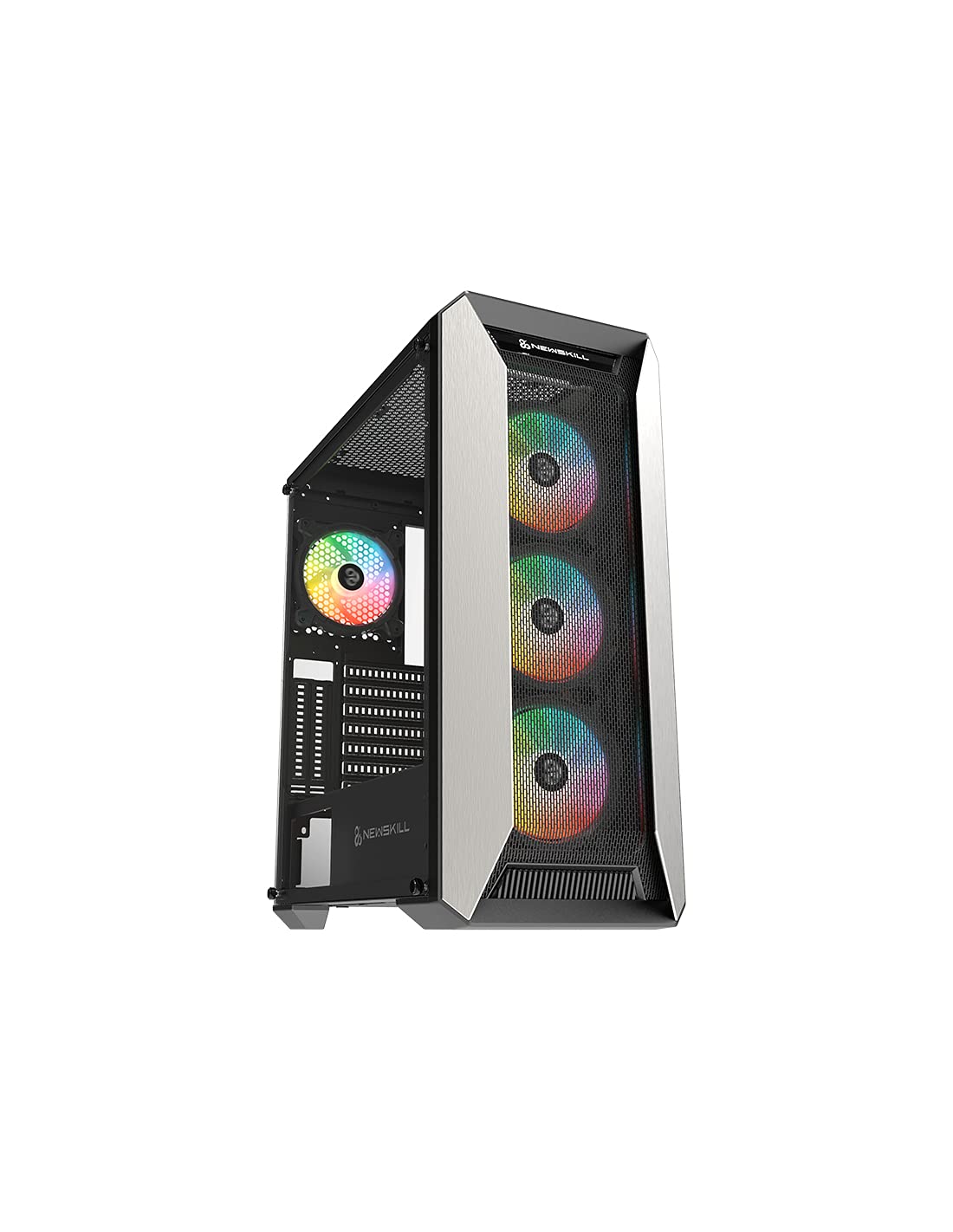
شکل 1: جلو view of the Newskill Manticore Gaming PC Case, highlighting the mesh front and tempered glass side panel.
ویژگی های کلیدی:
- ATX Mid-Tower compatibility
- Mesh front panel for optimized airflow
- پنل کناری شیشه سکوریت
- Four pre-installed 120mm ARGB fans
- Two removable dust filters
- USB 3.0 connectivity on the front panel
راه اندازی و نصب
1. باز کردن بسته بندی
Carefully remove the PC case from its packaging. Inspect for any damage that may have occurred during shipping. Retain the packaging for future transport or warranty claims.
2. شناسایی جزء
Before installation, familiarize yourself with the case components and included accessories:
- Newskill Manticore PC Case
- جعبه لوازم جانبی (پیچها، بستهای کابل، پایهها)
- راهنمای کاربر (این سند)
3. نصب مادربرد
- با باز کردن پیچهای شستی، پنل کناری شیشه سکوریت را بردارید.
- Install the necessary motherboard standoffs into the motherboard tray.
- Carefully place your ATX motherboard onto the standoffs, aligning the screw holes.
- مادربرد را با پیچهای ارائه شده محکم کنید.
۳. نصب منبع تغذیه (PSU)
- محل نصب PSU را در قسمت پایین و عقب کیس پیدا کنید.
- Slide your PSU into position from the rear of the case.
- منبع تغذیه (PSU) را با پیچ از قسمت بیرونی پشت کیس محکم کنید.
۴. نصب درایو ذخیرهسازی
The case supports various storage configurations. Refer to your specific drive type for mounting instructions (e.g., 2.5" SSDs, 3.5" HDDs).
۳.۶ نصب کارت گرافیک و کارت توسعه
Remove the necessary PCIe slot covers and install your graphics card or other expansion cards, securing them with screws.
۵.۸ اتصالات پنل جلویی
Connect the front panel cables (USB 3.0, HD Audio, Power Switch, Reset Switch, Power LED, HDD LED) to the corresponding headers on your motherboard. Consult your motherboard manual for exact pin layouts.
8. مدیریت کابل
از شیارهای عبور کابل و نقاط اتصال پشت سینی مادربرد برای مدیریت کابلها استفاده کنید. این کار جریان هوا و زیبایی را بهبود میبخشد.
دستورالعمل های عملیاتی
روشن/خاموش کردن
Press the power button located on the top panel of the case to turn on your system. To shut down, use the operating system's power-off function or press and hold the power button for several seconds for a forced shutdown (not recommended for regular use).
کنترل روشنایی ARGB
The pre-installed ARGB fans can be controlled via your motherboard's ARGB software (if compatible) or a dedicated ARGB controller (if included or purchased separately). Refer to your motherboard or controller manual for specific instructions on changing lighting effects and colors.
تعمیر و نگهداری
تمیز کردن فیلتر گرد و غبار
The Newskill Manticore includes two removable dust filters (typically located on the top and bottom/front). Regularly clean these filters to maintain optimal airflow and prevent dust buildup inside your PC. Gently slide them out, clean with water and mild soap, or use a vacuum cleaner, and ensure they are completely dry before re-inserting.
تمیز کردن بیرونی
سطوح بیرونی را با نرم، دamp پارچه. از پاککنندههای ساینده یا حلالهایی که میتوانند به روکش یا شیشه سکوریت آسیب بزنند، خودداری کنید.
عیب یابی
بدون قدرت
- مطمئن شوید که PSU به درستی به پریز برق وصل شده و روشن است.
- بررسی کنید که تمام کابلهای برق از PSU به درستی به مادربرد و قطعات متصل شده باشند.
- اتصالات کلید پاور پنل جلویی به مادربرد را بررسی کنید.
فنها نمیچرخند / ARGB روشن نمیشود
- مطمئن شوید که کابلهای برق فن به طور ایمن به مادربرد یا کنترلکننده فن متصل هستند.
- Check ARGB connections to the motherboard's ARGB header or dedicated controller.
- Ensure ARGB software or controller settings are correctly configured.
Poor Airflow / Overheating
- فیلترهای گرد و غبار را مرتباً تمیز کنید.
- Ensure no obstructions are blocking air intake or exhaust vents.
- Verify all fans are spinning correctly and oriented for optimal airflow.
For further assistance, please contact Newskill support.
مشخصات
| ویژگی | جزئیات |
|---|---|
| نام مدل | مانتیکور |
| شماره مدل | 1102 |
| نوع مورد | میانه برج |
| سازگاری با مادربرد | ATX |
| ابعاد (L x W x H) | 60 × 60 × 85 سانتی متر |
| وزن | 1 کیلوگرم |
| مواد | شیشه سکوریت، فلز |
| روش خنک کننده | Air (4x 120mm ARGB fans included) |
| بنادر ورودی / ورودی جلو | USB 3.0, Audio Jacks, Power, Reset |
| فیلترهای گرد و غبار | ۳ (قابل جدا شدن) |
| استفاده توصیه شده | بازی |
اطلاعات گارانتی
The Newskill Manticore PC Case comes with a ۱ سال گارانتی سازنده. This warranty covers defects in materials and workmanship under normal use. It does not cover damage caused by misuse, accident, modification, or unauthorized repair. Please retain your proof of purchase for warranty claims.
پشتیبانی و تماس
For technical support, troubleshooting assistance, or warranty inquiries, please visit the official Newskill website or contact their customer service department. You can find contact information on the Newskill webسایت: www.newskillgaming.com