
BRANTMAKER B092YNQVHV
BRANTMAKER Nail Dust Collector Instruction Manual
Model: B092YNQVHV
Brand: BRANTMAKER
1. مقدمه
The BRANTMAKER 60W Nail Dust Collector is designed to provide a clean and comfortable working environment by effectively collecting nail dust generated during various nail art and crafting processes. Its powerful suction and reusable filter system ensure efficient dust removal.
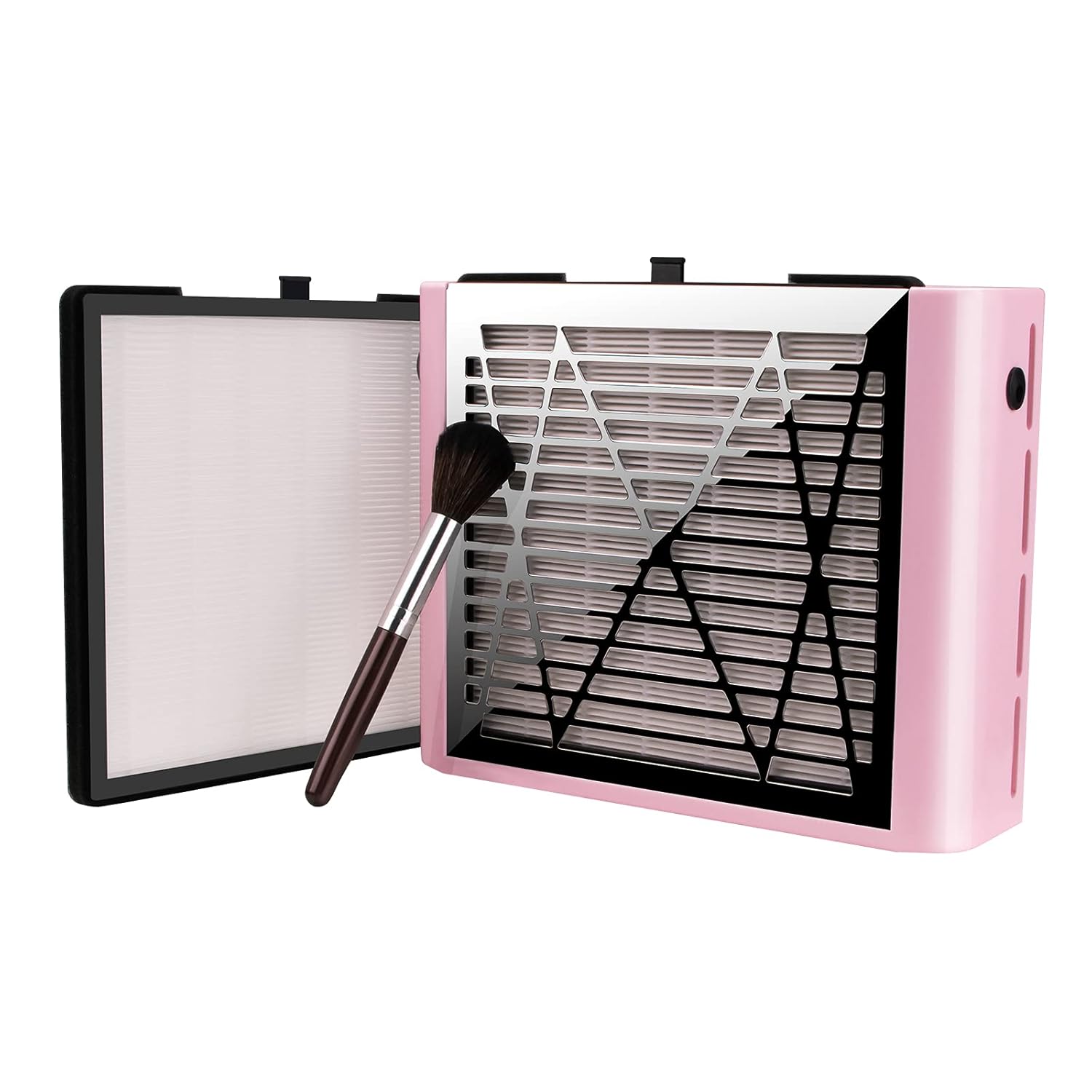
Image: The BRANTMAKER Nail Dust Collector, showcasing its compact design, alongside a cleaning brush and a reusable filter.
ویژگی های کلیدی:
- 60W Super Suction: Equipped with a powerful fan for effective dust collection.
- Acceptable Sound Level: Designed to operate at a comfortable noise level for a pleasant working experience.
- لوازم جانبی مفید: Includes a delicate brush and two reusable filters for convenience.
- اتلاف گرمای کارآمد: Features a large air hole and non-slip mat for stable operation and heat management.
- Simple One-Button Switch: Easy to operate with a straightforward on/off switch.
2. محتویات بسته
لطفاً بررسی کنید که تمام موارد ذکر شده در زیر در بسته شما موجود باشد:
- Dust Collector Main Box (x1)
- AC Adapter (110V-240V) (x1)
- Reusable Filter (x2)
- Dust Brush (x1)
- راهنمای دستورالعمل (x1)

Image: A visual representation of the package contents, including the dust collector, adapter, filters, brush, and manual.
3. اطلاعات ایمنی
- احتیاط: Do not insert your finger into the fan.
- احتیاط: Do not allow water to enter the machine.
- احتیاط: دور از کودکان نگهداری شود.
- تمیز کردن فیلتر: The filter board cannot be washed with water. Clean it using a hair dryer or dust brush only.
- تعمیر و نگهداری: It is forbidden for unprofessional personnel to disassemble the screws of the motor, rebuild, or decompose the machine, as this may cause malfunctions.
4. راه اندازی
- باز کردن بسته: Carefully remove the Nail Dust Collector and all accessories from the packaging.
- قرار دادن: Place the dust collector on a stable, flat surface where you intend to perform nail work. Ensure there is adequate ventilation around the unit.
- نصب فیلتر: Ensure the reusable filter is correctly inserted into the designated slot. The filter slides in from the side of the unit.
- اتصال برق: Connect the AC adapter to the power input port on the dust collector. Plug the adapter into a suitable electrical outlet (110V-240V).

Image: Demonstrates the typical setup with hands positioned over the dust collector for nail work.
5. دستورالعمل های عملیاتی
- روشن کردن: Locate the one-button switch on the side of the unit. Press the switch to turn on the dust collector. The fan will begin to operate.
- موقعیت یابی: Place your hand or the area being worked on directly over the dust collection grate. The powerful suction will draw in nail dust and debris.
- در حین استفاده: Continue with your nail art, grinding, or drilling tasks. The dust collector will continuously capture airborne particles.
- خاموش: After completing your work, press the one-button switch again to turn off the dust collector.

Image: An illustration highlighting the powerful suction capability of the device, drawing dust downwards.
ویدیوی رسمی محصول:
Video: An official product video demonstrating the BRANTMAKER Nail Dust Collector in use, showcasing its suction and ease of operation.
6. تعمیر و نگهداری
Regular cleaning of the filter is essential to maintain optimal performance of your dust collector.
- حذف فیلتر: Gently slide out the reusable filter from the side of the unit.
- تمیز کردن فیلتر: Use the provided dust brush or a hair dryer to clean the collected dust from the filter. فیلتر را با آب نشویید.
- نصب مجدد: Once clean, slide the filter back into its slot until it is securely in place.
- فرکانس: Clean the filter regularly, ideally after each significant use, to ensure consistent suction power. Replace the filter every 3-4 months for best results.

Image: A visual guide demonstrating the proper method for cleaning the reusable filter using a hair dryer, emphasizing not to use water.
7 عیب یابی
| مشکل | علت احتمالی | راه حل |
|---|---|---|
| دستگاه روشن نمی شود | منبع تغذیه وجود ندارد؛ اتصال شل است. | Check if the AC adapter is securely plugged into both the device and the power outlet. Ensure the outlet is functional. |
| مکش ضعیف | Clogged filter; fan obstruction. | Clean the reusable filter as per maintenance instructions. Ensure nothing is blocking the fan or the intake grate. |
| صدای غیر معمول در حین کار | Foreign object in fan; unit not stable. | Turn off and unplug the device. Carefully check for any foreign objects near the fan. Ensure the unit is placed on a flat, stable surface. |
8. مشخصات
- ابعاد محصول: 11.02 x 7.08 x 3.14 اینچ
- وزن: 2.43 پوند
- قدرت: 60 وات
- حجم ورودیtage: 110V-240V
- شماره مدل: B092YNQVHV
- UPC: 752771741896
9. برنامه های کاربردی
The BRANTMAKER Nail Dust Collector is suitable for various applications where dust collection is required:
- Nail Art (e.g., acrylic, gel, dip powder removal)
- سنگ زنی
- حفاری
- کاردستی
- کنده کاری
- Model Making
Image: A collage illustrating the versatility of the dust collector across various hobbies and professional uses.
10. گارانتی و پشتیبانی
For warranty information or technical support, please refer to the contact details provided with your purchase or visit the official BRANTMAKER store on Amazon:
BRANTMAKER is committed to providing high-quality products and customer satisfaction. If you encounter any issues, please do not hesitate to reach out to their support team.
Ask a question about this manual
Ask about setup, troubleshooting, compatibility, parts, safety, or missing instructions. Manuals+ will review the question and use this page’s manual context to help answer it.