
مقدمه
This manual provides detailed instructions for the installation, operation, and maintenance of your Wet Sounds WS-G2-CTR Wired Transom Remote. This remote is designed to provide full-color display control for your WS-MC-20 marine source unit.
Please read this manual thoroughly before installation and operation to ensure proper use and to prevent damage to the unit or connected equipment.
اطلاعات ایمنی
- قبل از انجام هرگونه نصب یا تعمیر و نگهداری، همیشه برق را قطع کنید.
- مطمئن شوید که تمام اتصالات سیمکشی ایمن و به درستی عایقبندی شدهاند تا از اتصال کوتاه جلوگیری شود.
- دستگاه را برای مدت طولانی در معرض دمای بسیار بالا یا نور مستقیم خورشید قرار ندهید.
- Consult a qualified marine electronics technician if you are unsure about any installation steps.
محتویات بسته
بررسی کنید که آیا همه اقلام در بسته موجود است یا خیر:
- WS-G2-CTR Wired Transom Remote
- سخت افزار نصب
- کابل اتصال
- راهنمای دستورالعمل (این سند)
راه اندازی و نصب
محل نصب
Select a mounting location on the transom that is easily accessible and visible, but protected from direct impact. Ensure there is sufficient space behind the mounting surface for wiring connections.
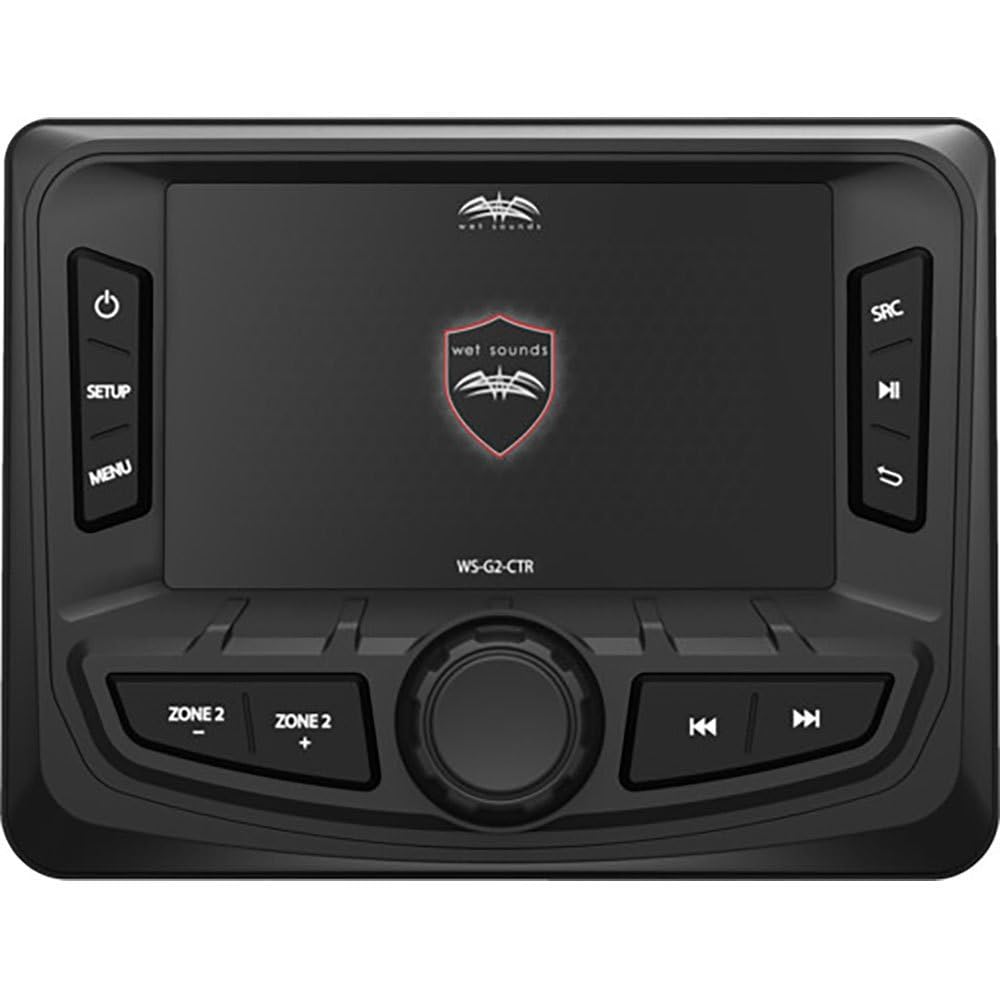
Image: The Wet Sounds WS-G2-CTR remote installed on a boat's transom, showing its compact design and full-color display.
اتصالات سیم کشی
- اتصال برق: Connect the remote's power wire to a switched 12V DC power source.
- اتصال زمینی: Connect the remote's ground wire to a reliable boat ground.
- ارتباط دیتا: Connect the data cable from the WS-G2-CTR to the dedicated remote input on your WS-MC-20 source unit. Refer to the WS-MC-20 manual for the exact port location.
- تست کردن: After all connections are made, power on your WS-MC-20 unit and verify that the WS-G2-CTR remote powers on and displays information correctly.
دستورالعمل های عملیاتی
The WS-G2-CTR remote provides intuitive control over your WS-MC-20 source unit. The full-color display shows source information, track details, and menu options.
توابع دکمه
| دکمه | تابع |
|---|---|
| منبع نیرو | Press to turn the unit on/off. Press and hold to cycle through available audio sources. |
| افزایش صدا (+) | حجم صدا را افزایش می دهد. |
| کاهش صدا (-) | حجم صدا را کاهش می دهد. |
| Track Up (>>) | به مسیر/ایستگاه بعدی میرود. |
| Track Down (<<) | به آهنگ/ایستگاه قبلی میرود. |
| پخش/مکث | Plays or pauses current audio playback. |
پیمایش منو
Use the directional buttons (if present, or specific buttons for navigation) to move through menu options displayed on the full-color screen. Press the وارد کنید or انتخاب کنید button (if present) to confirm a selection.
تعمیر و نگهداری
- تمیز کردن: Clean the display and buttons with a soft, damp پارچه از پاک کننده ها یا حلال های ساینده استفاده نکنید.
- بازرسی: Periodically inspect all wiring connections for corrosion or damage. Ensure the mounting hardware remains secure.
- به روز رسانی نرم افزار: Check the Wet Sounds official website for any available firmware updates for the WS-MC-20 source unit, which may also affect the remote's functionality.
عیب یابی
| مشکل | علت احتمالی | راه حل |
|---|---|---|
| ریموت روشن نمیشود. | No power supply; faulty wiring; blown fuse. | Check 12V power connection. Verify ground connection. Inspect inline fuse (if applicable). |
| Remote powers on but no display. | Display settings; internal fault. | Ensure the WS-MC-20 is powered on. Check for any display brightness settings. If problem persists, contact support. |
| Remote buttons are unresponsive. | Loose data cable; software glitch. | Check the data cable connection to the WS-MC-20. Power cycle both the remote and the source unit. |
| Incorrect information displayed. | مسئله همگامسازی. | Power cycle the WS-MC-20 and the remote. Ensure both units have the latest firmware. |
مشخصات
- مدل: WS-G2-CTR
- سازگاری: Wet Sounds WS-MC-20 Marine Source Unit
- نمایش: رنگ کامل
- قابلیت اتصال: سیمی
- نوع کنترلر: کنترل دکمه
- Button Quantity: 5
- ASIN: B08T6889XZ
- GTIN/UPC: 810042171220
گارانتی و پشتیبانی
For warranty information, please refer to the documentation included with your WS-MC-20 source unit or visit the official Wet Sounds website. For technical support, please contact Wet Sounds customer service directly.
Note: Recambios Marinos is a distributor of marine parts and accessories. For product-specific support, always refer to the original manufacturer, Wet Sounds.