
آمازون اکو نمایش 10
دفترچه راهنمای کاربر آمازون اکو شو ۸ (نسل سوم)
مدل: اکو شو ۱۱
مقدمه
This manual provides instructions for setting up, operating, and maintaining your Amazon Echo Show 10 (3rd Gen) smart display. Please read this guide thoroughly to ensure proper use and to maximize your device's capabilities.
راه اندازی
شامل چه چیزی است
- دستگاه اکو شو ۸
- Glacier white power adapter (30W) / cable (5 ft.)
- Motion footprint template
- راهنمای شروع سریع
دستورالعمل های قرار دادن
The Echo Show 10 features a rotating screen. Ensure adequate space around the device for its motion. The device itself measures 9.9"W x 6.7"D. A recommended footprint of 15"W x 10"D is suggested to allow for full rotation without obstruction.
اتصال اولیه
- Connect the power adapter to the Echo Show 10 and plug it into a power outlet.
- The device will power on and guide you through the on-screen setup process.
- Follow the prompts to connect to your Wi-Fi network. The device supports 802.11a/b/g/n/ac Wi-Fi networks (Wi-Fi 6 is not supported).
- The Alexa app is compatible with Fire OS, Android, and iOS devices, and is also accessible via a web browser for further configuration.
Amazon Wi-Fi simple setup is available to streamline the connection process for compatible smart devices.
عملیات
کنترل صدا با الکسا
The Echo Show 10 is primarily controlled using voice commands with Alexa. Simply say the wake word "Alexa" followed by your command or question. Alexa speaks English and Spanish.

Image: The Echo Show 10 displaying music content, with icons indicating its capabilities for music, timers, smart home control, information, intercom, and news.
Motion Features
The 10.1" HD screen is designed to move with you, keeping content in view. The device utilizes a brushless motor for +/- 175° rotation. This feature is particularly useful for video calls, recipes, and watching shows.
- Enabling/Disabling Motion: You can disable motion by saying "Alexa, disable Motion" or through the Alexa app settings.
- محدوده حرکت: During initial setup, you can customize the range of motion. This can also be adjusted in the 'Motion' menu within the device settings.
توابع دوربین
The Echo Show 10 includes a 13MP camera with an integrated shutter. The camera features auto-framing and motion tracking to keep you centered during video calls or when taking pictures.
- تماس های تصویری: The camera automatically adjusts zoom and framing to keep individuals in view در طول تماس های تصویری
- نظارت بر خانه: Securely access the built-in camera remotely via the Alexa app or other Echo Show devices to monitor your home.
- شاتر حریم خصوصی: A physical shutter is included to cover the camera when not in use, enhancing privacy.

Image: The Echo Show 10 screen showing a grid of four live camera feeds, demonstrating its home monitoring capability.

تصویر: نمای نزدیک view of the Echo Show 10's top edge, highlighting the physical camera shutter mechanism.
سرگرمی
The device offers access to various entertainment options, including streaming services and music playback. The 2.1 audio system features two 1.0" tweeters and a 3.0" woofer for premium sound.
- вы вы вы در درate вы вы вы вы در вы от вы вы در выate در در вы در вы در درateateate درateateate от در вы от Watch shows and movies from services like Prime Video, Netflix, and Hulu.
- Music & Podcasts: Play music and podcasts from Amazon Music, Spotify, and other supported services.
- قابلیت اتصال بلوتوث: Supports A2DP for audio streaming from mobile devices to the Echo Show 10, or from the Echo Show 10 to a Bluetooth speaker. AVRCP is supported for voice control of connected mobile devices.
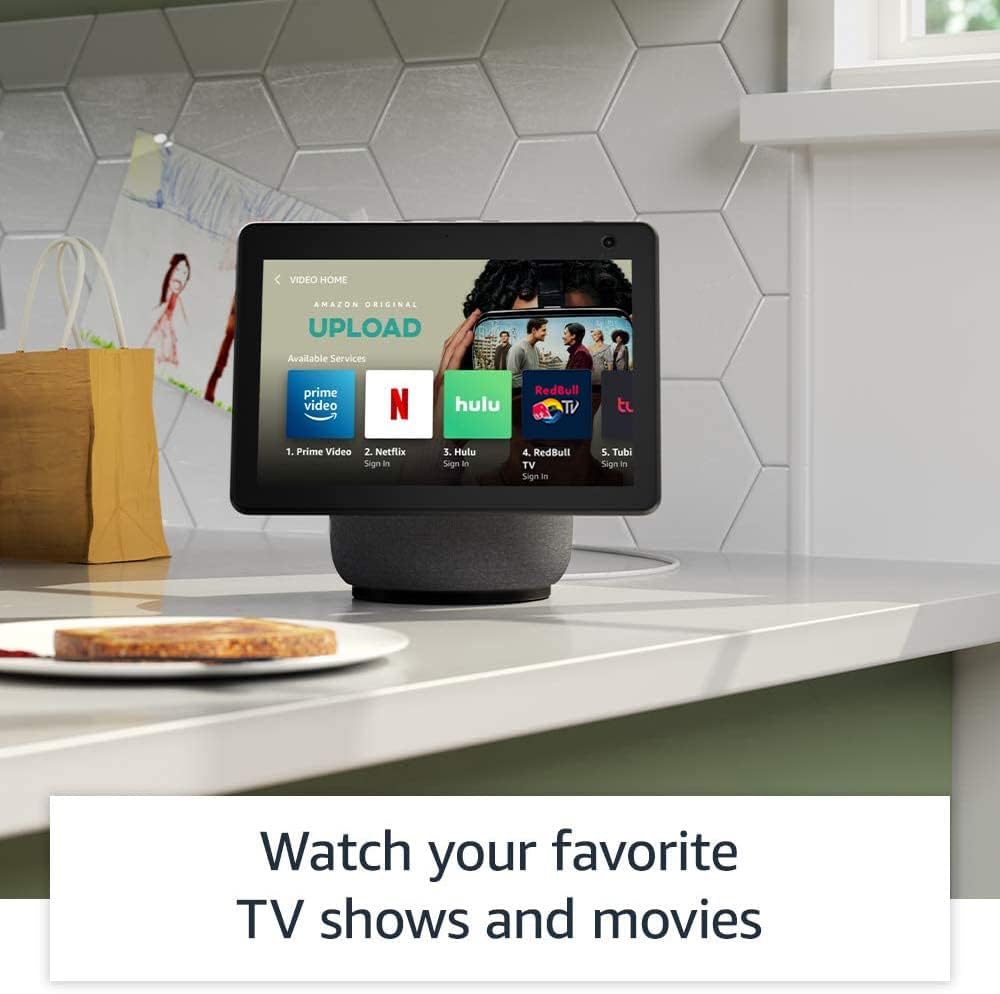
Image: The Echo Show 10 screen showing a "Video Home" interface with icons for Prime Video, Netflix, Hulu, and other streaming services.

Image: The Echo Show 10 displaying music playback with synchronized lyrics on the screen.
ادغام خانه هوشمند
The Echo Show 10 includes a built-in smart home hub supporting Zigbee, Sidewalk, and Matter protocols. This allows for direct setup and control of compatible smart home devices without a separate hub.
- کنترل دستگاه: Use voice commands to control lights, adjust thermostats, and view دوربینهای امنیتی.
- پیادهرو آمازون: This feature uses Echo and Ring devices to securely maintain connectivity for other devices and assist in locating lost items. Sidewalk uses a small portion of your internet bandwidth. It is enabled by default but can be turned off in settings.
Kitchen Companion
Utilize the Echo Show 10 in the kitchen for various tasks:
- Access personalized recipes and follow step-by-step instructions hands-free.
- Set multiple timers for cooking.
- Add items directly to your grocery list.

Image: The Echo Show 10 displaying a recipe on its screen, positioned on a kitchen counter.
قاب عکس دیجیتال
Transform your Echo Show 10 into a digital photo frame using Amazon Photos. Share photos with friends and family, and even take new photos directly from the device.
ویژگی های حریم خصوصی
The Echo Show 10 incorporates multiple privacy controls:
- دکمه خاموش کردن میکروفون/دوربین: یک دکمه فیزیکی برای قطع اتصال الکترونیکی میکروفون و دوربین.
- شاتر دوربین: یک اسلایدر فیزیکی برای پوشاندن لنز دوربین.
- فناوری ویک ورد: The device only begins recording and sending audio to the cloud after detecting the wake word.
- شاخصهای جریان: Visual indicators show when audio or video is being streamed.
- مدیریت ضبط صدا: توانایی به view و صداهای ضبط شدهات را پاک کن.
- Disable Motion: Option to turn off the device's motion tracking.
ویژگی های دسترسی
The Echo Show 10 includes various accessibility features. Access these settings via تنظیمات → دسترسیپذیری در دستگاه شما
- روی الکسا ضربه بزنید: Interact with Alexa via touch using on-screen tiles or a keyboard.
- گوش دادن تطبیقی: قبل از پاسخ دادن الکسا، زمان بیشتری برای اتمام صحبت فراهم میکند.
- نرخ ترجیحی صحبت کردن: سرعت صحبت کردن الکسا را کنترل کنید.
- زیرنویس الکسا، زیرنویس تماس، زیرنویس بسته: برای محتوای پشتیبانیشده، زیرنویس متنی ارائه دهید.
- نشان بده و بگو: با گفتن «الکسا، من چه چیزی در دست دارم» به شناسایی محصولات برای کاربران نابینا یا کمبینا کمک میکند.
- صداView صفحه خوان: Provides audio descriptions for screen elements.
- بزرگنمایی صفحه نمایش: بزرگنمایی/کوچکنمایی و حرکت در اطراف صفحه نمایش.
- اطلاع رسانی در صورت نزدیک بودن: Plays notification sounds when you are detected near the device.
- بلندخوانی در کیندل: الکسا کتابهای کیندل را با صدای بلند میخواند.
- متن بلادرنگ: Enables typing live text during a video call.
- تنظیمات اضافی شامل وارونگی رنگ، اصلاح رنگ، درخواست صدا و موارد دیگر میشود.
تعمیر و نگهداری
To maintain your Echo Show 10, gently wipe the screen and exterior surfaces with a soft, lint-free cloth. Avoid using abrasive cleaners or sprays directly on the device.
عیب یابی
مسائل و راه حل های رایج
- دستگاه پاسخ نمی دهد: Ensure the device is plugged in and powered on. Try restarting the device by unplugging it for a few seconds and plugging it back in.
- مشکلات اتصال وای فای: Verify your Wi-Fi network is active and within range. Check your Wi-Fi password. If issues persist, restart your router.
- Motion Tracking Problems: Ensure the motion feature is enabled in settings. Check for obstructions around the device. The device may have difficulty tracking in very low light conditions.
- مشکلات صوتی: Check the volume level. Ensure the microphone is not muted (indicated by a red light).
- دوربین کار نمیکند: Ensure the physical camera shutter is open and the camera is not electronically disabled via the mic/camera off button.
For further assistance, refer to the Alexa app or Amazon's online support resources.
مشخصات
| اندازه | 9.9 "x 9" x 6.7 "(251 x 230 x 172 میلی متر) |
| وزن | 90.3 اونس (2560 گرم) |
| نمایش | صفحه نمایش لمسی 10.1 اینچی، صفحه نمایش چرخان با شیب دستی |
| دوربین | 13MP + Shutter |
| قابلیت اتصال به وای فای | Dual-band, dual-antenna Wi-Fi (MIMO). Supports 802.11a/b/g/n/ac. Does not support Wi-Fi 6 (802.11ax) or ad-hoc networks. Includes 802.15.4 radio for smart home devices. |
| قابلیت اتصال بلوتوث | A2DP support for audio streaming. AVRCP for voice control of connected mobile devices. |
| صوتی | 2.1 System: 2 x 1.0” tweeters and a 3.0” woofer |
| پردازنده | MediaTek 8183 main processor plus Amazon AZ1 Neural Edge processor |
| حرکت | Brushless Motor +/- 175° rotation |
| هاب خانه هوشمند | Zigbee + Sidewalk + Matter |
| سنسور | ALS RGB |
| زبان | الکسا به زبانهای انگلیسی و اسپانیایی صحبت میکند |
گارانتی و پشتیبانی
اطلاعات گارانتی
The Echo Show 10 includes a 1-year limited warranty and service. Optional 1-year, 2-year, and 3-year extended warranties are available for purchase separately for U.S. customers.
Use of the Echo Show 10 is subject to the terms found on the Amazon webسایت
به روز رسانی های امنیتی نرم افزار
Information regarding software security updates can be found on the Amazon website. Existing Amazon Echo owners can manage their device-specific information via "Manage Your Content and Devices."
Ask a question about this manual
Ask about setup, troubleshooting, compatibility, parts, safety, or missing instructions. Manuals+ will review the question and use this page’s manual context to help answer it.