
1. مقدمه
This user manual provides detailed instructions for the proper use and maintenance of your Zebra DS8178 Wireless 2D/1D Barcode Scanner. Please read this manual thoroughly before operating the device to ensure optimal performance and safety. The DS8178 is designed for efficient and reliable barcode scanning in various environments, offering both 1D and 2D barcode reading capabilities with wireless connectivity.
2. اطلاعات ایمنی
برای جلوگیری از آسیب یا جراحت به دستگاه، نکات ایمنی زیر را رعایت کنید:
- Do not expose the scanner or cradle to extreme temperatures, moisture, or corrosive substances.
- Avoid direct eye exposure to the scanner's light source.
- فقط از آداپتور برق و کابل USB مشخص شده برای شارژ استفاده کنید.
- سعی نکنید دستگاه را جدا یا تغییر دهید. تمام مراحل سرویس را به پرسنل واجد شرایط ارجاع دهید.
- دستگاه را از میدان های مغناطیسی قوی دور نگه دارید.
3. محتویات بسته
بررسی کنید که همه اقلام در بسته شما موجود باشد:
- Zebra DS8178 Wireless Barcode Scanner
- USB Communication/Charging Cradle
- کابل USB
- راهنمای شروع سریع (در این دفترچه راهنما موجود نیست)
4. محصول تمام شدview
Familiarize yourself with the components of your Zebra DS8178 scanner and its cradle.

شکل 4.1: سمت view of the Zebra DS8178 Wireless Barcode Scanner, showing its ergonomic design.

شکل 4.2: جلو view of the Zebra DS8178 Wireless Barcode Scanner, highlighting the scanning window and trigger button.

شکل 4.3: جلو view of the USB Communication/Charging Cradle, featuring the pairing button.
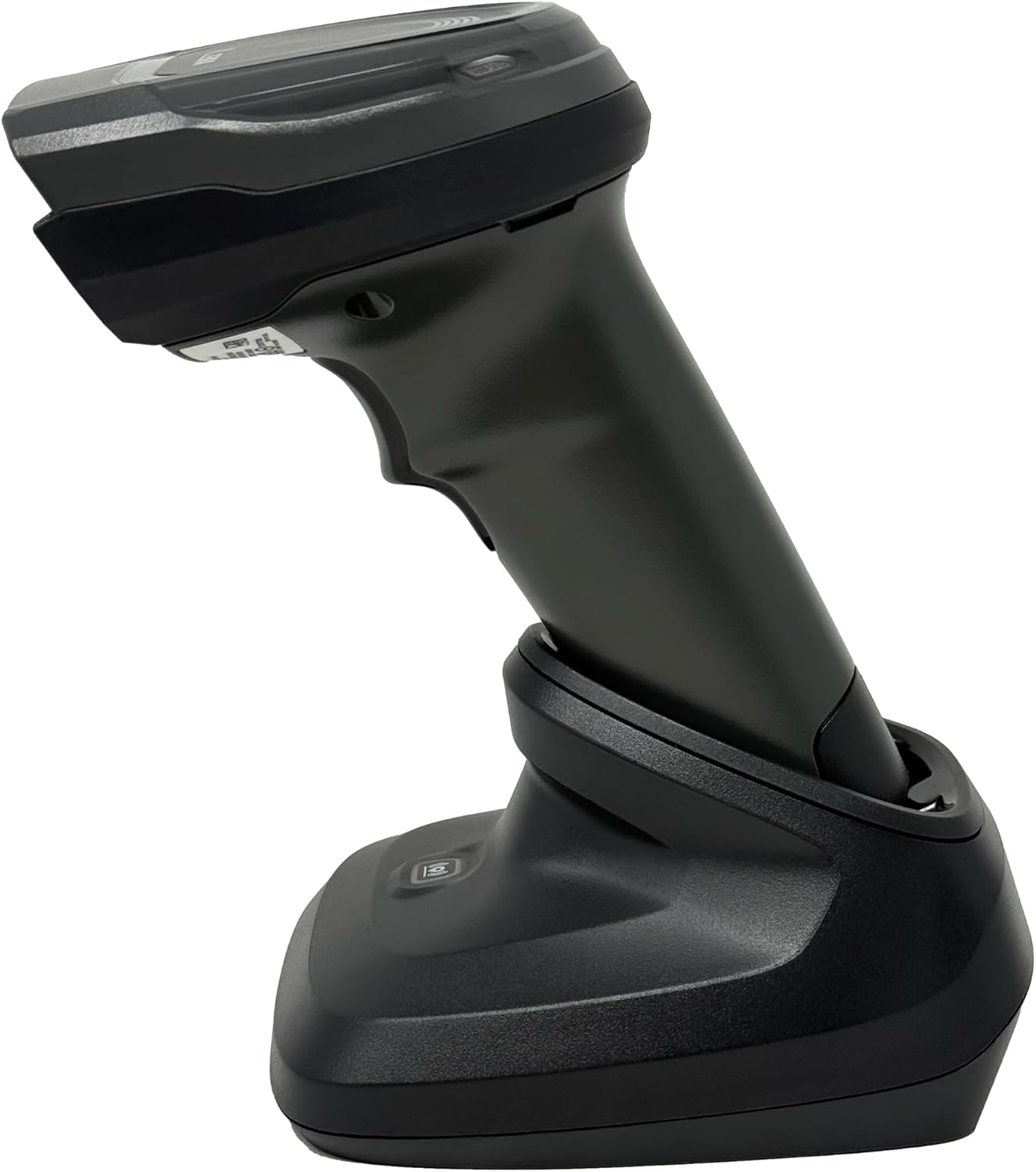
شکل 4.4: The Zebra DS8178 scanner securely docked in its USB cradle, ready for charging or communication.
4.1 Scanner Components
- اسکن پنجره: Area through which barcodes are read.
- ماشه: پرتو اسکن را فعال میکند.
- نشانگرهای LED: Provide status feedback (e.g., battery, scan success).
- محفظه باتری: Houses the removable/rechargeable battery.
4.2 Cradle Components
- Scanner Slot: Where the scanner docks for charging and communication.
- پورت USB: Connects the cradle to a host device (PC, laptop).
- دکمه جفت شدن: Initiates Bluetooth pairing with the scanner.
- نشانگرهای LED: Show cradle status (e.g., power, connection).
5. راه اندازی
۵.۱ شارژ کردن اسکنر
- Connect the USB cable to the cradle's USB port.
- سر دیگر کابل USB را به پورت USB کامپیوتر یا آداپتور دیواری USB وصل کنید.
- Place the DS8178 scanner into the cradle. Ensure it is seated correctly.
- The scanner's LED indicator will show charging status. A full charge typically takes approximately 3-4 hours.
5.2 Connecting the Cradle to a Host Device
The cradle connects to your computer via a standard USB cable.
- Plug the USB cable into the USB port on the back of the cradle.
- Connect the other end of the USB cable to an available USB port on your desktop or laptop computer.
- سیستم عامل باید به طور خودکار درایورهای لازم را شناسایی و نصب کند.
5.3 جفت شدن بلوتوث
The DS8178 offers two primary Bluetooth pairing methods: via the cradle or direct to a host device.
5.3.1 Pairing via Cradle (Recommended for PC/Laptop)
- Ensure the cradle is connected to your host device (PC/Laptop) via USB.
- Place the DS8178 scanner into the cradle.
- The scanner will automatically pair with the cradle. Once paired, the scanner can be removed from the cradle and will communicate wirelessly with the host device through the cradle.
- A successful connection is indicated by a specific LED pattern on both the scanner and cradle (refer to the scanner's LED guide for details).
5.3.2 Direct Bluetooth Pairing (for Phones/Tablets or PC/Laptop without cradle)
- Power on the DS8178 scanner.
- Scan the "Pairing Barcode" (usually found in a quick start guide or on the scanner itself) to put the scanner into discoverable mode. Alternatively, press and hold the Bluetooth pairing button on the scanner (if available) or scan a specific Bluetooth pairing configuration barcode.
- On your phone, tablet, or computer, navigate to the Bluetooth settings.
- جستجو برای available devices. The DS8178 should appear in the list (e.g., "Zebra DS8178").
- Select the scanner to initiate pairing. You may be prompted to confirm a passkey or scan a pairing barcode displayed on your screen.
- Once paired, the scanner's LED will indicate a successful connection.
6. عملیات
۴.۱ اسکن بارکدها
- Point the scan window of the DS8178 scanner at the barcode you wish to read.
- Press and hold the trigger button. A red aiming pattern will appear.
- Center the aiming pattern over the barcode. For 1D barcodes, the aiming line should cross the entire barcode. For 2D barcodes, the aiming pattern should encompass the entire code.
- Once the barcode is successfully read, the scanner will emit an audible beep and/or the LED indicator will flash green.
- ماشه را رها کنید.
6.2 Cordless Range
The Zebra DS8178 offers a cordless range of up to 330 feet (100 meters) from its cradle or directly paired host device, depending on environmental conditions and line of sight. Obstructions such as walls or other electronic devices may reduce the effective range.
۳.۶.۳ حالتهای اسکن
- حالت راه انداز: The scanner reads a barcode only when the trigger is pressed.
- Presentation Mode (Hands-Free): When placed in the presentation cradle, the scanner can be configured to automatically detect and read barcodes placed within its field of view without requiring a trigger press. This mode is ideal for high-volume scanning applications.
7. تعمیر و نگهداری
۴.۱ تمیز کردن اسکنر
To maintain optimal scanning performance, keep the scan window clean.
- از یک پارچه نرم، تمیز و بدون پرز استفاده کنید.ampened with water or a mild cleaning solution (e.g., isopropyl alcohol).
- پنجره اسکن و قسمت بیرونی اسکنر را به آرامی پاک کنید.
- از پاککنندههای ساینده، حلالها یا مواد شیمیایی قوی استفاده نکنید.
- Ensure the scanner is powered off before cleaning.
7.2 مراقبت از باتری
The DS8178 features a 2500mAh removable and rechargeable battery. Proper battery care extends its lifespan.
- قبل از استفاده اول باتری را کاملاً شارژ کنید.
- Avoid completely discharging the battery regularly.
- اسکنر را در صورت عدم استفاده برای مدت طولانی، در جای خشک و خنک نگهداری کنید.
- If the battery performance significantly degrades, it may need replacement. Contact support for genuine replacement batteries.
8 عیب یابی
| مشکل | علت احتمالی | راه حل |
|---|---|---|
| اسکنر روشن نمیشود. | باتری کم یا خالی. | Charge the scanner using the USB cradle and cable. |
| اسکنر از طریق بلوتوث متصل نمیشود. | Not in pairing mode; out of range; interference; host device Bluetooth off. | Ensure scanner is in pairing mode. Check host device Bluetooth settings. Move closer to the host device. Reduce interference. |
| اسکنر بارکدها را نمی خواند. | Barcode damaged/poor quality; scan window dirty; incorrect symbology enabled; scanner not aimed correctly. | Try scanning a different barcode. Clean the scan window. Ensure correct aiming. Check scanner configuration for enabled symbologies. |
| No data transmitted to host. | Not paired; application not in focus; incorrect interface settings. | Confirm successful Bluetooth pairing. Ensure the target application (e.g., text editor, POS software) is active and ready to receive input. |
9. مشخصات
| ویژگی | جزئیات |
|---|---|
| مدل | DS8178 |
| نام تجاری | Zebra (formerly Symbol) |
| فناوری اتصال | بلوتوث، کابل USB، بیسیم |
| دستگاه های سازگار | Desktop, Laptop, Phones, Tablets |
| منبع تغذیه | Battery Powered, Corded Electric, Rechargeable |
| ظرفیت باتری | 2500mAh (Removable/Rechargeable) |
| Cordless Range | تا 330 فوت (100 متر) |
| قابلیت اسکن | بارکدهای تک بعدی و دو بعدی |
| زاویه واقعی از View | 17 درجه |
| UPC / GTIN | 649661651499 |
10. گارانتی و پشتیبانی
This Zebra DS8178 Barcode Scanner comes with a 90 روز گارانتی محدود. This warranty covers defects in materials and workmanship under normal use. It does not cover damage caused by misuse, accidents, unauthorized modifications, or external causes.
For technical support, warranty claims, or to purchase genuine replacement parts (such as batteries), please contact your reseller or visit the official Zebra support website. Please have your model number (DS8178) and any purchase information ready when contacting support.