
1. مقدمه
This manual provides essential information for the installation, operation, and maintenance of your OCTAGON SF8008 4K UHD HDR Combo Receiver. The SF8008 is a high-performance digital receiver designed for DVB-S2X satellite and DVB-C/DVB-T2 cable/terrestrial signals, featuring 4K UHD resolution, HDR support, and the E2 Linux operating system. Please read this manual thoroughly before using the device to ensure proper functionality and safety.
2. اطلاعات ایمنی
برای جلوگیری از آسیب به دستگاه و اطمینان از ایمنی کاربر، اقدامات احتیاطی ایمنی زیر را رعایت کنید:
- از حجم منبع تغذیه اطمینان حاصل کنیدtage matches the device's requirements (DC 12V 2A).
- Do not expose the receiver to rain, moisture, or extreme temperatures.
- از قرار دادن دستگاه در نزدیکی منابع گرما یا زیر نور مستقیم خورشید خودداری کنید.
- Ensure adequate ventilation around the receiver to prevent overheating.
- گیرنده را باز نکنید جasinز. تمام مراحل سرویس را به پرسنل واجد شرایط ارجاع دهید.
- Disconnect the power cable during thunderstorms or when not in use for extended periods.
- دستگاه را از کودکان دور نگه دارید.
3. محتویات بسته
بررسی کنید که آیا همه اقلام در بسته موجود است یا خیر:
- 1 x OCTAGON SF8008 4K UHD E2 Linux Combo Receiver (black, without hard drive)
- 1 عدد کابل HDMI
- 1 x 300Mbit WiFi Module (Dual WiFi antennas are integrated or included)
- 1 x Remote Control (SF RCU 04)
- 2 عدد باتری قلمی
- 1 عدد آداپتور برق (DC 12V 2A)
- 1 x User Manual (German, English)

شکل 3.1: Contents of the OCTAGON SF8008 package, including the receiver, remote control, HDMI cable, power adapter, and WiFi module.
4. محصول تمام شدview
Familiarize yourself with the various components and ports of your SF8008 receiver.
4.1 صفحه جلو

شکل 4.1: جلو view of the OCTAGON SF8008 receiver, showing the 4K UHD logo, power button, and 7-segment display.
- 7-Segment Display: Shows current channel number or time.
- دکمه پاور: Turns the receiver on/off or puts it into standby.
- نشانگر LED: وضعیت قدرت را نشان می دهد.
- سنسور IR: سیگنال هایی را از کنترل از راه دور دریافت می کند.
4.2 پنل عقب

شکل 4.2: عقب view of the OCTAGON SF8008 receiver, displaying various input and output ports.
- DVB-S2X Tuner LNB IN: برای اتصال دیش ماهواره.
- DVB-C/T2 Tuner IN: For cable or terrestrial antenna connection.
- SPDIF (نوری): خروجی صدای دیجیتال
- جک AV: Analog audio/video output (requires jack to RCA cable).
- RS-232: Serial port for service/firmware updates.
- HDMI 2.0a OUT: Connects to your TV or display for 4K UHD video and audio.
- Ethernet (Gigabit LAN): اتصال شبکه سیمی.
- پورت USB 2.0: For external storage or peripherals.
- اسلات کارت SD: For MicroSD cards (recording/playback).
- DC 12V 2A: ورودی برق.
- سوئیچ روشن / خاموش روشن: کلید برق اصلی.
- دکمه تنظیم مجدد: برای ریست سیستم.
4.3 پانل جانبی
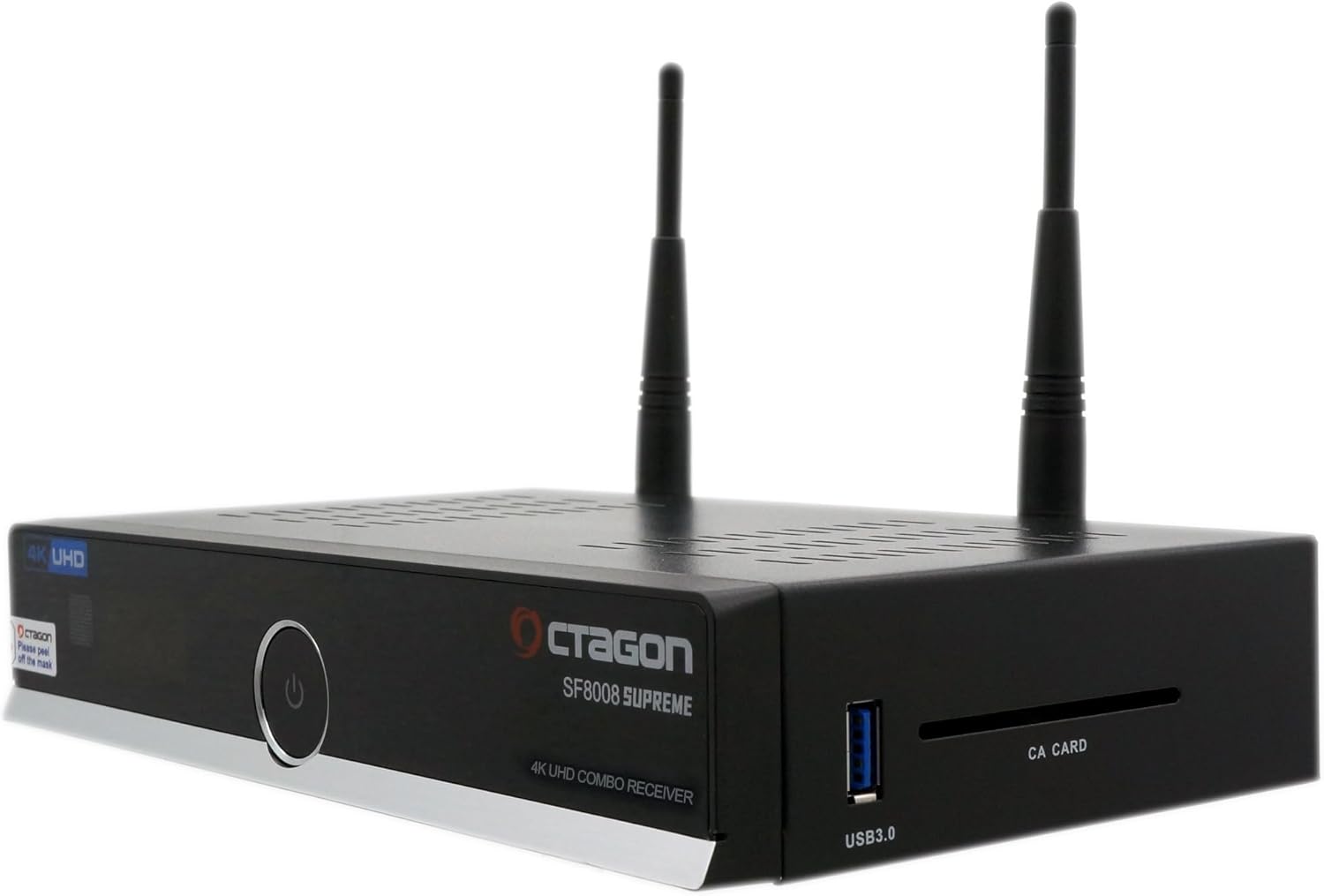
شکل 4.3: سمت view of the OCTAGON SF8008 receiver, highlighting the USB 3.0 port and CA Card slot.
- پورت USB 3.0: High-speed port for external storage (HDD/SSD) or other USB devices.
- CA CARD Slot: For conditional access cards.
4.4 کنترل از راه دور
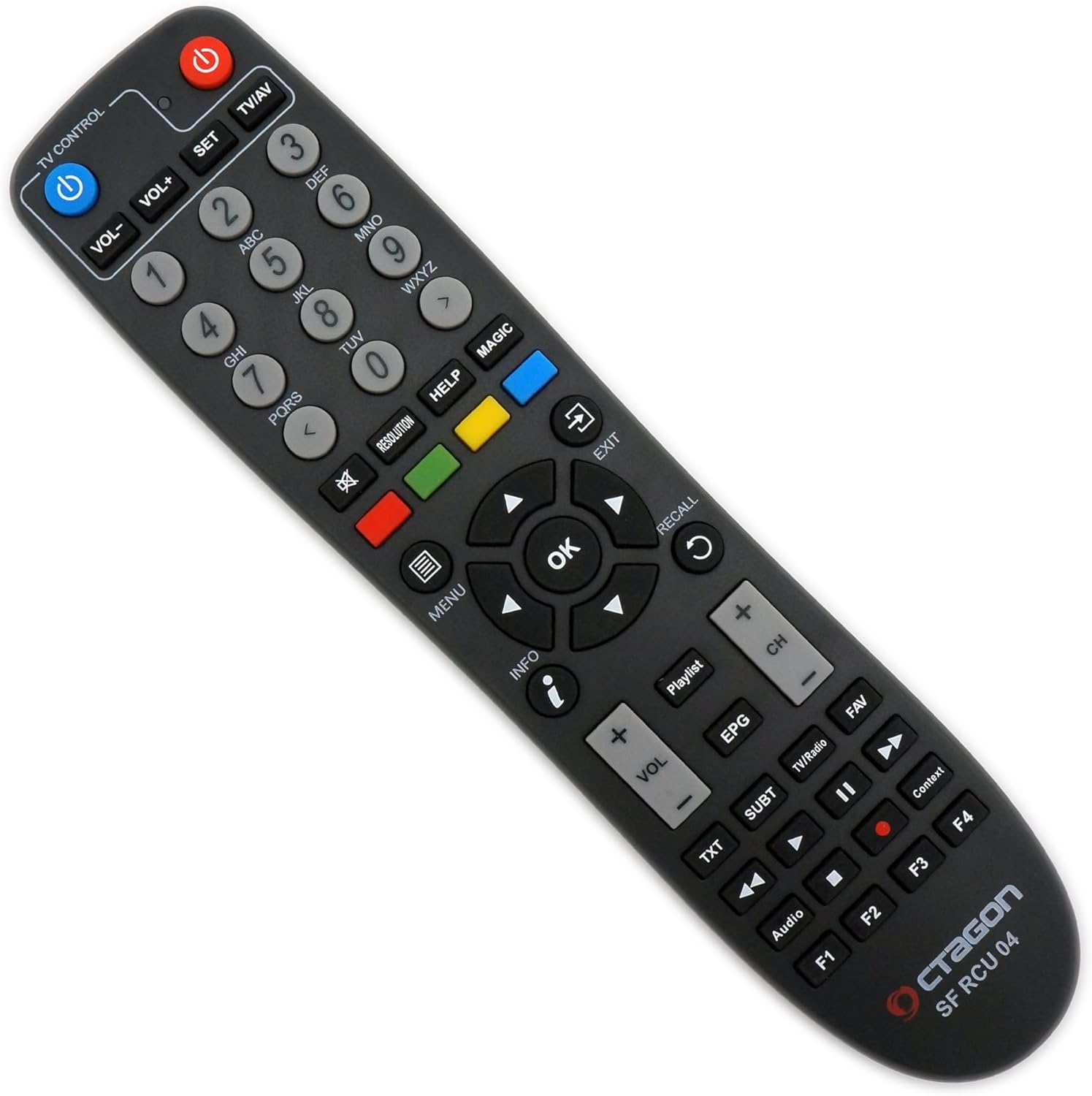
شکل 4.4: The OCTAGON SF8008 remote control (SF RCU 04) with various function buttons.
The remote control provides full functionality for navigating menus, changing channels, adjusting volume, and accessing special features. Insert the two AAA batteries into the remote control, ensuring correct polarity.
- قدرت: گیرنده را روشن/خاموش می کند.
- کنترل تلویزیون: Buttons for controlling your TV (requires setup).
- دکمه های عددی (0-9): برای ورودی مستقیم کانال.
- VOL+/VOL-: میزان صدا را تنظیم می کند.
- CH+/CH-: کانال ها را تغییر می دهد.
- خوب: انتخاب ها را تایید می کند.
- منو: به منوی اصلی دسترسی پیدا می کند.
- اطلاعات: اطلاعات برنامه را نمایش میدهد.
- EPG: راهنمای برنامه های الکترونیکی
- کنترل های پخش رسانه: Play, Pause, Stop, Rewind, Fast Forward.
- دکمه های رنگی (قرمز، سبز، زرد، آبی): توابع حساس به متن.
- F1-F4: کلیدهای عملکردی
5. راه اندازی
Follow these steps to set up your OCTAGON SF8008 receiver.
۳.۱ اتصال گیرنده
- اتصال آنتن/کابل:
- For satellite reception, connect your satellite dish LNB cable to the DVB-S2X Tuner LNB IN بندر
- For cable or terrestrial reception, connect your cable/antenna to the DVB-C/T2 Tuner IN بندر
- اتصال به تلویزیون: Use the provided HDMI cable to connect the HDMI 2.0a OUT port on the receiver to an HDMI input on your television.
- اتصال شبکه (اختیاری):
- For a wired connection, connect an Ethernet cable from your router to the اترنت پورت روی گیرنده
- For a wireless connection, ensure the included WiFi module is properly connected (if external) or the internal WiFi is enabled.
- External Storage (Optional): If you plan to use PVR functions, connect a USB hard drive/SSD to the USB 3.0 or USB 2.0 port, or insert a MicroSD card into the اسلات کارت SD.
- اتصال برق: آداپتور برق را به DC 12V 2A ورودی را روی گیرنده قرار دهید، سپس آداپتور را به پریز برق وصل کنید.

شکل 5.1: تمام شدview of the OCTAGON SF8008 receiver with connected cables (HDMI, power, antenna) and WiFi antennas.
۱.۴ روشن کردن اولیه و راهاندازی اولیه
- اطمینان حاصل کنید که همه اتصالات امن هستند.
- ورق بزنید کلید روشن/خاموش on the rear panel to the ON position.
- را فشار دهید دکمه پاور on the front panel or the remote control to turn on the receiver.
- Your TV should display the boot screen, followed by the initial setup wizard. The SF8008 typically comes with the E2 Linux OS, often pre-installed with OpenATV.
- Follow the on-screen instructions to configure:
- زبان: Select your preferred language (e.g., English).
- خروجی ویدیو: Confirm or adjust resolution (e.g., 2160p for 4K UHD).
- Tuner Configuration: Configure your DVB-S2X and DVB-C/T2 tuners based on your signal source (satellite dish type, cable provider settings, terrestrial region). This is a critical step for channel reception.
- تنظیمات شبکه: Configure wired (Ethernet) or wireless (WiFi) network connection.
- اسکن کانال: Perform an automatic channel scan to find available TV and radio channels.
- Once the setup wizard is complete, your receiver should be ready for use.
6. دستورالعمل های عملیاتی
This section covers basic and advanced operations of your SF8008 receiver.
6.1 Basic TV Viewing
- انتخاب کانال: استفاده کنید CH + / CH- buttons or enter the channel number directly using the numeric buttons on the remote.
- کنترل صدا: استفاده کنید VOL + / VOL- دکمه ها
- بی صدا: Press the mute button (speaker icon) to silence the audio.
- اطلاعات برنامه: را فشار دهید اطلاعات button to display current program details.
- راهنمای برنامه الکترونیکی (EPG): را فشار دهید EPG را فشار دهید تا view برنامه های زمانی
6.2 Recording (PVR Function)
The SF8008 supports recording to external USB storage (HDD/SSD) or MicroSD cards.
- Ensure compatible external storage is connected and properly formatted (usually EXT4 or NTFS).
- To record the current program, press the ضبط کنید button (red circle) on the remote.
- To schedule a recording, navigate to the EPG, select the desired program, and press the record button or follow the on-screen prompts to set a timer.
- To play back recordings, access the PVR or Recordings menu from the main menu.
۵.۳ پخش رسانه
The receiver can play various media files from connected USB devices or network shares.
- Access the Media Player from the main menu.
- Browse your connected storage or network locations to find video, audio, or image files.
- Use the remote's playback controls (Play, Pause, Stop, etc.) to manage media.
6.4 Network Features (E2 Linux OS)
The E2 Linux operating system offers extensive network capabilities:
- دسترسی به اینترنت: مرور کنید web content, access HbbTV services.
- Plugins: Install various plugins to extend functionality (e.g., streaming services, weather, games).
- Multiroom Client: Stream content to other compatible devices on your home network.
- سرور رسانه: Share media from connected storage with other devices.
۳.۵ تصویر در تصویر (PIP)
The SF8008 supports PIP for viewing two channels simultaneously (subject to tuner availability and signal type).
- Consult your specific E2 Linux image documentation for PIP activation and control.
7. تعمیر و نگهداری
7.1 تمیز کردن
- Disconnect the receiver from the power outlet before cleaning.
- برای پاک کردن قسمت بیرونی گیرنده از یک پارچه نرم و خشک استفاده کنید.
- از پاککنندههای مایع یا مواد ساینده استفاده نکنید.
- Ensure ventilation slots are free from dust accumulation.
7.2 به روز رسانی نرم افزار
Regular software updates are released for the E2 Linux operating system (e.g., OpenATV) to improve performance, add features, and fix bugs.
- Access the software update function through the receiver's menu (usually under System or Setup).
- در طول فرآیند بهروزرسانی، از اتصال پایدار اینترنت اطمینان حاصل کنید.
- Do not power off the receiver during an update.
- Refer to the specific E2 Linux image community forums or websites for detailed update instructions and available firmware versions.
8 عیب یابی
If you encounter issues with your SF8008 receiver, refer to the following common problems and solutions:
| مشکل | علت احتمالی | راه حل |
|---|---|---|
| بدون قدرت | Power cable disconnected, power switch off, faulty adapter. | Check power cable connection, ensure rear power switch is ON, test power adapter. |
| سیگنال وجود ندارد / تصویر وجود ندارد | Antenna/cable not connected, incorrect tuner configuration, wrong input on TV. | Check antenna/cable connections, verify tuner settings in the menu, select correct HDMI input on your TV. Perform a channel scan. |
| کنترل از راه دور کار نمی کند | باتریها تمام شدهاند، حسگر مادون قرمز مسدود شده، ریموت خارج از محدوده است. | Replace batteries, ensure clear line of sight to receiver's IR sensor, operate within range. |
| صدا نداره | Volume muted, incorrect audio settings, faulty HDMI cable. | Unmute volume, check audio output settings in receiver menu, try a different HDMI cable. |
| Receiver freezes or crashes | Software issue, overheating, incompatible plugin. | Restart the receiver. Ensure proper ventilation. Check for and install latest software updates. Remove recently installed plugins if the issue started after installation. |
For more complex issues, consult the online community forums for E2 Linux receivers or the official Octagon support resources.
9. مشخصات
| ویژگی | جزئیات |
|---|---|
| پردازنده | Hisilicon Hi3798MV200 Huawei Quad Core 64-bit (4 x 1.6 GHz), 15000 DMIPS |
| فلش مموری | 8 گیگابایت eMMC |
| RAM | 1 گیگابایت DDR4 |
| تیونرها | 1 x DVB-S2X (Silabs Si2166-D60 & RDA5815m), 1 x DVB-C/DVB-T2 (Altobeam ATBM7821) |
| رمزگشایی ویدیو | HEVC265, H.264, H.265, 2160P |
| ویژگی های ویدئو | 4K UHD, HDR 10-bit, HLG, PIP HD & UHD |
| سیستم عامل | E2 Linux OS (e.g., OpenATV) |
| قابلیت اتصال | Gigabit LAN Ethernet, Dual WiFi (300 Mbit), HDMI 2.0a, USB 3.0, USB 2.0, MicroSD Slot, SPDIF, AV Jack, RS-232 |
| کارت خوان | CA CARD Slot |
| منبع تغذیه | DC 12V 2A (suitable for camping/caravans) |
| ابعاد (W x D x H) | 220 میلیمتر × 125 میلیمتر در 40 میلیمتر |
| ویژگی ها | PVR recording, Media Player, HbbTV, Blindscan, HW Multiboot, Multiroom Client, Media Server |
10. ضمانت و پشتیبانی
10.1 اطلاعات گارانتی
The OCTAGON SF8008 receiver comes with a standard manufacturer's warranty. Please refer to the warranty card included in your package or the official Octagon website for specific terms and conditions regarding warranty coverage and duration. Keep your proof of purchase for warranty claims.
Note: Opening the receiver casing or attempting unauthorized repairs may void your warranty.
10.2 پشتیبانی فنی
For technical assistance, software updates, or further information, please visit the official Octagon website or consult community forums dedicated to E2 Linux receivers. These resources often provide comprehensive guides, FAQs, and peer support for advanced configurations and troubleshooting.
- رسمی Webسایت: www.octagon-germany.eu
- انجمن های انجمن: جستجو برای "E2 Linux forums" or "OpenATV forums" for extensive user support.