
مقدمه
The Lenovo 530 Wireless Mouse is designed for reliable and convenient navigation. Featuring 2.4 GHz wireless technology and a nano USB receiver, it offers a plug-and-play experience without the need for complex installations. Its ergonomic and contoured design ensures comfort for extended use, making it suitable for various computing tasks.
تمام شدview of the Lenovo 530 Wireless Mouse, highlighting its features and design.
راه اندازی
Follow these steps to set up your Lenovo 530 Wireless Mouse:
- باتری را وارد کنید: Open the battery compartment located on the underside of the mouse. Insert one AA battery, ensuring correct polarity. The mouse comes with an included AA battery.
- گیرنده نانو USB را پیدا کنید: The nano USB receiver is typically stored inside the battery compartment for safekeeping during transport. Remove it from its storage slot.
- گیرنده را وصل کنید: Plug the nano USB receiver into an available USB port on your computer (PC).
- روشن کردن: Turn on the mouse using the power switch, usually located on the bottom of the mouse.
- اتصال خودکار: The mouse should automatically connect to your computer. No additional drivers are typically required for Windows 7, 8, 8.1, 10, or 11.

Image showing the battery compartment and nano USB receiver storage on the underside of the mouse.

The Lenovo 530 Wireless Mouse connected wirelessly to a laptop via its 2.4 GHz nano USB receiver.
دستورالعمل های عملیاتی
The Lenovo 530 Wireless Mouse features a standard three-button design with a scroll wheel for intuitive control.
- کلیک چپ: Use the left button for selecting items, opening applications, and confirming actions.
- کلیک راست: Use the right button to access context menus and additional options.
- چرخ اسکرول: Rotate the scroll wheel to navigate vertically through documents and web pages. The scroll wheel also functions as a middle button when pressed.
- سنسور نوری: The 1200 DPI optical sensor provides precise and responsive tracking on various surfaces.

The mouse features a 1200 DPI optical sensor for smooth navigation and is compatible with Windows operating systems.
ارگونومی و راحتی
The mouse is designed for ambidextrous use, accommodating both left-handed and right-handed users comfortably. Its contoured shape provides a natural grip for extended periods.

The ambidextrous design ensures comfortable use for both left and right-handed individuals.
تعمیر و نگهداری
- تعویض باتری: When the mouse performance degrades or stops responding, replace the AA battery. Open the battery compartment on the underside, remove the old battery, and insert a new AA battery with correct polarity. The mouse offers up to 12 months of battery life, which may vary based on usage.
- تمیز کردن: برای تمیز کردن قسمت بیرونی ماوس از یک پارچه نرم و خشک استفاده کنید. برای حسگر نوری، از یک گوش پاک کن به آرامی استفاده کنید.ampبا الکل مالشی آغشته شده و مطمئن شوید که هیچ مایعی وارد موش نمیشود.
- فضای ذخیرهسازی گیرنده: When not in use or during travel, store the nano USB receiver in its dedicated slot within the battery compartment to prevent loss.

The mouse is lightweight and designed for portability, offering up to 12 months of battery life.
عیب یابی
- ماوس پاسخ نمیدهد:
- مطمئن شوید که ماوس روشن است.
- بررسی کنید که آیا باتری به درستی وارد شده و شارژ کافی دارد یا خیر. در صورت لزوم آن را تعویض کنید.
- مطمئن شوید که گیرنده نانو USB به طور ایمن به پورت USB سالم کامپیوتر شما وصل شده است. یک پورت USB دیگر را امتحان کنید.
- برای جلوگیری از تداخل یا مشکلات برد، ماوس را به گیرنده USB نزدیکتر کنید.
- حرکت نامنظم مکاننما:
- حسگر نوری زیر ماوس را تمیز کنید.
- مطمئن شوید که از ماوس روی سطح مناسبی استفاده میکنید. سطوح بسیار بازتابنده یا شفاف ممکن است روی ردیابی تأثیر بگذارند. استفاده از پد ماوس توصیه میشود.
- مشکلات اتصال:
- If the connection is lost, try unplugging and re-plugging the nano USB receiver.
- کامپیوتر خود را مجددا راه اندازی کنید.
مشخصات
| ویژگی | جزئیات |
|---|---|
| شماره مدل | GY50Z18988 |
| قابلیت اتصال | بیسیم ۲.۴ گیگاهرتز (گیرنده نانو USB) |
| فناوری سنسور | نوری |
| DPI (نقاط در اینچ) | 1200 DPI |
| دکمه ها | Left, Right, Scroll Wheel (Middle Click) |
| طول عمر دکمه | Up to 8 million clicks (Left/Right buttons) |
| نوع باتری | 1 عدد باتری AA (شامل) |
| عمر باتری | Up to 12 months (actual duration may vary based on usage) |
| سازگاری سیستم عامل | ویندوز ۷، ویندوز ۸، ویندوز ۸.۱، ویندوز ۱۰، ویندوز ۱۱ |
| ابعاد (L x W x H) | 4.17 x 2.48 x 1.46 اینچ (10.6 x 6.3 x 3.7 سانتیمتر) |
| وزن | 2.24 اونس (65 گرم) |
| ویژگی های خاص | Lightweight, Ambidextrous Design, Nano USB Receiver Storage |
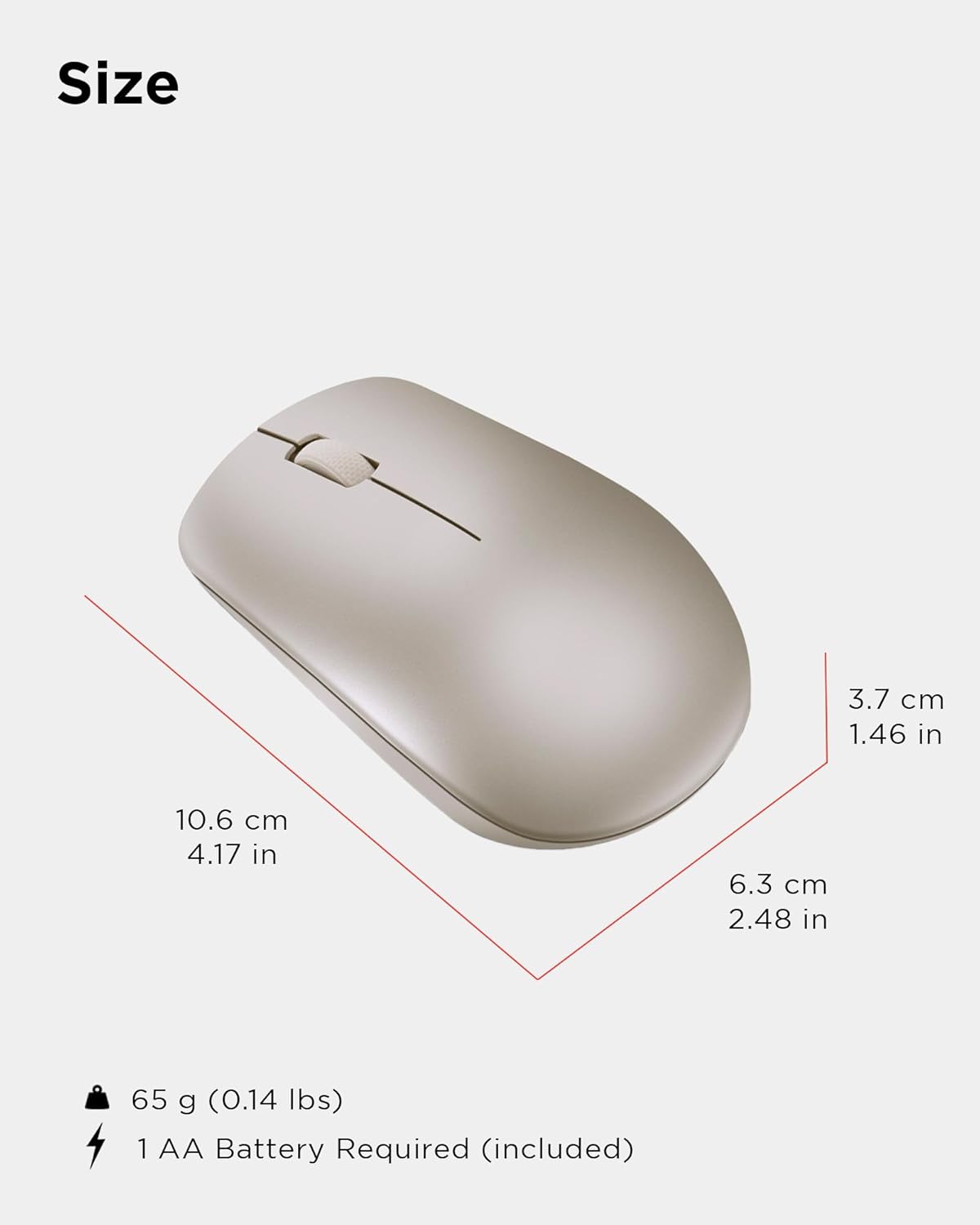
Physical dimensions and weight of the Lenovo 530 Wireless Mouse.
گارانتی و پشتیبانی
برای اطلاعات گارانتی و پشتیبانی فنی، لطفاً به مستندات موجود در بستهبندی محصول خود مراجعه کنید یا از پشتیبانی رسمی لنوو دیدن کنید. website. The warranty period and terms may vary by region and retailer.
پشتیبانی آنلاین: بازدید کنید support.lenovo.com برای درایورها، دفترچههای راهنما و راهنماهای عیبیابی.
تماس با پشتیبانی: Refer to your product's warranty card or the Lenovo support webسایتی برای شمارههای تماس منطقهای و گزینههای خدمات.