
1. اطلاعات ایمنی
Please read this entire manual before installation and use. If you have any questions, contact ECHOGEAR customer support. Improper installation can result in property damage or personal injury.
- ظرفیت وزنی: Do not exceed the maximum weight capacity of 110 lbs (50 kg). This mount is designed for TVs between 43" and 82".
- Stud Mounting Only: This mount is designed for installation into wood studs. نکن mount into drywall alone. Ensure studs are located accurately.
- الگوی VESA را تأیید کنید: Ensure your TV's VESA pattern (mounting holes on the back) is compatible with this mount (200x100 to 600x400).
- ابزار: Use appropriate tools for installation. A ratchet is recommended for securing lag bolts.
- کمک: Due to the size and weight of TVs, two people are recommended for safe installation.
2. محتویات بسته
Verify all components are present before beginning installation. If any parts are missing or damaged, contact ECHOGEAR customer support.
سخت افزار شامل:
- Full Motion TV Wall Mount Assembly
- Extension Brackets (for 24" stud spacing)
- قالب حفاری
- Assortment of TV screws and spacers
- Lag Bolts and Washers
- Cable Management Clips (2x)
- End Caps for aesthetic finishing
3. ویژگی های محصول
The ECHOGEAR EGLF324 Full Motion TV Wall Mount offers versatile positioning and robust support for your television.
- سازگاری جهانی: Supports 43" to 82" TVs weighing up to 110 lbs. Compatible with VESA patterns from 200x100 to 600x400.
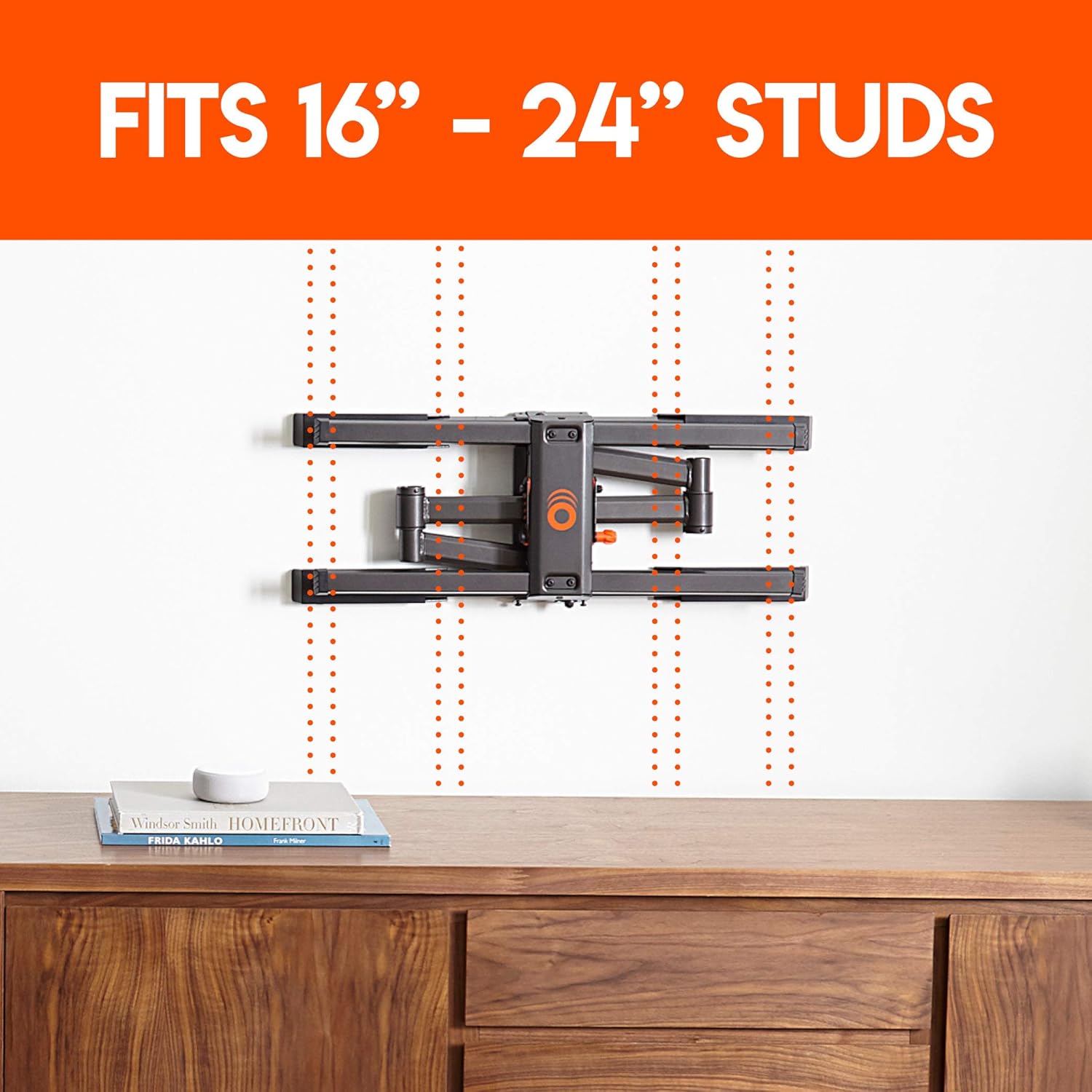
- Flexible Stud Spacing: Designed to accommodate both 16" and 24" stud spacing with included extension brackets.
- Full Motion Capability: از حالت بهینه لذت ببرید viewing angles with 19" of extension, 140° of swivel, and 15° of tilt.
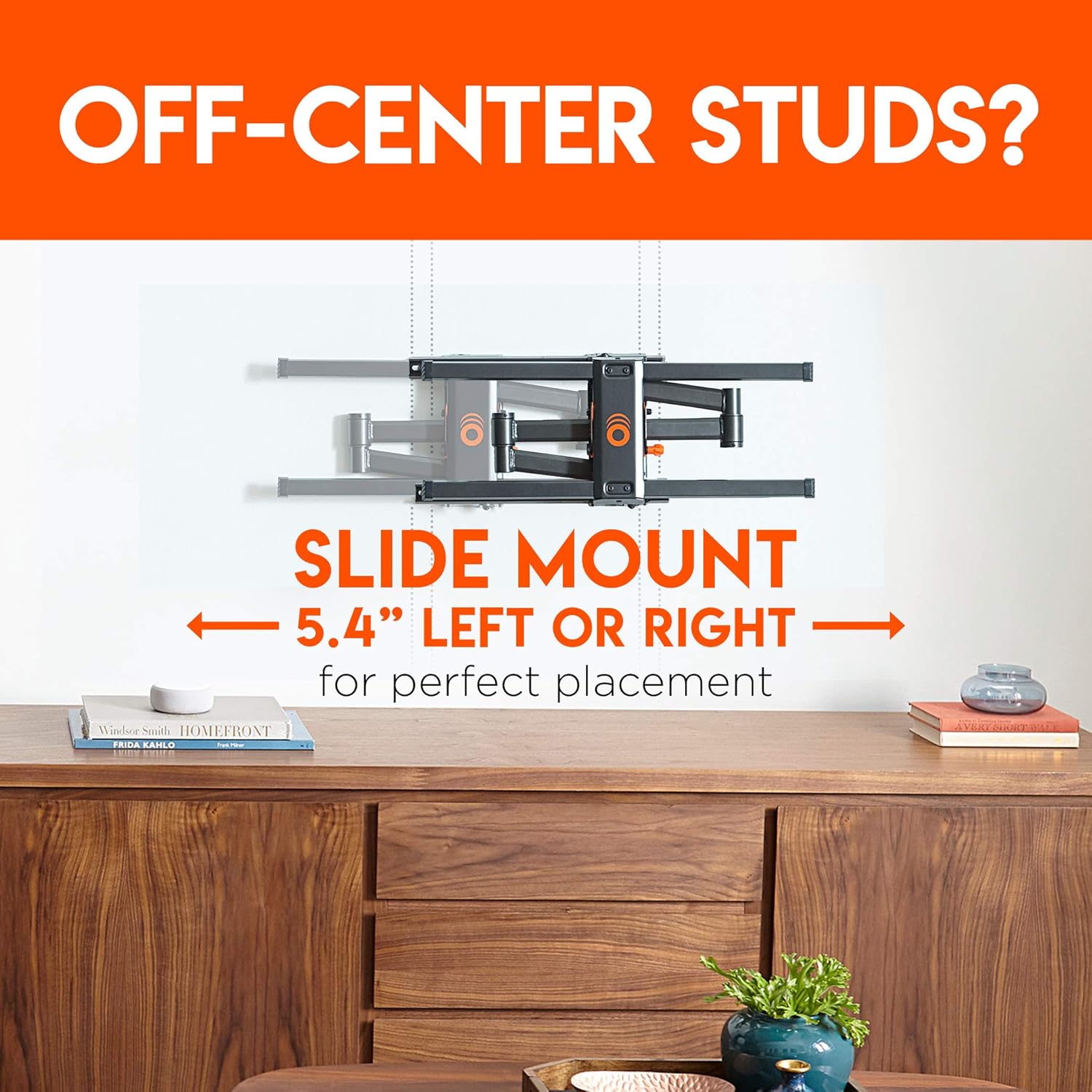
- Post-Installation Adjustments: Allows for 5.4" lateral shift (left or right) and ±3° post-installation leveling for perfect screen alignment.
- مدیریت یکپارچه کابل: Features a through-arm channel and two cable clips to keep cables organized and out of sight.




4. نصب و راه اندازی
Follow these steps carefully to install your ECHOGEAR EGLF324 TV Wall Mount. A detailed video guide is also available below.
مراحل نصب:
- براکت ها را به تلویزیون وصل کنید: Secure the TV brackets to the back of your television using the appropriate screws and spacers from the hardware kit.
- Find Studs: Use a stud finder to locate the center of your wood studs in the desired mounting location. Mark the stud centers.
- Position Drilling Template: Tape the included drilling template to the wall, aligning it with your marked stud centers. Use a level to ensure it is perfectly horizontal.
- سوراخ های پایلوت را دریل کنید: Drill pilot holes through the template at the marked locations.
- صفحه دیواری ایمن: Attach the wall plate of the mount to the wall using the provided lag bolts and washers. If your studs are 24" apart, attach the extension brackets to the wall plate first, then secure the entire assembly to the wall.
- تلویزیون را آویزان کنید: Carefully lift your TV and hook the TV brackets onto the wall plate.
- تلویزیون امن: Tighten the security screws on the TV brackets to lock the TV onto the mount.
- مدیریت کابلها: Route your TV cables through the integrated cable management channels on the mount arms and secure them with the included cable clips.
- تنظیم و سطح: Make any final adjustments to the TV's position, including lateral shift and post-installation leveling, to achieve your desired viewزاویه
راهنمای نصب ویدیویی:
توضیحات ویدیو: This official ECHOGEAR video provides a step-by-step guide on how to install the full motion TV wall mount, including instructions for both 16-inch and 24-inch stud spacing. It covers unboxing, attaching TV brackets, finding studs, using the drilling template, securing the wall plate, attaching extension brackets, hanging the TV, and cable management.
5. دستورالعمل های عملیاتی
Once installed, your ECHOGEAR EGLF324 mount allows for easy adjustment of your TV's position.
- پسوند: Gently pull the TV screen forward to extend the mount up to 19 inches from the wall.
- چرخش: Carefully push or pull the sides of the TV screen to swivel it left or right, up to 140 degrees.
- شیب: To adjust the tilt angle (up to 15 degrees), loosen the tilt adjustment knobs on the TV brackets, set the desired angle, and then re-tighten the knobs securely.
- Lateral Shift: For minor horizontal adjustments after installation, the TV can be slid left or right by up to 5.4 inches on the wall plate.
- تراز کردن: The mount allows for ±3 degrees of post-installation leveling. Consult the manual for specific instructions on how to adjust this feature.
6. تعمیر و نگهداری
نگهداری منظم، طول عمر و عملکرد ایمن پایه تلویزیون شما را تضمین میکند.
- بررسی های دوره ای: Periodically check that all screws and connections are secure. Re-tighten if necessary.
- تمیز کردن: پایه را با یک پارچه نرم و خشک تمیز کنید. از پاک کننده ها یا حلال های ساینده خودداری کنید.
- روغن کاری: Moving parts are designed for smooth operation and generally do not require lubrication. If movement becomes stiff, contact support.
7 عیب یابی
If you encounter issues during installation or use, refer to the following common solutions.
- تلویزیون تراز نیست: Use the post-installation leveling feature (±3 degrees) to correct the TV's horizontal alignment. Ensure the wall plate itself was installed level.
- Difficulty Moving TV: Check for any obstructions or overtightened bolts. Ensure cables are not snagged.
- احساس شل بودن پایه: Immediately remove the TV and re-check all wall plate and TV bracket connections. Ensure lag bolts are securely fastened into the center of the wood studs.
- قطعات گم شده: Refer to the package contents list. Contact ECHOGEAR customer support for replacement parts.
8. مشخصات
| ویژگی | جزئیات |
|---|---|
| مدل | EGLF324 |
| محدوده اندازه تلویزیون | ۰.۸ اینچ – ۲.۴ اینچ |
| حداکثر وزن تلویزیون | 110 پوند |
| نوع حرکت | Articulating, Tilt, Swivel, Extension |
| چرخشی | 140 درجه |
| پسوند | تا ۳.۲۵ اینچ |
| حداکثر زاویه شیب | 15 درجه |
| پشتیبانی از الگوهای VESA | 200x100 تا 600x400 |
| حرفه ایfile از وال | 2.90 اینچ |
| Wall-Centering Lateral Shift | 5.4" left or right |
| سطح بندی پس از نصب | ± 3 درجه |
| Compatible Stud Width | ۲۲ تا ۲۹ اینچ |
| مدیریت کابل | Through-arm channel & 2x cable clips |
| مواد | اکریلونیتریل بوتادین استایرن (ABS) |
| رنگ | مشکی |
| وزن مورد | 20.4 پوند |
| ابعاد بسته بندی | 17.8 x 13.5 x 4.2 اینچ |
9. گارانتی و پشتیبانی
ECHOGEAR stands by its products. For warranty information, technical assistance, or to report missing/damaged parts, please contact ECHOGEAR customer support.
اطلاعات تماس: Refer to the ECHOGEAR official website or the product packaging for the most current contact details.