
PowerPac PPFS212B 2-in-1 Dual-Usage Stand Fan Instruction Manual
Model: PPFS212B
1. اطلاعات ایمنی مهم
لطفاً قبل از استفاده از این دستگاه، تمام دستورالعملها را به دقت مطالعه کرده و آنها را برای مراجعات بعدی نگه دارید. عدم رعایت این دستورالعملها ممکن است منجر به برق گرفتگی، آتشسوزی یا آسیب جدی شود.
- از جلد اطمینان حاصل کنیدtagولتاژ نشان داده شده روی برچسب رتبهبندی با ولتاژ منبع تغذیه شما مطابقت داردtage.
- فن، دوشاخه یا سیم برق را در آب یا مایعات دیگر فرو نکنید.
- قبل از تمیز کردن، مونتاژ یا جدا کردن قطعات، فن را از پریز برق جدا کنید.
- هنگام کار کردن فن، انگشت، مداد یا هر شیء دیگری را از آن دور نگه دارید.
- پنکه را با سیم یا دوشاخه آسیبدیده روشن نکنید. برای تعمیر با پرسنل خدمات واجد شرایط تماس بگیرید.
- This appliance is equipped with thermal fuse protection against overheating. If the fan stops working unexpectedly, unplug it and allow it to cool before attempting to restart.
- این دستگاه برای استفاده توسط افرادی (از جمله کودکان) با توانایی های جسمی، حسی یا ذهنی کاهش یافته یا فاقد تجربه و دانش در نظر گرفته شده است، مگر اینکه توسط شخصی که مسئولیت ایمنی آنها را بر عهده دارد نظارت یا دستورالعمل هایی در مورد استفاده از دستگاه داده شده باشد. .
2. محصول تمام شدview
The PowerPac PPFS212B is a versatile 2-in-1 dual-usage stand fan designed for efficient cooling in indoor environments. It features 7 blades for maximum airflow, 3-speed settings, and an oscillation function for wider air distribution. The fan is equipped with thermal fuse protection for enhanced safety.
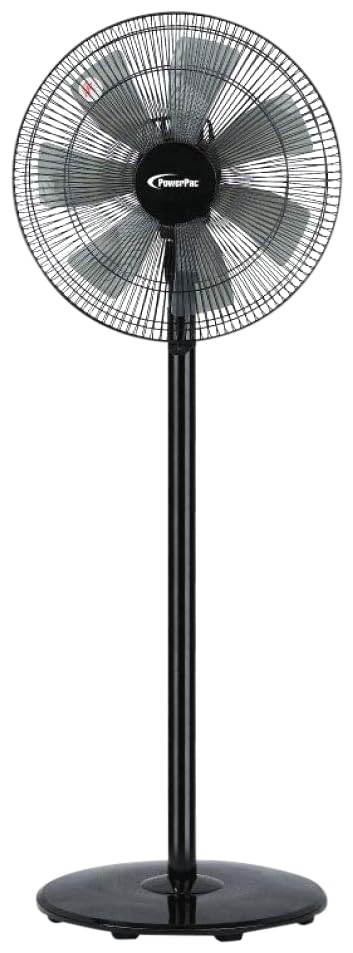
Image: PowerPac PPFS212B 2-in-1 Dual-Usage Stand Fan, showcasing its black finish and stand configuration.
3. محتویات بسته
Please check the package contents upon opening to ensure all parts are present and undamaged:
- 1 x PowerPac PPFS212B Stand Fan (includes fan head, stand pole, and base)
4. دستورالعمل مونتاژ
Follow these steps to assemble your PowerPac PPFS212B fan:
- تمام اجزای بسته بندی را با احتیاط از بسته بندی خارج کنید.
- Attach the stand pole to the fan base. Ensure it is securely fastened according to the markings or locking mechanism.
- Mount the fan head assembly onto the top of the stand pole. Align the connection points and secure it firmly.
- Ensure all screws and fasteners are tightened to prevent wobbling during operation.
- Place the assembled fan on a stable, flat surface.
Image: Illustrative diagram of the PowerPac PPFS212B fan assembly, showing the base, stand, and fan head components.
5. دستورالعمل های عملیاتی
To operate your PowerPac PPFS212B fan:
- سیم برق را به یک پریز برق مناسب وصل کنید.
- روشن/خاموش برق: Press the 'ON/OFF' button (or corresponding button) on the control panel to turn the fan on or off.
- تنظیم سرعت: Press the 'SPEED' button repeatedly to cycle through the 3 available speed settings (Low, Medium, High).
- عملکرد نوسان: Press the 'OSC' button (or corresponding button) to activate or deactivate the oscillation feature, which allows the fan head to sweep from side to side.
- When finished, press the 'ON/OFF' button to turn off the fan and unplug it from the power outlet.
6. نگهداری و تمیز کردن
Regular cleaning and maintenance will help ensure optimal performance and longevity of your fan:
- همیشه قبل از تمیز کردن، فن را از برق جدا کنید.
- استفاده از نرم، دamp cloth to wipe the exterior surfaces of the fan. Do not use abrasive cleaners, solvents, or harsh chemicals.
- To clean the fan blades, carefully remove the front grille (if detachable) according to the product design. Wipe the blades with a soft cloth. Ensure all parts are dry before reassembling.
- اجازه ندهید آب به داخل محفظه موتور چکه کند.
- وقتی برای مدت طولانی از پنکه استفاده نمیکنید، آن را در جای خشک و خنک نگهداری کنید.
7 عیب یابی
If you encounter issues with your fan, refer to the following table for common problems and solutions:
| مشکل | علت احتمالی | راه حل |
|---|---|---|
| فن روشن نمیشود. | بدون منبع تغذیه Thermal fuse activated. | بررسی کنید که آیا دوشاخه به طور ایمن در پریز قرار گرفته است. از عملکرد پریز برق اطمینان حاصل کنید. Unplug and allow the fan to cool down for 30 minutes before restarting. |
| جریان هوا ضعیف یا بدون جریان هوا. | سرعت فن خیلی کم تنظیم شده است. پرههای فن کثیف هستند. | تنظیمات سرعت فن را افزایش دهید. Unplug the fan and clean the blades as per maintenance instructions. |
| فن نوسان نمی کند. | عملکرد نوسان خاموش است. | Press the 'OSC' button to activate oscillation. |
| صدای غیر معمول در حین کار | قطعات سست. انسداد. | Unplug the fan and check for any loose components or obstructions around the blades or motor. Tighten any loose parts. |
اگر پس از امتحان کردن این راهحلها مشکل همچنان ادامه داشت، لطفاً با پشتیبانی مشتری تماس بگیرید.
8. مشخصات
| ویژگی | مشخصات |
|---|---|
| نام تجاری | پاورپک |
| شماره مدل | PPFS212B |
| تایپ کنید | 2-in-1 Dual-Usage Stand Fan |
| تعداد تیغه ها | 7 |
| تعداد سرعت | 3 |
| منبع تغذیه | سیم برقی |
| واتtage | 50 وات |
| روش کنترل | دکمه فشاری |
| ویژگی های خاص | Oscillating, Thermal Fuse Protection |
| مواد | پلاستیک |
| استفاده در فضای باز/داخلی | سرپوشیده |
| رنگ | مشکی |
9. گارانتی و پشتیبانی
This PowerPac PPFS212B fan comes with a 2 سال گارانتی از تاریخ خرید. این ضمانتنامه، نقصهای ناشی از تولید را در شرایط استفاده عادی پوشش میدهد.
For warranty claims, technical support, or any inquiries regarding your product, please contact PowerPac customer service. Keep your proof of purchase for warranty validation.