
مقدمه
This manual provides detailed instructions for the installation, operation, maintenance, and troubleshooting of the HP ProDesk 400 G3 MS-7957 motherboard. Please read this manual thoroughly before proceeding with any installation or operation to ensure proper functionality and safety.
اطلاعات ایمنی
برای جلوگیری از آسیب به مادربرد یا آسیب به خودتان، همیشه اقدامات احتیاطی ایمنی زیر را رعایت کنید:
- قبل از نصب یا جدا کردن هرگونه قطعه، منبع تغذیه را از پریز برق جدا کنید.
- Wear an anti-static wrist strap or frequently touch a grounded metal object to discharge static electricity before handling the motherboard.
- برای جلوگیری از تماس با اجزای حساس، مادربرد را از لبههای آن بگیرید.
- برای جلوگیری از گرمای بیش از حد، تهویه مناسب را در کیس کامپیوتر تضمین کنید.
- مادربرد را از رطوبت و دمای شدید دور نگه دارید.
محصول تمام شده استview
The HP ProDesk 400 G3 MS-7957 is a MicroATX motherboard designed for Intel processors with an LGA 1151 socket. It supports DDR4 RAM and features a B250 chipset, offering a reliable foundation for desktop computing.
ویژگی های کلیدی
- Compatible CPU Brand: اینتل
- نوع سوکت: LGA 1151/Socket H4
- فاکتور فرم: MicroATX
- اتصالات I/O: Ethernet (RJ-45), USB 2.0, USB 3.0, VGA, DisplayPort, HD Audio Jack
شناسایی کامپوننت
Familiarize yourself with the layout of the motherboard to facilitate proper installation and connection of components.

شکل ۲: زاویهدار view of the HP ProDesk 400 G3 MS-7957 motherboard. This image highlights the CPU socket (LGA 1151), four DDR4 RAM slots, PCIe slots, and various headers for front panel connections and storage devices.
راه اندازی و نصب
قبل از شروع
- Ensure your computer case is compatible with the MicroATX form factor.
- Gather all necessary components: CPU, RAM, CPU cooler, power supply, storage devices, and graphics card (if not using integrated graphics).
- Prepare your workspace by ensuring it is clean, well-lit, and static-free.
نصب مادربرد
- Install the CPU into the LGA 1151 socket. Carefully align the CPU with the socket's notch and gently lower it into place. Close the retention arm.
- خمیر حرارتی را روی CPU بمالید و خنککننده CPU را طبق دستورالعمل سازنده نصب کنید.
- Install the DDR4 RAM modules into the designated slots. Ensure they are fully seated until the clips lock into place.
- Mount the motherboard into the computer case using the appropriate standoffs and screws.
- کانکتور برق اصلی ۲۴ پین ATX و کانکتور برق ۴ پین یا ۸ پین CPU را از منبع تغذیه خود به مادربرد وصل کنید.
- Install any expansion cards (e.g., graphics card) into the PCIe slots.

شکل ۳: زاویهدار از بالا به پایین view of the HP ProDesk 400 G3 MS-7957 motherboard. This perspective provides a clear view of the processor socket, memory slots, and the layout of the various internal connectors and components.
اتصال لوازم جانبی
- Connect SATA storage devices (HDDs/SSDs) to the SATA ports on the motherboard.
- Connect front panel headers (power button, reset button, USB ports, audio jacks) to their respective pins on the motherboard. Refer to your case manual for specific pin assignments.
- Connect external peripherals such as monitor, keyboard, mouse, and Ethernet cable to the rear I/O panel.
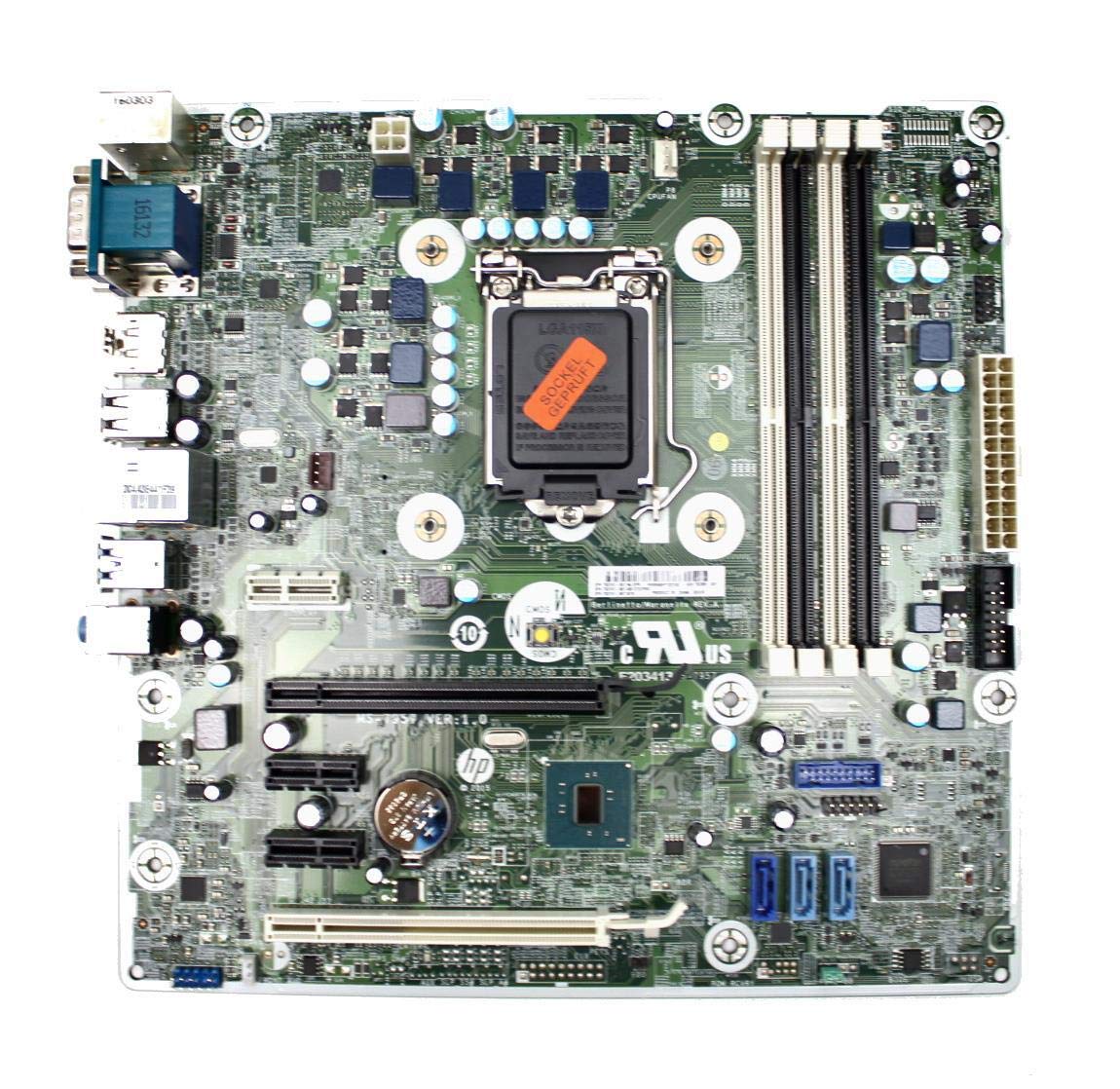
Figure 3: Rear I/O panel of the HP ProDesk 400 G3 MS-7957 motherboard. This image displays the available external connectivity options, including PS/2 ports, serial port, VGA, DisplayPort, USB 2.0, USB 3.0, Ethernet (RJ-45), and HD audio jacks.
دستورالعمل های عملیاتی
روشن شدن اولیه
After all components are installed and connected, connect the power cable to the power supply and press the power button on your computer case. The system should initiate the boot process.
پیکربندی بایوس/UEFI
To access the BIOS/UEFI setup utility, press the designated key (commonly دل, F2, F10، یا F12) during the initial boot sequence. Here you can configure boot order, system time, and other hardware settings.
نصب درایور
After installing your operating system, it is crucial to install the latest drivers for your motherboard's chipset, integrated graphics, audio, and network adapter. These drivers can typically be found on the HP support webسایت یا سازنده چیپست webسایت
تعمیر و نگهداری
- تمیز کردن: مرتباً با استفاده از هوای فشرده، گرد و غبار را از روی مادربرد و قطعات آن تمیز کنید. قبل از تمیز کردن، مطمئن شوید که سیستم خاموش و از برق کشیده شده است.
- بهروزرسانیهای بایوس/UEFI: Periodically check for BIOS/UEFI updates from HP's official support website. Updates can improve stability, compatibility, and performance. Follow update instructions carefully to avoid system damage.
- به روز رسانی درایور: برای اطمینان از عملکرد بهینه و سازگاری با نرمافزارها و سختافزارهای جدید، تمام درایورهای سیستم را بهروز نگه دارید.
عیب یابی
این بخش راهحلهایی برای مشکلات رایجی که ممکن است با آنها مواجه شوید ارائه میدهد:
- بدون برق: Check all power connections, including the 24-pin ATX and CPU power cables. Ensure the power supply is switched on and the wall outlet is functional.
- بدون نمایش: Verify that your monitor is connected to the correct video output (VGA or DisplayPort) and is powered on. Reseat the graphics card (if applicable) and RAM modules.
- ناپایداری/خرابی سیستم: This could be due to overheating, faulty RAM, or outdated drivers. Check CPU and GPU temperatures, run memory diagnostic tools, and update drivers.
- دستگاه جانبی شناسایی نشد: Ensure the peripheral is properly connected. Try a different port or update the relevant drivers.
- BIOS/UEFI Issues: If you encounter issues after changing BIOS settings, try resetting the CMOS by removing the CMOS battery for a few minutes or using the clear CMOS jumper (refer to motherboard diagram for location).
مشخصات
| ویژگی | مشخصات |
|---|---|
| نام تجاری | HP |
| سوکت CPU | LGA 1151 |
| دستگاه های سازگار | کامپیوتر رومیزی |
| فناوری رم | DDR4 |
| پردازندههای سازگار | Intel Core i3-6xxx, Intel Core i5-6xxx, Intel Core i7-6xxx, Intel Core i3-7xxx, Intel Core i5-7xxx, Intel Core i7-7xxx, Intel Core i3-8xxx, Intel Core i5-8xxx, Intel Core i7-8xxx |
| نوع چیپست | اینتل B250 |
| پلت فرم | ویندوز |
| نام مدل | MS-7957 |
| مدل CPU | Core i3 (Note: Supports i3, i5, i7 as listed above) |
| نوع اتصال دهنده برق اصلی | 24 پین |
| رابط کارت گرافیک | PCI Express |
| اسلاتهای حافظه موجود | 4 |
| Total SATA Ports | 6 |
| مجموع پورت های USB | 2 (Note: Refers to internal headers, rear I/O has more) |
| کل پورتهای اترنت | 1 |
| Total PCIe Ports | 3 |
| سازنده | Computer Store Berlin (Reseller/Supplier) |
| شماره قطعه | 4061435962741 |
| ASIN | B08CS13PTQ |
گارانتی و پشتیبانی
این محصول به همراه یک 1 سال گارانتی از تاریخ خرید این ضمانت نقص در مواد و طرز کار در استفاده معمولی را پوشش می دهد.
For technical support, warranty claims, or further assistance, please contact your point of purchase or refer to the official HP support resources for the ProDesk 400 G3 series.