
1. محصول تمام شدview
The Bewinner 2X2 Video Wall Controller is a high-performance device designed to split a single HDMI high-definition image into four distinct blocks, distributing them across four video display units. This allows for the creation of a large, dynamic image screen, ideal for various applications such as digital signage, home theaters, and control rooms. It supports 1 HDMI input and 4 HDMI outputs, delivering a resolution of up to 1920 x 1080P@60Hz.

Image: The Bewinner 2x2 Video Wall Controller shown with an example of a single image split across four displays.
2. ویژگی های کلیدی
- Large Screen Splicing: Supports 1 HDMI input and 4 HDMI outputs to divide a complete HDMI high-definition image into 4 blocks for display on multiple units, creating a large dynamic image screen.
- 1080P HD Output: Supports HDMI1.3 input and 4 HDMI outputs with a maximum resolution of 1920 x 1080P@60Hz. Compatible with 1920 x 1080P 24/30/50/60Hz and below input resolutions.
- Variety of Splicing Methods: Offers flexible splicing options including 2x1, 3x1, 4x1, 1x2, 1x3, 1x4, and 2x2 configurations. Note: Image rotation for vertical display is not supported; use a vertically oriented source.
- عملکرد قوی: Constructed from metal for anti-interference and durability, featuring dense heat dissipation holes for improved performance and longevity. Powered by a stable 12V supply.
- عملیات آسان: Plug and play functionality with convenient control via the device's buttons or the included remote control.

Image: Visual representation of the controller's key features, such as 1080P HD support and plug-and-play functionality.
3. محتویات بسته
لطفاً پس از باز کردن بسته، از موجود بودن و سالم بودن همه اقلام اطمینان حاصل کنید:
- Bewinner 2X2 Video Wall Controller Unit
- Remote Control (requires 2x AAA batteries, not included)
- آداپتور برق 12 ولت
- راهنمای کاربر (این سند)

Image: The main components included in the package: the video wall controller, its remote, and the power adapter.
۱. دستورالعملهای راهاندازی
- اتصال منبع ورودی: Connect your HDMI input source (e.g., computer, media player) to the "HDMI INPUT" port on the video wall controller using a high-quality HDMI cable.
- نمایشگرهای متصل: Connect your four HDMI display units (e.g., TVs, monitors) to the four "HDMI OUTPUT" ports on the controller using HDMI cables. Ensure each display is powered on.
- اتصال برق: Plug the 12V power adapter into the "DC/12V" port on the controller, then connect the adapter to a power outlet. مهم: Ensure the 12V power adapter is connected to prevent voltage instability and potential screen flickering issues.
- روشن کردن: The controller will power on automatically once connected to power.
- پیکربندی اولیه: Use the "MODE" button on the controller or the remote control to select the desired splicing mode (e.g., 2x2, 1x4). Refer to the "Operating Instructions" section for more details on mode selection.

Image: The rear panel of the controller, highlighting the HDMI input, four HDMI output ports, and the DC 12V power connection.
5. دستورالعمل های عملیاتی
5.1. کنترل پنل جلو
- IR: گیرنده مادون قرمز برای کنترل از راه دور.
- LED: Power/Status indicator light.
- صوتی: Button to cycle through audio modes or settings.
- حالت: Button to cycle through different splicing modes (e.g., 2x2, 1x4).
- دکمه پاور: برای روشن یا خاموش کردن دستگاه.
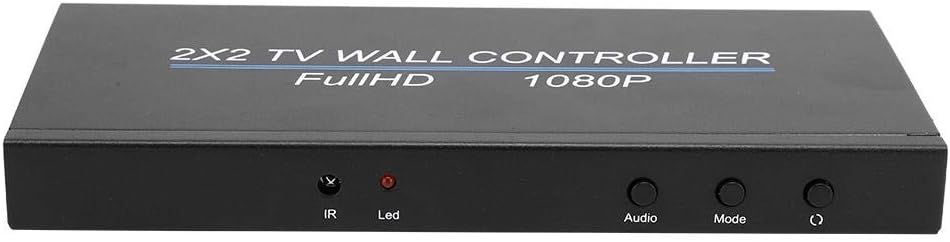
Image: The front panel of the controller, displaying the IR receiver, LED indicator, and control buttons.
5.2. عملیات کنترل از راه دور
The included remote control provides convenient access to all functions. Ensure 2x AAA batteries are installed correctly before use.
- قدرت: دستگاه را روشن/خاموش می کند.
- صوتی: تنظیمات صدا را تنظیم می کند.
- Mode Buttons (e.g., 2X2, 1X4, 3X1): Directly select desired splicing configurations.
- ATTR+/- and VAL+/-: Used for fine-tuning image attributes and values (e.g., brightness, contrast).
- تنظیم مجدد: تنظیمات را به حالت پیشفرض برمیگرداند.

Image: A hand demonstrating the use of the remote control, highlighting its various buttons for mode selection and adjustments.
5.3. Splicing Modes
The controller supports various display configurations:
| حالت | توضیحات | Example Use Case |
|---|---|---|
| 2x2 | Splits the image into 4 equal parts, displayed on a 2x2 grid of screens. | Standard video wall, home theater. |
| 2x1 | Splits the image across 2 screens horizontally. | Extended desktop, narrow display. |
| 3x1 | Splits the image across 3 screens horizontally. | Panoramic display, information board. |
| 4x1 | Splits the image across 4 screens horizontally. | Ultra-wide display, digital signage. |
| 1x2 | Splits the image across 2 screens vertically. | Vertical signage, portrait mode content. |
| 1x3 | Splits the image across 3 screens vertically. | Tall information displays. |
| 1x4 | Splits the image across 4 screens vertically. | Full-height digital posters. |
To select a mode, press the corresponding button on the remote control or cycle through modes using the "Mode" button on the front panel. توجه: This device does not support image rotation. For vertical displays (1x2, 1x3, 1x4), ensure your input source provides content already oriented for portrait mode.

Image: Illustrations of different video wall configurations supported by the controller, such as horizontal and vertical multi-screen setups.
6 عیب یابی
| مشکل | علت احتمالی | راه حل |
|---|---|---|
| No signal on displays / Black screen | Loose HDMI cables, incorrect input selection, power issue. |
|
| سوسو زدن صفحه نمایش یا تصویر ناپایدار | Insufficient power, faulty cable, incompatible resolution. |
|
| کنترل از راه دور کار نمی کند | Dead batteries, IR sensor blocked, remote malfunction. |
|
| Incorrect splicing mode / Image distortion | Wrong mode selected, input resolution mismatch. |
|
| Blue tint or incorrect colors | Cable issue, display settings, unit malfunction. |
|
7. مشخصات
| ویژگی | جزئیات |
|---|---|
| نام تجاری | Bewinner1 |
| شماره مدل | Bewinneryhxuge6g5c-11 |
| پورت ورودی | 1 x HDMI 1.3 |
| پورت های خروجی | 4 x HDMI |
| پشتیبانی از وضوح ورودی | 1920 x 1080P @ 24/30/50/60Hz and below |
| پشتیبانی از وضوح خروجی | 1920 x 1080P @ 60Hz |
| Supported Splicing Modes | 2x1, 3x1, 4x1, 1x2, 1x3, 1x4, 2x2 |
| منبع تغذیه | DC 12 ولت |
| مواد | فلز |
| وزن مورد | ۳.۷۴ پوند (تقریباً ۱.۷ کیلوگرم) |
8. تعمیر و نگهداری
To ensure the longevity and optimal performance of your Bewinner Video Wall Controller, please follow these maintenance guidelines:
- تمیز کردن: Use a soft, dry cloth to clean the exterior of the device. Do not use liquid cleaners or aerosol sprays, as they may damage the unit.
- تهویه: Ensure the device is placed in a well-ventilated area. Do not block the heat dissipation holes on the sides of the unit.
- محیط زیست: Avoid exposing the device to extreme temperatures, humidity, dust, or direct sunlight.
- قدرت: Always use the provided 12V power adapter. Disconnect power during electrical storms or when the unit will be unused for extended periods.
9. گارانتی و پشتیبانی
Bewinner is committed to providing quality products and excellent customer service. If you encounter any issues or have questions regarding your Bewinner LED Video Wall Controller, please contact our professional customer service team.
For support, please refer to the contact information provided with your purchase or visit the official Bewinner website. Our team is available to assist you with troubleshooting and any other product-related inquiries.
We strive to resolve any problems promptly and ensure a satisfactory experience.