
1. مقدمه
The ANCEL FX1000 is a professional vehicle diagnostic tool designed to read and clear trouble codes, view live data, and perform various special functions for a single-car manufacturer. It supports full OBD service modes and is compatible with vehicles manufactured from 1996 onwards. This manual provides detailed instructions for setting up and operating your device.
2. ویژگی های محصول
- Full OBDII Service Modes: Supports 8 OBDII service modes for comprehensive diagnostics.
- Multi-System Diagnostics: Capable of diagnosing all major vehicle systems including Engine, Transmission, SRS (Supplemental Restraint System), SAS (Steering Angle Sensor), TPMS (Tire Pressure Monitoring System), ABS (Anti-lock Braking System), and more.
- توابع ویژه: Includes advanced functions such as DPF (Diesel Particulate Filter) Regeneration, Battery Replacement, ABS Bleeding, Oil Service Reset, EPB (Electronic Parking Brake) Reset, and Throttle Position Adaption.
- پشتیبانی چند زبانه: Supports 7 languages: English, French, Spanish, German, Russian, Polish, and Portuguese.
- Manufacturer-Specific Tool: Designed for a single-car manufacturer, allowing in-depth diagnostics for a specific brand's vehicle series.
- Lifetime Free Online Updates: Ensures your device always has the latest software and vehicle coverage.
3. محتویات بسته
Your ANCEL FX1000 package should include the following items:
- ANCEL FX1000 Diagnostic Tool
- OBDII Connection Cable
- Micro USB Cable (for PC connection and updates)
- راهنمای دانلود
- کیف حمل پوسته سخت
4. طرح بندی دستگاه
Familiarize yourself with the buttons and ports on your ANCEL FX1000 device for optimal operation.

Image: ANCEL FX1000 device showing LCD display, Return button, Scroll Left/Right/Up/Down buttons, Fn button, and Ok button. Dimensions are also indicated.
- نمایشگر LCD: Shows diagnostic information and menu options.
- دکمه بازگشت: به صفحه یا منوی قبلی برمیگردد.
- Scroll Buttons (Up/Down/Left/Right): Used to navigate through menus and select options.
- دکمه Fn: Function button, may have context-specific uses.
- دکمه OK: انتخابها را تأیید میکند یا وارد زیرمنوها میشود.
- اتصال OBDII: دستگاه را به پورت OBDII خودرو متصل میکند.
- پورت USB: For connecting to a computer for software updates.
5. راه اندازی و اتصال
Follow these steps to connect your ANCEL FX1000 to your vehicle:
- پورت OBDII وسیله نقلیه خود را پیدا کنید. این پورت معمولاً در زیر داشبورد در سمت راننده قرار دارد.
- Ensure the vehicle's ignition is ON, but the engine is NOT running. For push-button start vehicles, press the start button until all dashboard lights illuminate without starting the engine.
- Plug the OBDII connector from the ANCEL FX1000 into your vehicle's OBDII port. The device will power on automatically.
- Once powered on, the device is ready for use.
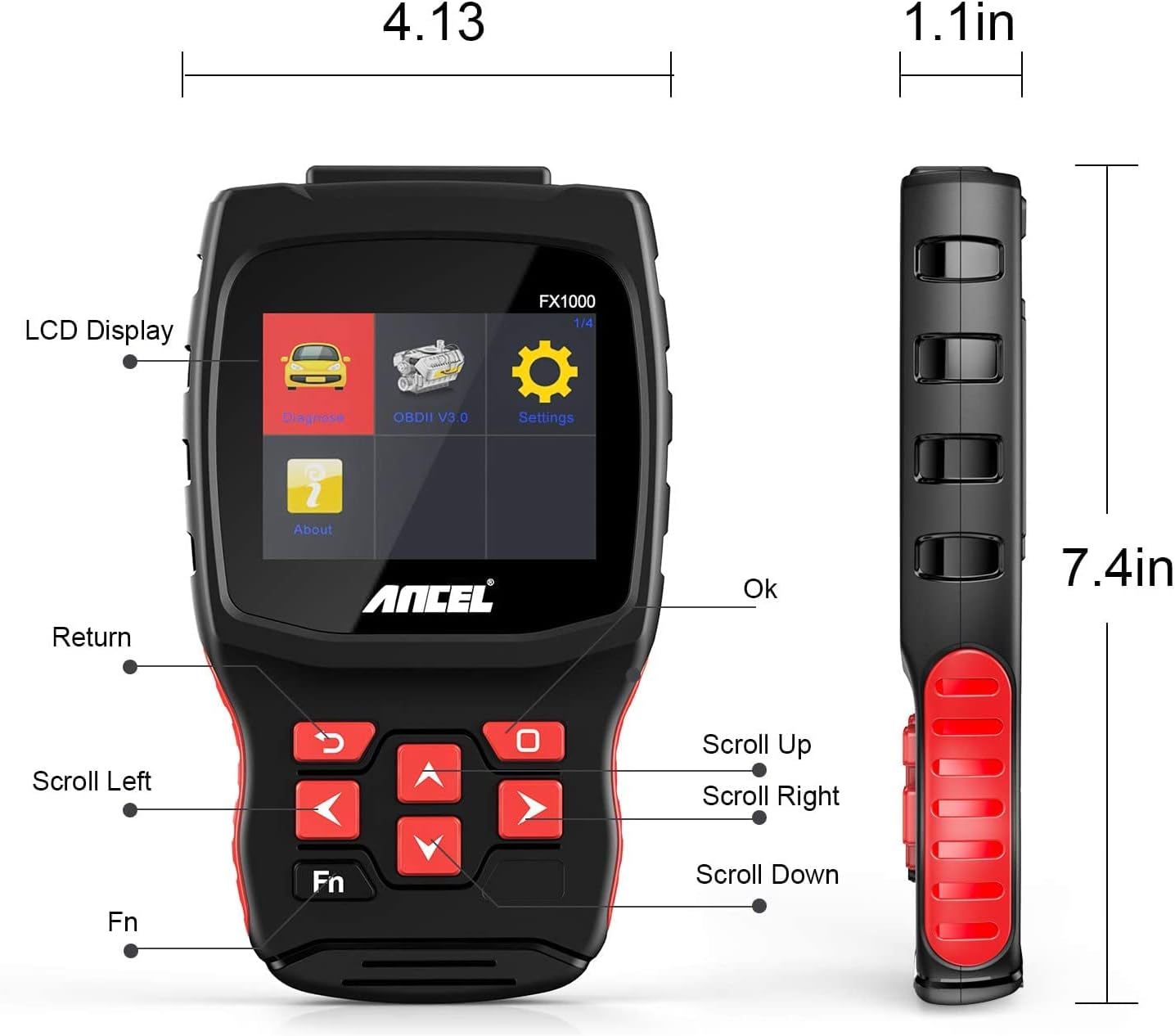
Image: A hand holding the ANCEL FX1000 connected to a vehicle's OBDII port, with the car's dashboard visible.
6. ناوبری و تنظیمات
The ANCEL FX1000 features a user-friendly interface. Use the arrow buttons to navigate and the OK button to select.
- تشخیص: Access vehicle-specific diagnostic functions.
- OBDII V3.0: Access general OBDII functions for all compatible vehicles.
- تنظیمات: تنظیمات برگزیده دستگاه را پیکربندی کنید.
- درباره: View device information such as serial number, firmware version, and software version.
گزینه های منوی تنظیمات:
- زبان: زبان نمایش را تغییر دهید.
- واحد: برای خواندن دما بین درجه سانتیگراد و فارنهایت تغییر دهید.
- بوق: Enable or disable audible feedback.
- ثبت: View recorded diagnostic data.
- تست دکمه: Test the functionality of the device buttons.
- LCD Test: Test the LCD display.
7. تشخیص سیستم
The ANCEL FX1000 allows you to perform in-depth diagnostics on various vehicle systems. After selecting 'Diagnose' and your vehicle's manufacturer (e.g., Toyota), you can choose specific systems.
Image: Visual representation of systems diagnosed by FX1000, including Engine, ABS, TPMS, Transmission, Oil Service, Airbag, Battery, Audio, and Headlight Activate.
عملکردهای تشخیصی:
- Read Trouble Code: Retrieves current, pending, and history Diagnostic Trouble Codes (DTCs).
- Clear Trouble Code: Erases DTCs from the vehicle's computer.
- جریان داده را بخوانید: پارامترهای داده را به صورت بلادرنگ از سنسورهای خودرو نمایش میدهد.
- تست فعال: Allows bidirectional control to test specific components.
- تابع ویژه: Accesses advanced maintenance and service functions.
8. توابع ویژه
The ANCEL FX1000 offers several special functions for vehicle maintenance:

Image: Visual representation of special functions including Oil Service Reset, ABS Bleeding, TPMS Reset, and EPB Reset.
- تنظیم مجدد سرویس روغن: چراغ سرویس روغن را پس از تعویض روغن، مجدداً تنظیم میکند.
- خونریزی ABS: Performs bleeding functions for the Anti-lock Braking System.
- تنظیم مجدد EPB: Resets the Electronic Parking Brake system.
- Throttle Position Adaption: Adapts the throttle position sensor.
- بازسازی DPF: فرآیند بازسازی فیلتر ذرات دیزل را آغاز میکند.
- تعویض باتری: Registers new battery replacements.
9. OBDII Functions (General)
The 'OBDII V3.0' menu provides general diagnostic functions compatible with all OBDII-compliant vehicles (1996 and newer).
- Read Current Trouble Code: Displays active DTCs.
- Clear Trouble Code: Erases all stored DTCs.
- Read Current Data: View live sensor data.
- Read Pending Trouble Code: Displays DTCs that have not yet fully matured.
- خواندن دادههای فریم فریز شده: Shows a snapshot of vehicle conditions when a DTC was set.
- Readiness Tests: وضعیت مانیتورهای مربوط به انتشار گازهای آلاینده را بررسی میکند.
Readiness Test:
The Readiness Test is crucial for emissions inspections. It indicates whether various emission control systems have completed their self-tests. Look for 'Complete' or 'Supported' status for all monitors. If a monitor shows 'Not Complete' or 'Not Supported', it may indicate an issue or that the drive cycle has not been completed.
10. Clearing Trouble Codes
To clear trouble codes, navigate to the 'Clear Trouble Code' option within the relevant diagnostic menu. The device will prompt you to confirm. After clearing, it is recommended to cycle the vehicle's ignition off and on to ensure all related warning lights are reset.
Note: The ANCEL FX1000 can only read and clear SRS error codes; it does NOT support SRS reset functions.
11. بروزرسانی نرم افزار
To ensure your ANCEL FX1000 has the latest vehicle coverage and features, regular software updates are recommended. The device offers lifetime free online updates.
- Connect the device to your computer using the provided Micro USB cable.
- Follow the instructions in the 'Download Guide' included in your package to install the update software on your computer.
- Register your device using the serial number and your email address.
- Select the specific car manufacturer software you need for your device.
- Perform the update as prompted by the software.

Image: ANCEL FX1000 connected via USB cable to a laptop, illustrating the update process.
12 عیب یابی
If you encounter issues while using your ANCEL FX1000, refer to the following common scenarios:
-
Ask a question about this manual
Ask about setup, troubleshooting, compatibility, parts, safety, or missing instructions. Manuals+ will review the question and use this page’s manual context to help answer it.