
1. مقدمه
Welcome to the user manual for your Google Pixel 4 XL smartphone. This guide provides essential information to help you get started, understand its features, and maintain your device. The Google Pixel 4 XL is designed to offer a seamless Android experience with advanced camera capabilities, intuitive gesture controls, and the integrated Google Assistant.

Figure 1.1: Google Pixel 4 XL (Oh So Orange)
2. راه اندازی
۲.۲ محتویات جعبه
- گوشی هوشمند گوگل پیکسل ۳ ایکس ال
- آداپتور برق متناوب
- کابل USB (USB-C به USB-C)
- OTG Dongle (USB-A to USB-C adapter)
- ابزار خارج کردن سینی سیم کارت
- راهنمای شروع سریع
۴.۱ قرار دادن سیم کارت
- Locate the SIM card tray on the side of your Pixel 4 XL.
- ابزار خارج کردن سینی سیمکارت را در سوراخ کوچک کنار سینی قرار دهید و محکم فشار دهید تا سینی بیرون بیاید.
- Place your Nano SIM card into the tray with the gold contacts facing down. Ensure it fits securely.
- با دقت سینی سیمکارت را به داخل گوشی فشار دهید تا در جای خود قرار گیرد.

شکل ۲.۱: محل قرارگیری سینی سیم کارت
۵.۲ روشن کردن و راهاندازی اولیه
- Press and hold the Power button (located on the right side) until the Google logo appears.
- Follow the on-screen instructions to select your language, connect to Wi-Fi, and transfer data from an old device if desired.
- با حساب گوگل خود وارد شوید یا یک حساب جدید ایجاد کنید.
- Set up security features such as Face Unlock.
2.4 شارژ کردن دستگاه
Connect the USB cable to the AC adapter and plug it into a power outlet. Connect the other end of the USB cable to the USB-C port at the bottom of your Pixel 4 XL. The device supports fast charging. For optimal battery health, avoid fully discharging the battery frequently.
3. دستورالعمل های عملیاتی
3.1 ناوبری اولیه
The Pixel 4 XL uses a touchscreen interface for navigation. Swipe up from the bottom to go to the home screen, swipe from the left or right edge to go back, and swipe up and hold to view برنامه های اخیر

Figure 3.1: Pixel 4 XL Front Display
3.2 دستیار Google
The new Google Assistant is integrated into the Pixel 4 XL. You can activate it by squeezing the sides of your phone or by saying "Hey Google." Use your voice to send texts, share photos, get directions, and more.
3.3 ویژگی های دوربین
The Pixel 4 XL camera offers advanced photography capabilities:
- نشانه گیری و شلیک: Capture brilliant color and control exposure balance.
- دید در شب: Take clear photos in low-light conditions, including astrophotography for capturing the Milky Way.
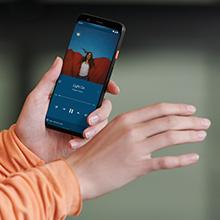
Figure 3.2: Using the Pixel 4 XL Camera
3.4 Motion Sense (Quick Gestures)
Utilize Quick Gestures to control your phone without touching it. Wave your hand above the screen to skip songs, silence calls, and more. Motion Sense functionality is available in specific regions including the US, Canada, Singapore, Australia, Taiwan, and most European countries.
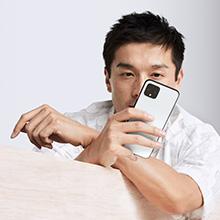
Figure 3.3: Motion Sense in Action
3.5 Call Screen
The Google Assistant's Call Screen feature helps filter out spam calls. It can proactively screen unknown callers and provide a transcript of the conversation, allowing you to decide whether to answer.
۵.۳ ویدیوی رسمی محصول
Video 3.1: An official video from Google Inc showcasing the features of the Google Pixel 4, including Google Assistant and Motion Sense. This video provides a visual overview of key functionalities.
4. تعمیر و نگهداری
4.1 تمیز کردن دستگاه
To clean your Pixel 4 XL, use a soft, lint-free cloth. Avoid abrasive materials, solvents, or aerosol sprays. For stubborn marks, slightly dampپارچه را با آب خیس کنید. دستگاه را در آب فرو نبرید.
4.2 به روز رسانی نرم افزار
Google regularly releases software updates to improve performance, add features, and enhance security. Ensure your device is connected to Wi-Fi and has sufficient battery life before installing updates. You can check for updates in Settings > System > System update.
4.3 مراقبت از باتری
برای افزایش طول عمر باتری:
- از دمای شدید خودداری کنید.
- Use the provided charger or a compatible Qi-certified wireless charger.
- Enable Adaptive Battery in settings to optimize app usage.
- Disable features like Motion Sense and Always-on Display if not actively needed to conserve power.
4.4 پشتیبان گیری از داده ها
Regularly back up your data to your Google Account. This includes photos, videos, contacts, and app data. Go to Settings > System > Backup to manage your backup settings.
5 عیب یابی
5.1 مسائل و راه حل های مشترک
- دستگاه پاسخ نمی دهد: برای ریستارت اجباری، دکمه پاور را حدود ۱۰ ثانیه فشار داده و نگه دارید.
- از کار افتادن برنامهها: Clear the cache and data for the problematic app in Settings > Apps & notifications > See all apps > [App Name] > Storage & cache.
- مشکلات اتصال (وایفای/بلوتوث): Try toggling Wi-Fi or Bluetooth off and on. If the issue persists, reset network settings in Settings > System > Reset options > Reset Wi-Fi, mobile & Bluetooth.
- عمر باتری ضعیف: Review battery usage in Settings > Battery to identify apps consuming excessive power. Adjust screen brightness and disable unnecessary features.
5.2 تنظیم مجدد کارخانه
تنظیم مجدد کارخانه، تمام اطلاعات گوشی شما را پاک کرده و آن را به تنظیمات اولیه کارخانه برمیگرداند. این کار میتواند مشکلات نرمافزاری مداوم را حل کند. Warning: Back up all important data before proceeding.
- به تنظیمات > سیستم > گزینههای بازنشانی بروید.
- Tap "Erase all data (factory reset)".
- تصمیم خود را تأیید کنید و دستورالعملهای روی صفحه را دنبال کنید.
6. مشخصات
Key technical specifications for the Google Pixel 4 XL:
| ویژگی | مشخصات |
|---|---|
| نام تجاری | گوگل |
| نام مدل | Pixel 4 XL |
| سیستم عامل | اندروید |
| ظرفیت ذخیره سازی حافظه | 64 گیگابایت |
| اندازه حافظه رم نصب شده | 6 گیگابایت |
| اندازه صفحه نمایش | 6.3 اینچ |
| قطعنامه | 1440×2960 |
| نرخ تازه سازی | 120 هرتز |
| مدل CPU | Snapdragon S3 |
| سرعت CPU | 2.84 گیگاهرتز |
| رنگ | Oh So Orange |
| تعداد اسلات سیم کارت | تک سیم کارت |
| نوع رابط | USB نوع C |
| ویژگی امنیتی بیومتریک | تشخیص چهره |
| سطح مقاومت در برابر آب | مقاوم در برابر آب |
| جک هدفون | جک هدفون ندارد |
| وضوح حسگر عکس جلو | 8 مگاپیکسل |
| وضوح تصویربرداری | 4k (30fps) |
| نوع نمایشگر | OLED |
| ارائه دهنده خدمات بیسیم | باز شده است |
| عمر متوسط باتری | 12 ساعت |
7. اطلاعات گارانتی
Your Google Pixel 4 XL comes with a ۱ سال گارانتی سازنده. This warranty covers defects in materials and workmanship under normal use. It does not cover damage caused by accidents, misuse, unauthorized repairs, or normal wear and tear.
For detailed terms and conditions, please refer to the warranty card included with your product or visit the official Google support webسایت
8. پشتیبانی
If you require further assistance or encounter issues not covered in this manual, please utilize the following resources:
- راهنما آنلاین: Visit the official Google Pixel Help Center for comprehensive articles, FAQs, and troubleshooting guides.
- انجمن های انجمن: Engage with other Pixel users and experts in Google's official product forums.
- تماس با پشتیبانی: Access direct support options (chat, phone, email) through the Google Pixel Help Center.
Always ensure you are referring to official Google support channels for accurate and up-to-date information.