
محصول تمام شده استview
The Marantz SR5014 7.2 channel 4K Ultra HD AV receiver is designed to deliver a refined surround sound home theater experience. It supports advanced object-based audio formats and offers high-definition video processing with superior connectivity. Tuned by world-renowned acousticians, the SR5014 produces musical sound from various sources, including vinyl and digital streaming. It provides immersive audio with Dolby Atmos, Dolby Atmos Height Virtualization Technology, DTS:X, and DTS Virtual:X. The receiver also supports voice control via Amazon Alexa, Google Assistant, and Apple Siri, and allows music streaming from popular services through Bluetooth, AirPlay 2, or the HEOS app.
ویژگی های کلیدی
- 7.2-Channel Discrete Power Ampزنده تر: Refine your surround sound home theater experience with advanced object-based audio formats, high definition video processing, and superior connectivity.
- Make the Most of Your 4K Ultra HD TV Investment: Drive exceptional visual clarity with full-rate pass-through, SD/HD video upscaling to UHD, 4:4:4 Pure Color sub-sampling, HDR10, BT.2020, 3D, 21:9 video, Dolby Vision, and HLG.
- Complement Premium Video with the Ultimate Cinematic Audio Experience: 100W per channel high power and latest audio formats including Dolby Atmos, DTS:X, DTS Virtual:X, and Dolby Atmos Height Virtualization Technology for a virtually heightened realism effect.
- Versatile HDMI eARC Connectivity: All 8 HDMI inputs support HDCP 2.3 Digital Content Protection, including 1 front-panel input for quick connections. Includes 2 HDMI outputs with 1 offering full eARC support.
- Effortless Voice Control with Leading Voice Agents: Use your voice to play, pause and stop music, switch inputs, turn the volume up & more with all major voice agents like Alexa, Siri and including, including the top smart home automation systems.
- Stream Unlimited Music or Videos: Using popular services like Spotify, TuneIn, Deezer, Tidal, Netflix, Amazon Prime & others via Bluetooth, AirPlay 2, or HEOS app across one room, or multiple rooms with built-in WIRELESS HEOS MULTI-ROOM AUDIO TECHNOLOGY.
- Easy-to-Understand and User-Friendly Setup Assistant: Comes with an advanced graphical user interface that guides you through the step-by-step process and connects all your audio sources to this stereo receiver.
محتویات بسته
پس از باز کردن بسته، لطفاً اطمینان حاصل کنید که تمام موارد ذکر شده در زیر موجود و در شرایط خوبی هستند:
- Marantz SR5014 AV Receiver
- کنترل از راه دور
- 2 AA Batteries (for remote controller)
- راهنمای شروع سریع
راهنمای راه اندازی
این بخش یک over کلی ارائه می دهدview of the setup process. For detailed, step-by-step instructions, please refer to the comprehensive User Manual PDF linked in the "Warranty and Support" section.
- باز کردن بسته بندی: گیرنده و تمام لوازم جانبی را با دقت از بسته بندی خارج کنید.
- قرار دادن: Place the receiver on a stable, flat surface with adequate ventilation. Ensure there is enough space around the unit for proper airflow.
- اتصال بلندگو: Connect your speakers to the appropriate speaker terminals on the rear of the receiver. Pay attention to polarity (+/-) for each speaker. The SR5014 supports 7.2 channels.
- منبع اتصال دستگاه: Connect your audio/video source devices (e.g., Blu-ray player, game console, cable/satellite box) to the HDMI input ports. Use high-quality HDMI cables for optimal performance.
- اتصال تلویزیون: Connect the HDMI OUT (ARC/eARC) port on the receiver to the corresponding HDMI input on your television.
- اتصال برق: سیم برق را به گیرنده و سپس به پریز برق وصل کنید.
- دستیار راه اندازی اولیه: Turn on the receiver and follow the on-screen instructions provided by the Marantz Setup Assistant. This guide will help you configure network settings, speaker calibration (Audyssey MultEQ XT), and input assignments.
عملیات
Once the receiver is set up, you can begin enjoying your audio and video content. For detailed operational procedures, refer to the full User Manual PDF.
- روشن/خاموش برق: Use the power button on the front panel or the remote control to turn the unit on or off.
- انتخاب ورودی: Select the desired input source (e.g., Blu-ray, Game, CBL/SAT) using the input selector knob on the front panel or the dedicated buttons on the remote control.
- کنترل صدا: Adjust the master volume using the large knob on the front panel or the VOLUME +/- buttons on the remote control.
- حالت های صدا: Explore various sound modes (e.g., Stereo, Multi-Channel Stereo, Dolby Atmos, DTS:X) to optimize your listening experience for different content types.
- ویژگی های شبکه: Access streaming services, internet radio, and HEOS multi-room audio via the network connection. Control these features using the HEOS app on your smartphone or tablet.
- کنترل صدا: If configured, use compatible voice assistants (Amazon Alexa, Google Assistant, Apple Siri) to control basic functions of the receiver.
تعمیر و نگهداری
Proper maintenance ensures the longevity and optimal performance of your Marantz SR5014 AV Receiver.
- تمیز کردن: Regularly wipe the exterior of the receiver with a soft, dry cloth. Avoid using abrasive cleaners, waxes, or solvents.
- تهویه: مطمئن شوید که منافذ تهویه در بالا و کنارههای گیرنده مسدود نشده باشند. جریان هوای مناسب برای جلوگیری از گرمای بیش از حد بسیار مهم است.
- تجمع گرد و غبار: Periodically use a soft brush or a low-power vacuum cleaner to remove dust from the vents and surfaces.
- مدیریت کابل: Keep cables neatly organized and ensure they are not kinked or pinched, which can affect signal quality or cause damage.
- به روز رسانی سیستم عامل: Check for and install available firmware updates to ensure your receiver has the latest features and performance enhancements. This can typically be done through the receiver's network settings.
عیب یابی
If you encounter issues with your Marantz SR5014, refer to the following common troubleshooting steps. For more complex problems, consult the detailed troubleshooting section in the full User Manual PDF.
- بدون برق:
- Check if the power cord is securely plugged into the receiver and the wall outlet.
- از عملکرد پریز برق اطمینان حاصل کنید.
- بدون صدا:
- تأیید کنید که منبع ورودی صحیح انتخاب شده است.
- Check speaker connections and ensure speaker wires are properly connected to both the receiver and speakers.
- تأیید کنید که صدا بیصدا یا خیلی کم تنظیم نشده باشد.
- Check audio output settings on your source device (e.g., TV, Blu-ray player).
- بدون عکس:
- Ensure HDMI cables are securely connected between the source, receiver, and TV.
- Verify that the correct HDMI input on your TV is selected.
- Check the HDMI output settings on the receiver and source device.
- مشکلات اتصال شبکه:
- روتر و مودم خود را مجدداً راه اندازی کنید.
- Ensure the Ethernet cable is securely connected if using a wired connection, or check Wi-Fi settings if using wireless.
- Perform a network diagnostic test through the receiver's setup menu.
- کنترل از راه دور کار نمی کند:
- باتری های کنترل از راه دور را تعویض کنید.
- مطمئن شوید که هیچ مانعی بین ریموت و حسگر IR گیرنده وجود ندارد.
- تنظیم مجدد کارخانه: As a last resort for persistent issues, a factory reset can resolve many problems. Refer to the User Manual for instructions on how to perform a factory reset, as this will erase all custom settings.
مشخصات فنی
| ویژگی | مشخصات |
|---|---|
| ابعاد محصول | 13.38 x 17.38 x 6.38 اینچ |
| وزن مورد | 26.1 پوند |
| سازنده | مارانتز |
| ASIN | B07SW88DXR |
| شماره مدل مورد | SR5014 |
| باتری ها | 2 باتری قلمی مورد نیاز (شامل) |
| تاریخ برای اولین بار در دسترس است | 10 جولای 2019 |
| نام تجاری | مارانتز |
| فناوری اتصال | بلوتوث، HDMI |
| نوع کنترلر | آمازون الکسا، دستیار گوگل |
| ویژگی خاص | آمازون موزیک |
| دستگاه های سازگار | تلویزیون، گوینده |
| مجموع پورت های HDMI | 7 |
| نوع رابط | HDMI |
| رمزگذاری صدا | استریو |
| حالت خروجی صدا | احاطه کنید |
| پیکربندی کانال صدای فراگیر | 7.2 |
تصاویری محصول
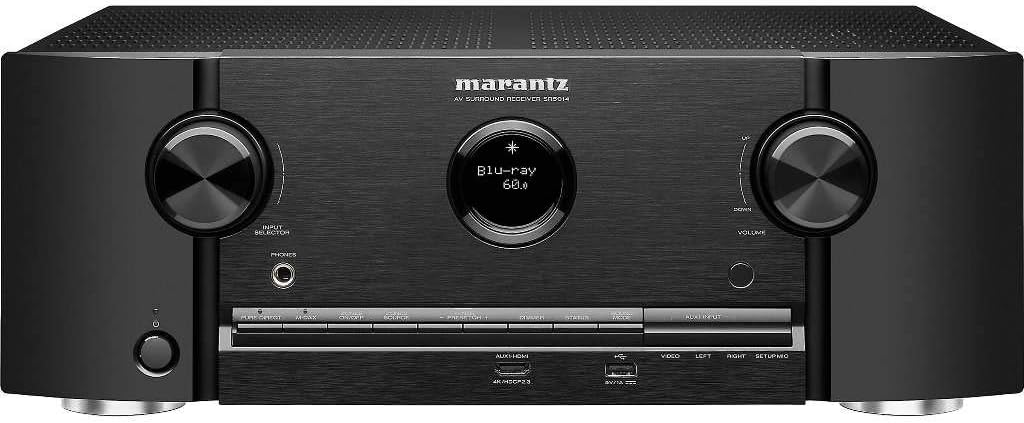
جلو view of the Marantz SR5014 AV Receiver, showcasing its sleek design with two large control knobs for input selection and volume, a central display, and front-panel inputs.

Rear panel of the Marantz SR5014 AV Receiver, displaying a comprehensive array of input and output ports, including multiple HDMI, analog audio, digital audio, and speaker terminals for a 7.2 channel setup.

داخلی view of the Marantz SR5014 AV Receiver, showing the meticulously arranged circuit boards and components, highlighting the quality engineering within the unit.

The included remote control for the Marantz SR5014 AV Receiver, featuring clearly labeled buttons for power, input selection, volume, navigation, and sound modes.
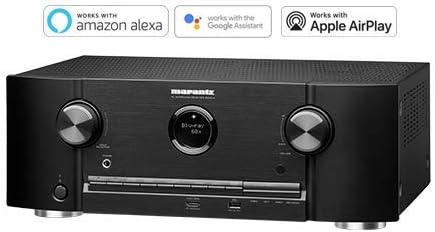
The Marantz SR5014 AV Receiver displayed alongside logos indicating compatibility with Amazon Alexa, Google Assistant, and Apple AirPlay for convenient voice control and streaming.
گارانتی و پشتیبانی
Marantz products are designed for reliability and performance. For detailed warranty information, please refer to the warranty card included with your product or contact Marantz customer support.
For comprehensive instructions, detailed setup guides, advanced features, and in-depth troubleshooting, please download the full User Manual PDF:
دانلود دفترچه راهنمای کامل کاربر (PDF)
For further assistance, please visit the official Marantz support webسایت یا با خدمات مشتریان آنها تماس بگیرید.