
Amazon Basics ABMT1000
دفترچه راهنمای کاربر یو پی اس آمازون بیسیکس لاین اینتراکتیو ۱۰۰۰VA/۵۵۰W
Model: ABMT1000
مقدمه
This manual provides essential information for the safe and efficient operation of your Amazon Basics Line Interactive Uninterruptible Power Supply (UPS) 1000VA/550W. A UPS provides battery backup power and surge protection for connected electronic devices, safeguarding against power outages, surges, and fluctuations. Please read this manual thoroughly before installation and use, and retain it for future reference.

Image: The Amazon Basics Line Interactive UPS 1000VA/550W positioned on a desk, providing power protection for a computer setup.
دستورالعمل های ایمنی مهم
Please adhere to these safety guidelines to prevent injury or damage to the UPS and connected equipment:
- این یو پی اس فقط برای استفاده در محیط داخلی طراحی شده است.
- Do not install the UPS in direct sunlight, near heat-emitting appliances, or in areas with excessive humidity or dust.
- مطمئن شوید که یو پی اس به پریز برق AC دارای اتصال زمین متصل است.
- یو پی اس را باز نکنیدasinز. هیچ قطعهای که توسط کاربر قابل تعمیر باشد در داخل وجود ندارد. تمام مراحل سرویس را به پرسنل خدمات واجد شرایط ارجاع دهید.
- Risk of electric shock. Do not connect or disconnect the UPS during a thunderstorm.
- The battery inside the UPS is not user-replaceable. Attempting to replace the battery yourself may void the warranty and pose a safety risk.
- In case of fire, use a dry chemical fire extinguisher. Water may cause electrical hazards.
محتویات بسته
بررسی کنید که همه اقلام در بسته شما موجود باشد:
- Amazon Basics Line Interactive UPS 1000VA/550W Unit
- کابل ارتباطی USB
- راهنمای کاربر (این سند)

Image: USB Communication Cable included with the UPS.
محصول تمام شده استview
پنل جلو

تصویر: جلو view of the Amazon Basics Line Interactive UPS 1000VA/550W, showing the power button, mute button, and LED indicators.
- دکمه پاور: Press to turn the UPS ON or OFF.
- دکمه قطع صدا: Press to silence audible alarms.
- نشانگرهای LED:
- آنلاین: Illuminates when the UPS is providing utility power to connected devices.
- روی باتری: Illuminates when the UPS is operating on battery power.
- AVR (Automatic Voltage مقررات): Illuminates when the UPS is correcting minor voltage fluctuations without switching to battery power.
- اضافه بار: Illuminates if connected equipment exceeds the UPS's capacity.
پنل عقب
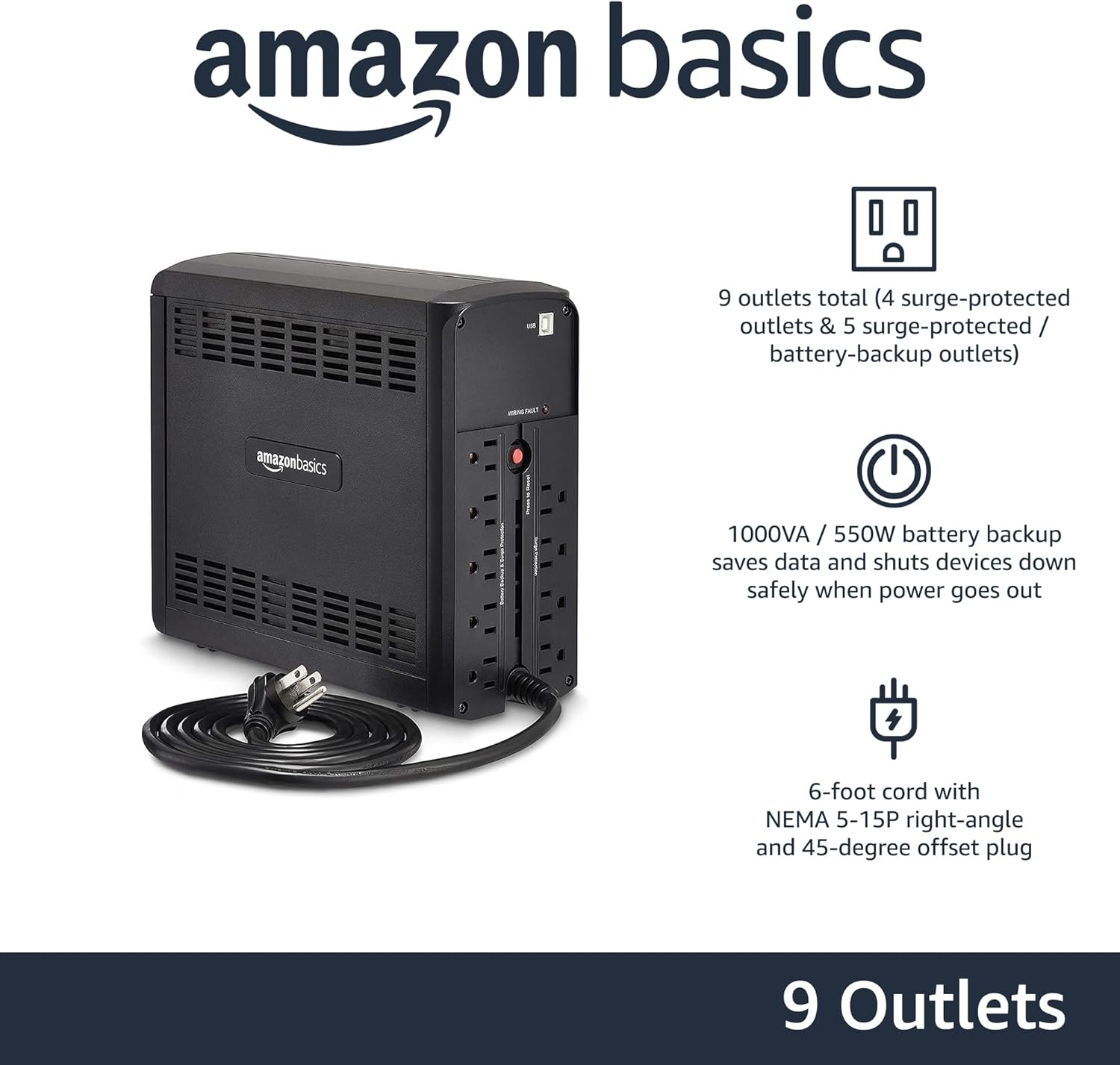
تصویر: عقب view of the Amazon Basics Line Interactive UPS 1000VA/550W, displaying the power cord, battery backup outlets, and surge-only outlets.
- باتری پشتیبان و پریزهای برق محافظتشده در برابر نوسانات برق (۵ پریز): این پریزها در طول کار، هم باتری پشتیبان و هم برق مورد نیاز را فراهم میکنند.tages and surge protection. Connect critical devices such as computers, monitors, and network equipment here.
- Surge Protected Outlets (4 outlets): These outlets provide surge protection only. Connect non-critical devices like printers or scanners here.
- پورت ارتباطی USB: Connects to a computer for power management software (e.g., CyberPower PowerPanel Personal).
- سیم برق ورودی AC: یو پی اس را به پریز برق وصل می کند.
راه اندازی
- باز کردن و بازرسی: Carefully remove the UPS from its packaging. Inspect for any shipping damage. If damage is found, do not use the unit and contact customer support.
- شارژ اولیه باتری: Before initial use, connect the UPS to a standard wall outlet and allow it to charge for at least 8 hours. This ensures the battery is fully charged and ready to provide optimal backup power. The UPS will charge whether it is turned ON or OFF.
- اتصال دستگاه ها:
- تجهیزات حیاتی (مثلاً کامپیوتر، مانیتور، روتر) را به برق وصل کنید باتری پشتیبان و پریزهای محافظت شده از نوسانات.
- Plug non-critical equipment (e.g., printer, desk lamp) به پریزهای محافظت شده از نوسانات.
- احتیاط: Do not plug laser printers into battery backup outlets, as their high power draw can overload the UPS.
- اتصال به کامپیوتر (اختیاری): Use the provided USB cable to connect the UPS's USB port to your computer's USB port. This allows for power management software installation, enabling features like automatic shutdown during extended power outages
- روشن کردن: Press and hold the Power Button on the front panel for approximately 2 seconds until you hear a beep and the UPS powers on.
دستورالعمل های عملیاتی
Turning the UPS On/Off
- برای روشن کردن: Press and hold the Power Button for 2 seconds. The UPS will beep, and the ONLINE LED will illuminate.
- برای خاموش کردن: Press and hold the Power Button for 2 seconds. The UPS will beep, and all LEDs will turn off.
Understanding LED Indicators and Alarms
- ONLINE (Green LED): Solid green indicates the UPS is receiving utility power and providing it to connected devices.
- ON BATTERY (Yellow LED): Solid yellow indicates the UPS is supplying battery power. An audible alarm will sound (beeping every 10 seconds).
- AVR (Yellow LED): Solid yellow indicates the UPS is automatically regulating input voltage بدون استفاده از باتری.
- OVERLOAD (Red LED): Solid red indicates that the connected load exceeds the UPS's capacity. An audible alarm will sound continuously. Immediately disconnect non-essential equipment from the battery backup outlets until the alarm stops.
- باتری کم: When the UPS is on battery power and the battery level is low, the ON BATTERY LED will flash, and the alarm will beep more frequently (every 1 second).
- خاموش کردن زنگ هشدار: Press the Mute Button to silence audible alarms. The alarm will reactivate if the condition changes (e.g., low battery).
زمان اجرای باتری
The battery runtime depends on the power consumption of the connected devices. For this 1000VA/550W model:
- At half load (500VA/275W), the UPS provides approximately دقیقه 7 of backup power.
- At full load (1000VA/550W), the UPS provides approximately 1 دقیقه of backup power.
It is recommended to save your work and safely shut down your computer during a power outage برای جلوگیری از از دست رفتن دادهها.
تعمیر و نگهداری
مراقبت از باتری
- To maintain optimal battery life, keep the UPS connected to an AC outlet at all times.
- If the UPS is stored for an extended period, recharge the battery every three months for at least 8 hours to prevent battery degradation.
- Batteries have a finite lifespan and will eventually require replacement. If you notice a significant decrease in runtime, contact Amazon Basics customer support for guidance on battery replacement options.
تمیز کردن
- Always unplug the UPS from the wall outlet before cleaning.
- Use a soft, dry cloth to wipe the exterior surfaces of the UPS.
- Do not use liquid or aerosol cleaners, as they may contain flammable substances or cause electrical shock.
عیب یابی
| مشکل | علت احتمالی | راه حل |
|---|---|---|
| یو پی اس روشن نمیشود. | باتری خالی شده یا وصل نیست. | Connect the UPS to an AC outlet and allow it to charge for 8 hours. Ensure the power cord is securely plugged in. |
| UPS is beeping continuously and OVERLOAD LED is on. | دستگاههای زیادی به پریزهای پشتیبان باتری متصل هستند. | Disconnect non-essential equipment from the battery backup outlets until the alarm stops. Ensure total load does not exceed 550W. |
| یو پی اس اغلب به حالت باتری تغییر می کند. | Unstable utility power or voltage نوسانات | This is normal operation for a line interactive UPS. The AVR function is working. If it happens excessively, consult an electrician about your home's wiring. |
| زمان کارکرد کوتاه باتری. | باتری قدیمی است یا کاملاً شارژ نشده است. | Ensure the battery is fully charged (8 hours). If the battery is several years old, it may need replacement. Contact Amazon Basics support. |
| UPS does not provide power to connected devices. | UPS is off, or outlets are surge-only. | Ensure the UPS is turned on. Verify devices are plugged into the correct battery backup outlets. |
مشخصات
| ویژگی | جزئیات |
|---|---|
| شماره مدل | ABMT1000 |
| ظرفیت | 1000 ولت / 550 وات |
| حجم ورودیtage | 120 ولت AC |
| خروجی ها | 9 total (5 Battery Backup & Surge Protected, 4 Surge Protected) |
| نوع باتری | اسید سرب مهر و موم شده |
| زمان شارژ معمولی | ظرفیت 8 ساعت تا 90 درصد |
| ابعاد (D x W x H) | 10.2 x 3.9 x 9 اینچ (25.91 x 9.91 x 22.86 سانتیمتر) |
| وزن | 15 پوند (6.8 کیلوگرم) |
| رنگ | مشکی |

Image: Diagram showing the dimensions of the Amazon Basics Line Interactive UPS 1000VA/550W.
گارانتی و پشتیبانی
This Amazon Basics UPS is backed by a limited 1-year warranty, which includes the battery. For warranty claims, technical support, or questions regarding battery replacement, please contact Amazon Basics customer support through the Amazon webسایت یا پلتفرم خرید شما.
For the most up-to-date support information, please visit the official Amazon Basics support page or refer to your purchase documentation.