
مقدمه
Welcome to the Ipega PG-9033 Bluetooth Gamepad user manual. This guide provides detailed instructions for setting up, operating, maintaining, and troubleshooting your new wireless controller. Please read this manual carefully before use to ensure optimal performance and longevity of your device.
محصول تمام شده استview
The Ipega PG-9033 is a versatile Bluetooth gamepad designed for an enhanced gaming experience across multiple platforms, including Android, iOS, and PC. It features an adjustable phone holder, dual analog sticks, a D-pad, and action buttons.

Figure 1: The Ipega PG-9033 Bluetooth Gamepad with a smartphone securely mounted in its adjustable holder, actively displaying a racing game. This illustrates the controller's primary use for mobile gaming.
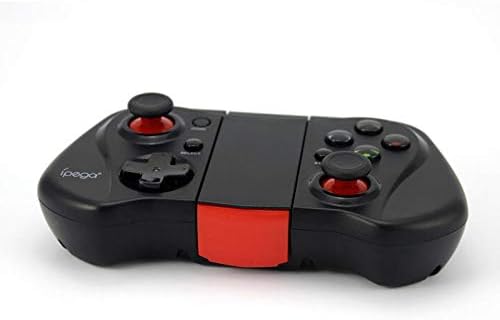
شکل ۲.۴: یک ضلع view of the Ipega PG-9033 Bluetooth Gamepad, showcasing its ergonomic design and compact form factor when not in use. The red accent on the central hinge is visible.
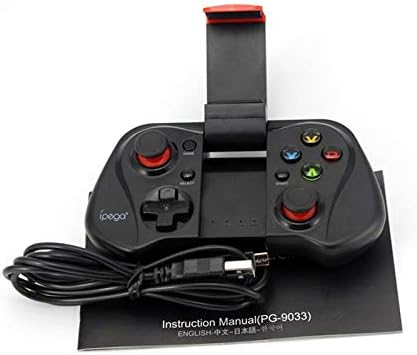
Figure 3: The Ipega PG-9033 Bluetooth Gamepad displayed alongside its USB charging cable and the included instruction manual, which clearly indicates the model number PG-9033.

شکل ۴.۲: عقب view of the Ipega PG-9033 Bluetooth Gamepad, featuring a label with technical details such as "BLUETOOTH CONTROLLER," working voltage, working current, and input specifications.
راه اندازی
شارژ گیم پد
Before first use, fully charge the gamepad using the provided USB cable.
- Connect the micro-USB end of the charging cable to the gamepad's charging port.
- Connect the USB-A end to a USB power source (e.g., computer, USB wall adapter).
- The charging indicator light will illuminate. It will typically turn off or change color when fully charged.
جفت شدن با یک دستگاه
The PG-9033 supports different pairing modes for various operating systems.
جفت شدن اندروید
- Ensure the gamepad is off.
- را فشار داده و نگه دارید HOME دکمه و X button simultaneously until the indicator light flashes rapidly. This puts the gamepad into Android pairing mode.
- On your Android device, go to Bluetooth settings and search for available devices.
- Select "PG-9033" from the list to pair. The indicator light will become solid when connected.
iOS Pairing (iCade Mode)
- Ensure the gamepad is off.
- را فشار داده و نگه دارید HOME دکمه و B button simultaneously until the indicator light flashes rapidly. This puts the gamepad into iOS iCade pairing mode.
- On your iOS device, go to Bluetooth settings and search for available devices.
- Select "PG-9033" from the list to pair. The indicator light will become solid when connected.
Note: iCade mode has limited game compatibility. For broader iOS compatibility, check specific game requirements.
جفت شدن کامپیوتر
- Ensure the gamepad is off.
- را فشار داده و نگه دارید HOME دکمه و A button simultaneously until the indicator light flashes rapidly. This puts the gamepad into PC pairing mode.
- On your PC, go to Bluetooth settings and search for available devices.
- Select "PG-9033" from the list to pair. The indicator light will become solid when connected.
Note: A Bluetooth adapter may be required for PCs without built-in Bluetooth.
دستورالعمل های عملیاتی
Attaching Your Smartphone
- Gently extend the adjustable phone holder located on the top of the gamepad.
- Carefully place your smartphone into the holder, ensuring it is securely gripped and centered.
- زاویه را برای بهینه تنظیم کنید viewing.
Game Mode Selection
The gamepad automatically enters the last used mode upon reconnection. To switch modes, disconnect the gamepad and re-pair using the desired mode's button combination (HOME + X for Android, HOME + B for iOS, HOME + A for PC).
روشن/خاموش برق
برای روشن کردن، دکمه را فشار دهید HOME دکمه برای خاموش کردن، دکمه را فشار داده و نگه دارید HOME button for approximately 5 seconds until the indicator light turns off. The gamepad will automatically power off after a period of inactivity.
تعمیر و نگهداری
To ensure the longevity and proper functioning of your Ipega PG-9033 gamepad, follow these maintenance guidelines:
- دستگاه را خشک نگه دارید. از قرار گرفتن در معرض رطوبت یا مایعات خودداری کنید.
- دسته بازی را با یک پارچه نرم و خشک تمیز کنید. از مواد شیمیایی قوی یا پاک کننده های ساینده استفاده نکنید.
- دسته بازی را در جای خشک و خنک و دور از نور مستقیم خورشید و دمای شدید نگهداری کنید.
- از انداختن یا قرار دادن دسته بازی در معرض ضربات شدید خودداری کنید.
- برای حفظ سلامت باتری، آن را مرتباً شارژ کنید، حتی اگر از آن استفاده نمیکنید.
Do not attempt to disassemble the gamepad. This will void the warranty and may cause damage.
عیب یابی
Gamepad not connecting or pairing:
- مطمئن شوید که دسته بازی کاملاً شارژ شده است.
- بررسی کنید که بلوتوث در دستگاه شما فعال باشد.
- Make sure the gamepad is in the correct pairing mode for your device (Android, iOS, or PC).
- سعی کنید دستگاه را در تنظیمات بلوتوث خود فراموش کنید و دوباره جفت سازی کنید.
- هم دسته بازی و هم دستگاه خود را مجدداً راه اندازی کنید.
دکمهها یا جویاستیکها واکنش نشان نمیدهند:
- بررسی کنید که آیا دسته بازی به درستی وصل شده است یا خیر.
- Ensure the game you are playing supports external controllers.
- Some games may require specific controller mapping or settings adjustments within the game.
- If the issue persists, try resetting the gamepad (if a reset button is available, typically a small pinhole).
لگ یا تأخیر ورودی:
- Ensure your device is not too far from the gamepad. Maintain a clear line of sight.
- کاهش تداخل با سایر دستگاههای بیسیم
- برنامههای غیرضروری پسزمینه را در دستگاه خود ببندید.
Phone not fitting in holder:
- The holder is designed for most smartphones. Ensure your phone's dimensions are within the supported range.
- هرگونه قاب گوشی حجیم را که ممکن است از قرارگیری ایمن آن جلوگیری کند، بردارید.
مشخصات
| ویژگی | جزئیات |
|---|---|
| مدل | PG-9033 |
| نام تجاری | ایپگا |
| قابلیت اتصال | بلوتوث |
| سازگاری | Android, iOS (iCade), PC |
| جلد کارtage | DC 3.7 ولت |
| جریان کاری | 30 میلی آمپر |
| حجم ورودیtage | DC 5 ولت 500 میلی آمپر |
| ASIN | B07P52YH7M |
گارانتی و پشتیبانی
For warranty information and technical support, please refer to the official Ipega webبه سایت مراجعه کنید یا با فروشگاه تماس بگیرید. رسید خرید خود را به عنوان مدرک خرید نگه دارید.
این دفترچه راهنما صرفاً جهت اطلاعرسانی است. مشخصات فنی ممکن است بدون اطلاع قبلی تغییر کند.