
1. مقدمه
This manual provides instructions for the installation, operation, and maintenance of the Cisco CP-68KEM-3PCC Expansion Module. This module is designed to enhance the functionality of your Cisco IP Phone 6851 by providing additional programmable keys.
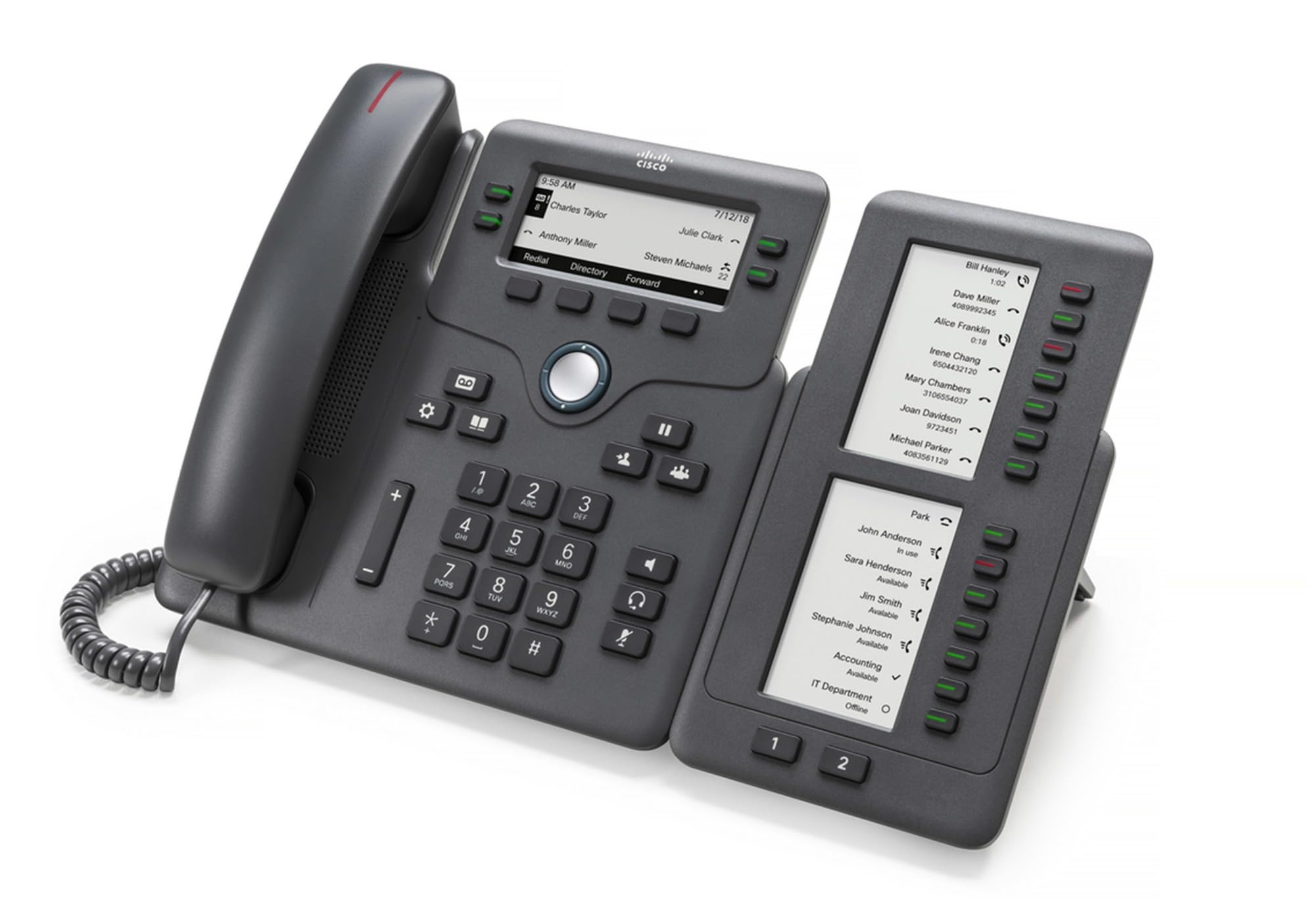
Figure 1: Cisco CP-68KEM-3PCC Expansion Module. This image shows the front view of the expansion module with its grayscale LCD screen and programmable keys.
The Cisco CP-68KEM-3PCC Expansion Module adds 14-line keys and 2-page keys, totaling 28 additional keys, with an easy-to-read grayscale LCD screen. It is ideal for monitoring and managing call status, directory numbers, and speed dial functions.
۲. چه چیزهایی در جعبه است؟
جعبه را با دقت باز کنید و مطمئن شوید که همه اقلام موجود هستند:
- Cisco CP-68KEM-3PCC Phone Expansion Module
- Connecting Cable (typically included for linking to the phone)
- Documentation (this user manual, safety information)
اگر هر یک از اقلام مفقود یا آسیب دیده است، لطفاً فوراً با فروشنده یا پشتیبانی سیسکو تماس بگیرید.
۱. دستورالعملهای راهاندازی
Follow these steps to connect your Cisco CP-68KEM-3PCC Expansion Module to your Cisco IP Phone 6851.
- Prepare the IP Phone: Ensure your Cisco IP Phone 6851 is powered off and disconnected from the network.
- Connect the Expansion Module: Locate the expansion port on the back or side of your Cisco IP Phone 6851. Connect the provided connecting cable from the expansion module to this port.
- اتصال را ایمن کنید: Ensure the cable is securely fastened to prevent accidental disconnection.
- روشن کردن: Reconnect your Cisco IP Phone 6851 to the network and power it on. The expansion module should be detected automatically.
- بررسی عملکرد: Once the phone has booted, check the expansion module's display and keys to ensure they are responsive.
For detailed visual instructions, refer to the official Cisco documentation or support webسایت
4. Operating the Expansion Module
The expansion module provides additional keys for various functions, enhancing your call management capabilities.
4.1 کلید قابل برنامه ریزی
The 28 programmable keys (14 keys across 2 pages) can be configured for:
- Directory Numbers (DNs): Assign specific phone lines or extensions.
- شماره گیری سریع: Program frequently called numbers for quick access.
- Feature Keys: Assign functions like call transfer, conference, or call park.
- Call Status Monitoring: Monitor the status of other lines (e.g., busy, ringing).
4.2 Page Navigation
Use the dedicated page keys (usually located near the display) to switch between the two pages of programmable keys. The grayscale LCD screen will update to show the labels for the currently active page.
4.3 پیکربندی
Configuration of the programmable keys is typically managed through your organization's phone system administrator or via the web interface of the Cisco IP Phone 6851. Consult your IT department for specific configuration instructions.
5. تعمیر و نگهداری
To ensure the longevity and optimal performance of your Cisco CP-68KEM-3PCC Expansion Module, follow these maintenance guidelines:
- تمیز کردن: Use a soft, dry, lint-free cloth to clean the exterior surfaces. For stubborn marks, slightly dampپارچه را با آب بشویید. از استفاده از مواد شیمیایی قوی، پاککنندههای ساینده یا حلالها خودداری کنید، زیرا این مواد میتوانند به روکش و قطعات الکترونیکی آسیب برسانند.
- محیط زیست: ماژول را در محیطی تمیز و خشک، دور از نور مستقیم خورشید، گرمای بیش از حد و رطوبت نگهداری کنید.
- رسیدگی: ماژول را با احتیاط حمل کنید. از انداختن آن یا قرار دادن آن در معرض ضربات شدید خودداری کنید.
- مدیریت کابل: Ensure connecting cables are not kinked, pinched, or under strain.
There are no user-serviceable parts inside the expansion module. Do not attempt to open or repair the device yourself.
6 عیب یابی
If you encounter issues with your expansion module, try the following troubleshooting steps:
| مشکل | علت احتمالی | راه حل |
|---|---|---|
| ماژول توسط گوشی شناسایی نمیشود | Loose cable connection, phone not restarted, incompatible phone model. |
|
| کلیدها پاسخگو نیستند | Software glitch, configuration issue. |
|
| صفحه نمایش خالی است یا سوسو میزند | مشکل برق، ایراد داخلی. |
|
If these steps do not resolve the issue, please contact Cisco technical support or your authorized reseller.
7. مشخصات
| ویژگی | جزئیات |
|---|---|
| شماره مدل | CP-68KEM-3PCC |
| نام تجاری | سیسکو |
| دستگاه های سازگار | تلفن سیسکو سیسکو 6851 |
| رنگ | مشکی |
| مواد | فلز |
| ابعاد مورد (LxWxH) | 5.1 × 10.2 × 20.3 سانتی متر |
| منبع تغذیه | Corded (powered via host IP Phone) |
| تعداد کلیدها | 28 (14 keys across 2 pages) |
| نمایش | Grayscale LCD |
| GTIN/UPC | 889728068383 |
8. اطلاعات گارانتی
The Cisco CP-68KEM-3PCC Expansion Module comes with a 2 سال گارانتی محصول از تاریخ خرید. این ضمانتنامه نقصهای مربوط به مواد و طرز کار را در شرایط استفاده عادی پوشش میدهد. خسارات ناشی از سوء استفاده، حوادث، تغییرات غیرمجاز یا عوامل خارجی را پوشش نمیدهد.
For warranty claims or detailed terms and conditions, please refer to the official Cisco warranty policy available on their webسایت یا با محل خرید خود تماس بگیرید.
9. پشتیبانی
For technical assistance, product information, or to report issues, please contact Cisco support:
- پشتیبانی سیسکو Webسایت: به مقام رسمی مراجعه کنید پشتیبانی سیسکو webسایت for documentation, downloads, and contact options.
- Authorized Reseller: Contact the reseller from whom you purchased the product.
When contacting support, please have your product model (CP-68KEM-3PCC) and serial number ready.