
1. مقدمه
This manual provides essential information for the proper installation, operation, and maintenance of your JFA J6 Hybrid 6-Way Digital Audio Processor with Limiter. Please read this manual thoroughly before using the device to ensure optimal performance and to prevent damage.
The JFA J6 is designed to offer precise control over your audio system, featuring digital signal processing capabilities combined with a hybrid architecture for superior sound management.
2. دستورالعمل های ایمنی مهم
- ایمنی برق: Always disconnect power before making any connections or disconnections. Ensure proper grounding to prevent electrical shock.
- تهویه: Install the unit in a location with adequate ventilation to prevent overheating. Do not block ventilation openings.
- رطوبت: Do not expose the unit to water, rain, or excessive moisture.
- دما: Avoid installing the unit in direct sunlight or near heat sources. Operate within specified temperature ranges.
- نصب حرفه ای: For complex installations, it is recommended to seek assistance from a qualified professional.
- تمیز کردن: برای تمیز کردن از یک پارچه نرم و خشک استفاده کنید. از پاک کننده های مایع یا آئروسل استفاده نکنید.
3. محصول تمام شدview
The JFA J6 Hybrid Digital Audio Processor is a sophisticated device designed for advanced audio system management. It provides 6 independent output channels, allowing for precise control over crossovers, equalization, gain, and limiting functions.
3.1. ویژگی ها
- 6-Way Digital Audio Processing
- Hybrid Architecture for enhanced performance
- Integrated Limiter for speaker protection
- Adjustable Crossovers
- تساوی پارامتریک
- Independent Gain Control for each channel
- User-friendly interface with LCD display
3.2. محتویات بسته
- JFA J6 Hybrid Digital Audio Processor
- راهنمای کاربر
- سختافزار نصب (پیچها، براکتها)
- کانکتور برق
3.3. شناسایی جزء

شکل 1: پنل جلویی View. This image displays the front panel of the JFA J6 Hybrid Digital Audio Processor. It features a central LCD screen for settings and monitoring, surrounded by a rotary encoder for navigation and adjustment. Below the screen are various buttons and indicators for input level, mute, limiter, and output level controls for each of the six channels. The 'LEVEL IN' and 'MAIN IN' indicators are visible on the left, while 'LEVEL OUT 5' and 'LEVEL OUT 6' are on the right, alongside the power terminal.
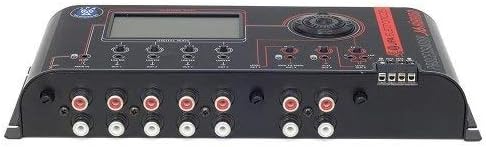
شکل 2: پنل عقب View. This image shows the rear panel of the JFA J6 Hybrid Digital Audio Processor, highlighting the input and output connections. On the left, there are RCA input jacks labeled 'MAIN IN'. The center features multiple RCA output jacks for OUT 1 through OUT 6. On the right, a screw terminal block is visible for power connections (BAT, REM, GND).
4. نصب و راه اندازی
4.1. نصب
Select a secure, dry, and well-ventilated location for mounting the JFA J6. Use the provided mounting hardware to firmly attach the unit, ensuring it is protected from vibrations and direct heat.
4.2. اتصالات سیم کشی
Ensure all audio components are powered off before making any connections.
- اتصال برق: Connect the power cable to the screw terminal block on the unit's rear panel.
- BAT (+12V): Connect to a fused +12V constant power source.
- REM (ریموت): Connect to the remote turn-on output of your head unit or ignition switch.
- GND (زمینی): به یک نقطه اتصال بدنه محکم متصل شوید.
- ورودی صوتی: Connect the RCA output from your head unit or audio source to the 'MAIN IN' RCA jacks on the JFA J6.
- خروجی صدا: Connect the RCA output jacks (OUT 1 to OUT 6) of the JFA J6 to the corresponding input channels of your amplifiers. Ensure correct channel assignment for your speaker configuration (e.g., front, rear, subwoofer).
5. دستورالعمل های عملیاتی
5.1. روشن/خاموش کردن
The JFA J6 will power on automatically when a remote signal is received at the REM terminal. It will power off when the remote signal is removed.
5.2. ناوبری اولیه
Use the rotary encoder and associated buttons on the front panel to navigate through the menus and adjust settings displayed on the LCD screen. Rotate the encoder to scroll through options and press it to select.
5.3. Input/Output Configuration
Access the input/output menu to configure the routing of audio signals and set individual channel parameters:
- به دست آوردن کنترل: Adjust the input and output gain levels for each channel to match the sensitivity of connected amplifiers and prevent clipping.
- تنظیمات متقاطع: Define high-pass, low-pass, and band-pass filters for each output channel. Set crossover frequencies and slopes to optimize speaker performance and protect drivers.
- تنظیم فاز: Adjust the phase (0° or 180°) for each output channel to ensure proper acoustic alignment with other speakers in the system.
5.4. Limiter Function
The integrated limiter protects your speakers from excessive power and distortion. Access the limiter settings to adjust the threshold and attack/release times for each channel. The 'LIMITER' indicators on the front panel will illuminate when the limiter is active.
5.5. یکسان سازی
The JFA J6 offers parametric equalization for precise tonal adjustments. Navigate to the EQ menu to select specific frequencies, adjust their gain (boost/cut), and set the Q-factor (bandwidth) for each band.
5.6. ایستگاه از پیش تنظیم شده
You can save your customized audio settings as presets for quick recall. This is useful for different music genres or listening preferences. Refer to the on-screen menu for saving and loading presets.
6. تعمیر و نگهداری
The JFA J6 requires minimal maintenance. Keep the unit clean and free from dust. Use a soft, dry cloth to wipe the exterior. Do not use harsh chemicals or abrasive materials. Ensure all connections remain secure over time.
7 عیب یابی
| مشکل | علت احتمالی | راه حل |
|---|---|---|
| بدون قدرت | Incorrect power wiring; Blown fuse; No remote signal | Check BAT, REM, and GND connections. Verify fuse integrity. Ensure remote signal is present. |
| بدون خروجی صدا | Incorrect audio connections; Muted channels; Low gain settings | Verify RCA input/output connections. Check if any channels are muted. Increase gain levels. |
| صدای مخدوش | Input/output gain too high; Clipping; Incorrect EQ settings | Reduce input/output gain. Check for 'CLIP' indicator. Adjust EQ settings. |
| گرمای بیش از حد واحد | Insufficient ventilation; Excessive load | Ensure adequate airflow around the unit. Check speaker impedance and ampبار تقویت کننده. |
8. مشخصات فنی
| ویژگی | مشخصات |
|---|---|
| کانال های ورودی | 2 (Stereo RCA) |
| کانال های خروجی | 6 (RCA) |
| نوع پردازش | پردازنده سیگنال دیجیتال (DSP) |
| فیلترهای متقاطع | High-Pass, Low-Pass, Band-Pass (adjustable slopes) |
| تساوی | EQ پارامتری |
| محدود کننده | Integrated, adjustable threshold and timing |
| منبع تغذیه | 12V DC (Automotive) |
| ابعاد (تقریبا) | مشخص نشده است |
| وزن (تقریبا) | مشخص نشده است |
۹. گارانتی و پشتیبانی مشتری
JFA products are manufactured to high-quality standards. This product is covered by a limited warranty against defects in materials and workmanship. The duration and terms of the warranty may vary by region. Please retain your proof of purchase for warranty claims.
For technical assistance, troubleshooting, or warranty inquiries, please contact your authorized JFA dealer or visit the official JFA Electronicos webسایت برای اطلاعات پشتیبانی.