
1. محصول تمام شدview
The Sekonic L-308X-U Flashmate Light Meter is a portable and versatile device designed for precise light measurement in photography, cinematography, and HD cinematography. It features a sliding lumisphere for incident or reflected light measurement via a 40° reception angle lens. The meter offers a wide metering range from 0 to 19.9 EV at ISO 100, with exposure times from 1/8000 to 60 seconds, and a flash range from f/1.0 to f/90.9 at ISO 100. Its customizable LCD display illuminates automatically in low light conditions (5 EV or darker). The L-308X-U supports Photo, Cine, and HD Cine modes, and includes PC sync terminal and cordless flash measuring options. It is powered by a single AA battery and weighs approximately 3.5 oz, ensuring convenient portability.
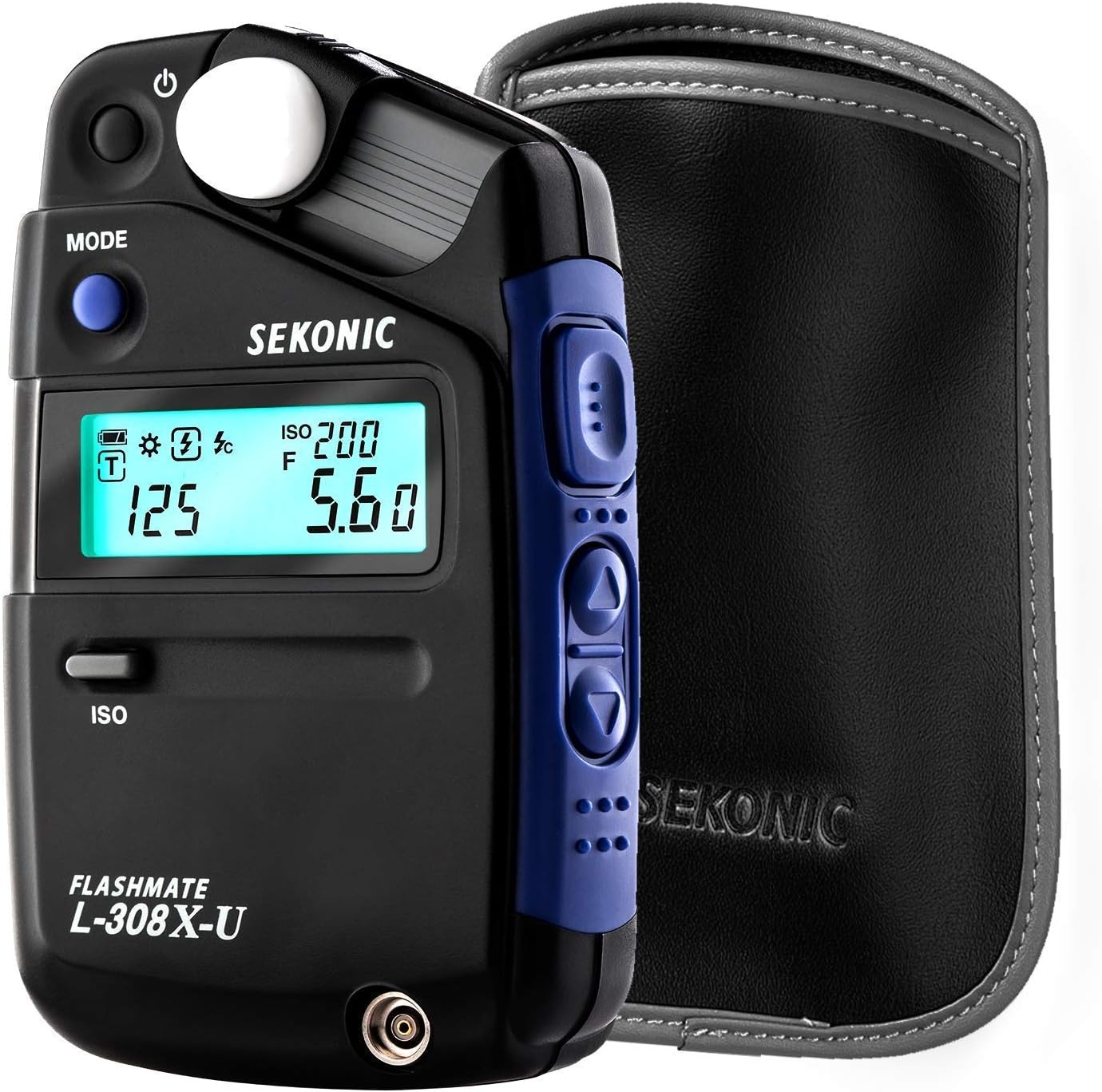
Figure 1: The Sekonic L-308X-U Flashmate Light Meter shown with its included protective case. The meter features a clear LCD display and intuitive controls for various light measurement modes.
2. ویژگی های کلیدی
The L-308X-U is designed with three distinct metering modes to cater to diverse imaging needs:
- حالت عکس: Provides comprehensive exposure control for still photography. It displays measurement data for both flash and ambient light readings, including ambient EV measurement. This mode supports both Shutter Priority and Aperture Priority for flexible depth-of-field control.
- HD Cine Mode: A compact solution for cinematographers, ideal for location scouting or quick adjustments on set. Users can select from a range of frame rates and shutter angles, with accurate measurements to within one-tenth of a stop. The inclusion of ISO 850 allows for measurements in native ISOs of many professional cinema cameras.
- حالت سینما: Tailored for professional digital cinematography, this mode allows selection of frame rates and shutter angles for precise exposure control with one-tenth stop accuracy. It also offers Lux (lx) and foot-candle (fc) readouts, facilitating quick lighting setup.
3. راه اندازی
3.1. نصب باتری
The Sekonic L-308X-U requires one AA battery for operation. To install the battery:
- پوشش محفظه باتری را در پشت دستگاه اندازه گیری پیدا کنید.
- درپوش را در جهت مشخص شده با پیکان باز کنید.
- Insert one AA battery, ensuring correct polarity (+/-) as marked inside the compartment.
- درب محفظه باتری را محکم ببندید تا در جای خود قرار گیرد.
۳.۲ روشن کردن اولیه
After battery installation, power on the device:
- Press the power button located on the top left of the meter.
- The LCD display will light up, showing the current settings (e.g., ISO, shutter speed, aperture).
- Adjust the ISO setting by pressing the ISO button and using the up/down arrow buttons on the side to match your camera's ISO.

شکل 2: جلو view of the Sekonic L-308X-U, highlighting the LCD display where metering information and settings are shown. The MODE button is visible on the left.
۵. کار با نورسنج
۲. انتخاب یک حالت
را فشار دهید حالت button on the front of the meter to cycle through Photo, HD Cine, and Cine modes. The selected mode will be indicated on the LCD display.
4.2. اندازه گیری
To take a light reading:
- Ensure the lumisphere is in the correct position for incident (extended) or reflected (retracted) light measurement.
- Point the lumisphere towards the light source (incident) or the subject (reflected).
- Press the large measurement button located on the side of the meter.
- The LCD display will show the recommended exposure settings (e.g., aperture and shutter speed).
4.3. تنظیم تنظیمات
Use the up and down arrow buttons on the side of the meter to adjust various settings such as ISO, shutter speed, or frame rate, depending on the selected mode. The display will update in real-time to reflect the changes.

Figure 3: The Sekonic L-308X-U in a practical setting, demonstrating its use by a photographer to measure light for a subject. Its compact size makes it ideal for on-location work.
5. تعمیر و نگهداری
5.1. تمیز کردن
To ensure optimal performance and longevity of your light meter:
- Wipe the exterior of the meter with a soft, dry cloth.
- برای لکههای سرسخت، کمیampen the cloth with water or a mild, non-abrasive cleaning solution. Avoid harsh chemicals.
- Gently clean the lumisphere and LCD display with a microfiber cloth to prevent scratches.
5.2. ذخیره سازی
When not in use, store the light meter in a cool, dry place, away from direct sunlight and extreme temperatures. It is recommended to use the provided protective case to prevent dust and physical damage.

Figure 4: The Sekonic L-308X-U being placed into its custom-fit protective case, emphasizing the importance of proper storage for device longevity.
6 عیب یابی
If you encounter issues with your Sekonic L-308X-U, refer to the table below for common problems and their solutions:
| مشکل | علت احتمالی | راه حل |
|---|---|---|
| متر روشن نمیشود. | باتری خراب یا به درستی نصب نشده است. | باتری AA را تعویض کنید یا مطمئن شوید که با قطب صحیح وارد شده است. |
| Inaccurate light readings. | Dirty lumisphere, incorrect mode selected, or improper metering technique. | Clean the lumisphere. Verify the correct Photo, HD Cine, or Cine mode is selected. Ensure the lumisphere is positioned correctly (incident/reflected) and pointed accurately. |
| صفحه نمایش LCD کم نور یا سوسو میزند. | قدرت باتری کم. | باتری AA را تعویض کنید. |
| دکمه ها پاسخگو نیستند | مشکل موقت نرمافزاری یا کمبود باتری. | Remove and reinsert the battery to reset the device. If the issue persists, replace the battery. |
7. مشخصات
| ویژگی | جزئیات |
|---|---|
| شماره مدل | L-308X-U |
| ابعاد محصول | 0.35 x 0.98 x 1.69 اینچ |
| وزن مورد | 3.52 اونس |
| منبع تغذیه | 1 AA battery (required) |
| سازنده | Sekonic |
| رنگ | مشکی |
| Metering Range (ISO 100) | 0 to 19.9 EV |
| زمان قرار گرفتن در معرض | 1/8000 تا 60 ثانیه |
| Flash Range (ISO 100) | f/1.0 تا f/90.9 |
| Video Capture Resolution (HD Cine) | 1080p (supported mode) |
8. گارانتی و پشتیبانی
Sekonic products are manufactured to high-quality standards and come with a manufacturer's warranty. For detailed information regarding warranty coverage, terms, and conditions, please refer to the warranty card included with your product or visit the official Sekonic webسایت
For technical support, service, or additional inquiries, please contact Sekonic customer service or visit their support page. Keep your purchase receipt as proof of purchase for warranty claims.
Official Sekonic Webسایت: www.sekonic.com


