
1. مقدمه
The Canon PowerShot G5 X is a compact digital camera featuring a 1.0-inch, 20.2 Megapixel High-Sensitivity CMOS sensor and a built-in 2.36 million dot electronic viewfinder. This camera is designed for advanced photographers seeking high-quality stills and video with comprehensive control. It includes Wi-Fi and NFC capabilities for easy sharing and remote operation.
ویژگی های کلیدی عبارتند از:
- 1.0-inch, 20.2 Megapixel High-Sensitivity CMOS sensor.
- Canon DIGIC 6 Image Processor for enhanced image quality and fast operation.
- Built-in 2.36 million dot electronic viewیاب
- Multi-angle capacitive 3.0-inch touch panel LCD with 1.04 million dots.
- Full HD 1080p video recording at 60p/30p/24p.
- Integrated Wi-Fi and NFC for wireless connectivity.
۲. چه چیزهایی در جعبه است؟
Verify that all items are present before initial use:
- Canon PowerShot G5 X Camera Body
- بسته باتری
- شارژر باتری
- بند گردن

Figure 2.1: Included items with the Canon PowerShot G5 X camera.
3. راه اندازی اولیه
3.1 شارژ باتری
- باتری را داخل شارژر باتری قرار دهید.
- شارژر را به پریز برق وصل کنید. چراغ نشانگر شارژ روشن خواهد شد.
- پس از اتمام شارژ، چراغ نشانگر تغییر میکند یا خاموش میشود. باتری را خارج کنید.
۴.۲ قرار دادن باتری و کارت حافظه
- پوشش محفظه باتری/کارت حافظه را که در پایین دوربین قرار دارد، باز کنید.
- باتری شارژ شده را با اطمینان از جهت صحیح، داخل محفظه قرار دهید.
- Insert a compatible SD, SDHC, or SDXC memory card into the card slot until it clicks into place.
- درپوش محفظه را محکم ببندید.
۴.۴ روشن کردن دوربین
را فشار دهید روشن/خاموش button located on the top of the camera to power it on. The lens will extend, and the LCD screen will activate.

شکل 3.1: جلو view of the Canon PowerShot G5 X.
4. کار با دوربین
۳.۲ حالتهای عکاسی پایه
پیچ تنظیم حالتهای عکاسی در بالای دوربین امکان انتخاب حالتهای مختلف عکاسی را فراهم میکند:
- حالت خودکار: For automatic settings.
- پ (برنامه AE): Camera sets aperture and shutter speed, but allows other adjustments.
- Av (Aperture Priority AE): شما دیافراگم را تنظیم میکنید، دوربین سرعت شاتر را تنظیم میکند.
- Tv (Shutter Priority AE): شما سرعت شاتر را تنظیم میکنید، دوربین دیافراگم را تنظیم میکند.
- م (دستی): شما هم دیافراگم و هم سرعت شاتر را کنترل میکنید.
- Custom Modes (C1/C2): Save and recall your preferred settings.
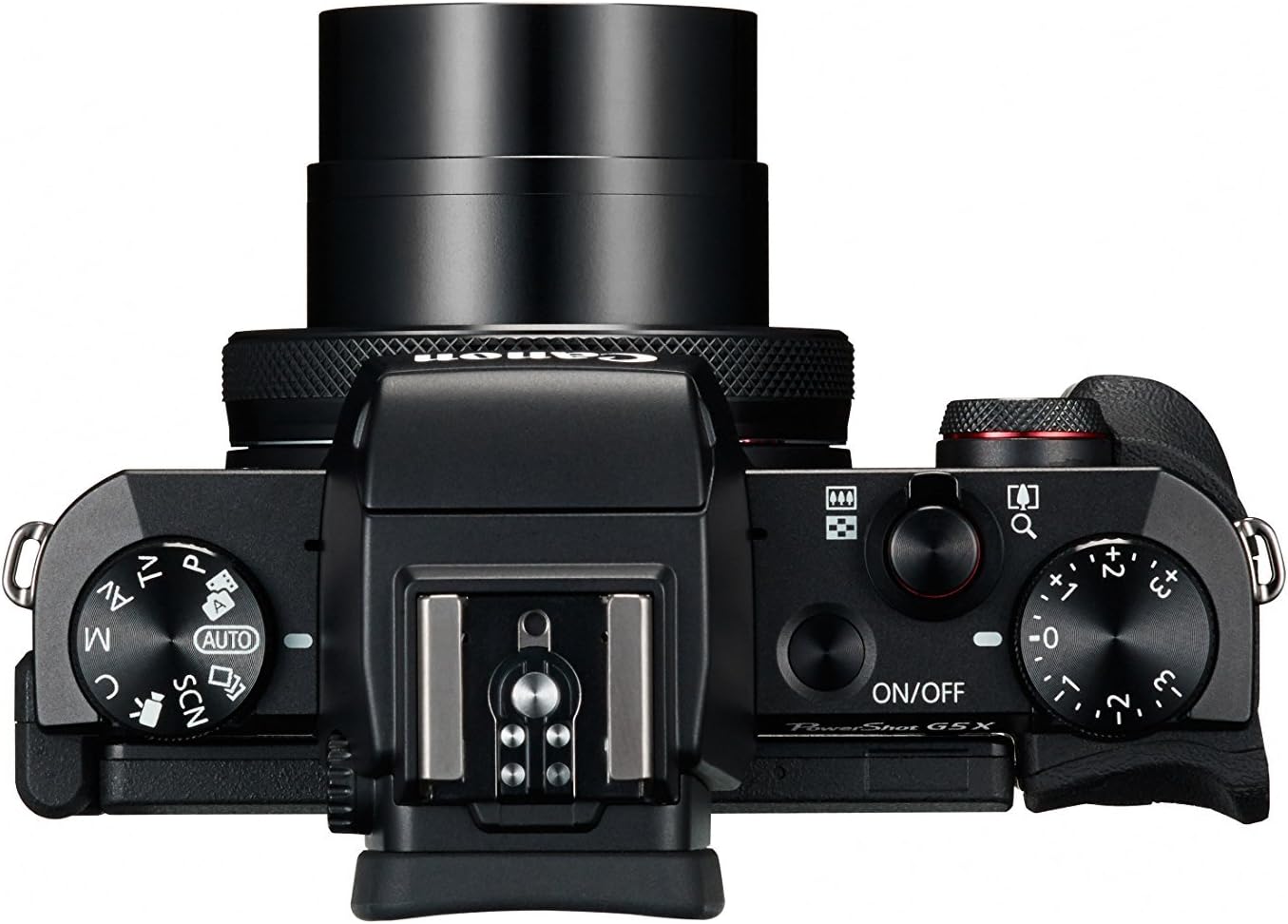
Figure 4.1: Top controls of the Canon PowerShot G5 X.
4.2 با استفاده از Viewمنظرهیاب و صفحه نمایش LCD
The camera features both an electronic viewfinder (EVF) and a multi-angle touch panel LCD. You can switch between them or use the EVF for composing shots in bright conditions. The LCD screen can be articulated for various shooting angles and touch operations.

Figure 4.2: Canon PowerShot G5 X with articulated LCD screen.

شکل 4.3: عقب view of the Canon PowerShot G5 X.
4.3 ضبط فیلم
To record video, set the mode dial to the movie mode icon. Press the dedicated movie button to start and stop recording. The camera supports 1080p Full HD video at various frame rates (60p/30p/24p).
۳.۷ اتصال وایفای و NFC
The camera's built-in Wi-Fi and NFC functions allow for wireless transfer of images and videos to compatible smart devices or computers. Refer to the camera's menu for detailed instructions on setting up these connections.
5. نگهداری و مراقبت
۶.۱ تمیز کردن دوربین
- لنز: Use a lens brush or blower to remove dust, then gently wipe with a microfiber lens cloth. Avoid touching the lens surface directly.
- صفحه نمایش LCD: Wipe gently with a soft, dry cloth. For stubborn smudges, use a screen cleaner specifically designed for electronics.
- بدنه دوربین: Wipe with a soft, dry cloth. Do not use organic solvents or strong cleaning agents.
5.2 ذخیره سازی
در صورت عدم استفاده، دوربین را در جای خشک و خنک و دور از نور مستقیم خورشید و دمای بسیار بالا نگهداری کنید. اگر قرار است برای مدت طولانی از دوربین استفاده نکنید، باتری را خارج کنید.
6 عیب یابی
This section addresses common issues you might encounter with your Canon PowerShot G5 X camera.
| مشکل | علت / راه حل احتمالی |
|---|---|
| دوربین روشن نمیشود. | Battery is depleted. Charge the battery. Ensure battery is inserted correctly. |
| تصاویر تار هستند. | Lens is dirty. Clean the lens. Shutter speed is too slow. Increase shutter speed or use image stabilization. Camera shake. Hold the camera steady or use a tripod. |
| Cannot connect to Wi-Fi/NFC. | Ensure Wi-Fi/NFC is enabled in camera settings. Check device compatibility and network settings. Refer to the camera's connectivity guide in the menu. |
| خطای کارت حافظه. | کارت حافظه پر است. موارد غیر ضروری را حذف کنید. files or replace card. Card is corrupted. Format the card (this will erase all data). Card is incompatible. Use a supported SD, SDHC, or SDXC card. |
| فلاش روشن نمیشود. | Flash is set to OFF. Change flash mode to Auto or On. Subject is too far. Check flash range. |
7. مشخصات
| ویژگی | جزئیات |
|---|---|
| نوع سنسور | 1.0-inch High-Sensitivity CMOS |
| وضوح هنوز موثر | 20.2 مگاپیکسل |
| پردازشگر تصویر | DIGIC 6 |
| زوم اپتیکال | 4.2 برابر |
| دیافراگم لنز | f/1.8-2.8 |
| فاصله کانونی (معادل ۳۵ میلیمتر) | 24-100 میلی متر |
| تثبیت تصویر | دیجیتال |
| Viewیاب | Built-in Electronic Viewfinder (2.36 million dots) |
| صفحه نمایش ال سی دی | 3.0-inch Multi-angle Capacitive Touch Panel (1.04 million dots) |
| وضوح تصویر | 1080p Full HD (60p/30p/24p) |
| قابلیت اتصال | وایفای، انافسی، اچدیامآی، یواسبی |
| رسانه ذخیره سازی | کارتهای حافظه SD، SDHC، SDXC |
| وزن مورد | 1.8 پوند |
| شماره مدل | 0510C001 |
| UPC | 748926548632 |
8. گارانتی و پشتیبانی
8.1 اطلاعات گارانتی
This Canon PowerShot G5 X camera comes with a 90-day limited warranty from the date of purchase. This warranty covers manufacturing defects under normal use. Please retain your proof of purchase for warranty claims.
8.2 پشتیبانی مشتری
برای کمک فنی، خدمات یا سوالات بیشتر، لطفاً به پشتیبانی رسمی کانن مراجعه کنید webبه سایت مراجعه کنید یا با بخش خدمات مشتریان آنها تماس بگیرید. اطلاعات تماس معمولاً در وبسایت سازنده موجود است. webسایت