
1. مقدمه
The Ambient Weather WS-3000-X8 Thermo-Hygrometer Wireless Monitor is designed to provide accurate, real-time environmental data for your home or business. This system allows you to monitor temperature and humidity from up to eight remote locations simultaneously, helping you protect valuable assets, optimize conditions, and prevent potential issues. With its high-resolution display, advanced data logging capabilities, and programmable alarms, the WS-3000-X8 offers comprehensive environmental monitoring.

Figure 1.1: The Ambient Weather WS-3000-X8 console and eight included remote sensors.
2. محصول تمام شدview و ویژگی ها
The WS-3000-X8 system is engineered for precision and ease of use, offering a robust solution for multi-location environmental monitoring.
- Multi-Sensor Monitoring: Graphs and displays data from up to eight wireless remote sensors simultaneously.
- High-Resolution TFT Display: Features a compact, high-resolution Thin-Film Transistor (TFT) display for clear, easy-to-read graphics, charts, and alarms.
- Data Logging and Analysis: Includes PC software for advanced data analysis, console programming, and easy data extraction from an optional micro-SD card. Data can be stored on an SD card or accessed via desktop software.
- دادههای بلادرنگ: Track multiple data points at various locations in real-time.
- کالیبراسیون: All sensors can be calibrated for high accuracy, ensuring reliable readings.
- Radio-Controlled Clock: An integrated radio-controlled clock keeps the entire station synchronized, providing accurate timekeeping.
- Programmable Alarms: Set timers for automatic shutdowns and startups, and program alarms to notify you if a parameter exceeds a predefined threshold.
Video 2.1: An official product video from Ambient Weather demonstrating the features and benefits of the WS-3000 series weather station, including its ability to monitor various environmental parameters and provide real-time data.
3. محتویات بسته
پس از باز کردن بسته، از موجود بودن و سالم بودن همه اقلام اطمینان حاصل کنید:
- WS-3000-X8 Main Console Unit
- 8 x Wireless Remote Thermo-Hygrometer Sensors
- AC Power Adapter for Main Console
- راهنمای کاربر (این سند)
Note: 2 x AA batteries are required for each remote sensor and are NOT included. Please purchase 16 AA batteries separately.
4. راه اندازی
۴.۱ نصب باتری سنسور
- Locate the battery compartment on the back of each wireless remote sensor.
- درپوش محفظه باتری را باز کنید.
- Insert 2 x AA batteries into each sensor, observing the correct polarity (+/-).
- درپوش محفظه باتری را محکم ببندید.

Figure 4.1: A single wireless remote sensor displaying temperature and humidity.
4.2 Console Power
Connect the included AC power adapter to the main console unit and plug it into a standard electrical outlet. The console will power on automatically.
۴.۳ همگامسازی حسگر
Once the sensors are powered on and the console is active, the console will automatically begin searching for and synchronizing with the remote sensors. This process typically takes a few minutes. Ensure sensors are within range during initial setup.
4.4 قرار دادن سنسور
Place the remote sensors in the desired locations you wish to monitor. Consider the following for optimal performance:
- Avoid direct sunlight or heat sources for temperature accuracy.
- Ensure sensors are protected from direct rain or excessive moisture if placed outdoors.
- Maintain a clear line of sight between sensors and the console if possible, or minimize obstructions for best wireless signal.
4.5 Time Synchronization (Radio Controlled Clock)
The console features a radio-controlled clock that automatically synchronizes with the atomic clock signal. Allow some time for the unit to receive and set the correct time. Ensure the console is placed in an area where it can receive a clear signal.
4.6 کالیبراسیون سنسور
For enhanced accuracy, individual sensors can be calibrated. Refer to the console's menu options for calibration procedures. It is recommended to allow sensors to acclimate to their environment for at least 30 minutes before performing calibration.
5. دستورالعمل های عملیاتی
5.1 درک صفحه نمایش
The main console display provides a clear overview of temperature and humidity readings from all eight channels. Each channel displays its current temperature and humidity percentage.

Figure 5.1: The console display showing real-time temperature and humidity for eight channels.
5.2 Using Console Buttons
The console features several buttons for navigation and control:
- نمودار: Access historical data graphs for each channel.
- منو: Enter the main menu to configure settings, set alarms, and access advanced features.
- فلش های بالا/پایین: در گزینههای منو حرکت کنید یا مقادیر را تنظیم کنید.
- OK/Enter: انتخاب ها را تأیید کنید
۵.۲ تنظیم هشدارها
You can set high and low alarms for temperature and humidity on each channel. If a reading exceeds or falls below the set threshold, the console will trigger an audible and/or visual alert.
- را فشار دهید MENU دکمه
- Navigate to the "Alarm Settings" option using the arrow buttons and press OK.
- Select the desired channel and parameter (Temperature High/Low, Humidity High/Low).
- Adjust the threshold value using the arrow buttons and confirm with OK.
5.4 تایمر
The console allows for setting timers for automatic shutdown and startup, which can be useful for power saving or specific monitoring schedules. Consult the menu for timer configuration options.
6. Data Logging and Analysis
The WS-3000-X8 offers robust data logging capabilities, allowing you to store and analyze historical environmental data.
6.1 Micro-SD Card Usage
Insert a micro-SD card (not included) into the designated slot on the console to enable continuous data logging. The console will automatically record readings at set intervals.
6.2 نرم افزار کامپیوتر
The included PC software (available for download from the Ambient Weather website) provides a comprehensive interface for viewing, analyzing, and exporting logged data. You can connect the console to your computer via USB or transfer data directly from the micro-SD card.
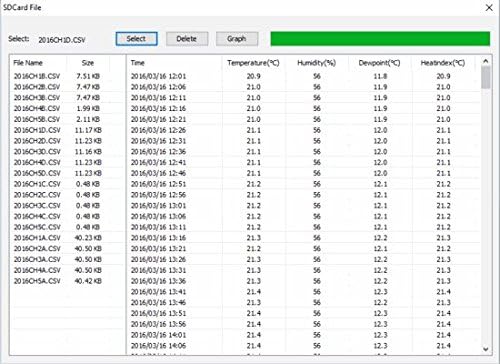
Figure 6.1: Screenshot of the PC software interface for data analysis and management.
6.3 Graphing Historical Data
Both the console's display and the PC software allow you to view historical trends of temperature and humidity in graphical format. This feature is crucial for identifying patterns, understanding environmental changes over time, and optimizing conditions.
7. تعمیر و نگهداری
7.1 تعویض باتری
Replace the AA batteries in the remote sensors when the low battery indicator appears on the console or sensor display. Use high-quality alkaline or lithium batteries for best performance, especially in cold environments.
7.2 تمیز کردن
Wipe the console and sensors with a soft, damp cloth. Do not use abrasive cleaners or solvents, as these may damage the surfaces or electronic components.
۴.۱ جایگذاری بهینه
Periodically check the placement of your sensors to ensure they are still in optimal positions for accurate readings and strong wireless signal transmission.
8 عیب یابی
8.1 No Sensor Readings on Console
- بررسی باتری ها: Ensure batteries are correctly installed and not depleted in the remote sensors.
- چرخه قدرت: Remove and reinsert batteries in sensors, and power cycle the main console.
- محدوده: Move sensors closer to the main console to check if they are out of wireless range.
- تداخل: Avoid placing sensors near large metal objects or strong electromagnetic interference sources.
۷.۲ قرائتهای نادرست
- محل قرارگیری سنسور: Ensure sensors are not in direct sunlight, near heat/cold sources, or in areas with poor air circulation.
- کالیبراسیون: Perform a calibration of the affected sensor(s) using the console's menu.
- سازگاری: Allow sensors sufficient time (at least 30 minutes) to acclimate to a new environment before taking critical readings.
8.3 Console Not Responding
- منبع تغذیه: Verify the AC adapter is securely connected and receiving power.
- تنظیم مجدد: If unresponsive, disconnect the AC adapter, wait 10 seconds, and reconnect it.
9. مشخصات
| ویژگی | مشخصات |
|---|---|
| شماره مدل | WS-3000-X8 |
| نام تجاری | آب و هوای محیطی |
| ابعاد کنسول | 3.25"W x 4.5"H x 0.38"D (base 1.5") |
| ابعاد سنسور | ۵.۹ اینچ در ۱۱.۸ اینچ در ۱۴.۶ اینچ |
| منبع تغذیه (کنسول) | آداپتور برق متناوب |
| منبع تغذیه (سنسورها) | 2 عدد باتری AA (شامل نمی شود) |
| فناوری اتصال | Radio Frequency (915 MHz) |
| دقت دما | ± 1 درجه سانتیگراد |
| درجه حرارت بالا | 140 درجه فارنهایت |
| نوع نمایشگر | LCD / TFT |
| وزن مورد | 1.68 پوند |
| رنگ | مشکی |
10. گارانتی و پشتیبانی
Ambient Weather products are designed for reliability and performance. For any technical assistance, troubleshooting, or warranty inquiries, please contact Ambient Weather customer support directly. Refer to the official Ambient Weather webسایتی برای بهروزترین اطلاعات پشتیبانی و اطلاعات تماس.
منابع آنلاین: Visit the Ambient Weather website for FAQs, software downloads, and additional product information.
تماس با پشتیبانی: Details for phone and email support can be found on the Ambient Weather support page.