
1. مقدمه
Thank you for choosing the NTC V380 WiFi Smart Camera. This device is designed to provide reliable indoor security monitoring with advanced features such as remote access, two-way audio, and night vision. This manual will guide you through the setup, operation, and maintenance of your camera to ensure optimal performance.
2. محصول تمام شدview
The NTC V380 WiFi Smart Camera is a compact, indoor surveillance camera featuring pan, tilt, and zoom capabilities. It connects wirelessly to your home network, allowing for remote viewing and control via a smartphone or desktop application.
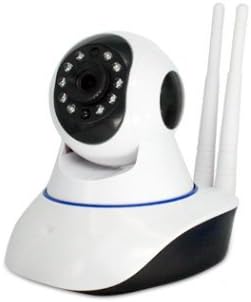
شکل 2.1: جلو view of the NTC V380 WiFi Smart Camera, showing the lens, infrared LEDs, and microphone.
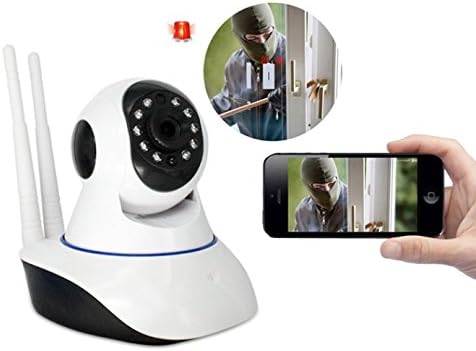
Figure 2.2: The NTC V380 camera demonstrating remote monitoring capabilities with a smartphone displaying the live video feed.
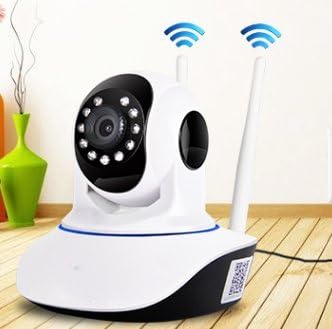
Figure 2.3: The NTC V380 camera positioned in an indoor environment, illustrating its wireless connectivity with WiFi signal indicators.
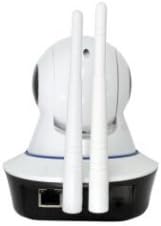
شکل 2.4: عقب view of the NTC V380 camera, highlighting the dual antennas for enhanced WiFi reception and the Ethernet port for wired connection.
3. ویژگی های کلیدی
- صوتی دو طرفه: Communicate through the camera with built-in microphone and speaker.
- کنترل PTZ: Pan (355° horizontal) and Tilt (120° vertical) functionality for comprehensive area coverage.
- ویدیوی با کیفیت بالا: Records video at 1080p resolution with a frame rate of up to 25 frames per second.
- دید در شب: Equipped with 10 infrared LEDs, providing clear visibility up to 10 meters in low-light conditions.
- تشخیص حرکت: Receive alerts via email or FTP upload when motion is detected, with adjustable sensitivity.
- اتصال بی سیم: Supports Wi-Fi for flexible placement and easy integration into your network.
- نظارت از راه دور: Access live video and control camera functions from your smartphone (iOS/Android) or desktop via the V380 application.
- محل ذخیره سازی: Supports TF (microSD) card for local video recording.
4. راهنمای راه اندازی
4.1 محتویات بسته
اطمینان حاصل کنید که همه موارد موجود است:
- NTC V380 WiFi Smart Camera
- آداپتور برق
- Mounting Accessories (screws, wall plug)
- راهنمای کاربر (این سند)
4.2 روشن شدن اولیه
- آداپتور برق را به پورت ورودی برق دوربین وصل کنید.
- Plug the adapter into a power outlet. The camera will power on and initiate its self-test sequence.
- Wait for the camera to indicate readiness (e.g., a voice prompt or LED indicator change).
۴.۲ نصب برنامه و اتصال Wi-Fi
- دانلود کنید V380 application from your smartphone's app store (available for iOS and Android).
- یک حساب کاربری جدید ثبت کنید یا اگر از قبل حساب کاربری دارید، وارد شوید.
- Follow the in-app instructions to add your camera. This typically involves scanning a QR code on the camera or using an AP hotspot connection method.
- Select your 2.4GHz Wi-Fi network and enter the password when prompted. The camera does not support 5GHz Wi-Fi networks.
- Once connected, the camera will confirm its network status, and you will see it listed in your app.
4.4 نصب دوربین
The camera supports wall mounting for optimal positioning.
- Choose a suitable indoor location with a clear view و در محدوده وای فای.
- Use the provided mounting bracket as a template to mark screw holes on the wall.
- سوراخهای راهنما را دریل کنید و در صورت لزوم، درپوشهای دیواری را قرار دهید.
- با استفاده از پیچ، براکت نصب را به دیوار محکم کنید.
- دوربین را به براکت نصب وصل کنید و مطمئن شوید که محکم بسته شده است.
5. دستورالعمل های عملیاتی
5.1 زنده View و کنترل PTZ
- Open the V380 app and select your camera from the device list to access the live video feed.
- Use the on-screen joystick or swipe gestures to pan (move horizontally) and tilt (move vertically) the camera lens.
- Pinch-to-zoom on the live feed to digitally zoom in or out.
۵.۴ صدای دوطرفه
- در حالی که زنده است view، روی نماد میکروفون در برنامه ضربه بزنید تا از طریق بلندگوی دوربین صحبت کنید.
- برای گوش دادن به صدای محیط دوربین، روی نماد بلندگو ضربه بزنید.
۴.۳ ضبط و پخش ویدئو
- Insert a TF (microSD) card into the camera's card slot for continuous or event-based recording.
- In the app, navigate to the playback section to view Foo ضبط شدهtage stored on the TF card.
- You can also manually record video or capture screenshots directly from the live view interface in the app.
۴.۴ تشخیص حرکت و هشدارها
- Access the camera settings in the V380 app to configure motion detection.
- سطح حساسیت را تنظیم کنید تا آلارمهای کاذب به حداقل برسند.
- Enable push notifications, email alerts, or FTP uploads for motion detection events.
6. تعمیر و نگهداری
- تمیز کردن: لنز و بدنه دوربین را به آرامی با یک پارچه نرم و خشک پاک کنید. از استفاده از مواد شیمیایی قوی یا مواد ساینده خودداری کنید.
- به روز رسانی سیستم عامل: Periodically check the V380 app for available firmware updates to ensure your camera has the latest features and security enhancements. Follow the in-app instructions for updating.
- مدیریت کارت TF: Regularly back up important recordings from your TF card. Format the TF card periodically within the app to maintain optimal recording performance.
7 عیب یابی
مسائل و راه حل های رایج:
- دوربین آفلاین:
- Check if the camera is powered on.
- مطمئن شوید که شبکه Wi-Fi شما فعال است و دوربین در محدوده آن قرار دارد.
- دوربین و روتر Wi-Fi خود را مجدداً راه اندازی کنید.
- مطمئن شوید که دوربین به شبکه Wi-Fi 2.4 گیگاهرتز متصل است.
- کیفیت ضعیف ویدیو:
- Ensure a strong Wi-Fi signal. Move the camera closer to the router if necessary.
- لنز دوربین را تمیز کنید.
- سرعت اتصال اینترنت خود را بررسی کنید.
- تشخیص حرکت کار نمی کند:
- تأیید کنید که تشخیص حرکت در تنظیمات برنامه فعال شده است.
- سطوح حساسیت را تنظیم کنید.
- Ensure notification permissions are granted for the V380 app on your smartphone.
- اتصال به برنامه امکانپذیر نیست:
- Ensure you have the correct V380 app.
- نام کاربری و رمز عبور خود را بررسی کنید.
- If issues persist, try resetting the camera to factory defaults (refer to the camera's physical reset button, usually a small pinhole, and hold for 5-10 seconds while powered on) and re-add it to the app.
8. مشخصات
| ویژگی | جزئیات |
|---|---|
| شماره مدل | ICP-T3810-Q5 (T) V380 |
| نام تجاری | NTC |
| وضوح ضبط ویدیو | 1080p |
| نرخ فریم | 25 فریم در ثانیه |
| فناوری اتصال | بی سیم (Wi-Fi) |
| پروتکل اتصال | وایفای (فقط ۲.۴ گیگاهرتز) |
| فاصله دید در شب | 10 متر |
| ویژگی های خاص | Night Vision, Motion Sensor, PTZ Technology, Two-Way Audio |
| دستگاه های سازگار | Smartphone, Desktop |
| نوع کنترلر | Android (via V380 App) |
| نوع نصب | پایه دیواری |
| فاکتور فرم | Turret (Dome Type) |
| موارد استفاده توصیه شده | امنیت داخلی |
| استفاده در فضای باز/داخلی | سرپوشیده |
| منبع تغذیه | Corded Electric (No batteries required) |
9. گارانتی و پشتیبانی
For warranty information and technical support, please refer to the documentation provided at the time of purchase or contact your retailer. Keep your purchase receipt as proof of purchase for any warranty claims.